aSmart HUD 3D +SpeedCams
ダウンロード: App Store

このページはアプリまたはその開発者の公式ページではなく、情報提供および論評を目的として作成された独立した編集出版物です。明示的に別段の記載がない限り、アプリおよびその開発者は、MWM、Apple、Google Play、アプリのパブリッシャー、またはアプリの開発者と提携、承認、後援、認可、またはその他の公式的な関係はなく、このページのいかなる内容も、アプリがMWMのサービスを使用して開発されたことを意味するものではありません。すべての商標、ロゴ、スクリーンショット、その他のコンテンツはそれぞれの所有者の財産です。

ロゴ: aSmart HUD 3D +SpeedCams
ダウンロード: App Store

aSmart HUD 3D +SpeedCams

フロントガラスを未来的な3Dダッシュボードに変えましょう。リアルタイムの速度カメラアラート、高度なトリップロギング、統合された音楽コントロールをすべて、現代のドライバーのために設計されたプロフェッショナルHUDで実現します。

主要数値

ダウンロード

155K+

ユーザー評価

3.0/5

評価数

600

開発元

Vitalijs Lennojs

カテゴリ

Navigation

対応言語

1

最新バージョン

8.1

サイズ

8.4 MB

リリース日

2009年9月24日
機能

プロフェッショナル3Dダッシュボードでドライブを変革

現代のドライバーのために設計された、リアルタイムHUDプロジェクション、高度な速度カメラアラート、包括的なトリップデータを備えたプレミアムコックピットインターフェースを体験してください。

未来的なHUDプロジェクション

ダッシュボードをフロントガラスに直接投影し、安全な夜間運転と、視線を道路から離すことなくハイテクコックピット体験を実現します。

スマート速度カメラ防御

編集可能なグローバルな速度違反カメラと赤信号カメラのデータベースと、プロアクティブなマルチレベル速度制限警告を組み合わせて、高額なチケットを回避しましょう。

以下のスクリーンショットと説明は、アプリの公式ストアリスティングから直接取得されたものであり、アプリ開発者の所有物です。

アプリストア

スクリーンショット
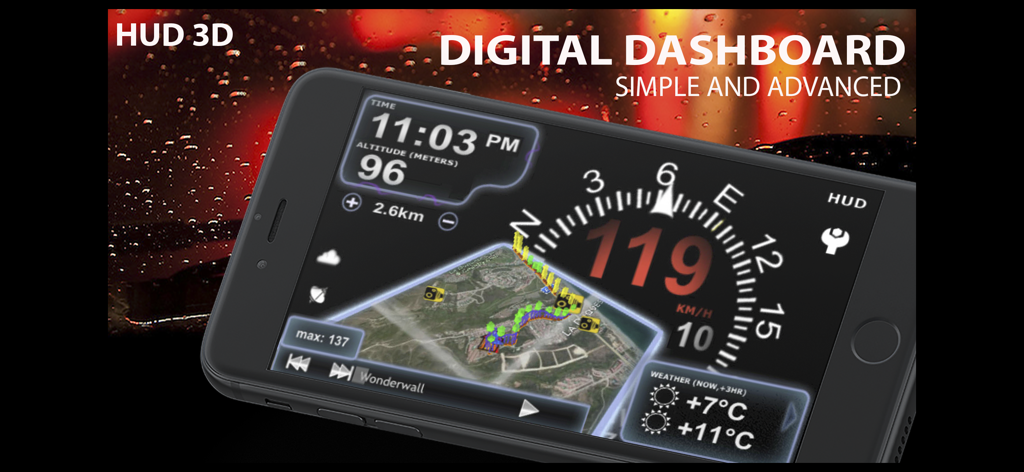
aSmart HUD 3D +SpeedCams - aSmart HUD 3Dデジタルダッシュボードアプリのインターフェース、速度とナビゲーションを表示
aSmart HUD 3Dデジタルダッシュボードアプリのインターフェース、速度とナビゲーションを表示

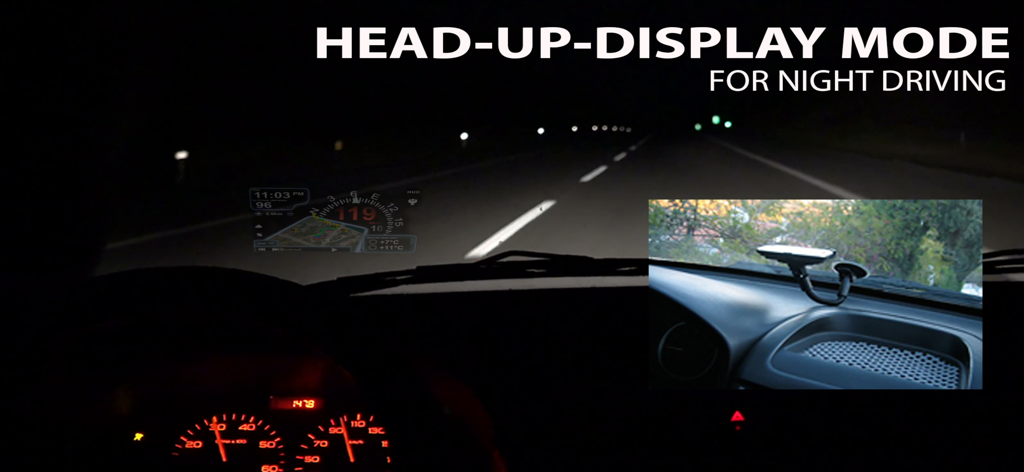
aSmart HUD 3D +SpeedCams - aSmart HUD 3Dアプリのインターフェース、夜間運転中のヘッドアップディスプレイモードで車のフロントガラスに反射
aSmart HUD 3Dアプリのインターフェース、夜間運転中のヘッドアップディスプレイモードで車のフロントガラスに反射

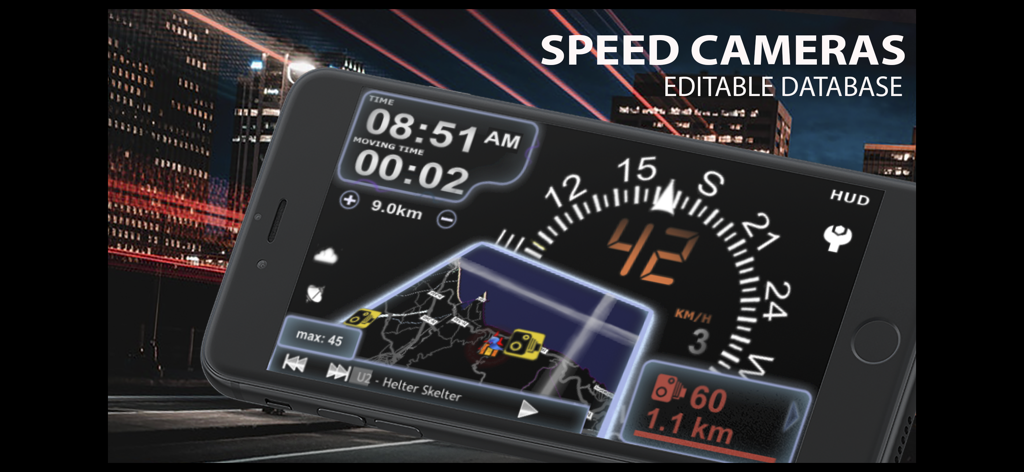
aSmart HUD 3D +SpeedCams - aSmart HUD 3Dアプリ、速度カメラアラートとナビゲーションインターフェースを備えたデジタル車のダッシュボードを表示
aSmart HUD 3Dアプリ、速度カメラアラートとナビゲーションインターフェースを備えたデジタル車のダッシュボードを表示

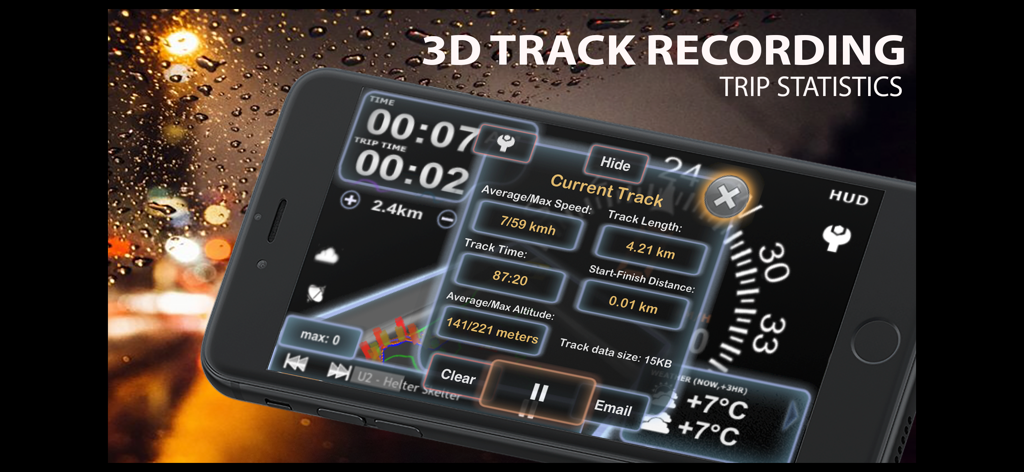
aSmart HUD 3D +SpeedCams - aSmart HUD 3Dアプリで3Dトラック記録と詳細なトリップ統計を表示するインターフェース
aSmart HUD 3Dアプリで3Dトラック記録と詳細なトリップ統計を表示するインターフェース

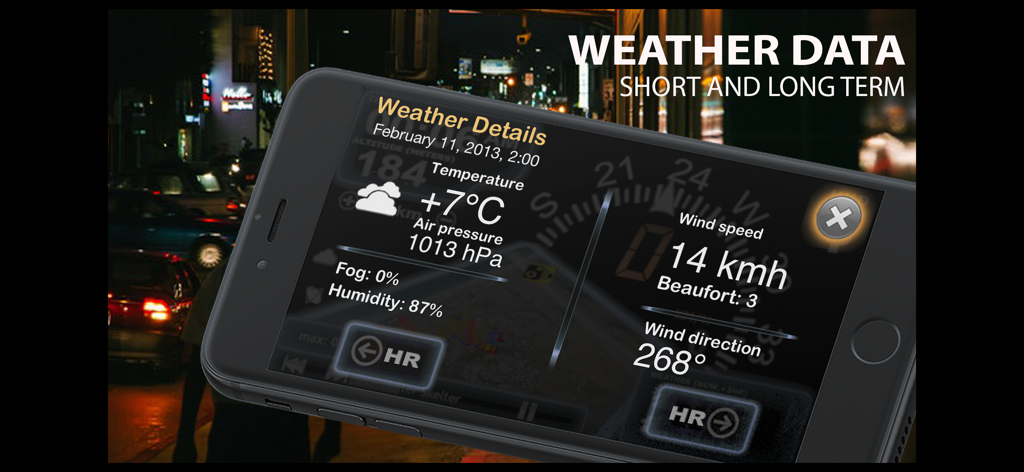
aSmart HUD 3D +SpeedCams - aSmart HUD 3Dアプリで温度、気圧、風速を含む気象詳細を表示するスマートフォン
aSmart HUD 3Dアプリで温度、気圧、風速を含む気象詳細を表示するスマートフォン

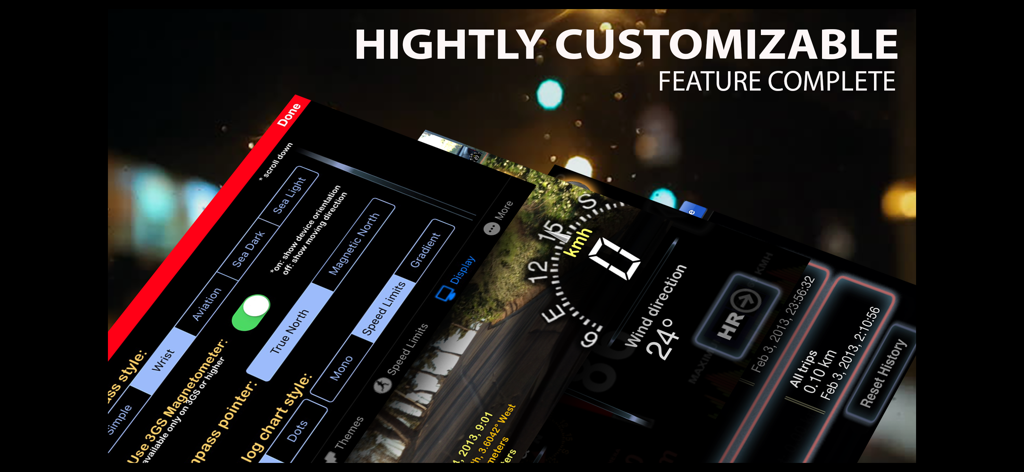
aSmart HUD 3D +SpeedCams - aSmart HUD 3Dアプリの画面のモンタージュ、カスタマイズ可能なダッシュボード設定とリアルタイム運転データを示しています

aSmart HUD 3Dアプリの画面のモンタージュ、カスタマイズ可能なダッシュボード設定とリアルタイム運転データを示しています

説明

Advanced car digital dashboard combining map, routing, tracking, photo and speed cameras functionality wrapped into nicely polished 3D user interface. Key features: - HUD MODE - EDITABLE FIXED AND REDLIGHT SPEED CAMERAS DATABASE - UNIQUE COMBINED SPEED, LOCATION and ALTITUDE 3D LOG GRAPH - SHORT-TIME WEATHER FORECAST - IPOD PLAYLIST REMOTE CONTROL - PHOTO CAMERA WITH IMAGE MARKING aSmartHUD visualizes your - current and average speed - time - elapsed trip time - heading - altitude - distance/time to stored Home location - distance to the trip starting point - maximum reached speed, altitude and distance to starting point for the current trip and all the trips your ever did, - current playing music track - weather forecast for nearest 48 hours the with 3-hour time interval. Also it shows - positions of the nearest known speed cameras - color coded distance to the nearest known speed camera and it's speed limit, if known; The fixed cameras database includes an information about speed cameras in - Europe (whole EU) - USA - Canada - Australia - New Zealand - Brazil - South Africa - Singapore - United Arab Emirates - Taiwan - HongKong - Kuwait - Russia - Thailand You can edit the database by adding or removing the speed cameras and set cameras speed limit. NOTE: It's not guaranteed all speed cameras in your area are included into the database. However, we will release database updates right after the new information will become available. - Tapping the "HUD" icon mirrors all the text, so if you position the iPhone horizontally under your car's windscreen you can see perfectly readable half-transparent reflection of the picture displayed. 
Note: this mode works pretty well at night time and twilight, but on direct sunlight the screen brightness can be insufficient. - aSmartHUD can keep track on 4 speed limits, giving a warning each time you crossing it. Normally, it's legal speed limits within cities, local roads and high-speed motorways. "Never exceed speed" is the speed you should not exceed under any conditions. Like technical limit of your vehicle or the point where government can arrest your driving license. - 3D Trip Log Graph - unique way to represent the speed, location and altitude data in a single 3D graph. Color coded speed and altitude chart is constantly adjusted according to your moving trajectory. In Track Preferences, you can set the transparency of all the components of the chart or switch them off completely. - Apple and OpenStreet maps in several flavors and color modes. - Landscape and portrait screen modes. - "Records" screen, with maximum reached speed, altitude and distance from start. - Different measurement units, display color schemes (6 available), log type, sounds and more. - Select the music iPod Playlist, pause, play, skip or rewind it's items, set the player in Shuffle or Repeat mode. - Advanced location Info (longitude and latitude, GPS measurement precision) and more. - Local weather forecast;

Download

ダウンロード: App Store

このページはアプリまたはその開発者の公式ページではなく、情報提供および論評を目的として作成された独立した編集出版物です。明示的に別段の記載がない限り、アプリおよびその開発者は、MWM、Apple、Google Play、アプリのパブリッシャー、またはアプリの開発者と提携、承認、後援、認可、またはその他の公式的な関係はなく、このページのいかなる内容も、アプリがMWMのサービスを使用して開発されたことを意味するものではありません。すべての商標、ロゴ、スクリーンショット、その他のコンテンツはそれぞれの所有者の財産です。








