Attendant for Zoom

Attendant for Zoom

ダウンロード: App Store
ロゴ: Attendant for Zoom

Attendant for Zoom:ミーティングのためのプロフェッショナル・コマンドセンター

iPhoneやiPadをパワフルなリモートコントロールに変えましょう。参加者、ブレイクアウトルーム、出席を簡単に管理し、リードすることに集中できるようにします。

ダウンロード: App Store

開発元

Think Tap Work, LLC

カテゴリ

Business

ダウンロード

4K+

ユーザー評価

4.6/5

評価数

200

対応言語

5

ミーティングの流れをマスターする

このインターフェースを利用する 4K+ 人のユーザー.

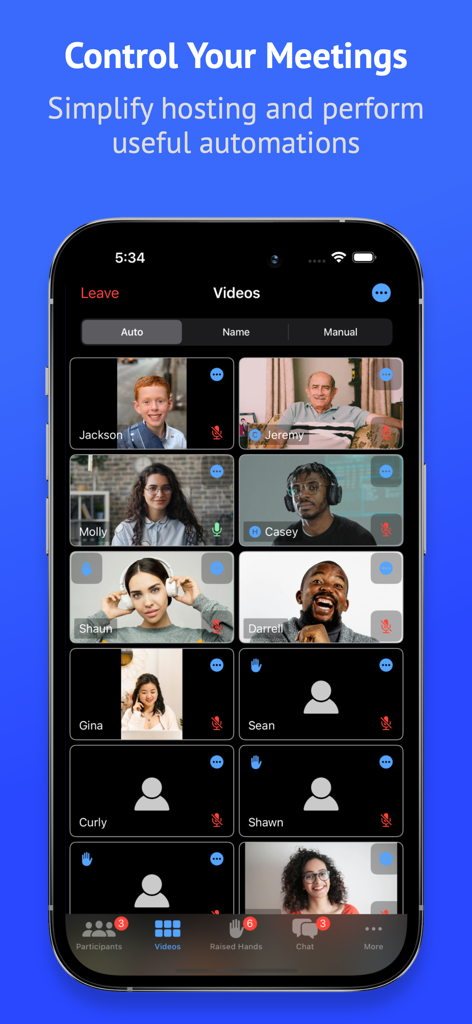
Attendant for Zoomアプリのインターフェース。プロフェッショナルなホストコントロール機能を備えた、ミーティング参加者のグリッドを表示。

Attendant for Zoomアプリのインターフェース。プロフェッショナルなホストコントロール機能を備えた、ミーティング参加者のグリッドを表示。

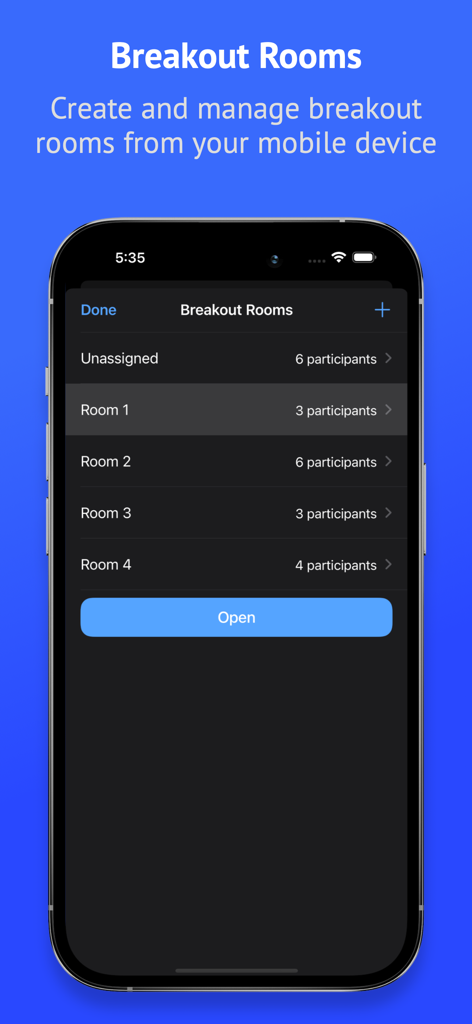
Attendant for Zoomアプリのモバイルデバイスでのブレイクアウトルーム管理インターフェース

Attendant for Zoomアプリのモバイルデバイスでのブレイクアウトルーム管理インターフェース

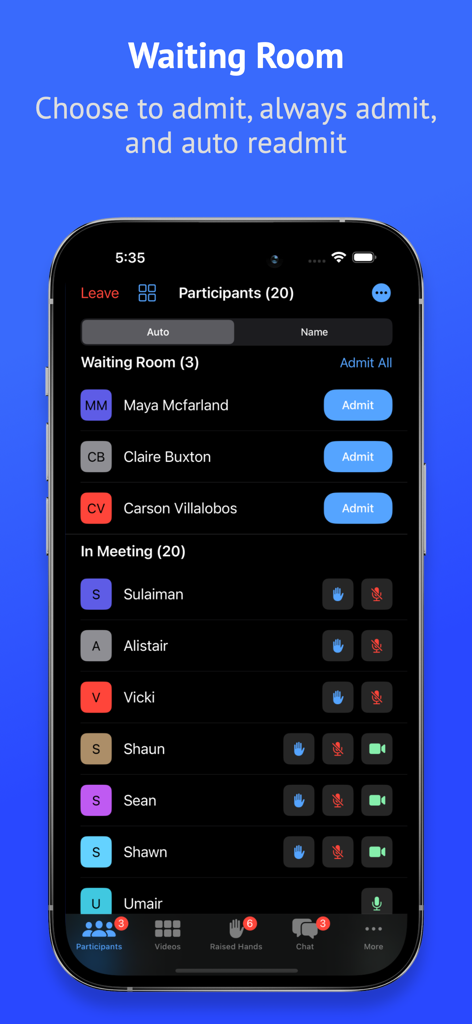
Attendant for Zoomアプリのモバイルインターフェース。参加者管理と待機室への入場オプションを表示。

Attendant for Zoomアプリのモバイルインターフェース。参加者管理と待機室への入場オプションを表示。

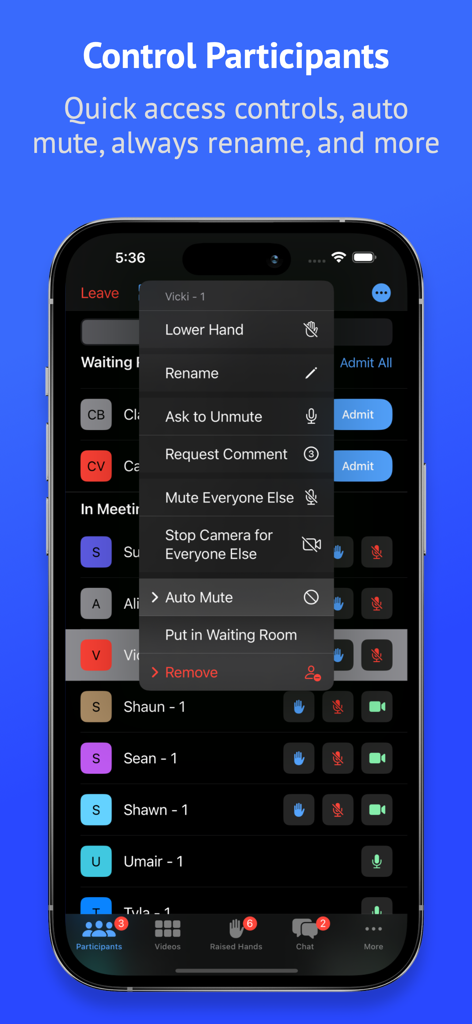
Attendant for Zoomアプリのモバイルインターフェース。ミーティング参加者リストと、特定の参加者へのクイックアクセス制御メニューを表示。

Attendant for Zoomアプリのモバイルインターフェース。ミーティング参加者リストと、特定の参加者へのクイックアクセス制御メニューを表示。

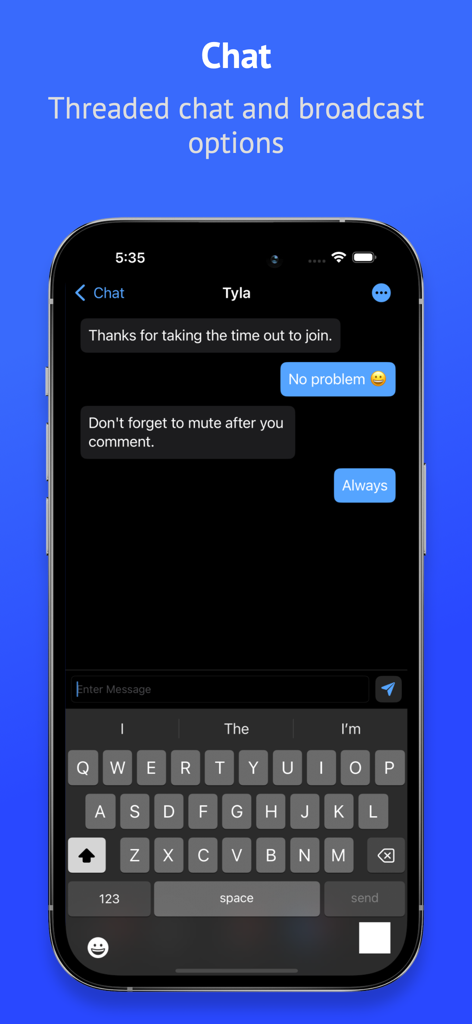
iPhone上のAttendant for Zoomアプリで、スレッドチャットとブロードキャストオプションを表示するモバイルスクリーンショット

iPhone上のAttendant for Zoomアプリで、スレッドチャットとブロードキャストオプションを表示するモバイルスクリーンショット

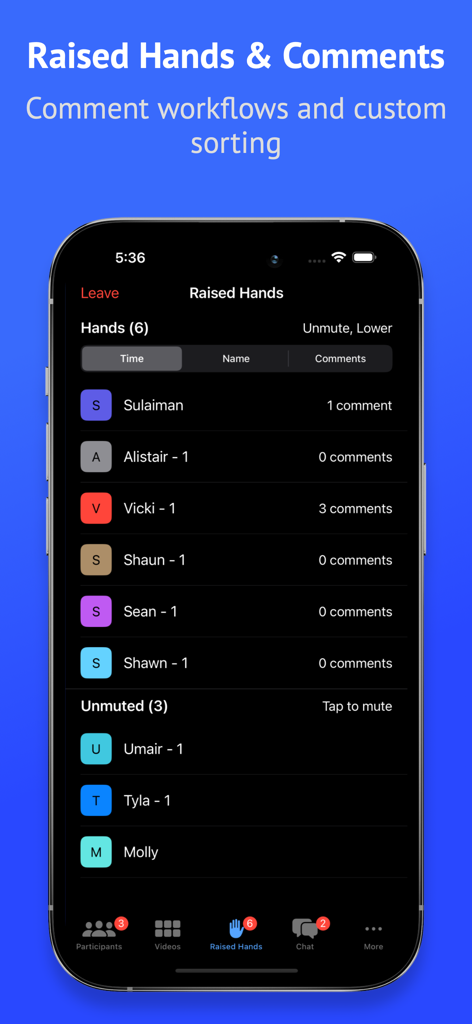
Attendant for Zoomアプリのインターフェース。参加者の挙手とコメント数を表示し、ホストが管理できるようにするもの。

Attendant for Zoomアプリのインターフェース。参加者の挙手とコメント数を表示し、ホストが管理できるようにするもの。

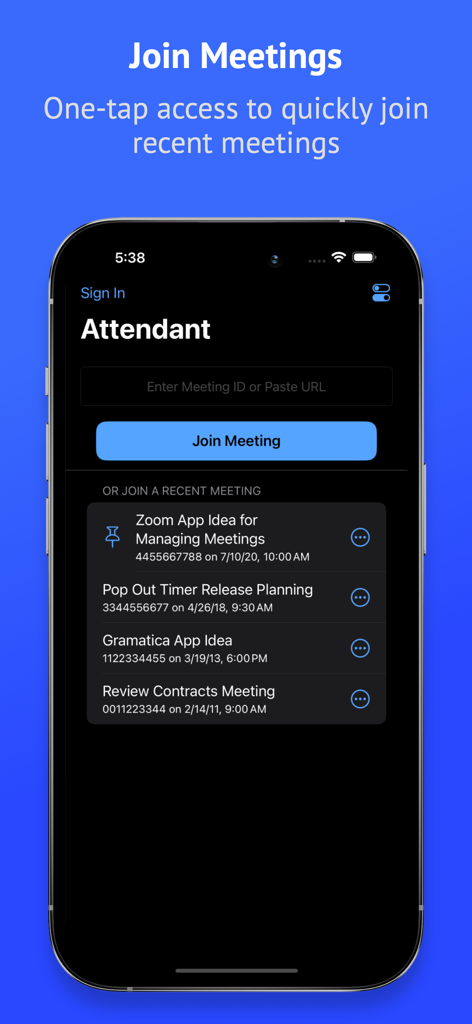
Attendant for Zoomアプリのインターフェース。クイックアクセスのための最近のミーティングリストを表示するミーティング参加画面。

Attendant for Zoomアプリのインターフェース。クイックアクセスのための最近のミーティングリストを表示するミーティング参加画面。

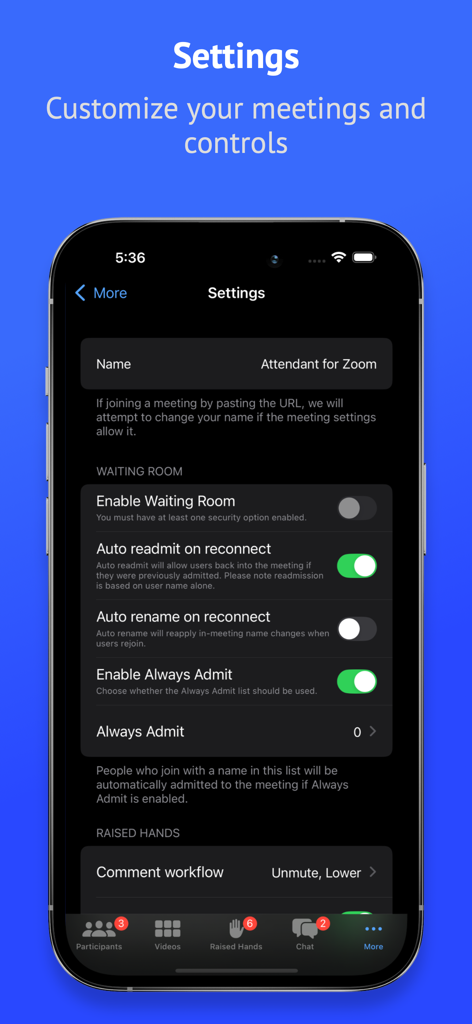
Attendant for Zoomのセッティング画面。待機室とミーティングコントロールを表示。

Attendant for Zoomのセッティング画面。待機室とミーティングコントロールを表示。

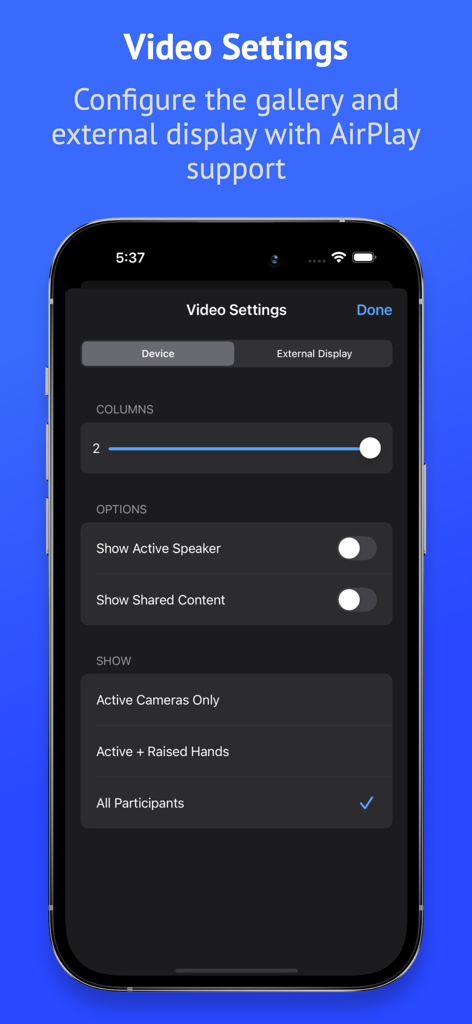
Attendant for Zoomアプリのインターフェース。ギャラリー列と外部ディスプレイオプションを設定するためのビデオ設定を表示。

Attendant for Zoomアプリのインターフェース。ギャラリー列と外部ディスプレイオプションを設定するためのビデオ設定を表示。

Attendant for Zoomアプリのインターフェース。ミーティング参加者の出席者カウント機能を表示。

Attendant for Zoomアプリのインターフェース。ミーティング参加者の出席者カウント機能を表示。

Zoomステージの全コマンドを握る

このアプリを際立たせるツール、 4K+ 人のユーザーが選択.

📱

デュアルスクリーン・コマンドセンター

メインディスプレイはスライド専用に。参加者リストやモデレーションツールをiPadやiPhoneに移動させ、distraction のない「プロデューサー」体験を。

ワンタップ・モデレーション

挙手した参加者の管理、待機室への入場、全参加者のミュートなどを即座に実行。ハイスピードショートカットにより、フローを中断させる技術的な手間を省きます。

👥

高度なエンゲージメントツール

ブレイクアウトルームのシャッフル、出席者数の追跡、挙手の時間順ソートなどを簡単に行えます。教育者やプロフェッショナルなファシリテーターのニーズに合わせて特別に設計されています。

アプリについて

について知っておくべきこと Attendant for Zoom.

説明

Take control of your meetings with Attendant for Zoom. Easily manage audio/video, counts, raised hands, breakout rooms, chats, and your waiting room. Use Attendant as host/co-host while connected to a Zoom meeting from another device. Tap into these useful automations: • Manage Breakout Rooms from your mobile device • Unmute and lower a hand with a single tap • Export participant list for record keeping • Quick tap management of participant audio/video • Manage participants from the video grid • Search from the video grid • Get attendee count (based on count in name) • Actions to mute/unmute all and turn on/off all cameras • Mute Everyone Else (everyone but selected participant) • Turn Off Camera for Everyone Else (everyone but selected participant) • Easily manage your Waiting Room • Long press to take a quick look at a participant's video • Chat with participants Upgrade to Attendant Pro to unlock the following: • Threaded chat and broadcast direct messages to multiple participants • Automatically mute specific participants • Always Admit: optionally choose to always admit specific names into your meeting • Count attendance to quickly mark the number of attendees on each connection • Auto readmit participants when they reconnect • Video: configure size, manually sort, and configure external display • Rename mode to quickly rename participants • Optionally persist renames across multiple meetings • Breakout room shuffle • Configure comment workflow • Comment counting • Sort raised hands by time, name, or comment count • Manage unlimited raised hands • Themes & Icons Please note that webinars are not currently supported. Attendant for Zoom uses the Zoom SDK but is not endorsed, certified, warrantied, or supported by Zoom Video Communications, Inc. If Zoom changes their policies or capabilities of their SDK this app may lose access. If you choose to purchase an Attendant Pro subscription, payment will be charged to your iTunes account, and your account will be charged for renewal 24 hours prior to the end of the current period. Auto-renewal may be turned off at any time by going to your settings in the iTunes Store after purchase. Terms of use: https://thinktapwork.com/tos.html

最新バージョン

3.2

サイズ

213.6 MB

リリース日

2020年6月4日

次のミーティングをマスターする準備はできましたか?

何千人ものプロフェッショナルなホストや教育者が、モバイルデバイスを専用コントロールデッキに変えています。Attendant for Zoomを今すぐダウンロードして、完璧に管理されたセッションの流れを体験してください。

ダウンロード: App Store
FAQ

よくある質問

について知っておくべきこと Attendant for Zoom

Zoomのアテンダントとは何ですか?

Zoomのアテンダントは、モバイルデバイスからZoomミーティングを制御できるアプリケーションです。オーディオ、ビデオ、参加者、チャット、ブレイクアウトルームを管理することで、ホスティングを簡素化します。

Zoomのアテンダントはブレイクアウトルームを管理できますか?

はい、Zoomのアテンダントを使用すると、モバイルデバイスから直接ブレイクアウトルームを作成および管理できます。これには、参加者の割り当てやルームのオープンが含まれます。

Zoomのアテンダントは待機室の管理をサポートしていますか?

はい、Zoomのアテンダントは待機室を管理する機能を提供します。ユーザーは参加者を入室させたり、常に入室させたり、自動で再入室させたりできます。

Zoomのアテンダントはミーティング参加者の管理にどのように役立ちますか?

Zoomのアテンダントは、参加者のオーディオ/ビデオのクイックタップ管理、全員のミュート/ミュート解除、カメラのオン/オフを提供します。ユーザーは、他の全員のミュート/カメラオフもでき、ビデオグリッドから参加者を管理できます。

Attendant Pro for Zoomにはどのような機能が含まれていますか?

Attendant Pro for Zoomは、スレッドチャット、ダイレクトメッセージのブロードキャスト、参加者の自動ミュート、「常に入室」機能(特定の名前用)、出席者カウント、自動再入室をアンロックします。また、ビデオ構成、名前変更モード、高度な挙手管理も提供します。

Zoomのアテンダントはミーティングの出席者数をカウントできますか?

はい、Attendant Pro for Zoomには「出席者数をカウント」機能が含まれています。これにより、ユーザーは記録保持のために各接続の参加者数を素早くマークできます。

Zoomのアテンダントで参加者の名前を変更することは可能ですか?

はい、Attendant Pro for Zoomは、参加者の名前を素早く変更するための名前変更モードを提供します。また、これらの名前変更を複数のミーティングにわたって維持するオプションも提供します。

ZoomのアテンダントはZoomウェビナーをサポートしていますか?

いいえ、Zoomのアテンダントは現在Zoomウェビナーをサポートしていません。アプリケーションの説明には、この制限が明記されています。

Attendant Pro for Zoomの請求はどのように行われますか?

Attendant Proのサブスクリプションは、ユーザーのiTunesアカウントに請求されます。現在の期間が終了する24時間前に自動更新が行われますが、iTunesの設定で無効にすることができます。

Zoomのアテンダントはビデオ表示設定をカスタマイズできますか?

はい、Attendant Pro for Zoomはビデオ設定のカスタマイズを可能にします。ユーザーは、ビデオサイズを設定したり、表示を手動で並べ替えたり、外部ディスプレイのサポートを設定したりできます。

App information, icons, screenshots, and descriptions displayed on this page are sourced from the Apple App Store and are the property of their respective developers. Download estimates and rankings are based on MWM's proprietary models and may not reflect actual figures. This page is provided for informational and analytical purposes only.

Believe this page infringes your intellectual property? File a dispute