
このページはアプリまたはその開発者の公式ページではなく、情報提供および論評を目的として作成された独立した編集出版物です。明示的に別段の記載がない限り、アプリおよびその開発者は、MWM、Apple、Google Play、アプリのパブリッシャー、またはアプリの開発者と提携、承認、後援、認可、またはその他の公式的な関係はなく、このページのいかなる内容も、アプリがMWMのサービスを使用して開発されたことを意味するものではありません。すべての商標、ロゴ、スクリーンショット、その他のコンテンツはそれぞれの所有者の財産です。


Audio Lab: Music,Voice Editor
スタジオ品質のポッドキャスト、音楽、ボイスオーバーを録音、ミキシング、マスタリングできます。外出先で活躍する現代のクリエイター向けに設計されたマルチトラック編集とプロフェッショナルエフェクトで、クリエイティブなワークフローを強化しましょう。
ダウンロード
239K+ユーザー評価
評価数
2K+開発元
カテゴリ
Music対応言語
9最新バージョン
2.4.10サイズ
52.7 MBリリース日
2022年4月14日ポケットに入るプロフェッショナルオーディオスタジオ
Audio Labは、クリエイターがどこでもスタジオ品質のポッドキャスト、音楽、ボイスオーバーを制作できるようにし、モバイルの利便性とプロフェッショナルな制作のギャップを埋めます。
マルチトラックマスタリング
ボーカル、楽器、BGMをシームレスにレイヤー化できます。外出先で複雑なプロジェクトをミキシングする必要があるポッドキャスターやミュージシャンに最適です。
プロレベルのエンハンスメント
12バンドEQ、ノーマライゼーション、リバーブやディレイなどのスタジオエフェクトでサウンドを向上させ、コンテンツがバイラルになる準備ができていることを確認しましょう。
よくある質問
について知っておくべきこと Audio Lab: Music,Voice Editor
Audio Lab: Music,Voice Editorとは何ですか?
Audio Lab: Music,Voice Editorは、録音、ミキシング、オーディオ編集のための強力なスタジオアプリケーションです。ポッドキャストの作成、音楽や音声の録音、効果音の追加、さまざまなオーディオ形式での作業の保存が可能です。
Audio Lab: Music,Voice Editorはマルチトラック録音に対応していますか?
はい、Audio Lab: Music,Voice Editorにはマルチトラックレコーダーが搭載されています。ユーザーはトラック間で複数のオーディオファイルを Đây, , và di chuyển cho phép tạo ra các dự án âm thanh phức tạp trong ứng dụng.
Audio Lab: Music,Voice Editorは基本的なオーディオ編集ツールを提供していますか?
はい、Audio Lab: Music,Voice Editorには基本的な編集ツールが用意されています。ユーザーはオーディオファイルの一部を簡単に cắt, , và dán để chỉnh sửa chính xác bản ghi âm và dự án của họ.
Audio Lab: Music,Voice Editorで利用できるオーディオエフェクトは何ですか?
Audio Lab: Music,Voice Editorには、リバーブ(ルームプリセット付き)、ディレイ、ディストーション、コーラス、フィルターなどのさまざまなオーディオエフェクトが含まれています。また、周波数を調整するための12バンドイコライザーも搭載しています。
Audio Lab: Music,Voice Editorでプロジェクトを保存するにはどうすればよいですか?
Audio Lab: Music,Voice Editorでは、プロジェクトとして作業を保存できます。複数の形式でファイルをエクスポートし、ビットレートを調整し、無音部分を削除できます。プロジェクトはいつでも再編集できるように保存されます。
Audio Lab: Music,Voice Editorはどのファイル形式をサポートしていますか?
Audio Lab: Music,Voice Editorは一般的なオーディオ形式をサポートしています。これらには、WAV、MP3、MP4、AAC、AIFF、m4aが含まれており、ユーザーに多様なインポートおよびエクスポートオプションを提供します。
Audio Lab: Music,Voice Editorの無料トライアルはありますか?
はい、Audio Lab: Music,Voice Editorには無料トライアルがあります。ユーザーは3日間アプリケーションを試すことができます。この期間後、キャンセルしない場合、サブスクリプション料金が自動的に請求されます。
Audio Lab: Music,Voice Editorのサブスクリプションを管理するにはどうすればよいですか?
Audio Lab: Music,Voice Editorのサブスクリプションはいつでも管理でき、自動更新をオフにすることができます。このオプションは、お使いのデバイスの設定およびApp Storeアカウントで利用できます。
Audio Lab: Music,Voice Editorのサブスクリプション期間はどのくらいですか?
Audio Lab: Music,Voice Editorのサブスクリプションは1か月間有効です。このサブスクリプションは自動更新され、現在の期間が終了する前の24時間以内に更新料金が請求されます。
Audio Lab: Music,Voice Editorはサードパーティファイルの追加を許可していますか?
はい、Audio Lab: Music,Voice Editorはサードパーティファイルの追加をサポートしています。ユーザーは、iCloud Driveなどのソースからファイルやノイズをインポートしたり、iTunesから購入したトラックをインポートしたりできます。
Audio Lab: Music,Voice Editorは長いオーディオファイルで動作しますか?
はい、Audio Lab: Music,Voice Editorは、1時間以上の長さのファイルを含む長いオーディオファイルでも動作するように設計されています。アプリケーションは、さまざまな長さの録音とファイルの追加を効率的に処理します。
Audio Lab: Music,Voice Editorにはプライバシーポリシーがありますか?
はい、Audio Lab: Music,Voice Editorにはプライバシーポリシーがあります。ユーザーは、アプリケーションをサブスクライブする前に、完全なポリシーを確認してデータ処理方法を理解することができます。
以下のスクリーンショットと説明は、アプリの公式ストアリスティングから直接取得されたものであり、アプリ開発者の所有物です。
アプリストア
スクリーンショット
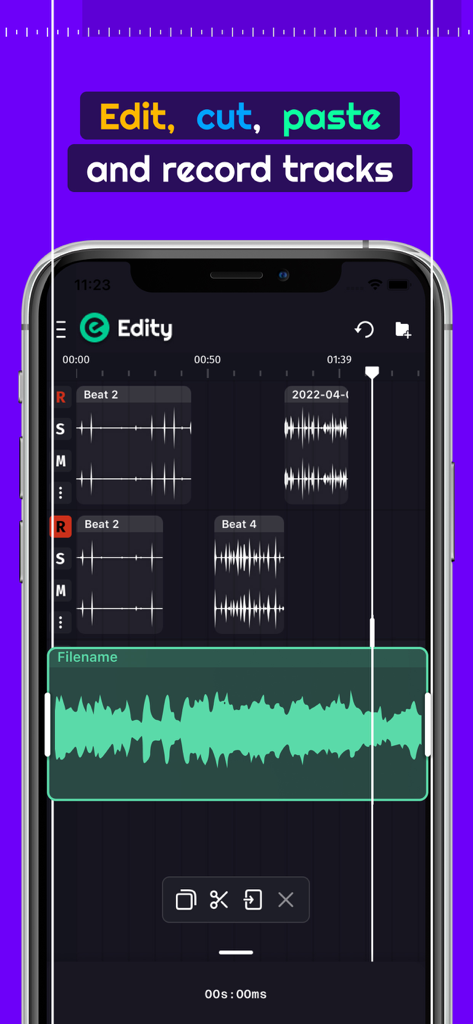
モバイルオーディオ編集アプリのインターフェース。マルチトラック録音と波形編集ツールが表示されています
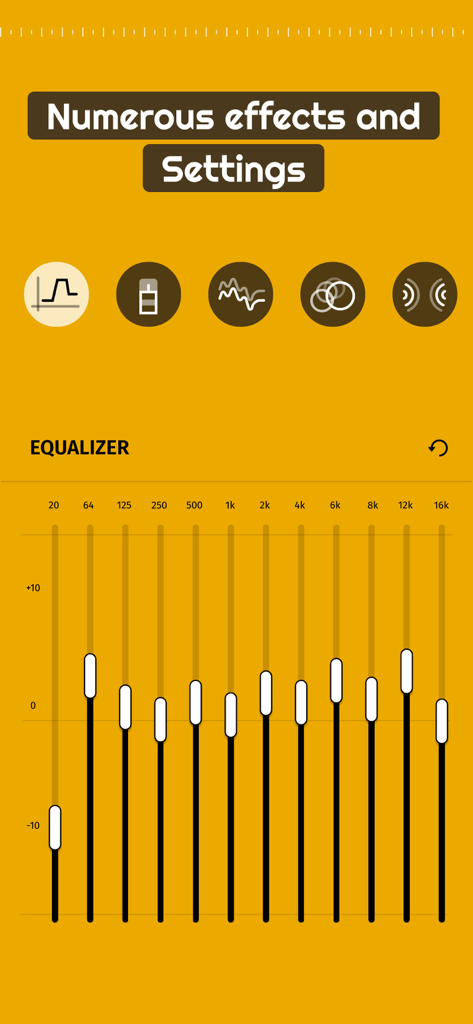
Audio Labの12バンドイコライザーとオーディオエフェクト設定
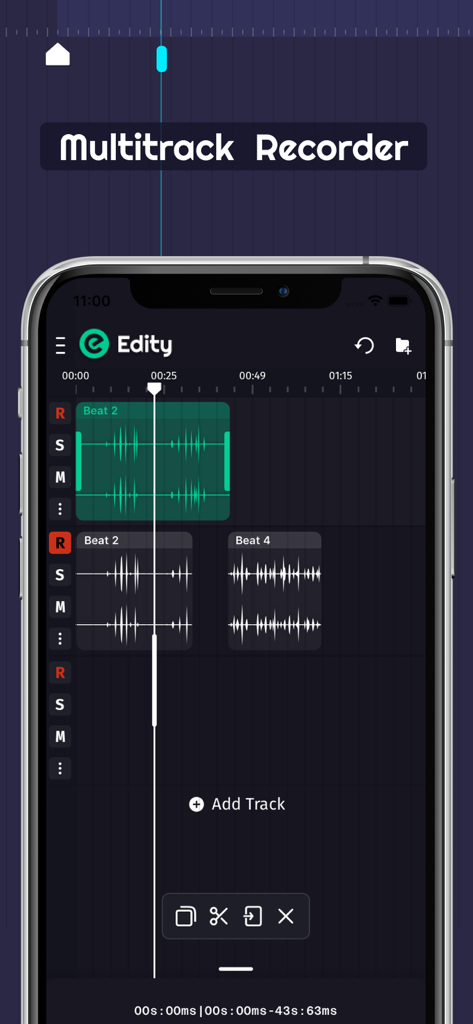
Audio Labアプリのマルチトラックオーディオ録音および編集インターフェース
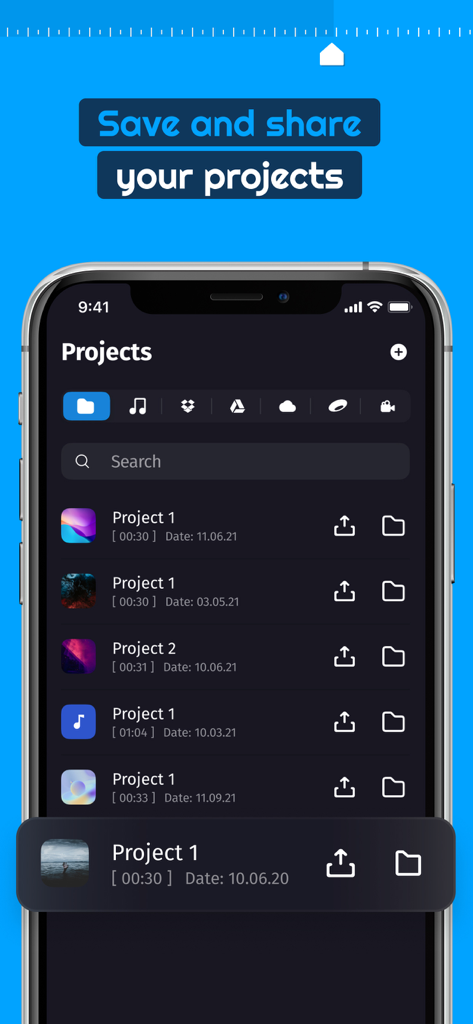
Audio Lab Music and Voice Editorアプリのプロジェクトリストを表示するスマートフォン画面
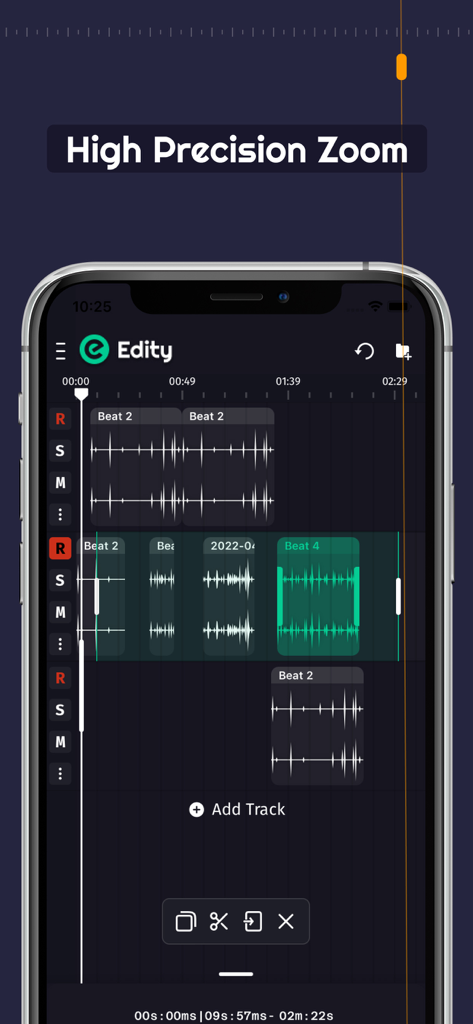
マルチトラックオーディオエディターの精密ズーム機能を表示するスマートフォン画面
説明
Download
類似アプリ
同じカテゴリのトップランクアプリ

Spotify: Music and Podcasts
Spotify

YouTube Music
Google LLC

Shazam: Find Music & Concerts
Apple Inc.

SoundCloud: The Music You Love
SoundCloud Global Limited & Co KG

Suno - AI Songs & Music
Suno Inc.

QQ音乐 - 听我想听
Tencent Technology (Shenzhen) Company Limited

Audiomack - Play Music Offline
Audiomack, Inc.

GuitarTuna: Tune & Play Guitar
Yousician Ltd

BandLab – Music Maker & Beats
BandLab Singapore Pte Ltd
このページはアプリまたはその開発者の公式ページではなく、情報提供および論評を目的として作成された独立した編集出版物です。明示的に別段の記載がない限り、アプリおよびその開発者は、MWM、Apple、Google Play、アプリのパブリッシャー、またはアプリの開発者と提携、承認、後援、認可、またはその他の公式的な関係はなく、このページのいかなる内容も、アプリがMWMのサービスを使用して開発されたことを意味するものではありません。すべての商標、ロゴ、スクリーンショット、その他のコンテンツはそれぞれの所有者の財産です。