Best Clock Radio & Podcast
ダウンロード: App Store

このページはアプリまたはその開発者の公式ページではなく、情報提供および論評を目的として作成された独立した編集出版物です。明示的に別段の記載がない限り、アプリおよびその開発者は、MWM、Apple、Google Play、アプリのパブリッシャー、またはアプリの開発者と提携、承認、後援、認可、またはその他の公式的な関係はなく、このページのいかなる内容も、アプリがMWMのサービスを使用して開発されたことを意味するものではありません。すべての商標、ロゴ、スクリーンショット、その他のコンテンツはそれぞれの所有者の財産です。

ロゴ: Best Clock Radio & Podcast
ダウンロード: App Store

Best Clock Radio & Podcast

40,000以上のラジオ局をストリーミングし、お気に入りのポッドキャストを楽しみ、5日間の天気予報を1つの信頼できるアプリで確認できます。AutoDimテクノロジーと9つのプログラム可能なプリセットボタンで、あなたの完璧なルーチンに合わせて設計されています。

主要数値

ダウンロード

52K+

ユーザー評価

3.3/5

評価数

0

開発元

Mark Linthicum

カテゴリ

Music

対応言語

1

最新バージョン

8.9.4

サイズ

216.8 MB

リリース日

2012年4月12日
機能

あなたの究極のベッドサイドコンパニオン

クラシックな時計ラジオの信頼性と、最新ストリーミングのパワーが出会いました。グローバルラジオ、ポッドキャスト、天気を1つのシンプルなインターフェースでコントロールし、朝のルーチンを管理しましょう。

ワンタッチラジオプリセット

クラシックなカーオーディオのように、お気に入りの9つのボタンにグローバル局、ローカルニュース、またはカスタムミュージックストリームをプログラムして、すぐにアクセスできるようにしましょう。

快適なAutoDimディスプレイ

夜中に眩しいライトに悩まされることはもうありません。画面は就寝時には自動的に暗くなり、起床時には明るくなるため、完璧な専用ベッドサイドクロックになります。

以下のスクリーンショットと説明は、アプリの公式ストアリスティングから直接取得されたものであり、アプリ開発者の所有物です。

アプリストア

スクリーンショット
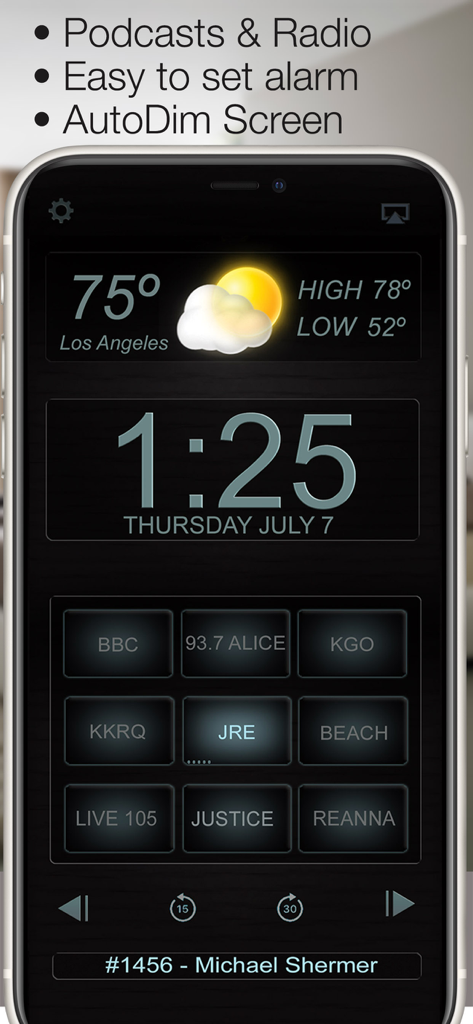
Best Clock Radio & Podcast - ロサンゼルスの天気とプログラム可能な局プリセットを備えたデジタル時計ラジオアプリ画面
ロサンゼルスの天気とプログラム可能な局プリセットを備えたデジタル時計ラジオアプリ画面

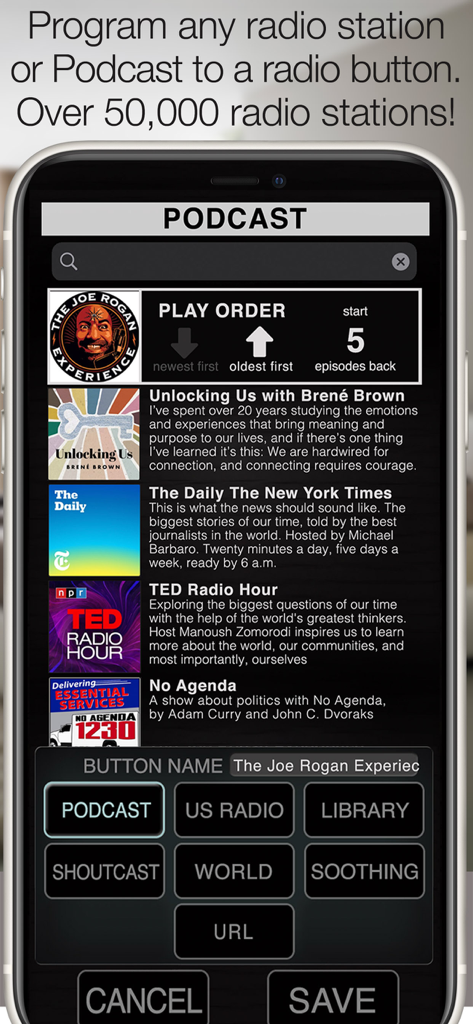
Best Clock Radio & Podcast - Best Clock Radioアプリで、ポッドキャストやラジオ局をプリセットボタンにプログラムするためのインターフェース。
Best Clock Radioアプリで、ポッドキャストやラジオ局をプリセットボタンにプログラムするためのインターフェース。

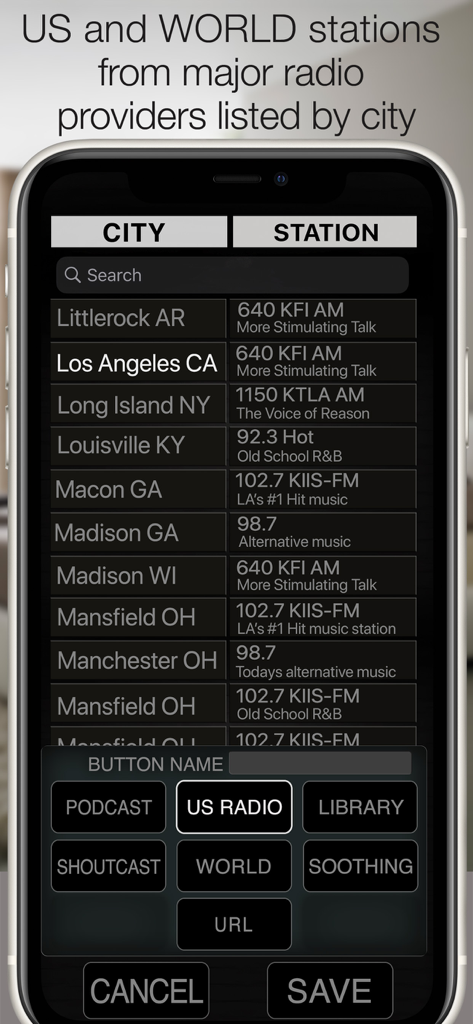
Best Clock Radio & Podcast - Best Clock Radioアプリのインターフェース。米国と世界のラジオ局のリストが都市別にソートされており、手動でプログラムできます。
Best Clock Radioアプリのインターフェース。米国と世界のラジオ局のリストが都市別にソートされており、手動でプログラムできます。

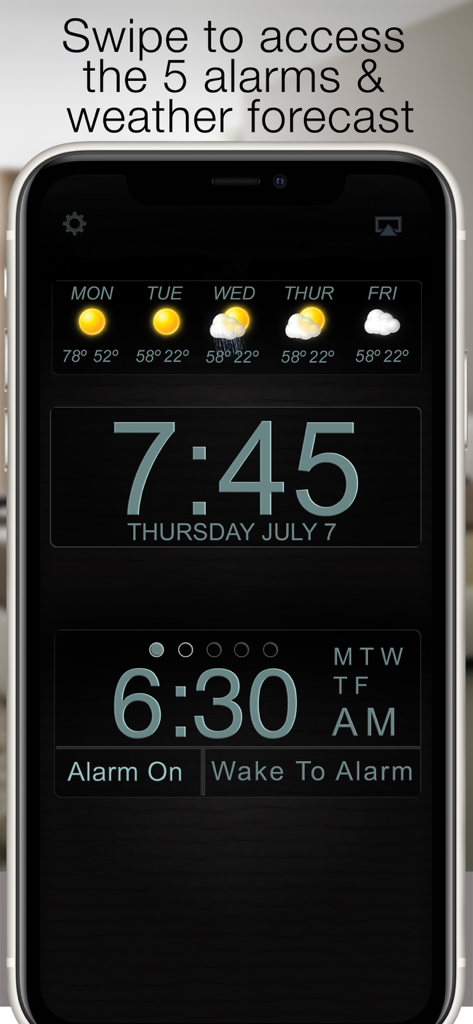
Best Clock Radio & Podcast - Best Clock Radioアプリのインターフェース。デジタル時刻、5日間の天気予報、アラーム設定が表示されます。
Best Clock Radioアプリのインターフェース。デジタル時刻、5日間の天気予報、アラーム設定が表示されます。

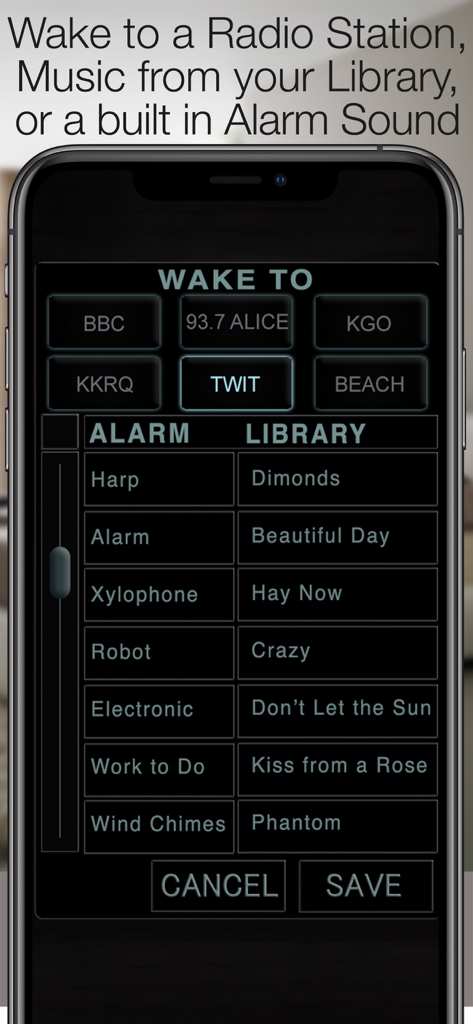
Best Clock Radio & Podcast - ラジオ局、アラーム音、音楽ライブラリのトラックを選択して目覚めるためのインターフェース。
ラジオ局、アラーム音、音楽ライブラリのトラックを選択して目覚めるためのインターフェース。

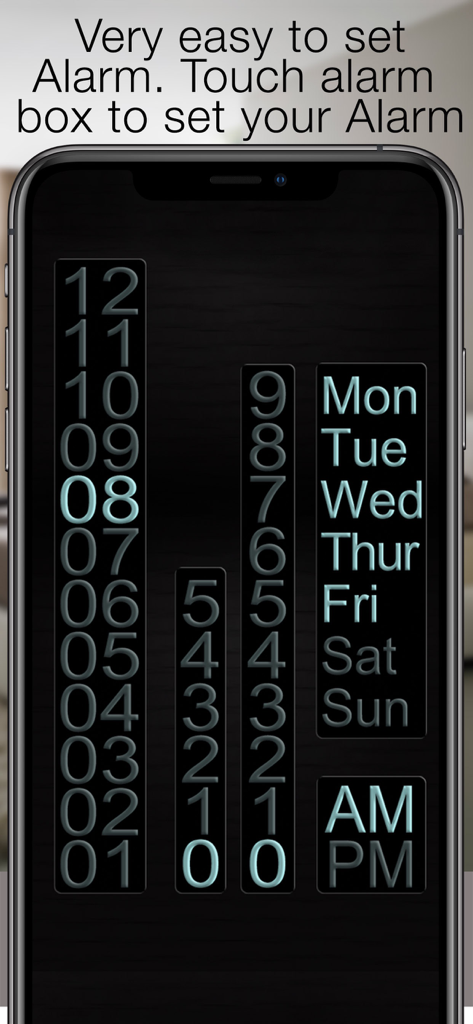
Best Clock Radio & Podcast - アラーム時刻の設定と、週ごとの繰り返し曜日の選択のためのユーザーインターフェース

アラーム時刻の設定と、週ごとの繰り返し曜日の選択のためのユーザーインターフェース

説明

“Your app is outstanding - by far the best radio alarm clock app available!” - David Riviello “By far the most usable clock radio available anywhere” - Jay Adams New in version 8, program a Podcast to a radio button. Press and hold the radio button to bring up the radio sources, Select a Podcast and scroll through the top 100 or use the search bar to search for your favorite podcast. After saving to the radio button, play the podcast and touch the info bar below the radio buttons to bring up the episode list, here you can select the play order and mark podcasts as played or unplayed so they can be skipped or played again. Use the arrows on the top to set the order in which the episodes are played. Available episodes are represented by little ticks on the radio button, 5 ticks mean there are 5 or more available episodes. 3 ticks mean there are 3 available episodes. For the alarm to work properly you must allow notifications to be sent from the app, For Radio to be used as an alarm Best Clock Radio must be open, closing the app will cause a backup alarm to sound. AutoDim feature dims the screen automatically at night so it is not too bright and brightens it up again in the morning. 9 programmable radio buttons (8 on the iPad) to store your favorite Radio Stations, Music Library Playlists or Soothing Sound. See our website for demo videos www.BeautifulClockRadio.com Radio stations from all over the world, US, UK, Australia, Dutch, Netherlands, Norway, New Zealand, Switzerland, Germany, Ireland, Canada, Spain, South Africa, Germany, Serbia, Sweden, Ukraine. 5 Alarms allow you to program 5 different alarm times and sounds, With this feature you can trigger the radio to turn on when your favorite show starts. Radio, touch and hold a radio button to program it to your favorite Playlist, Soothing sound, or internet streaming radio station. There are over 40,000 stations available, or you add your own URL. It takes mere seconds to program a button and you can continue to listen to your music in the background when the app is closed. The weather shows the current weather forecast, swipe to the left and you get a 6-day forecast. swipe again to contact support. Swipe to the right and turn the weather display off. Best Clock Radio is stable and reliable and very easy to use. Best Clock Radio features: • Powerful podcast player • Plays any radio station in the world! • 5 easy to set alarms • One-touch radio • Weather Current Temp, High, Low, & 5 Day forecast • AutoDim • Support link in the Weather Panel • Very easy to use, stable and reliable • Wake up to radio, music or one of the 32 included alarm sounds • AutoSleep button turns the radio off after a set time • Select from 12-hour and 24-hour mode • 9 programmable buttons for internet streaming radio station (8 programmable buttons iPad) • Thousands of Shoutcast, U.S., and World Radio stations. • Soothing sounds to help you sleep. • URL option Allows you to program a streaming radio URL to a button •Contact support for any questions or help

Download

ダウンロード: App Store

このページはアプリまたはその開発者の公式ページではなく、情報提供および論評を目的として作成された独立した編集出版物です。明示的に別段の記載がない限り、アプリおよびその開発者は、MWM、Apple、Google Play、アプリのパブリッシャー、またはアプリの開発者と提携、承認、後援、認可、またはその他の公式的な関係はなく、このページのいかなる内容も、アプリがMWMのサービスを使用して開発されたことを意味するものではありません。すべての商標、ロゴ、スクリーンショット、その他のコンテンツはそれぞれの所有者の財産です。







