
このページはアプリまたはその開発者の公式ページではなく、情報提供および論評を目的として作成された独立した編集出版物です。明示的に別段の記載がない限り、アプリおよびその開発者は、MWM、Apple、Google Play、アプリのパブリッシャー、またはアプリの開発者と提携、承認、後援、認可、またはその他の公式的な関係はなく、このページのいかなる内容も、アプリがMWMのサービスを使用して開発されたことを意味するものではありません。すべての商標、ロゴ、スクリーンショット、その他のコンテンツはそれぞれの所有者の財産です。

ダウンロード
12.5M+ユーザー評価
評価数
737.4K開発元
カテゴリ
Utilities対応言語
34最新バージョン
7.1サイズ
46.0 MBリリース日
2013年8月14日「Calculator - Pad Edition」の主要機能分析
日常の計算から専門的な要件までを網羅するiPad向け多機能電卓
高度な科学・基本電卓機能
このアプリは、縦向きでの基本的な計算と横向きでの高度な科学計算(根、べき乗、階乗、指数、対数、三角関数、双曲線関数など)を提供し、日常的な計算から学術的、専門的な数学的ニーズまで、広範な計算に対応します。度数とラジアンの切り替えやメモリー機能も備えています。
包括的な単位・通貨変換
このツールは、為替レートが毎日更新される国際通貨換算機能と、面積、データ、長さ、質量、速度、温度など、多岐にわたるカテゴリの単位変換を提供します。専門的な作業や旅行における多様な換算ニーズを満たします。
プログラマー向け電卓
本アプリは、バイナリ、オクタル、デシマル、ヘキサデシマル間のシームレスな切り替えを含む多基数計算を提供し、算術演算と論理演算を実行可能です。内蔵のビットエディタにより、個々のビットを直接表示・操作できます。
高効率な操作と統合性
この電卓は、計算履歴の確認、表示された数値のコピー&ペースト、Split Viewマルチタスクへの対応、外部ハードウェアキーボード入力のサポートを通じて、ユーザーの作業効率を大幅に向上させます。
分計算機
このアプリには、分数の問題を迅速かつ容易に解決できる専用の分計算機が内蔵されており、結果を真分数、仮分数、または小数形式で表示することが可能です。
柔軟でカスタマイズ可能なインターフェース
このツールは、複数のテーマ、リサイズおよびドラッグ可能なインターフェースを提供することで、ユーザーの好みに合わせた表示と操作を可能にし、特に片手での操作を容易にします。
よくある質問
について知っておくべきこと Calculator - Pad Edition
Does Calculator - Pad Edition support scientific calculations?
Yes, Calculator - Pad Edition supports both basic and scientific calculations. Basic functions are available in portrait mode, while scientific functions like trigonometry and logarithms appear in landscape mode.
Does Calculator - Pad Edition include a unit converter?
Yes, Calculator - Pad Edition includes a comprehensive unit converter. It handles currency with daily updated exchange rates, along with various categories like area, data, length, mass, and temperature.
Can Calculator - Pad Edition handle fraction calculations?
Yes, Calculator - Pad Edition features a built-in Fraction Calculator. It solves fraction math problems and displays results as proper fractions, improper fractions, or decimal numbers.
Does Calculator - Pad Edition offer a programmer calculator?
Yes, Calculator - Pad Edition provides a Programmer Calculator. It supports multi-base calculations, allowing seamless switching between binary, octal, decimal, and hexadecimal bases for arithmetic and logical operations.
Does Calculator - Pad Edition have a tip calculator and bill splitter?
Yes, Calculator - Pad Edition features a Tip Calculator. It calculates tip percentages on the fly and includes a bill splitter to easily share costs among multiple people.
Can Calculator - Pad Edition be accessed via an iOS widget?
Yes, Calculator - Pad Edition supports access via a widget. Users can add the Calculator widget to view results and perform calculations directly from the iOS widget list.
Does Calculator - Pad Edition save calculation history?
Yes, Calculator - Pad Edition records previous calculations. Users can check their calculation history to review past equations and results within the app.
Does Calculator - Pad Edition support external keyboard input?
Yes, Calculator - Pad Edition supports external hardware keyboard input. This feature allows users to easily input numbers and operations, enhancing usability.
以下のスクリーンショットと説明は、アプリの公式ストアリスティングから直接取得されたものであり、アプリ開発者の所有物です。
アプリストア
スクリーンショット
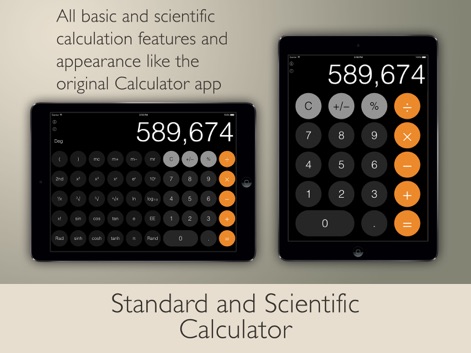
基本と科学計算
このアプリは、iPadの縦向きで基本的な日常計算を、横向きで高度な科学計算を実行する柔軟性を提供し、ユーザーは基本的な計算機能と科学計算機能を使い分けることができます。

分数計算を解決
組み込みの分数計算機を活用することで、ユーザーは複雑な分数計算を迅速に解決し、その結果を適切な分数形式と小数形式の両方で確認できます。
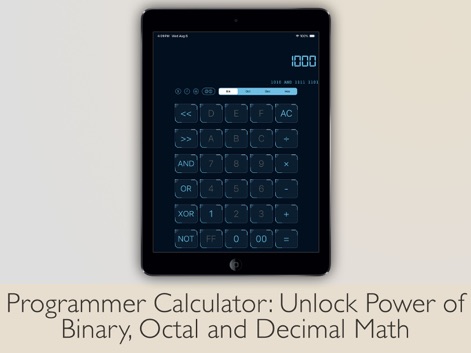
プログラマー向け機能
プログラマー計算機機能により、ユーザーは二進数、八進数、十進数、十六進数の間でシームレスに切り替えて多基数計算を実行し、ビットエディタでビット操作も可能です。

通貨&単位換算
このツールは、日々更新される為替レートに基づいた通貨換算機能と、多様なカテゴリにわたる単位換算機能の両方を内蔵しています。
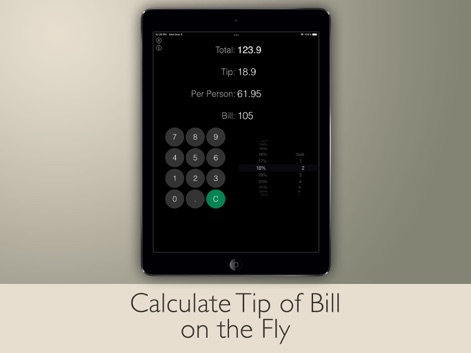
チップ計算と割り勘
チップ計算機機能を使用すると、ユーザーは支払いのチップを即座に計算できるだけでなく、割り勘機能で支払いを簡単に分割して共有することができます。

ウィジェットで計算
ウィジェットを通じて、ユーザーはアプリを開かずに現在の計算結果にアクセスし、直接ウィジェット上でさらなる計算を継続できるため、効率的な作業が可能です。

履歴で過去を追跡
計算履歴機能により、ユーザーは過去の計算式を簡単に確認し、必要に応じて以前の計算結果を再利用することで、作業の正確性を高めます。
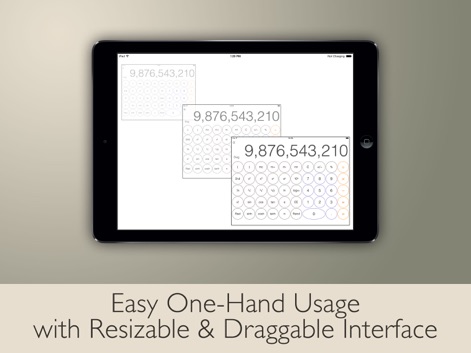
自由なインターフェース
リサイズおよびドラッグ可能なインターフェースを備えているため、ユーザーは計算機のサイズや配置を自由に調整し、片手操作で快適に利用できます。
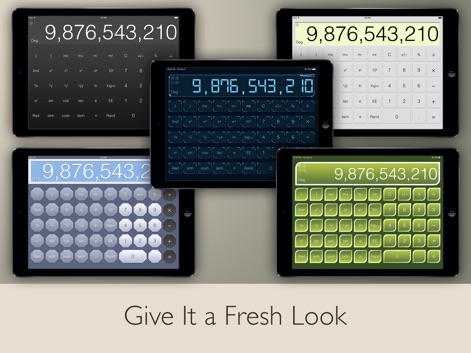
テーマで新鮮な外観
このアプリは複数のテーマオプションを提供しており、ユーザーは好みに合わせて外観をカスタマイズすることで、パーソナルな体験を創り出すことができます。

外部キーボード対応
外部ハードウェアキーボード入力のサポートにより、ユーザーは計算結果を簡単にコピー&ペーストでき、より迅速かつ正確なデータ入力を実現します。
説明
Download
類似アプリ
似た機能とユーザー体験を持つアプリ

Unit Converter - Best Unit App
Alan Mrvica
计算器i -简单好用算得快
Chongqing Frozen Technology Co., LTD
Metric Conversion tool
Wight Hat Ltd
Convert Any Unit
Cider Software LLC
Calculator with History +
Beijing Free Calculator Technology Co., Ltd.

ClevCalc - Calculator
Cleveni Inc.
Calculator for iPad!
7th Gear
Calculator!
7th Gear

Calzy
Raja V
このページはアプリまたはその開発者の公式ページではなく、情報提供および論評を目的として作成された独立した編集出版物です。明示的に別段の記載がない限り、アプリおよびその開発者は、MWM、Apple、Google Play、アプリのパブリッシャー、またはアプリの開発者と提携、承認、後援、認可、またはその他の公式的な関係はなく、このページのいかなる内容も、アプリがMWMのサービスを使用して開発されたことを意味するものではありません。すべての商標、ロゴ、スクリーンショット、その他のコンテンツはそれぞれの所有者の財産です。