
このページはアプリまたはその開発者の公式ページではなく、情報提供および論評を目的として作成された独立した編集出版物です。明示的に別段の記載がない限り、アプリおよびその開発者は、MWM、Apple、Google Play、アプリのパブリッシャー、またはアプリの開発者と提携、承認、後援、認可、またはその他の公式的な関係はなく、このページのいかなる内容も、アプリがMWMのサービスを使用して開発されたことを意味するものではありません。すべての商標、ロゴ、スクリーンショット、その他のコンテンツはそれぞれの所有者の財産です。


Call Recorder iCall
通話のすべてを瞬時に掌握。会話はもはや記憶ではなく、確かな証拠となる。
ダウンロード
10M+ユーザー評価
評価数
53.1K開発元
カテゴリ
Business対応言語
14最新バージョン
3.6.0サイズ
484.0 MBリリース日
2019年1月23日テックアナリストによる生産性とコミュニケーション効率向上への寄与
「Call Recorder iCall」アプリ分析:主要機能評価
双方向通話の簡単録音
このアプリは、重要なビジネス交渉、会議、個人的な会話など、発信・着信の両方をワンタップで簡単に記録できます。これにより、会話の正確な記録を確保し、後で内容を確認する際の信頼性を高めます。
録音データの安全な保存とアクセス
録音されたすべての通話データはアプリ内に安全に保存され、ユーザーは必要な時にいつでも簡単にアクセスできます。これにより、重要な情報の整理と迅速な検索が可能となり、生産性が向上します。
録音の再生と共有
録音された会話をアプリ内で手軽に再生できるほか、メールやメッセージアプリなどを通じて関係者と簡単に共有できます。これにより、チーム内の情報連携や意思決定プロセスが円滑になります。
無制限の通話録音
本ツールは、録音回数や通話時間の制限なく、必要なだけ多くの会話を自由に記録することを可能にします。これにより、長期的なプロジェクトや頻繁なコミュニケーションが必要な業務において、全ての重要な情報を網羅的に保存できます。
直感的なワンタップインターフェース
このアプリは、複雑な設定や操作を必要とせず、ワンタップで録音を開始できる直感的なユーザーインターフェースを提供します。これにより、ユーザーは手間なく迅速に録音機能を利用でき、コミュニケーションの効率が向上します。
包括的なカスタマーサポート
本ツールを使用中に発生した問題や疑問に対し、専門のカスタマーサービスチームが迅速かつ丁寧なサポートを提供します。これにより、ユーザーは安心してアプリを継続的に利用し、最適なパフォーマンスを維持できます。
よくある質問
について知っておくべきこと Call Recorder iCall
How do I record phone calls using Call Recorder iCall?
Call Recorder iCall records calls in one tap. Open the app, press ‘Record,’ and continue your conversation. Recordings are accessible after the call, and you can play or share them.
Does Call Recorder iCall offer a free trial?
Yes, Call Recorder iCall offers a free trial version for 3 days. This trial is included with the 1-week subscription plan and provides access to all available features.
Can Call Recorder iCall record both incoming and outgoing calls?
Yes, Call Recorder iCall records both incoming and outgoing phone calls. These features are part of the Pro Upgrade.
How can I manage my recordings in Call Recorder iCall?
Users can save, access, play, and share recordings within Call Recorder iCall. The Pro Upgrade enhances this with a specific 'Share-and-manage your calls' feature for comprehensive management.
Does my Call Recorder iCall subscription automatically renew?
Yes, Call Recorder iCall subscriptions automatically renew. Users can manage their subscriptions and disable auto-renewal through their Account Settings at least 24 hours before the current period ends.
Does Call Recorder iCall have a security feature like a PIN?
Call Recorder iCall provides a PIN setting feature to secure your recordings and app access. This enhances privacy by requiring a passcode to open the app.
Does Call Recorder iCall transcribe recorded conversations?
Yes, Call Recorder iCall offers a feature to transcribe your calls. This converts the spoken content of your recordings into text for easy review.
What are the available subscription plans for Call Recorder iCall?
Call Recorder iCall provides three subscription options: a 1-week plan with a 3-day trial, a 1-month plan, and an Annual subscription. Pricing may vary by region.
以下のスクリーンショットと説明は、アプリの公式ストアリスティングから直接取得されたものであり、アプリ開発者の所有物です。
アプリストア
スクリーンショット

このアプリは通話中に「record」ボタンをタップするだけで録音を開始し、画面上部の「00:07」というタイマーで録音時間を表示します。
通話録音開始

録音した通話履歴は一覧で表示され、ユーザーは特定の会話が「TRANSCRIBED」されているかを確認できるほか、「All」「Calls」「Memos」で絞り込み表示が可能です。
録音管理を簡単に
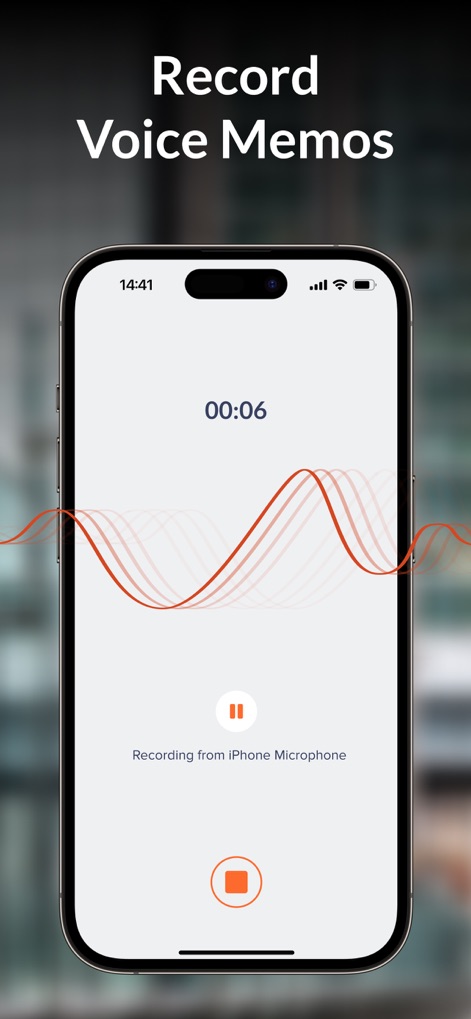
本ツールはクリアな音質で音声メモを録音し、録音中は「Recording from iPhone Microphone」と表示されるとともに、リアルタイムの音声を「波形ビジュアライザー」で視覚的に表現します。
音声メモも録音
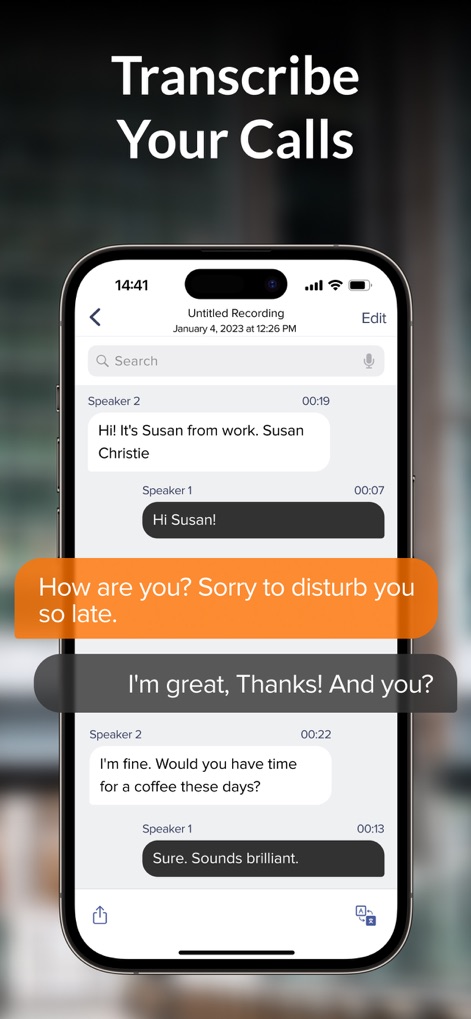
このアプリは通話内容を「チャット形式」で文字起こしし、話者を「Speaker 1」と「Speaker 2」で区別して表示することで、会話の流れを分かりやすく可視化します。
通話を文字起こし

ユーザーは「Enter your iCall Passcode」の指示に従って、重要な録音データのプライバシーを保護するための「PINコード」を設定することができます。
セキュリティ設定

このアプリは「6 MILLION users trust iCall」と表示されるように、多くのユーザーからの信頼を得ており、「3,8 MILLION mins of call recording」という膨大な録音実績がその人気の裏付けとなっています。
信頼の実績
説明
Download
類似アプリ
似た機能とユーザー体験を持つアプリ

Beside (M1): AI Receptionist
Interface, Inc.

Call Recorder for iPhone.
JatApp LLC

Voice Recorder & Audio Editor
TapMedia Ltd

Call Recorder App ◉ACR MyCalls
AppAmore Limited

Switch - Call recording app
Atlas Guide, Inc.

Call Recorder App-Voice Record
WindTalking LLC

TeleMe – Record on 2nd Number
Gelenk Networks Inc.

Call Recorder: Record All
Henrieta Jaworski

Record Phone Calls App - Auto
Henning Christensen Bonde Søgaard
このページはアプリまたはその開発者の公式ページではなく、情報提供および論評を目的として作成された独立した編集出版物です。明示的に別段の記載がない限り、アプリおよびその開発者は、MWM、Apple、Google Play、アプリのパブリッシャー、またはアプリの開発者と提携、承認、後援、認可、またはその他の公式的な関係はなく、このページのいかなる内容も、アプリがMWMのサービスを使用して開発されたことを意味するものではありません。すべての商標、ロゴ、スクリーンショット、その他のコンテンツはそれぞれの所有者の財産です。