Chat Backup Assistant: Textify

Chat Backup Assistant: Textify

ダウンロード: App Store
ロゴ: Chat Backup Assistant: Textify

チャットバックアップアシスタント:Textify — 会話を復元、保護、追体験

フォレンジックメッセージ復元、生体認証ロック付きアーカイブ、プライベートな思い出を魅力的なストーリーに変えるクリエイティブツールで、デジタル遺産を保護しましょう。

開発元

muge deniz

カテゴリ

Utilities

ダウンロード

50K+

ユーザー評価

4.8/5

評価数

7K+

対応言語

9

あなたの保管庫の中を覗いてみましょう

このインターフェースを利用する 50K+ 人のユーザー.

削除されたメッセージを復元」という見出しの下でスマートフォンを持っている驚いた女性
削除されたメッセージを復元」という見出しの下でスマートフォンを持っている驚いた女性

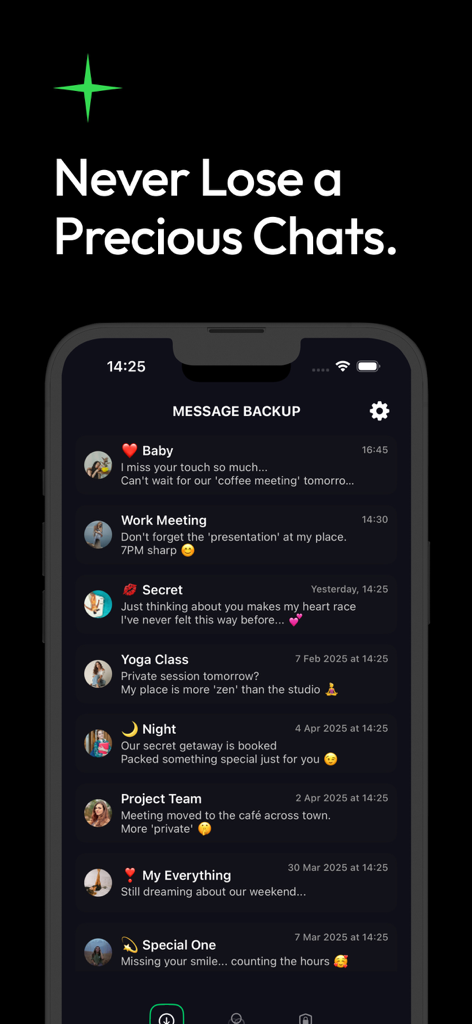
ベビー、仕事の会議、秘密のチャットなどのカテゴリ別に整理されたバックアップ済みメッセージのリストを表示するモバイルインターフェイス。
ベビー、仕事の会議、秘密のチャットなどのカテゴリ別に整理されたバックアップ済みメッセージのリストを表示するモバイルインターフェイス。

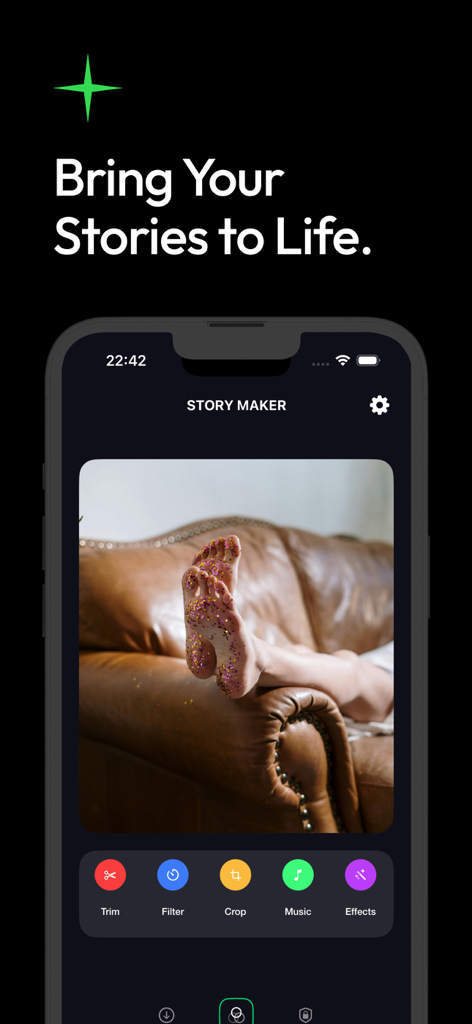
写真編集ツールとメディアエフェクトを備えたTextifyアプリのストーリーメーカーインターフェイス
写真編集ツールとメディアエフェクトを備えたTextifyアプリのストーリーメーカーインターフェイス

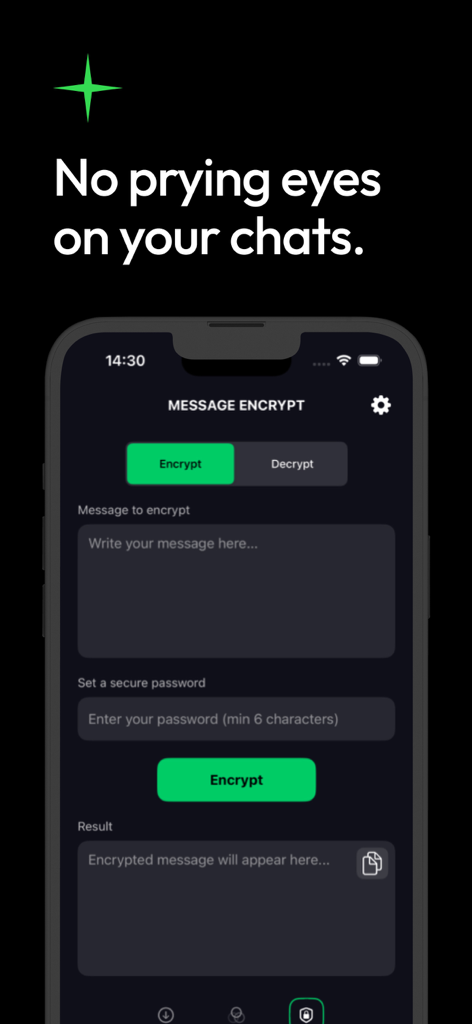
テキストを入力し、安全なパスワードを設定するためのフィールドが表示されたTextifyアプリのメッセージ暗号化ツール画面

テキストを入力し、安全なパスワードを設定するためのフィールドが表示されたTextifyアプリのメッセージ暗号化ツール画面

デジタル会話のための完全な保護

このアプリを際立たせるツール、 50K+ 人のユーザーが選択.

🔎

削除された瞬間を復元

大切なスレッドを失くしましたか?ディープフォレンジックスキャンを使用して、お気に入りのアプリから削除されたメッセージやメディアを簡単に復元します。

🔒

生体認証プライバシーシールド

FaceIDと暗号化で、詮索好きな目から守りましょう。機密性の高い会話は、安全で一元化された保管庫にロックされたままです。

クリエイティブメモリーメーカー

チャットメディアを魅力的なストーリーに変換します。バックアップした写真に音楽やエフェクトを追加して、共有したり、永遠に保存したりできます。

アプリについて

について知っておくべきこと Chat Backup Assistant: Textify.

説明

Chat Backup Assistant: Textify — Your Trusted Partner for Secure Conversation Preservation and Creative Expression Textify is a comprehensive backup and content management solution designed to safeguard your digital communications, protect your privacy, and help you bring your precious memories to life with creativity and ease. It offers a seamless way to secure your chat history while keeping your digital life organized and accessible whenever you need it. 1. Recover Deleted Messages with Confidence Accidental deletions are no longer a concern. Textify’s advanced backup technology enables you to effortlessly recover your chat history, even if the original messages have been deleted from your device. Whether it’s an important conversation or a cherished memory, lost messages are restored quickly and reliably. This process is completely secure, under your control, and designed to give you peace of mind knowing that nothing valuable will ever be permanently lost. Lost a message? Chat Backup Assistant performs a deep forensic scan to recover deleted chats, photos, and media from your favorite messaging apps. Reclaim your memories and important info now. 2. All Your Messages Organized in One Intelligent Archive Say goodbye to chaotic message storage. Textify automatically categorizes and organizes your conversations into a neat, centralized archive. This intelligent organization helps you locate any message quickly—be it casual chats, professional correspondence, or personal notes. Spend less time searching and more time enjoying your conversations with everything just a few taps away. 3. Protect Your Personal Content with Encryption Privacy is your right—and Textify makes sure it stays that way. With built-in encryption, you can safeguard your sensitive messages behind a password, allowing access only to you or trusted individuals you authorize. This layered security approach ensures that your confidential information is shielded from unauthorized access at all times. 4. Enhanced Security Against Unauthorized Access Textify takes your security seriously. Beyond simple backups, it provides robust protection with features like password protection, automatic locking, and biometric authentication options such as face recognition or fingerprint scanning. These measures guarantee that your personal conversations remain private and accessible only to you, no matter what. 5. Transform Your Media Into Meaningful Stories Textify is not just about storing text—it’s about breathing new life into your memories. Use your backed-up photos and videos to create captivating stories with ease. Add music, stickers, text, and special effects using powerful editing tools, and customize your content to reflect your unique style. Turn everyday moments into polished, memorable visuals that you can cherish and share anytime. 6. Easy Editing, Sharing, and Preservation With Textify, you can crop, trim, rotate, resize, and apply filters to your media files effortlessly. Create professional-quality content in just a few taps and share it across your favorite social networks or keep it safely archived for personal enjoyment. Make every memory unforgettable with minimal effort and maximum impact. * Your subscription will continue until you cancel and renew. Subscription payments will be charged to your iTunes account at confirmation of your purchase and upon commencement of each renewal term. * You can cancel a free trial or subscription anytime by cancelling your subscription through your iTunes account settings. This must be done 24 hours before the end of a free trial or subscription period to avoid being charged. The cancellation will take effect the day after the last day of the current subscription period, and you will be downgraded to the free service. * Please note: any unused portion of a free trial period (if offered) will be forfeited when you purchase a premium subscription during the free trial period.

最新バージョン

1.3

サイズ

49.9 MB

リリース日

2025年4月16日

今すぐ会話を保護&すべての思い出を取り戻しましょう

削除されたメッセージの復元、プライベートチャットの暗号化、デジタルな思い出を永遠のストーリーに変えるために、Textifyを信頼する5万人以上のユーザーに加わりましょう。

ダウンロード: App Store
FAQ

よくある質問

について知っておくべきこと Chat Backup Assistant: Textify

Textifyは削除されたメッセージを復元できますか?

はい、Chat Backup Assistant: Textifyは削除されたチャット履歴を復元できます。高度なバックアップ技術により、メッセージングアプリから失われたメッセージ、写真、メディアを復元するために詳細なフォレンジックスキャンを実行します。

Chat Backup Assistant: Textifyはどのようにメッセージを整理しますか?

Chat Backup Assistant: Textifyは、会話を自動的にカテゴリ分けして整理し、整然とした一元化されたアーカイブにまとめます。このインテリジェントな整理により、ユーザーは任意のメッセージをすばやく見つけることができ、検索時間を短縮できます。

Textifyはプライバシーのためにメッセージ暗号化を提供していますか?

はい、Textifyは機密メッセージを保護するために組み込みの暗号化を提供します。ユーザーはパスワードでコンテンツを保護でき、機密情報が無許可のアクセスから保護されることを保証します。

Textifyにはチャットを保護するためのどのようなセキュリティ機能が含まれていますか?

Textifyには、パスワード保護、自動ロック、顔認識や指紋スキャンなどの生体認証オプションなどの堅牢なセキュリティ機能が含まれています。これにより、個人的な会話はプライベートに保たれます。

Chat Backup Assistant: Textifyでバックアップしたメディアを使用してストーリーを作成できますか?

はい、Textifyを使用すると、バックアップした写真や動画を魅力的なストーリーに変換できます。強力な編集ツールを提供して、音楽、ステッカー、テキスト、特殊効果を追加し、コンテンツをカスタマイズできます。

メディアファイル用のTextifyにはどのような編集ツールがありますか?

Textifyは、メディアファイル用のクロップ、トリム、回転、リサイズ、フィルターなどの使いやすい編集ツールを提供します。ユーザーはプロ品質のコンテンツを作成し、ソーシャルネットワーク全体で共有できます。

Chat Backup Assistant: Textifyのサブスクリプションをキャンセルするにはどうすればよいですか?

ユーザーは、iTunesアカウント設定を通じていつでもTextifyサブスクリプションをキャンセルできます。課金されないようにするには、無料トライアルまたはサブスクリプション期間の終了の24時間前までにこれを行う必要があります。

Textifyのプレミアムサブスクリプションを早期に購入した場合、無料トライアルはどうなりますか?

Chat Backup Assistant: Textifyの無料トライアル期間中にプレミアムサブスクリプションを購入した場合、無料トライアル期間の未使用部分は失われます。

Chat Backup Assistant: Textifyとは何ですか?

Chat Backup Assistant: Textifyは、包括的なバックアップおよびコンテンツ管理ソリューションです。デジタル通信を保護し、プライバシーを保護し、安全なチャット履歴管理とクリエイティブなメディア編集を通じて思い出を生き生きとさせるのに役立ちます。

Chat Backup Assistant: Textifyはチャットバックアップに安全ですか?

はい、Textifyは暗号化、パスワード保護、自動ロック、生体認証オプションを通じてチャットバックアップのセキュリティを確保します。チャット履歴と機密メッセージを不正アクセスから保護します。

App information, icons, screenshots, and descriptions displayed on this page are sourced from the Apple App Store and are the property of their respective developers. Download estimates and rankings are based on MWM's proprietary models and may not reflect actual figures. This page is provided for informational and analytical purposes only.

Believe this page infringes your intellectual property? File a dispute