
このページはアプリまたはその開発者の公式ページではなく、情報提供および論評を目的として作成された独立した編集出版物です。明示的に別段の記載がない限り、アプリおよびその開発者は、MWM、Apple、Google Play、アプリのパブリッシャー、またはアプリの開発者と提携、承認、後援、認可、またはその他の公式的な関係はなく、このページのいかなる内容も、アプリがMWMのサービスを使用して開発されたことを意味するものではありません。すべての商標、ロゴ、スクリーンショット、その他のコンテンツはそれぞれの所有者の財産です。


Dialog - Translate Speech
もはや言葉の壁は存在しない。このアプリは、見知らぬ土地の音声を自分の言葉に変え、手書きの文字を瞬時に理解可能な情報に変える。
ダウンロード
7.5M+ユーザー評価
評価数
51.4K開発元
カテゴリ
Reference対応言語
19最新バージョン
4.72.1サイズ
327.1 MBリリース日
2018年4月22日国際的なコミュニケーションをサポートする主要機能の評価
Dialog - Translate Speech アプリケーション分析
音声およびテキスト翻訳
このアプリは、175以上の言語で音声とテキストの双方を瞬時に翻訳する機能を提供し、多様な状況でのシームレスなコミュニケーションを可能にします。
オフラインモード
ユーザーは、インターネット接続がない環境でもテキスト翻訳を利用できるため、海外旅行中やネットワークが不安定な場所でも安心して使用できます。
カメラ翻訳とARオブジェクト認識
本ツールは、カメラを通じて画像内のテキストや周囲の物理的なオブジェクトの名前を即座に翻訳し、標識、メニュー、物品の理解を助けます。
翻訳キーボード
このアプリケーションは、メッセージングアプリやメールで直接利用できる翻訳機能付きキーボードを備えており、多言語でのテキストコミュニケーションを円滑にします。
リアルタイムかつ高精度な翻訳
本アプリは、迅速かつ非常に正確な翻訳をリアルタイムで提供し、ユーザーが自然で効果的な会話を行えるようにサポートします。
高度な音声認識と自動言語検出
騒がしい環境でも高い認識精度を誇る音声認識機能と、話されている言語を自動で検出する機能により、ユーザーは手間なく翻訳を開始できます。
AIツールによるテキスト調整
翻訳されたテキストのトーン調整、文法チェック、および長さの変更をAIツールで行うことができ、より洗練された多言語コミュニケーションを実現します。
Apple Watch連携
ユーザーは、Apple Watchから直接175以上の言語を瞬時に翻訳できるため、手首から素早くコミュニケーションを開始できます。
よくある質問
について知っておくべきこと Dialog - Translate Speech
What is Dialog - Translate Speech?
Dialog - Translate Speech is an app providing quick speech and text translation. It supports over 175 languages for voice-to-voice, text, and camera-based translations, facilitating communication and language learning.
How many languages does Dialog - Translate Speech support?
Dialog - Translate Speech supports instantaneous translation between more than 175 languages and dialects for both speech and text. This includes a wide range of global languages.
Does Dialog - Translate Speech offer camera translation?
Yes, Dialog - Translate Speech includes a Camera Translator feature. Users can utilize their device's camera to instantly translate text found on signs, menus, or any other printed material.
Can I use Dialog - Translate Speech without an internet connection?
Yes, Dialog - Translate Speech offers an offline mode. This feature allows users to translate texts even when they do not have an active internet connection.
What are the subscription options for Dialog - Translate Speech?
Dialog - Translate Speech offers a weekly subscription option. This subscription automatically renews unless turned off at least 24 hours before the current period ends.
Is Dialog - Translate Speech available on Apple Watch?
Yes, Dialog - Translate Speech has an Apple Watch app. It enables instant translation of over 175 languages directly from the user's wrist. Unlimited translations require a Dialog Plus subscription.
What AI tools are available in Dialog - Translate Speech?
Dialog - Translate Speech provides advanced AI tools. Users can adjust the tone, check grammar, and change the length of their translations to refine the output.
Does Dialog - Translate Speech translate physical objects using AR?
Yes, Dialog - Translate Speech includes an AR Translator feature. This allows users to employ their camera to translate the names of physical objects located around them in real-time.
Can Dialog - Translate Speech be used for messaging?
Yes, Dialog - Translate Speech includes a translation keyboard feature. This allows users to communicate via text and email with friends and contacts directly through a built-in translator.
What translation engine does Dialog - Translate Speech use?
Dialog - Translate Speech utilizes Google Translate to power its translations. This ensures excellent accuracy and lightning-fast results across supported languages.
以下のスクリーンショットと説明は、アプリの公式ストアリスティングから直接取得されたものであり、アプリ開発者の所有物です。
アプリストア
スクリーンショット

このアプリの直感的なインターフェースは、マイクアイコンによる音声入力とテキスト入力フィールドを通じて、主要な翻訳機能を明確に示しています。
音声&テキスト翻訳

このアプリは、豊富な言語選択肢(英語、フィンランド語、フランス語など多数)を提供し、ユーザーは世界中の多様な言語でのコミュニケーションを簡単な音声入力で行うことができます。
175言語以上対応

標識の「駐車場」を瞬時に「Parking lot」と翻訳するこの機能は、カメラアイコンをタップするだけで、周囲のテキスト情報をリアルタイムで理解する視覚的翻訳能力を示しています。
カメラで即座に翻訳

このキーボードは、チャットアプリケーション内で直接利用可能であり、自動翻訳機能により「Good morning」のようなメッセージと「Buongiorno」といったイタリア語の返信をリアルタイムで表示し、スムーズな多言語コミュニケーションを可能にします。
翻訳キーボードで会話

インターネット接続がない状況でも、このアプリは「Offline Mode On」インジケーターと飛行機アイコンが示すように、保存された言語パックを使用して「Could I have a cup of coffee?」のようなフレーズをオフラインで翻訳します。
オフラインで翻訳

この便利なフレーズブックは、「LOCATION」や「TICKETS」などのカテゴリ分けにより、ユーザーが旅行中に必要なフレーズを簡単に見つけられるように設計されており、検索バーで特定の表現を素早く探すことも可能です。
内蔵フレーズブック

拡張現実(AR)機能により、このアプリはビーチのオブジェクトに直接「ombrello」(傘)や「sedia」(椅子)のような翻訳を表示し、ユーザーはリアルタイムで周囲の物理的なものを識別・翻訳できます。
ARカメラで認識
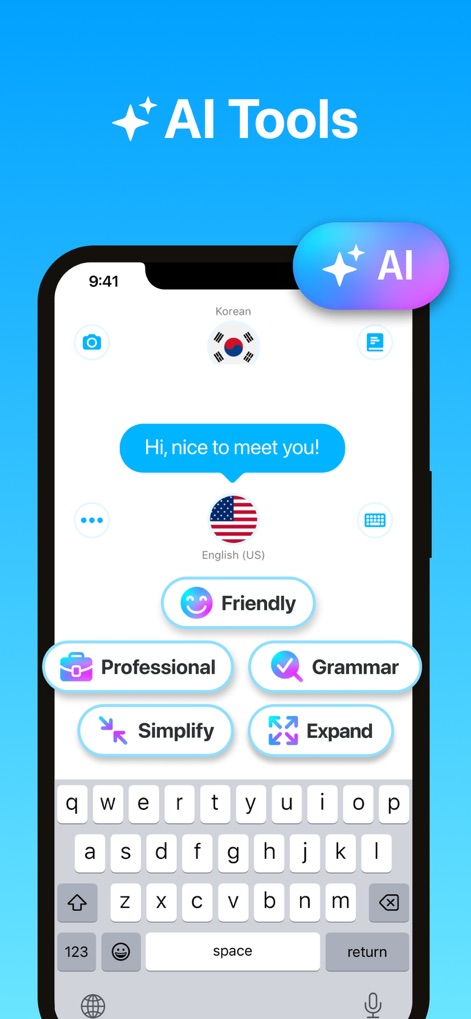
このアプリは、翻訳後のテキストに対して「Professional」や「Friendly」のようなトーン調整、あるいは「Grammar」チェックなど、ユーザーがメッセージを完璧に仕上げるための多様なAIツールを提供します。
高度なAIツール

Apple Watch版アプリでは、手首から直接音声入力で翻訳を開始でき、最近使用した言語のリストに素早くアクセスして、移動中もシームレスなコミュニケーションを実現します。
Apple Watchで手軽に
説明
Download
類似アプリ
似た機能とユーザー体験を持つアプリ

DeepL Translate
DeepL SE

腾讯翻译君-多语言翻译
Tencent Technology (Shenzhen) Company Limited

出国翻译官- 多语言语音翻译聊天交友
Beijing Qicai Muzhi Technology Co.,Ltd.

Translate Voice:Ai Chat
TINY BOLT (HK) CO., LIMITED

GO Translate・AI Translator App
INNOVAPP LLC

翻译全能王-中文日文图片扫描翻译器
Shanghai Baowu Network Technology Co., Ltd.

translation-Global translation
Hebei jiudao network technology co., ltd

Photo Translator: Camera OCR
Son Hoang

Voice Translator : Language +
AmazinPro Technology Solutions And Training Company Limited
このページはアプリまたはその開発者の公式ページではなく、情報提供および論評を目的として作成された独立した編集出版物です。明示的に別段の記載がない限り、アプリおよびその開発者は、MWM、Apple、Google Play、アプリのパブリッシャー、またはアプリの開発者と提携、承認、後援、認可、またはその他の公式的な関係はなく、このページのいかなる内容も、アプリがMWMのサービスを使用して開発されたことを意味するものではありません。すべての商標、ロゴ、スクリーンショット、その他のコンテンツはそれぞれの所有者の財産です。