DoubleTake - Multicam video

DoubleTake - Multicam video

ダウンロード: App Store
ロゴ: DoubleTake - Multicam video

DoubleTake: iPhoneをプロ仕様のマルチカメラスタジオに変える

インタビュー、リアクション動画、ハイエンドvlogの撮影をシネマティックに。2つのカメラフィードを同時に記録し、ポストプロダクションの時間を節約して、デバイスのレンズの創造的な可能性を最大限に引き出しましょう。

ダウンロード: App Store

開発元

Bending Spoons Apps ApS

カテゴリ

Photo & Video

ダウンロード

1M+

ユーザー評価

3.6/5

評価数

2K+

対応言語

11

視覚を倍増

このインターフェースを利用する 1M+ 人のユーザー.

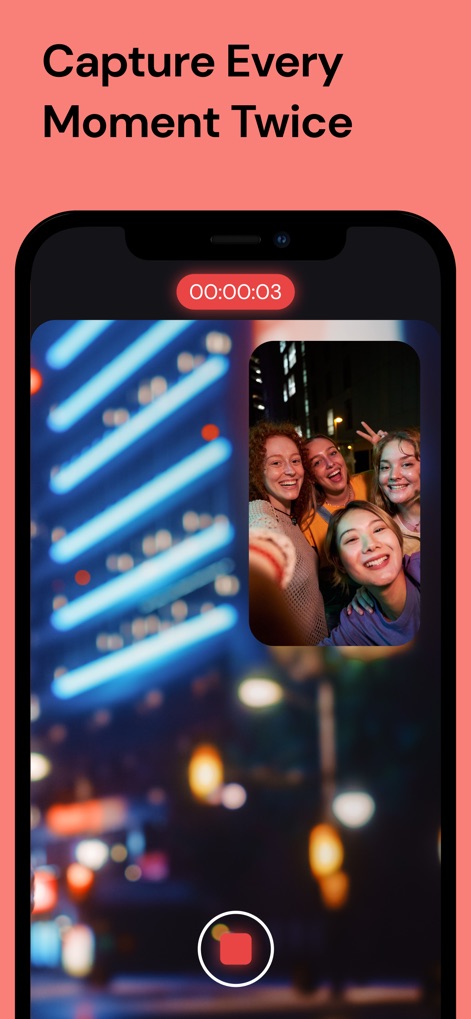
スマートフォン画面に、4人の友人のピクチャーインピクチャー表示でマルチカムビデオを記録しているDoubleTakeアプリが表示されています。

スマートフォン画面に、4人の友人のピクチャーインピクチャー表示でマルチカムビデオを記録しているDoubleTakeアプリが表示されています。

DoubleTakeアプリのインターフェースに、ピクチャーインピクチャーと分割画面の録画モードが表示されています。

DoubleTakeアプリのインターフェースに、ピクチャーインピクチャーと分割画面の録画モードが表示されています。

DoubleTakeアプリのインターフェースに、超広角レンズやセルフィーレンズを含むカメラの組み合わせオプションが表示され、同時に録画できます。

DoubleTakeアプリのインターフェースに、超広角レンズやセルフィーレンズを含むカメラの組み合わせオプションが表示され、同時に録画できます。

DoubleTakeアプリのインターフェースに、4Kビデオ設定とマルチカムのピクチャーインピクチャーモードが表示されています。

DoubleTakeアプリのインターフェースに、4Kビデオ設定とマルチカムのピクチャーインピクチャーモードが表示されています。

DoubleTakeアプリのインターフェースに、さまざまなマルチカムビデオ録画とエクスポートオプションが表示されたメディアギャラリーが表示されています。

DoubleTakeアプリのインターフェースに、さまざまなマルチカムビデオ録画とエクスポートオプションが表示されたメディアギャラリーが表示されています。

プロフェッショナルな制作を、ひとつのデバイスで

このアプリを際立たせるツール、 1M+ 人のユーザーが選択.

📸

マルチレンズ・パースペクティブ

広角と望遠のショットを同時に撮影し、追加機材なしで視聴者にプロフェッショナルなシネマティック体験を提供します。

👥

シームレスなインタビュー

ショット/リバースショットモードを使用して、インタビュー対象者と被写体の両方を同時に記録します。ポッドキャストやストリートvlogに最適です。

⏱️

ゼロシンク編集

コンポジットファイルまたは個別のハイビットレートクリップとして映像をエクスポートし、編集時間を半分に短縮して、より迅速なソーシャル共有を可能にします。

レビュー分析

ユーザーレビューの分析.

感情スコア

18%
ネガティブ

概要

This mobile app, designed for multi-camera video recording, is currently facing significant functionality issues, leading to widespread user dissatisfaction. Many reviews report frequent app crashes, failure to save recorded footage (often resulting in lost content or only one camera's feed saved), and general instability, particularly following recent updates and on newer iOS versions (e.g., iOS 18.x, iOS 26) and iPhone models (e.g., 12 Pro Max, 16 Pro). While users appreciate its intuitive interface and the core concept of multi-camera recording, these positives are overshadowed by critical bugs, poor video quality, and frustrating pricing models like weekly subscriptions, making the app unreliable and often unusable.

主なテーマ

Multi-Camera Recording(4)
Reliability(4)
Creative Control(2)
Intuitive Interface(1)
High-Quality Output(1)
Separate Video Feeds(1)
Advanced Camera Features(1)

アプリについて

について知っておくべきこと DoubleTake - Multicam video.

説明

DoubleTake transforms your iPhone into a multi-cam studio allowing you to capture video from two cameras at the same time on recent devices* *NOTE: Per iOS 15 capabilities, multi-cam video is restricted to the following devices only: iPhone 13 series devices, iPhone 12 series devices, iPhone 11 Pro Max, 11 Pro, 11, Xs Max, Xs, Xr, SE 2. iPad Pro 2018 and newer. While this app will install and function on all devices supported by iOS 15, all devices outside of this list will be restricted to recording video from on a single camera. Use DoubleTake to record video in new ways: - Camera Visualization: Better than a director’s viewfinder! Use DoubleTake’s camera picker view to visualize all available cameras for your device. Use this view to help decide how to frame your shot and which cameras you will select. - Shot/Reverse shot: To capture all the organic and intimate interaction between two actors or interviewer and interviewee. Traditionally, filmmakers would need to employ two cameras and place these in cumbersome ‘over the shoulder’ locations. With DoubleTake you can place one device in between your actors and place the audience right in the middle of the conversation. - Multi-cam: Capture two different focal lengths of the same subject at the same time. Use DoubleTake with the Ultra Wide lens (iPhone 11 Pro Max, 11 Pro and 11 only) and the Tele to capture both an establishing shot and a punch-in on your subject simultaneously. Or use any other combination of front and rear lenses for unrivaled multi-cam capture. - PiP or Discreet: The DoubleTake interface allows you to see both cameras of your video capture at the same time through the use of a Picture in Picture (PiP) window. You can move this PiP around the screen, tap to zoom in, or swipe it away if it’s distracting (the second video will continue to record). With DoubleTake you can decide if you want to record your videos as separate discrete files or if you want the video recorded as a composite video that includes the PiP window animated as you see it on the screen. - Split-screen: Doubletake also allows you to use any two cameras to create a 50/50 split-screen effect that is saved as a single video. This is great for capturing engaging interviews, or any scenario where two sides of the story need equal weighting on screen. - Focus & Exposure Controls: DoubleTake allows you to set and lock your focus and exposure on both cameras during multi-cam capture with our unified reticle. Just tap anywhere to set an area of interest with the reticle, then tap again to lock or unlock. Our easy to use camera switcher lets you effortlessly move between your A and B cams during a recording to adjust the focus and exposure for each independently of one another. Video Specs: - Full frame focus and exposure for smooth and easy automated focus and exposure adjustments. - Selectable broadcast frame rates: 24fps, 25fps, and 30fps depending on your project requirements. - 1080p video at high bitrate encoding for maximum quality. (note: 1080p video is the maximum resolution supported by the Apple API for multi-cam capture). - Composited PiP or separate discreet video files recorded as .h264 .mov files are saved to DoubleTake’s internal library which supports batch export to the Camera Roll. Terms of Use: https://support.bendingspoons.com/tos.html?app=436577167

最新バージョン

3.1.2

サイズ

64.6 MB

リリース日

2020年1月28日

マルチカメラスタジオがタップひとつであなたの手に

制作レベルを向上させている100万人以上のクリエイターに参加しましょう。iPhoneをプロ仕様のリグに変え、今日からストーリーの両面を捉え始めましょう。

ダウンロード: App Store

App information, icons, screenshots, and descriptions displayed on this page are sourced from the Apple App Store and are the property of their respective developers. Download estimates and rankings are based on MWM's proprietary models and may not reflect actual figures. This page is provided for informational and analytical purposes only.

Believe this page infringes your intellectual property? File a dispute