
このページはアプリまたはその開発者の公式ページではなく、情報提供および論評を目的として作成された独立した編集出版物です。明示的に別段の記載がない限り、アプリおよびその開発者は、MWM、Apple、Google Play、アプリのパブリッシャー、またはアプリの開発者と提携、承認、後援、認可、またはその他の公式的な関係はなく、このページのいかなる内容も、アプリがMWMのサービスを使用して開発されたことを意味するものではありません。すべての商標、ロゴ、スクリーンショット、その他のコンテンツはそれぞれの所有者の財産です。


eSign App: Sign PDF Documents
紙の足かせを断ち切り、デジタル署名があなたの手のひらで完結する。このアプリは、場所と時間を選ばない、真のドキュメント支配力をユーザーに与える。
ダウンロード
1M+ユーザー評価
評価数
1.7K開発元
カテゴリ
Business対応言語
10最新バージョン
1.4.4サイズ
70.9 MBリリース日
2023年3月29日テックアナリストによるプロフェッショナル向けモバイル電子署名ソリューションの評価
eSign App: Sign PDF Documents の主要機能分析
他者への署名依頼
このツールは、ユーザーが他の関係者に文書の署名を依頼し、そのプロセスを効率的に管理する機能を提供します。
モバイル電子署名
ユーザーはiPhoneやiPadから直接、様々な形式の文書に電子署名を行うことができます。
電子署名の作成
ユーザーは自分自身の電子署名をアプリ内で簡単に作成し、保存することができます。
オフラインでのアクセスと作業
アプリはインターネット接続なしで文書にアクセスし、作業を行うことを可能にし、ユーザーの利便性を高めます。
クラウドサービス連携
アプリは主要なクラウドストレージサービスと連携し、ユーザーの文書管理を効率化します。
文書への入力と編集
アプリは、ユーザーがPDFなどの文書に直接入力し、情報を編集する機能を提供します。
文書のインポートとスキャン
ユーザーは様々なソースから文書を素早くアプリに取り込み、必要に応じてスキャンしてデジタル化することが可能です。
文書の共有とエクスポート
ユーザーは署名済みの文書をPDFやJPG形式で簡単に共有またはエクスポートすることができます。
よくある質問
について知っておくべきこと eSign App: Sign PDF Documents
What is eSign App?
eSign App transforms an iPhone or iPad into a powerful tool for e-signing PDF and other document formats. It allows users to import, sign, and share documents easily.
Can eSign App function without an internet connection?
Yes, eSign App functions offline. It does not require an Internet connection because all documents are stored locally on your device for convenient access.
What are the core features of eSign App?
eSign App's core features include signing, filling, and editing documents, creating e-signatures, importing, sending for signing, and integrating with cloud services.
How can I create an e-signature in eSign App?
Users can create their e-signature directly within eSign App. The interface allows for custom signature creation, which can then be applied to documents.
Does eSign App support cloud storage integrations?
Yes, eSign App supports cloud integrations. It works seamlessly with iCloud, Dropbox, Evernote, Box, OneDrive, and Google Drive for document management.
What are the subscription costs for eSign App?
eSign App subscriptions are $4.99 for one week (with a 3-day trial), $9.99 for one month, and $49.99 for twelve months. Prices may vary by location.
Is a free trial available for eSign App?
Yes, eSign App offers a free trial. A 3-day trial version is included with the 1-week subscription plan, as stated in the app's details.
How do eSign App subscriptions auto-renew?
eSign App subscriptions automatically renew unless auto-renewal is turned off 24 hours before the current period ends. Users manage this in iTunes Account Settings.
What file formats can eSign App export?
eSign App can export documents as PDF or JPG files. This allows users flexibility in sharing and storing their signed documents.
Can I request signatures from others using eSign App?
Yes, eSign App allows you to send documents for signature to another party. This feature simplifies collecting multiple signatures efficiently.
Where can I find the privacy policy for eSign App?
The privacy policy for eSign App is available at e-sign.co/privacy. This link provides details on data handling and user privacy practices.
以下のスクリーンショットと説明は、アプリの公式ストアリスティングから直接取得されたものであり、アプリ開発者の所有物です。
アプリストア
スクリーンショット
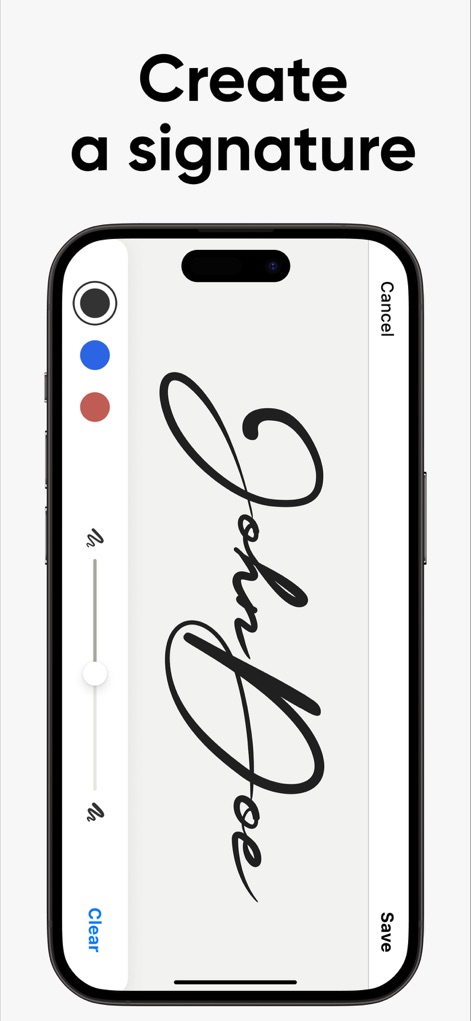
ユーザーは手書きで「John Doe」のような署名を作成し、色の選択肢(黒、青、赤)や線の太さ調整スライダーを用いて、自分だけのパーソナライズされたサインを生成できます。
電子署名を作成

作成した署名「John Doe」を文書内の指定された署名ボックスに簡単にドラッグ&ドロップで配置でき、画面下部に表示される複数の保存済み署名オプションから選択して適用できます。
文書に署名挿入

本アプリは、「EASY TO USE!」という強調されたテキストが示す通り、ユーザーが作成した「John Doe」のような美しい電子署名を白い背景に明確に表示し、使いやすさを直感的に伝えています。
直感的な操作性

本アプリでは、文書内の署名済み領域(John Doeの署名)を調整する機能や、トリミング、フィルタリング、回転などの多様なツールバーオプションを利用して、ドキュメントを詳細に編集できます。
ドキュメントを編集

ユーザーは整理された「Documents」一覧画面から任意のファイルを選択し、ポップアップメニューから「PDF」または「JPG」形式のいずれかを選んで、簡単にドキュメントをエクスポートできます。
柔軟なファイル出力

署名済みのドキュメントは、AirDrop、メッセージ、メールなど様々な共有オプションを通じてシームレスに送信でき、連絡先アイコン(Elena、Business partner、Emmy)から直接受取人を選んで共有できます。
ドキュメントを共有

ユーザーは文書内の「Client」署名フィールドを明確に指定し、画面下部に表示される「Request signature」ボタンや「Send document」機能を利用して、他の人へ署名依頼を安全に送信できます。
署名を安全に依頼
説明
Download
類似アプリ
似た機能とユーザー体験を持つアプリ

Docusign - Upload & Sign Docs
Docusign

Sign.Me
SM, OOO (Apps)

Signeasy-Sign Documents App
Glykka LLC

Genius Sign: PDF doc signature
The Grizzly Labs

eSign - Fill & Sign Form Docs
B TO J PTY LTD

Sign Documents: PDF Signature
MR BIKRAMJIT SINGH

Fill & Sign Documents PDF Scan
Upsquare Technosys Private Limited

Receipt Maker - Sign & Send
SVG Apps

Sign Documents - eSign PDF
Tola Marciniak
このページはアプリまたはその開発者の公式ページではなく、情報提供および論評を目的として作成された独立した編集出版物です。明示的に別段の記載がない限り、アプリおよびその開発者は、MWM、Apple、Google Play、アプリのパブリッシャー、またはアプリの開発者と提携、承認、後援、認可、またはその他の公式的な関係はなく、このページのいかなる内容も、アプリがMWMのサービスを使用して開発されたことを意味するものではありません。すべての商標、ロゴ、スクリーンショット、その他のコンテンツはそれぞれの所有者の財産です。