ETA - GPS & maps driving times
ダウンロード: App Store

このページはアプリまたはその開発者の公式ページではなく、情報提供および論評を目的として作成された独立した編集出版物です。明示的に別段の記載がない限り、アプリおよびその開発者は、MWM、Apple、Google Play、アプリのパブリッシャー、またはアプリの開発者と提携、承認、後援、認可、またはその他の公式的な関係はなく、このページのいかなる内容も、アプリがMWMのサービスを使用して開発されたことを意味するものではありません。すべての商標、ロゴ、スクリーンショット、その他のコンテンツはそれぞれの所有者の財産です。


ロゴ: ETA - GPS & maps driving times
ダウンロード: App Store

ETA - GPS & maps driving times

効率を重視するプロフェッショナルのための必須ダッシュボード。お気に入りの目的地やカレンダーイベントまでのリアルタイム交通状況と到着時間情報を、ホーム画面やApple Watchで直接確認できます。

主要数値

ダウンロード

218K+

ユーザー評価

3.8/5

評価数

1K+

開発元

Eastwood Co Pty Ltd

カテゴリ

Navigation

対応言語

17

最新バージョン

2.8.0

サイズ

21.9 MB

リリース日

2014年2月26日
機能

スケジュールを楽々管理

効率を重視するプロフェッショナル向けに設計されたETAは、リアルタイムの移動情報と交通データをご利用のデバイスとホーム画面に直接提供します。

一目でわかる移動時間

検索は不要です。アプリを開かなくても、iOSウィジェットとApple Watchのコンプリケーションで、運転、公共交通機関、徒歩の時間を瞬時に確認できます。

スマートカレンダー連携

予定を同期すれば、ETAがリアルタイムの交通状況に基づいて最適な出発時間を計算し、会議に遅れることなく、落ち着いて時間通りに到着できるようになります。

以下のスクリーンショットと説明は、アプリの公式ストアリスティングから直接取得されたものであり、アプリ開発者の所有物です。

アプリストア

スクリーンショット
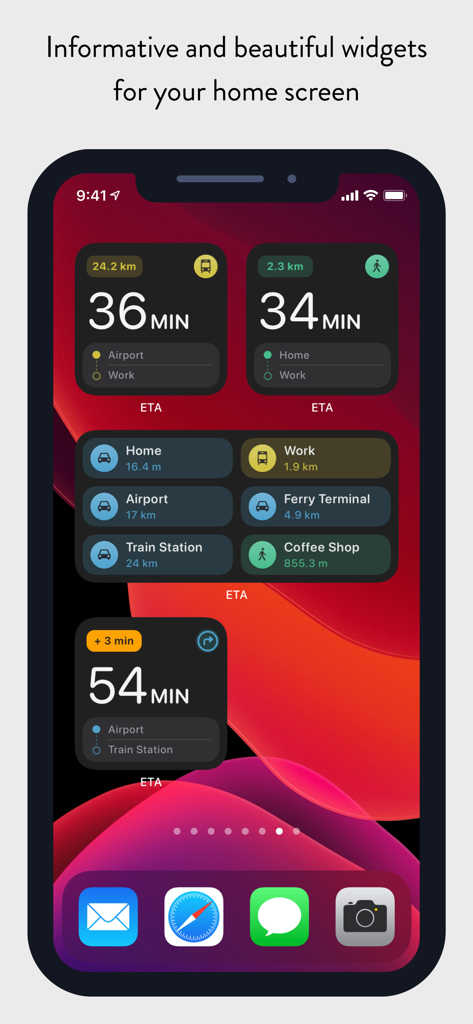
ETA - GPS & maps driving times - iPhoneのホーム画面に、さまざまな場所や交通手段の移動時間が表示されたETAウィジェットを表示
iPhoneのホーム画面に、さまざまな場所や交通手段の移動時間が表示されたETAウィジェットを表示

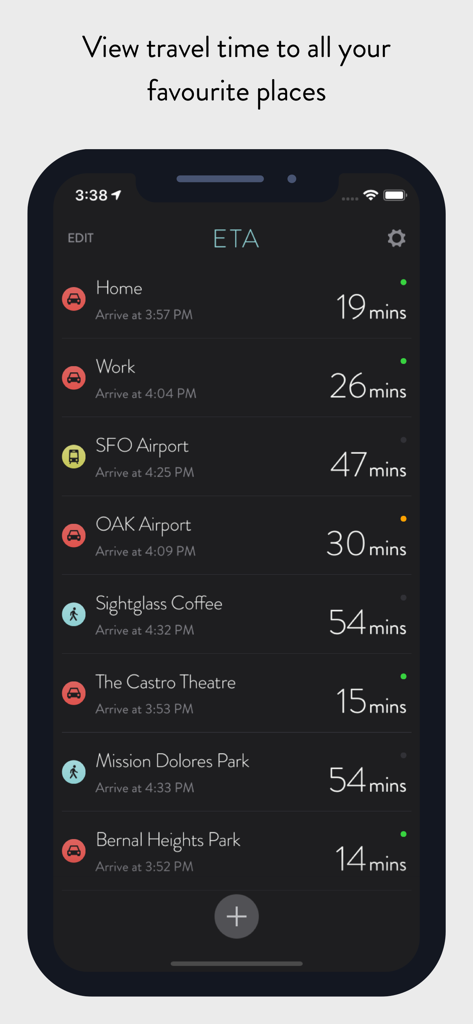
ETA - GPS & maps driving times - ETAアプリのダッシュボードに、自宅や職場などの複数の目的地までの移動時間と推定到着時間を表示
ETAアプリのダッシュボードに、自宅や職場などの複数の目的地までの移動時間と推定到着時間を表示

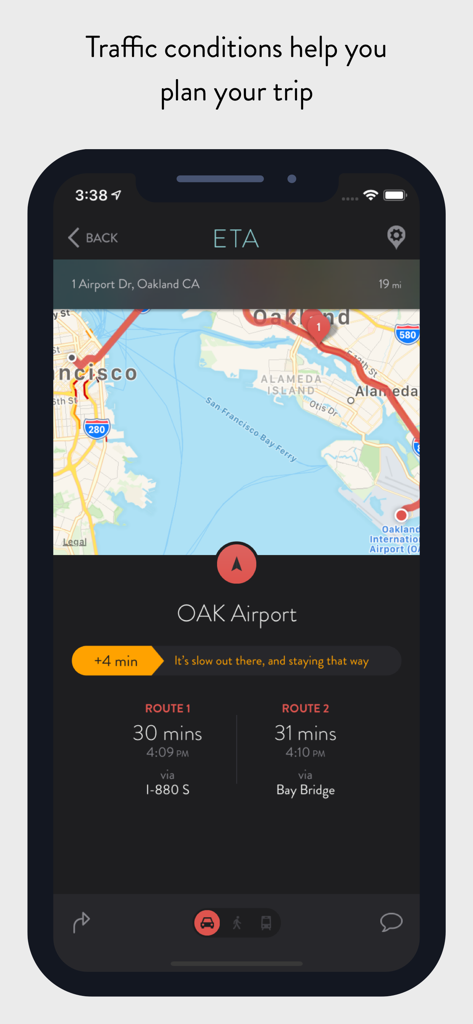
ETA - GPS & maps driving times - ETAアプリのインターフェースに、オークランド空港までのさまざまなルートの運転時間と交通状況を表示
ETAアプリのインターフェースに、オークランド空港までのさまざまなルートの運転時間と交通状況を表示

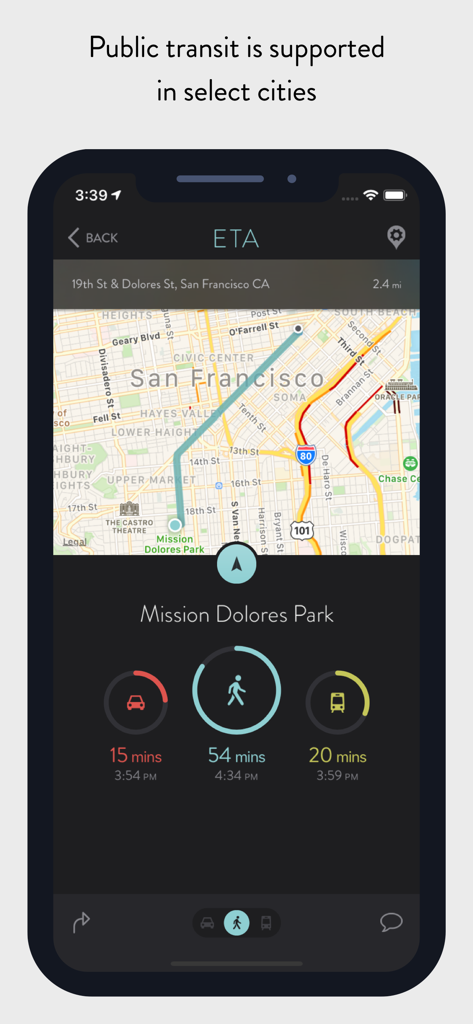
ETA - GPS & maps driving times - iPhoneの画面に、ミッション・ドロレス・パークまでの運転時間、徒歩時間、公共交通機関の時間を表示したETAアプリを表示
iPhoneの画面に、ミッション・ドロレス・パークまでの運転時間、徒歩時間、公共交通機関の時間を表示したETAアプリを表示

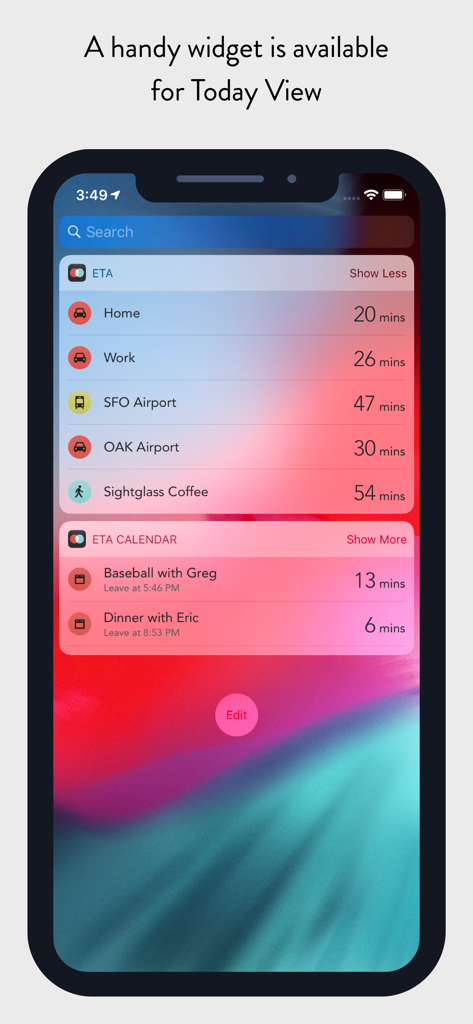
ETA - GPS & maps driving times - iPhoneの画面に、よく使う場所やカレンダーの予定までの移動時間が表示されたETAアプリのウィジェットを今日の表示で表示
iPhoneの画面に、よく使う場所やカレンダーの予定までの移動時間が表示されたETAアプリのウィジェットを今日の表示で表示

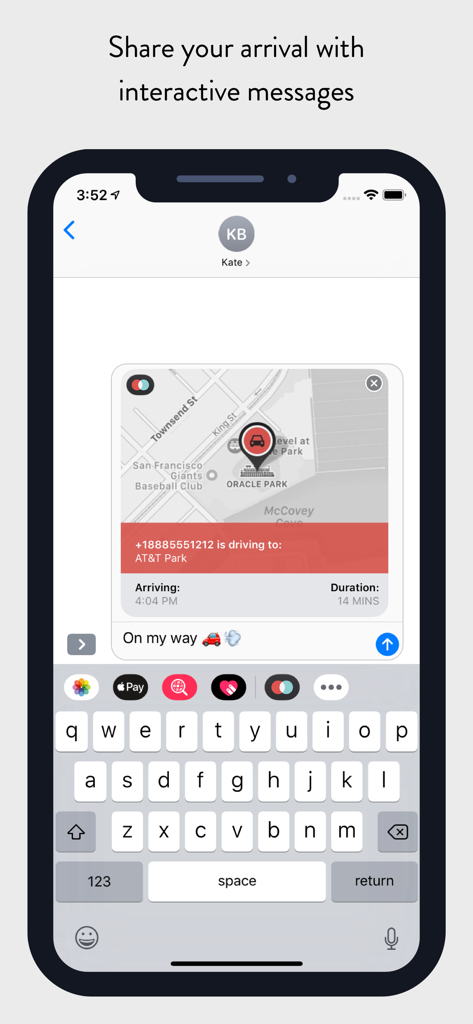
ETA - GPS & maps driving times - iMessageの会話画面で、運転時間と到着状況を共有するインタラクティブなETAカードを表示
iMessageの会話画面で、運転時間と到着状況を共有するインタラクティブなETAカードを表示

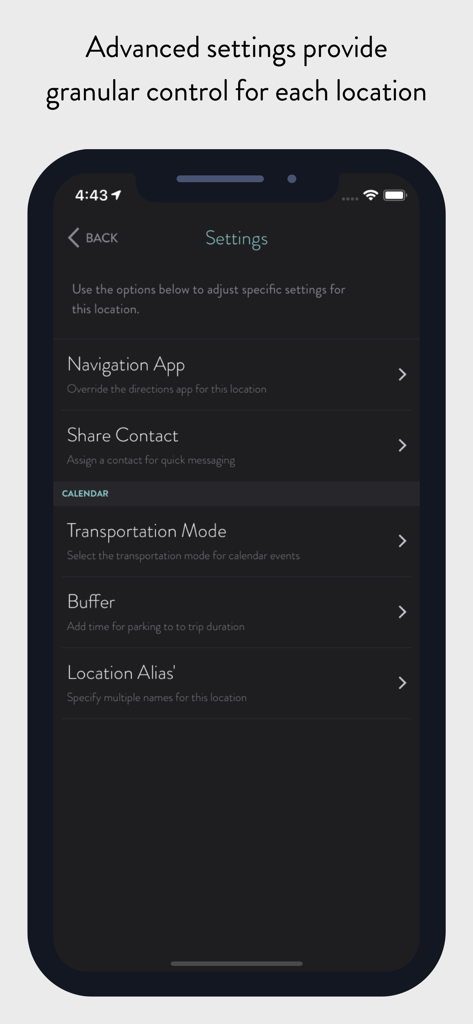
ETA - GPS & maps driving times - ETAアプリの詳細な場所設定インターフェースに、ナビゲーションアプリの交通手段や移動バッファ時間などのオプションを表示
ETAアプリの詳細な場所設定インターフェースに、ナビゲーションアプリの交通手段や移動バッファ時間などのオプションを表示

ETA - GPS & maps driving times - モバイルアプリのインターフェースに、カレンダーイベントまでの運転時間、徒歩時間、公共交通機関の時間を表示
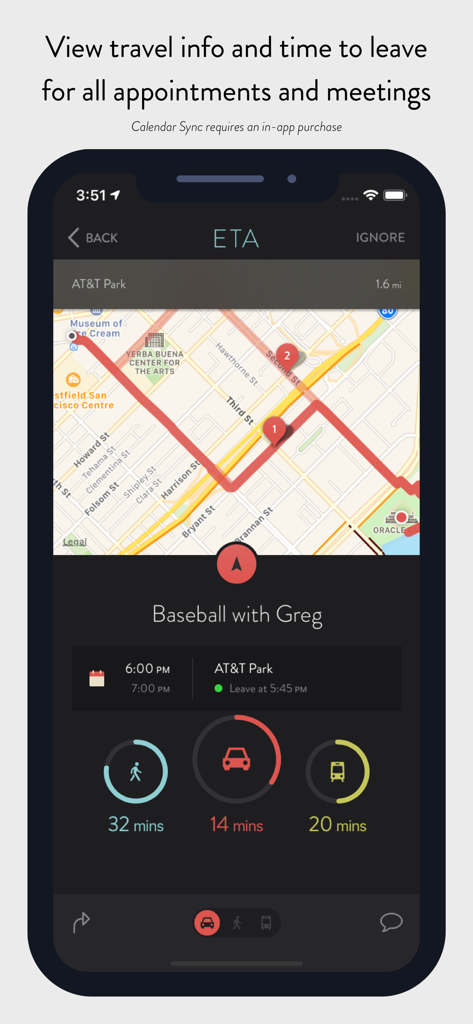
モバイルアプリのインターフェースに、カレンダーイベントまでの運転時間、徒歩時間、公共交通機関の時間を表示

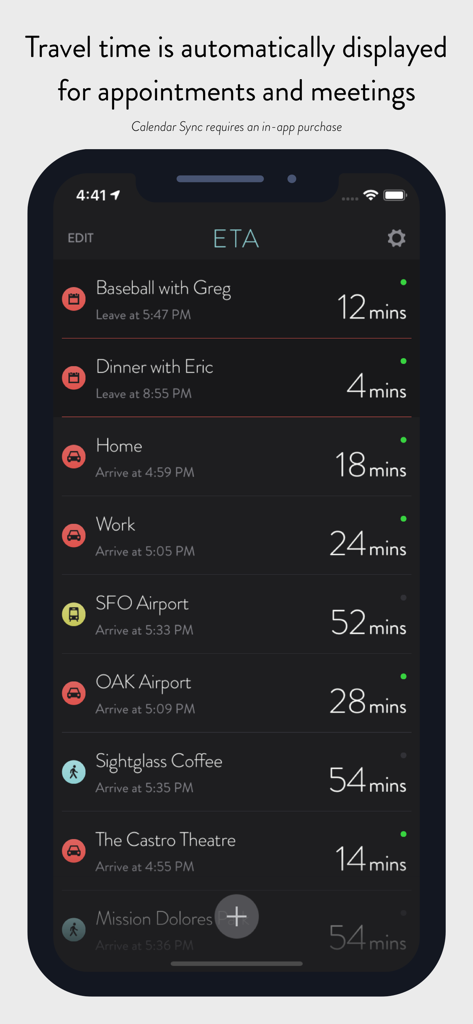
ETA - GPS & maps driving times - ETAアプリのインターフェースに、目的地やカレンダーイベントまでの移動時間をリスト表示
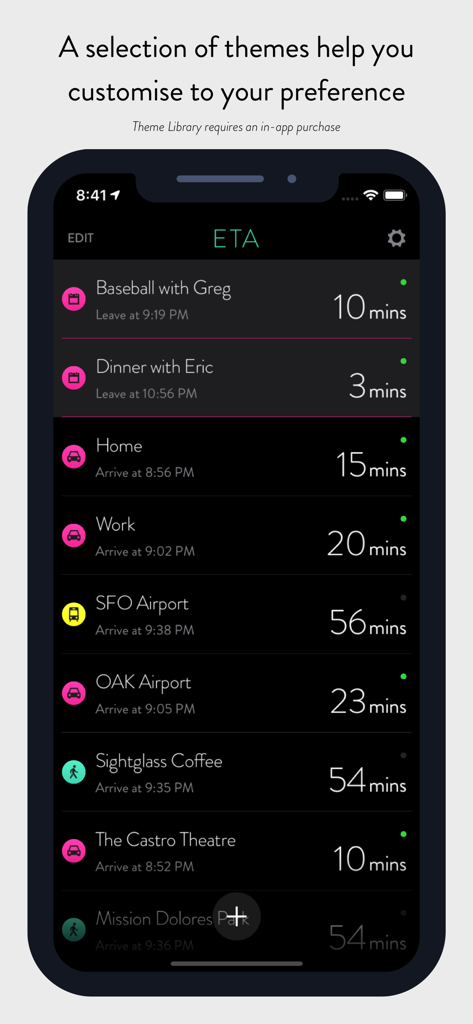
ETAアプリのインターフェースに、目的地やカレンダーイベントまでの移動時間をリスト表示

ETA - GPS & maps driving times -

説明

** ETA supports the latest iOS and watchOS features including informative iOS Home Screen widgets and powerful complications for your Apple Watch watch face. With ETA you'll always know how long it'll take to get to your destination. ** ETA instantly shows travel time (including support for driving, public transit*, cycling* and walking) to your favourite places. When driving, ETA also supplies traffic information that details any delays on your route. ## The only app that provides driving times and traffic information on your iPhone Home Screen ## Our thoughtfully designed iOS Home Screen widgets will keep you informed of the travel and traffic situation without you needing to open the app. The calendar widget automatically retrieves your appointments so you know when best to leave to arrive on time. In line with Apple's guidelines our Home Screen widgets update at regular intervals during the day. ## The only app that shows driving time on your watch face ## You can rely on ETA to show you travel time on the watch face of your Apple Watch. Whether you travel by car, bike, public transit or foot, ETA will update in the background and show you an updated travel time as you move. ETA adheres to Apple's guidelines and updates at minimum every 15 minutes ensuring your watch face displays current travel time and traffic conditions. ## The only app that gives you travel time to meetings and appointments in one place ## ETA's 'set and forget' calendar functionality is a must have to keep you on time for your appointments and meetings. Once setup, ETA automatically monitors your calendar (securely and privately on your device) and displays travel time and traffic conditions for your upcoming events. This is available across our apps on iOS and Apple Watch, on your Apple Watch watch face as well in widgets on your iPhone Home Screen and Today View. ## Five star support ETA is backed by our great support to help you get the most from the app. Browse our knowledgeable or reach out to one of our friendly support members. We're here for you whether you have a simple question or need a helping hand getting the best from a feature. === ETA has a long history on the App Store since initial launch in the Australian summer of 2014. The app has grown and evolved over that time welcoming hundreds-of-thousands of happy users. Read our many user reviews here on the App Store and also from our friends in the press across publications such as TechCrunch, MacStories, iMore, Wired, FastCompany, Gizmodo, Macworld and more. ETA is your personal assistant providing you with quick access to travel times and traffic conditions to all your favourite destinations. Don't drive? Don't worry! ETA also supports public transit (in select cities), cycling (Apple Watch only) and walking. Share your arrival time securely to friends and family via our interative iMessage cards. In a tap get driving directions in your favourite maps app. Driving times to your locations are conveniently presented on a single screen with an indication of current traffic alongside. In a tap you're delivered pre-routed, turn-by-turn driving directions in your favourite navigation app. ETA works with Apple Maps, Google Maps, Waze, HERE Maps, CityMapper, Transit, TomTom and more. Travelling by transit? No problems, ETA has you covered. In addition to driving and walking, ETA offers travel time travelling by public transportation (check http://www.apple.com/ios/feature-availability/#transit to see if this feature is available in your area). Our Apple Watch app allows you to start cycling and walking workouts to your locations. ETA for Apple Watch works with Apple Health to sync workouts and activity data. # Countries Supported # To calculate travel time ETA requires Apple Maps support for driving directions in your country. Please check the following list to ensure ETA will work in your area: https://www.apple.com/ios/feature-availability/#maps-directions

Download

ダウンロード: App Store

このページはアプリまたはその開発者の公式ページではなく、情報提供および論評を目的として作成された独立した編集出版物です。明示的に別段の記載がない限り、アプリおよびその開発者は、MWM、Apple、Google Play、アプリのパブリッシャー、またはアプリの開発者と提携、承認、後援、認可、またはその他の公式的な関係はなく、このページのいかなる内容も、アプリがMWMのサービスを使用して開発されたことを意味するものではありません。すべての商標、ロゴ、スクリーンショット、その他のコンテンツはそれぞれの所有者の財産です。