
このページはアプリまたはその開発者の公式ページではなく、情報提供および論評を目的として作成された独立した編集出版物です。明示的に別段の記載がない限り、アプリおよびその開発者は、MWM、Apple、Google Play、アプリのパブリッシャー、またはアプリの開発者と提携、承認、後援、認可、またはその他の公式的な関係はなく、このページのいかなる内容も、アプリがMWMのサービスを使用して開発されたことを意味するものではありません。すべての商標、ロゴ、スクリーンショット、その他のコンテンツはそれぞれの所有者の財産です。


Expense Tracker - Money Note
銀行と無縁、サブスク不要。このアプリは、ユーザーに自分の金銭を掌握する力を与える。
ダウンロード
7.5M+ユーザー評価
評価数
791.7K開発元
カテゴリ
Finance対応言語
33最新バージョン
5.1.1サイズ
126.5 MBリリース日
2018年3月25日プライバシー重視の予算管理を求めるiOSユーザー向け主要機能の評価
Expense Tracker - Money Noteの機能分析
完全に無料でプライバシー重視のデータ管理
本アプリは、アカウント登録、銀行口座連携、サブスクリプションが不要であり、すべてのデータがデバイスにローカル保存されるため、プライバシーとセキュリティを確保しつつ、追加費用なしで利用できます。
Face ID/Touch ID対応のパスコードロック
ユーザーは、Face IDまたはTouch IDを利用したパスコードロックを設定することで、財務データを安全に保護できます。
直感的で簡単な手動入力
本ツールは、大きくて押しやすいカテゴリボタンと内蔵計算機キーボードを備え、迅速かつ快適に支出や収入を手動で記録することを可能にします。
ホーム画面とロック画面のウィジェット
ユーザーは、アプリを開くことなく残りの予算を確認したり、記録された日を表示したり、ロック画面から直接新しい入力を追加したりできるウィジェットを利用できます。
視覚的な収支レポート
本アプリは、月ごと、年ごと、および累積の収支を明確な円グラフで表示し、ユーザーが支出の割合を把握し、予算管理に役立てることができます。
統合されたカレンダー機能
ユーザーは、日々の収入と支出を一目で確認できるカレンダーを利用し、給料日から追跡を開始できるよう週の開始日や月の締日をカスタマイズできます。
カテゴリ別予算設定と無制限のカスタムカテゴリ
本ツールは、ユーザーがカテゴリごとに予算を設定し、無制限のカスタムカテゴリを作成できるため、個別のニーズに合わせて支出を詳細に管理できます。
データのエクスポートとiCloudバックアップ
ユーザーは、すべてのデータをCSV(Excel互換)またはPDF形式でエクスポートでき、iCloudバックアップとiPad同期により、デバイス間でデータを安全に管理・移行できます。
無制限の固定収入・支出設定
本アプリは、ユーザーが定期的な収入や支出を無制限に設定できるため、毎月の繰り返し入力を簡素化し、効率的な管理を実現します。
豊富なテーマカラーとアプリアイコン
ユーザーは、20種類以上のテーマカラーと20種類以上のアプリアイコンから選択することで、アプリの見た目を個人のスタイルに合わせてカスタマイズできます。
よくある質問
について知っておくべきこと Expense Tracker - Money Note
Is MoneyNote a free budget tracker?
Yes, MoneyNote is a completely free budgeting app. It has no monthly subscriptions or hidden charges, offering all essential features without cost.
Does MoneyNote require an account registration?
No, MoneyNote does not require any account registration. Users can start budgeting instantly without creating an account.
Is my financial data secure in Expense Tracker - Money Note?
Yes, Expense Tracker - Money Note stores all data locally on your device for enhanced security. It also supports Passcode lock with Face ID and Touch ID for data protection.
Can I use MoneyNote offline?
Yes, MoneyNote functions entirely offline. All data is stored locally on your device, eliminating the need for an internet connection.
What reporting features does MoneyNote offer?
MoneyNote provides monthly, yearly, and cumulative reports. It displays income and expenses in clear pie charts and allows viewing spending ratios by category.
Can I export data from the MoneyNote app?
Yes, the MoneyNote app allows data export. Users can export all data as CSV (Excel-compatible) files and monthly data as PDF files for archiving or printing.
Does MoneyNote support widgets for iOS?
Yes, MoneyNote supports both Home Screen and Lock Screen widgets. These widgets allow users to check budgets, see recorded days, and add new entries quickly.
Can I customize the appearance of the MoneyNote app?
Yes, MoneyNote offers extensive customization options. Users can choose from over 20 theme colors and select from more than 20 app icons to personalize their experience.
Does Expense Tracker - Money Note connect to bank accounts?
No, Expense Tracker - Money Note does not connect to bank accounts. It is designed for manual income and expense tracking, focusing on user privacy and simplicity.
How can I track daily expenses with MoneyNote?
MoneyNote provides a built-in calendar to check daily income and expenses at a glance. Users can also add or delete entries directly from the calendar.
Can I set budgets by category in MoneyNote?
Yes, MoneyNote allows users to set budget settings by category. This feature helps manage spending and identify areas of overspending.
Does MoneyNote offer unlimited custom categories?
Yes, MoneyNote offers unlimited custom categories. Users can create as many categories as needed to accurately track their specific income and expenses.
Is MoneyNote compatible with iPad?
Yes, MoneyNote is compatible with iPad. It supports iCloud backup and iPad sync, allowing users to manage finances across Apple devices.
以下のスクリーンショットと説明は、アプリの公式ストアリスティングから直接取得されたものであり、アプリ開発者の所有物です。
アプリストア
スクリーンショット
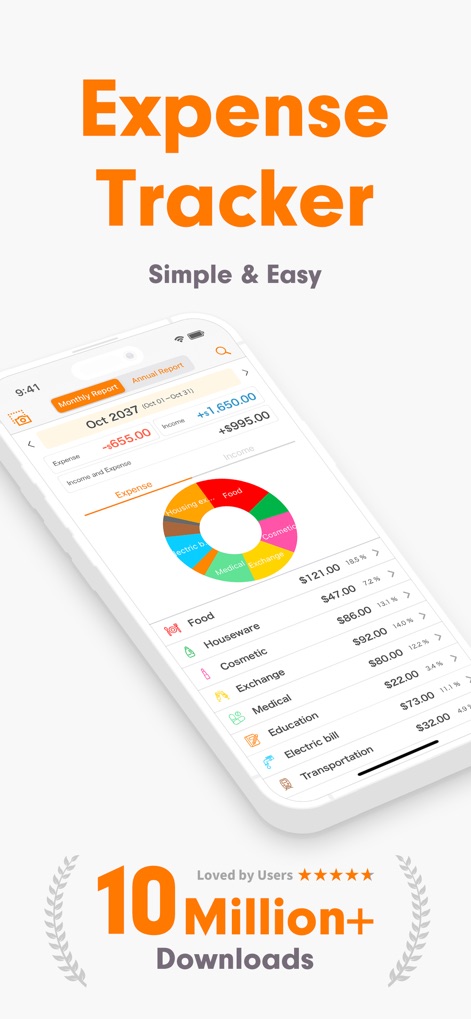
このアプリは、月ごとの支出と収入のバランスを分かりやすい円グラフで視覚化し、カテゴリー別の内訳を一覧表示する機能を提供します。
収支を即座に把握
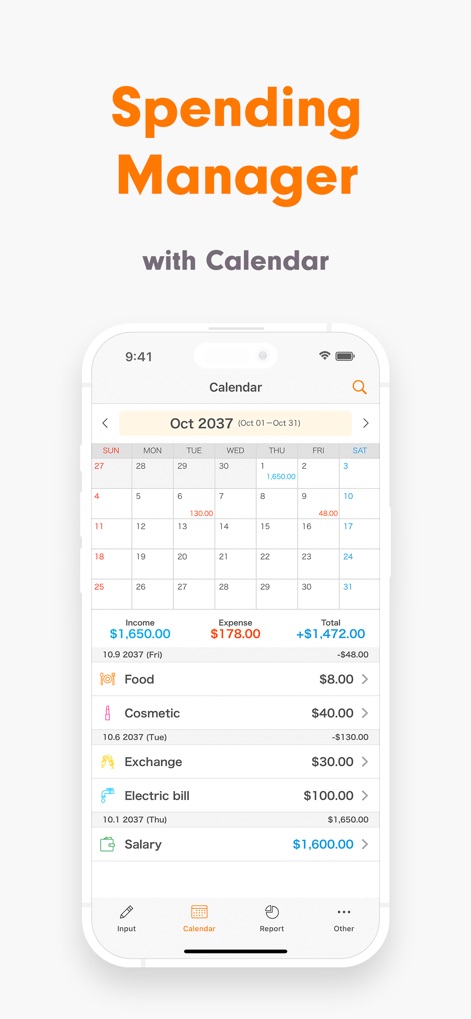
本ツールは、日々の支出と収入をカレンダー形式で一覧でき、特定の日付を選択してその日の取引詳細を確認する機能が特徴です。
カレンダーで支出管理
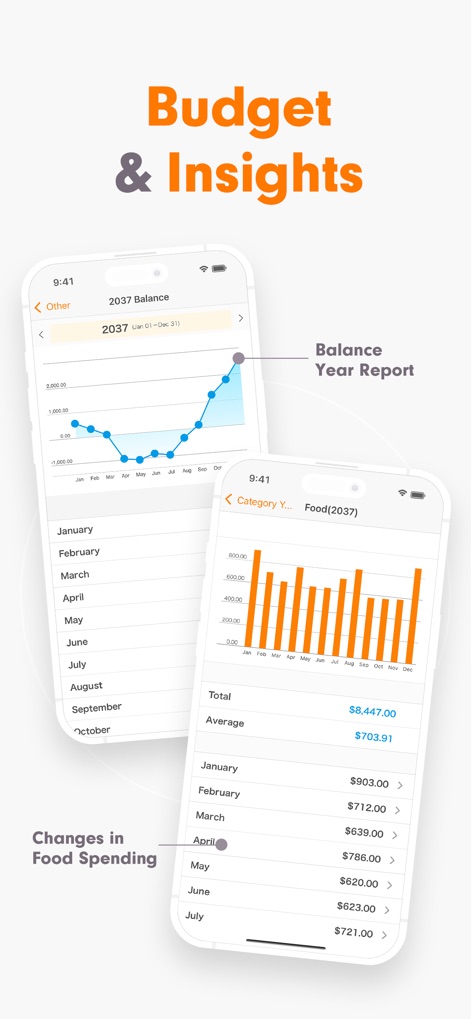
ユーザーは、年間の残高推移を示す折れ線グラフで全体の財務状況を把握でき、カテゴリー別の費用を棒グラフで比較分析する機能を利用できます。
詳細な財務レポート
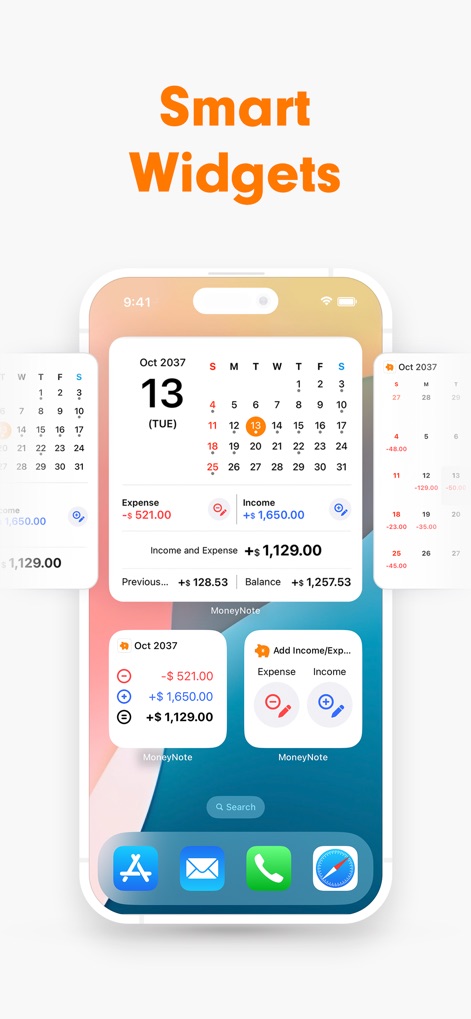
このアプリは、ホーム画面に月間収支を示すミニカレンダーを表示するウィジェットと、収入、支出、残高の概要を一目で確認できるウィジェットを提供します。
スマートなウィジェット
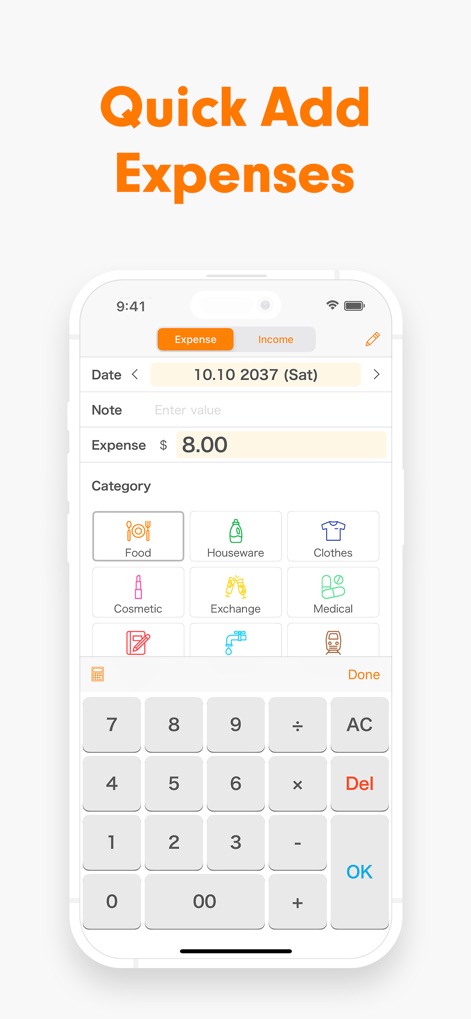
ユーザーは、大きく直感的なカテゴリボタンで支出を素早く分類でき、内蔵された高機能な電卓キーボードで金額をスムーズに入力する機能を利用できます。
素早い支出入力
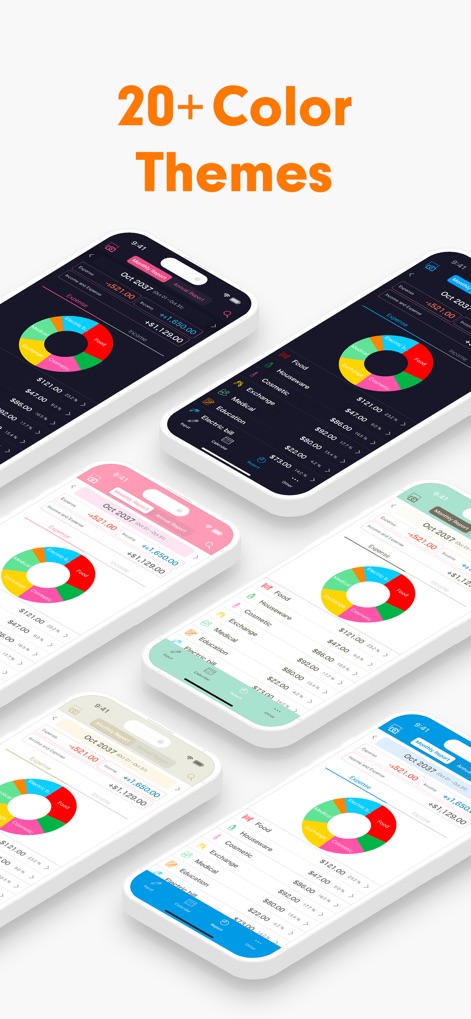
本アプリは、20種類以上の多彩なカラーテーマを提供し、ユーザーは好みに合わせてアプリの配色と視覚的なスタイルを自由にカスタマイズする機能を楽しめます。
豊富なデザインテーマ
説明
Download
類似アプリ
似た機能とユーザー体験を持つアプリ

鲨鱼记账本-城市理财圈子必备工具软件
Beijing Shark Pioneer Network Technology Co.,Ltd

咔皮记账 -自动记账 AI记账 预算 多账本 资产管理 存钱
Shanghai Yuhuan Technology Co., Ltd.

Money manager, expense tracker
Orange dog d.o.o.

Money Manager Expense & Budget
Realbyte Inc.

Budget Planner App - Fleur
Akash Jain

iCost记账-快速简洁好用的记账理财助手&记账软件
Guangzhou Quji Technology Co., Ltd.

YNAB
You Need A Budget LLC

Copilot: Track & Budget Money
Copilot Money, Inc.

小青账记账-存钱记账本理财购物清单
YouQian
このページはアプリまたはその開発者の公式ページではなく、情報提供および論評を目的として作成された独立した編集出版物です。明示的に別段の記載がない限り、アプリおよびその開発者は、MWM、Apple、Google Play、アプリのパブリッシャー、またはアプリの開発者と提携、承認、後援、認可、またはその他の公式的な関係はなく、このページのいかなる内容も、アプリがMWMのサービスを使用して開発されたことを意味するものではありません。すべての商標、ロゴ、スクリーンショット、その他のコンテンツはそれぞれの所有者の財産です。