Expenses Tracker - Accountit
ダウンロード: App Store

このページはアプリまたはその開発者の公式ページではなく、情報提供および論評を目的として作成された独立した編集出版物です。明示的に別段の記載がない限り、アプリおよびその開発者は、MWM、Apple、Google Play、アプリのパブリッシャー、またはアプリの開発者と提携、承認、後援、認可、またはその他の公式的な関係はなく、このページのいかなる内容も、アプリがMWMのサービスを使用して開発されたことを意味するものではありません。すべての商標、ロゴ、スクリーンショット、その他のコンテンツはそれぞれの所有者の財産です。


ロゴ: Expenses Tracker - Accountit
ダウンロード: App Store

Expenses Tracker - Accountit

ネイティブなApple体験で、あなたの財政を完全に管理しましょう。取引を追跡し、予算を管理し、デバイス間で同期させ、データのプライバシーを損なうことなく。

主要数値

ダウンロード

57K+

ユーザー評価

4.5/5

評価数

500

開発元

DesignTech SIA

カテゴリ

Finance

対応言語

8

最新バージョン

2.6.8

サイズ

133.1 MB

リリース日

2021年6月7日
機能

完全なプライバシーであなたの財政をマスターする

Appleエコシステム専用に設計された究極の手動経費トラッカーを体験してください。安全で、直感的で、完全にあなたの管理下にあります。

プライバシー重視の追跡

銀行口座のリンクやデータ収集はありません。あなたの財務データはローカルに保存され、iCloud経由で同期されるため、あなたの履歴はあなただけが見ることができます。

あなたのAppleライフスタイル向けに構築

Apple Watchで外出先で経費を記録し、iPhoneで予算を管理し、Macで詳細な分析を実行し、シームレスでネイティブな体験を。

以下のスクリーンショットと説明は、アプリの公式ストアリスティングから直接取得されたものであり、アプリ開発者の所有物です。

アプリストア

スクリーンショット
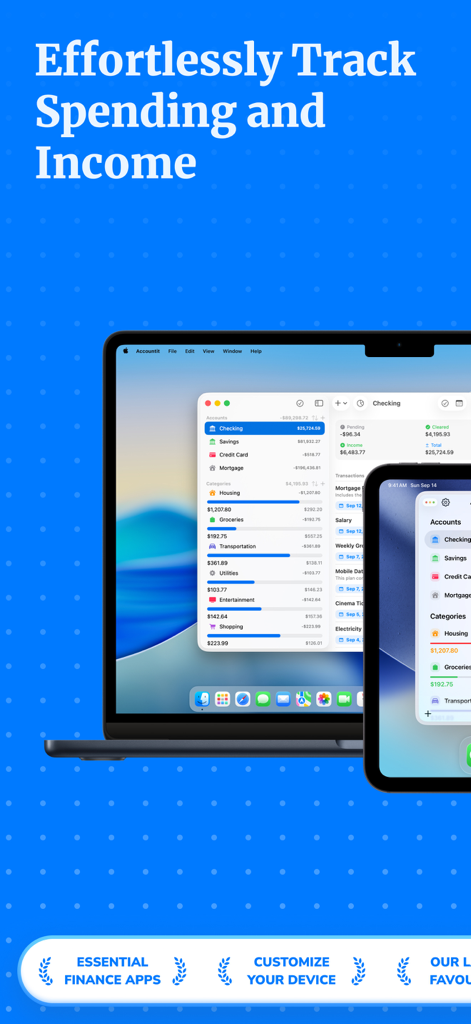
Expenses Tracker - Accountit - Accountit経費トラッカーアプリのインターフェースがMacBookとiPhoneに表示されています
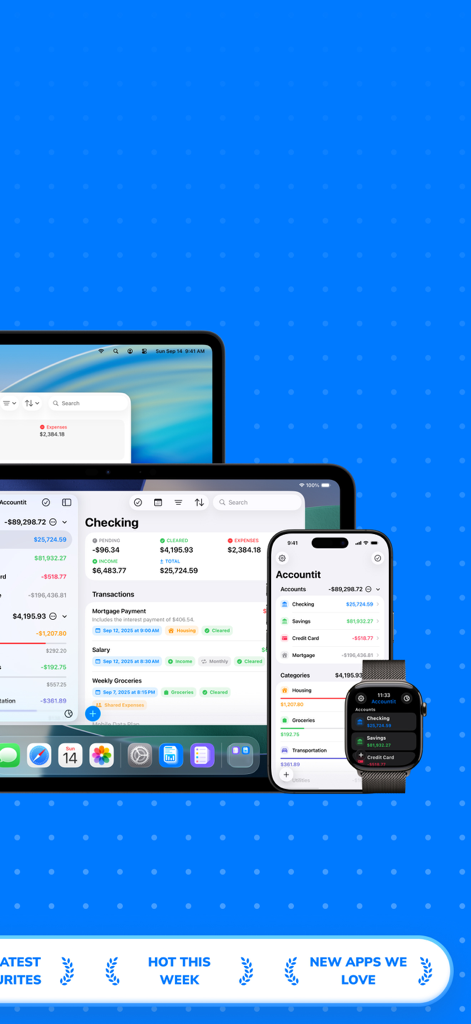
Accountit経費トラッカーアプリのインターフェースがMacBookとiPhoneに表示されています

Expenses Tracker - Accountit - Accountit経費追跡アプリがMac、iPad、iPhone、Apple Watchに表示されています
Accountit経費追跡アプリがMac、iPad、iPhone、Apple Watchに表示されています

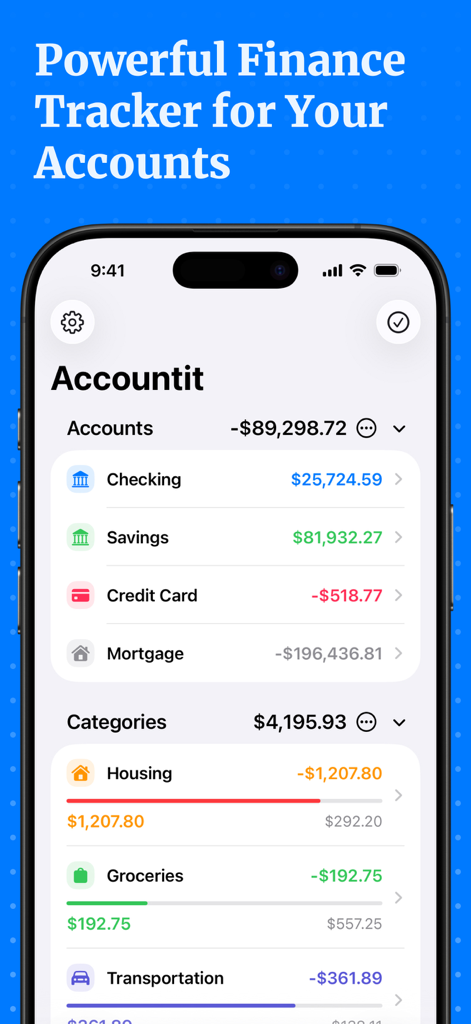
Expenses Tracker - Accountit - Accountitアプリのインターフェースに、チェック口座と普通預金口座の残高、および住宅費や食料品費などのカテゴリ別支出が表示されています
Accountitアプリのインターフェースに、チェック口座と普通預金口座の残高、および住宅費や食料品費などのカテゴリ別支出が表示されています

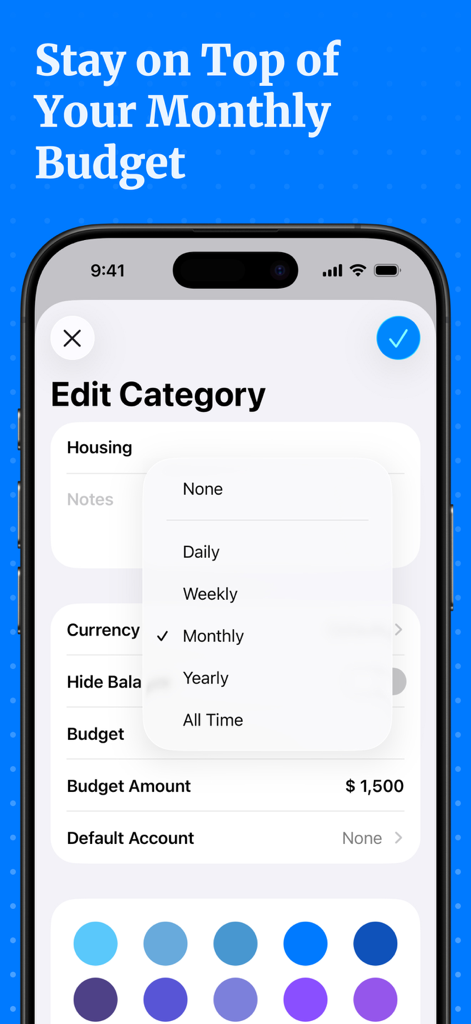
Expenses Tracker - Accountit - Accountitアプリのインターフェースで、カテゴリを編集し、月間予算額を設定します
Accountitアプリのインターフェースで、カテゴリを編集し、月間予算額を設定します

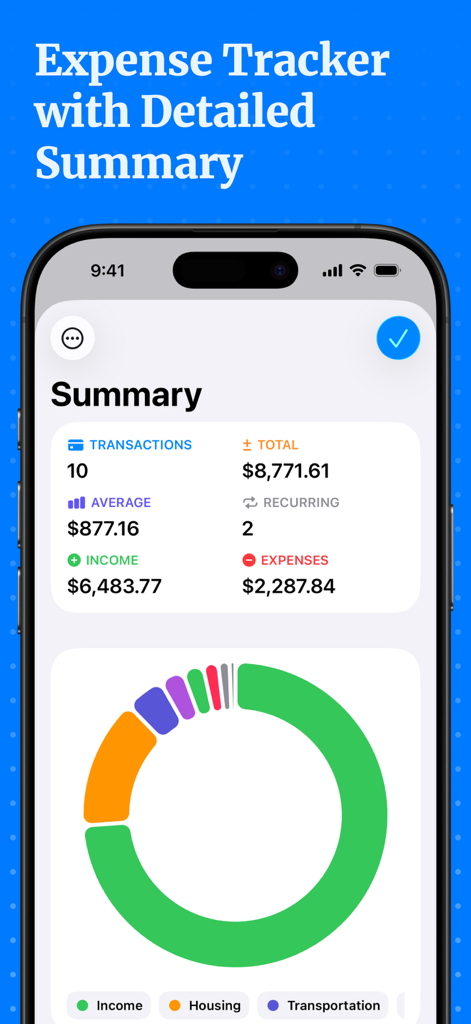
Expenses Tracker - Accountit - Accountitアプリの詳細な財務概要ダッシュボード。収入と支出の統計、およびカテゴリ別チャートが含まれています
Accountitアプリの詳細な財務概要ダッシュボード。収入と支出の統計、およびカテゴリ別チャートが含まれています

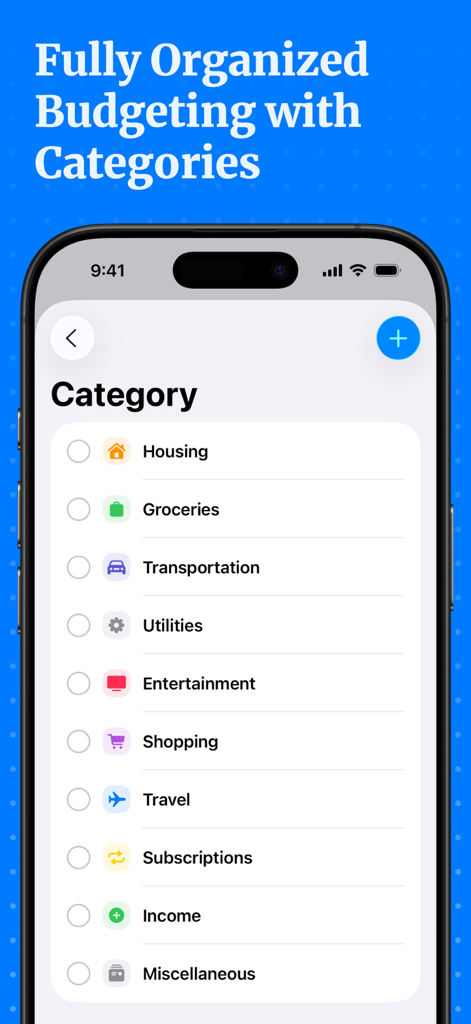
Expenses Tracker - Accountit - Accountitアプリのスクリーンショット。整理された予算編成のために、住宅費、食料品費、交通費などの支出カテゴリのリストが表示されます。

Accountitアプリのスクリーンショット。整理された予算編成のために、住宅費、食料品費、交通費などの支出カテゴリのリストが表示されます。

説明

Welcome to Accountit, a simple, but powerful daily transactions tracker that will definitely help you get a full picture of your finances. With Accountit, tracking and organizing all of your transactions becomes as effortless as possible, all thanks to the useful features that the app has on offer. Accountit lets you add an unlimited number of transactions that can be organized into different categories that you can create and customize yourself. With Accountit, you can also filter and organize all of your transactions even more efficiently using tags that you can create and assign to any of your transactions in the app. Don’t worry if you have any recurring transactions because we have got you covered too! Just mark a transaction as recurring and set the frequency when adding it, Accountit will handle the rest for you and you won’t need to manually add the same exact transactions every single time. With Accountit, you can also add various attachments, such as receipts, to your transactions in no time at all because you can scan receipts and take photos directly in the app. One of the main goals of the app is to help you quickly analyze all of your transactions and this is why Accountit offers a dedicated Summary screen that displays an extensive variety of information based on your transactions. Accountit is built with privacy and security in mind and it just doesn’t collect any personal data that can be linked to you. All of your data in the app is stored locally on your device and synced via iCloud if you have enabled this functionality in the settings of the app. We have designed Accountit to be as intuitive and easy to use as possible and it will definitely feel right at home on any of your Apple devices, all thanks to its native design. Accountit offers an extensive variety of features that you can use completely for free, but if you feel that the free functionality isn’t enough for your needs, you can always upgrade to Accountit Plus for even better experience. With Accountit Plus, you get an access to an unlimited number of accounts, categories, and tags, as well as various app customization options, and more. KEY FEATURES: - Unlimited number of transactions - iCloud sync - Ability to add notes to your transactions - Ability to add links to your transactions - Income, expense, and transfer transactions - 1 account - Budgets - Recurring transactions - Multiple sorting and filtering options to help you better organize your transactions - Transactions summary - CSV import and export - Beautiful and useful widgets - Available on iOS, iPadOS, macOS and watchOS PLUS FEATURES: - Unlimited number of accounts - Access to categories and tags - iCloud sharing - Ability to add attachments to transactions - 10 different app icons for you to pick the one that fits your home screen the most - 15 different tint colors that you can choose from to make the app feel more unique to you - Custom appearance (System, light, and dark) - More than 150 different currencies - Bulk editing If you have any questions about Accountit, you can just get in touch with us via email at info@designtech.so. We are always happy to help! Terms of service: https://designtech.notion.site/DesignTech-Terms-of-Service-18cc124eba4080c58316f2ed81f84bff. Privacy policy: https://designtech.notion.site/DesignTech-Privacy-Policy-18bc124eba40809eba48e6af249ebd2c.

Download

ダウンロード: App Store

このページはアプリまたはその開発者の公式ページではなく、情報提供および論評を目的として作成された独立した編集出版物です。明示的に別段の記載がない限り、アプリおよびその開発者は、MWM、Apple、Google Play、アプリのパブリッシャー、またはアプリの開発者と提携、承認、後援、認可、またはその他の公式的な関係はなく、このページのいかなる内容も、アプリがMWMのサービスを使用して開発されたことを意味するものではありません。すべての商標、ロゴ、スクリーンショット、その他のコンテンツはそれぞれの所有者の財産です。