Feed MoneyBook Pro
Feed MoneyBook Pro
ダウンロード: App Store

このページはアプリまたはその開発者の公式ページではなく、情報提供および論評を目的として作成された独立した編集出版物です。明示的に別段の記載がない限り、アプリおよびその開発者は、MWM、Apple、Google Play、アプリのパブリッシャー、またはアプリの開発者と提携、承認、後援、認可、またはその他の公式的な関係はなく、このページのいかなる内容も、アプリがMWMのサービスを使用して開発されたことを意味するものではありません。すべての商標、ロゴ、スクリーンショット、その他のコンテンツはそれぞれの所有者の財産です。


ロゴ: Feed MoneyBook Pro
ダウンロード: App Store

Feed MoneyBook Pro

予算管理を美しい思い出に変えましょう。可愛いテーマ、写真、ソーシャル風フィードで支出を記録 — 完全プライベート、広告なし、そして100%あなただけのもの。

主要数値

ダウンロード

100

ユーザー評価

1.0/5

評価数

0

開発元

MINIE BAI

カテゴリ

Finance

対応言語

4

最新バージョン

1.3.7

サイズ

151.7 MB

リリース日

2025年11月4日
機能

財務があなたの美的センスと出会う

退屈な予算管理を、美しいデジタルスクラップブックに変えましょう。ビジュアルフィードで支出を記録し、すべての詳細をカスタマイズし、データを100%プライベートに保ちましょう。

思い出を追体験

単調な取引をビジュアルフィードに変えましょう。1つのエントリにつき最大3枚の写真を追加して、支出を意味あるものにした人々や場所を思い出しましょう。

あなたのスタイルを表現

あなたのお金帳、あなたの雰囲気。可愛いテーマや背景色から、自分のギャラリー写真を使ったカスタムアイコンまで、すべてをパーソナライズしましょう。

設計上プライベート

ローカルストレージで完全な安心感を享受しましょう。サーバーなし、アカウント連携なし、個人データ収集なし — あなたの財務履歴はあなたのデバイスに残ります。

以下のスクリーンショットと説明は、アプリの公式ストアリスティングから直接取得されたものであり、アプリ開発者の所有物です。

アプリストア

スクリーンショット
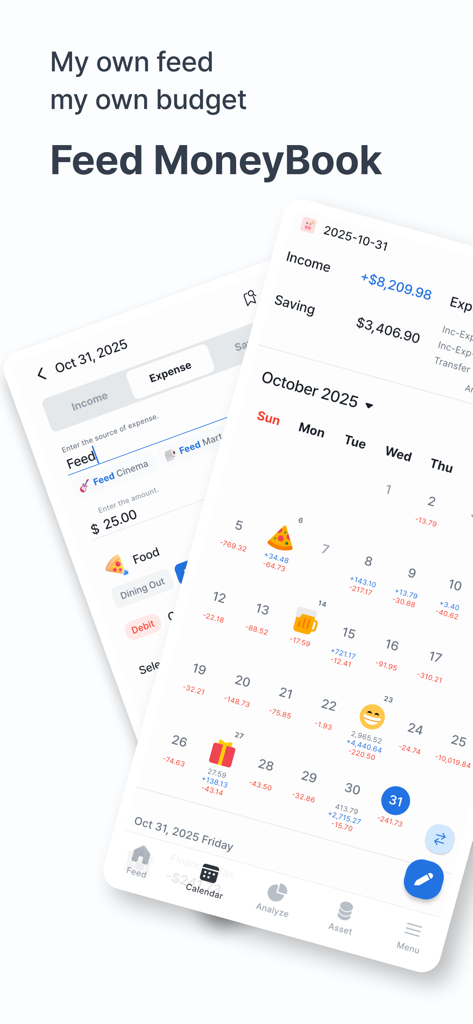
Feed MoneyBook Pro - Feed MoneyBook Proの絵文字アイコン付き予算カレンダーと支出入力フォームを示す2つのモバイルアプリ画面
Feed MoneyBook Proの絵文字アイコン付き予算カレンダーと支出入力フォームを示す2つのモバイルアプリ画面

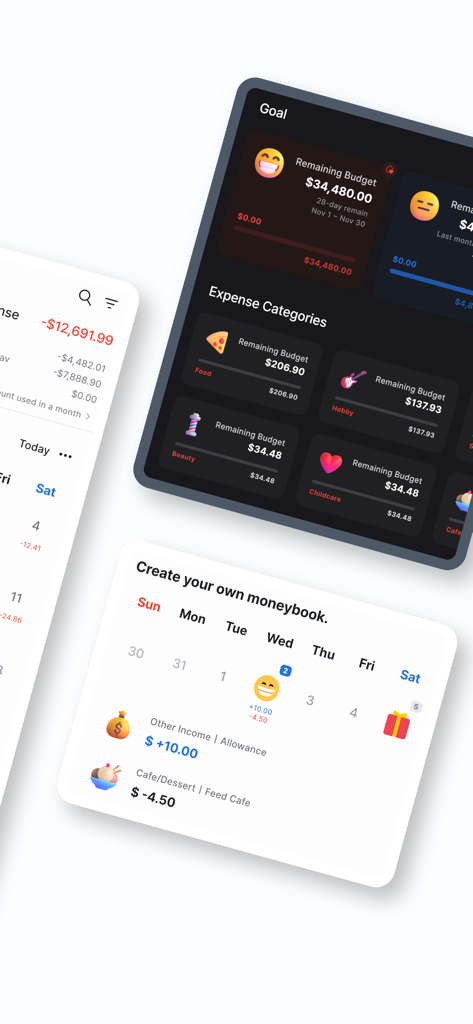
Feed MoneyBook Pro - Feed MoneyBook Proアプリのスクリーンショット。パーソナライズされた予算目標と可愛いアイコン付きの支出カテゴリが表示されています
Feed MoneyBook Proアプリのスクリーンショット。パーソナライズされた予算目標と可愛いアイコン付きの支出カテゴリが表示されています

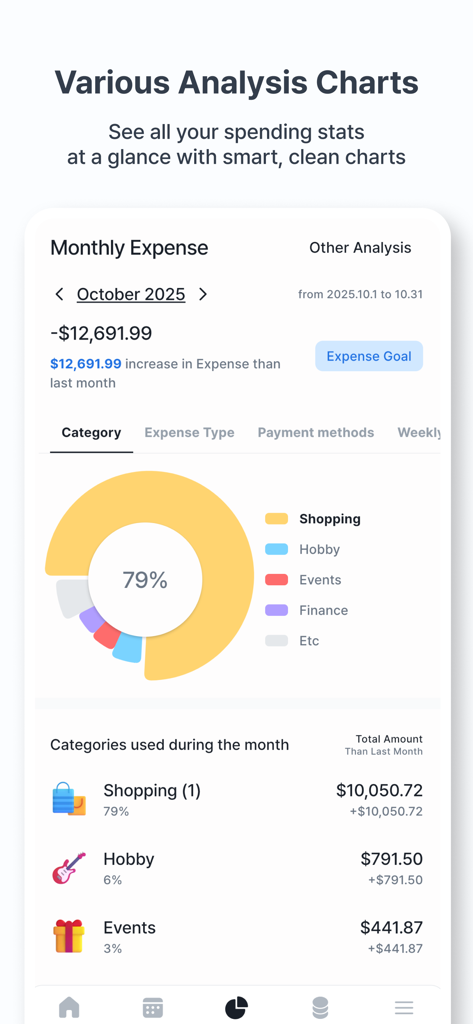
Feed MoneyBook Pro - Feed MoneyBook Proのカテゴリ別支出を示すドーナツチャート付き月次支出分析画面
Feed MoneyBook Proのカテゴリ別支出を示すドーナツチャート付き月次支出分析画面

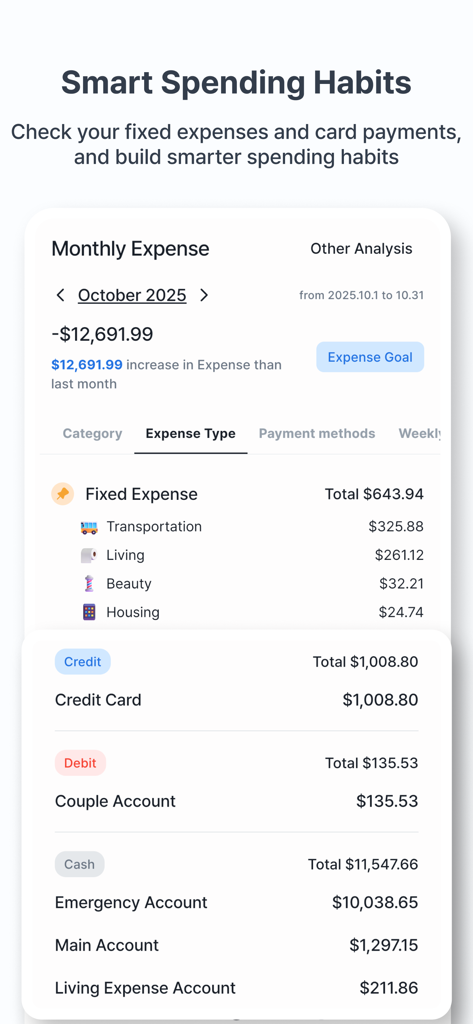
Feed MoneyBook Pro - 可愛いアイコン付きの固定支出と支払い方法を示す月次支出分析画面。

可愛いアイコン付きの固定支出と支払い方法を示す月次支出分析画面。

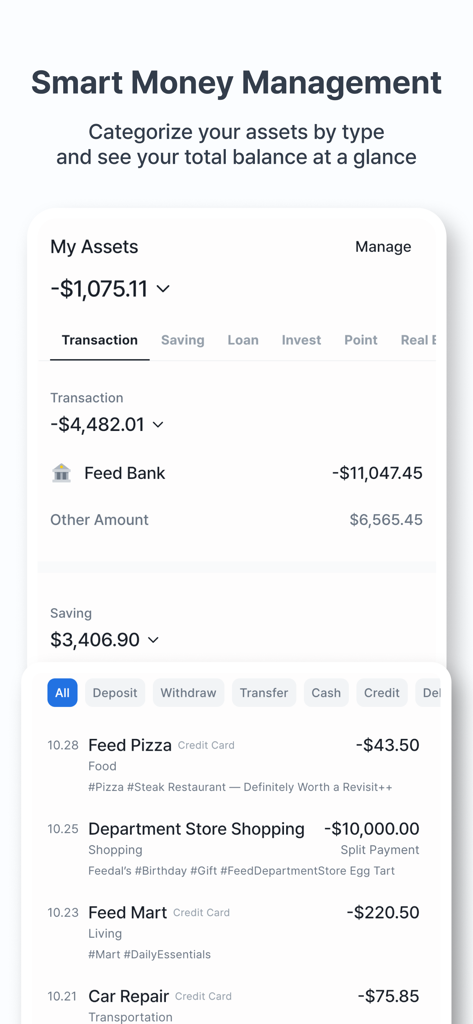
Feed MoneyBook Pro - Feed MoneyBook Proの資産管理画面。総残高と最近の取引が表示されています。
Feed MoneyBook Proの資産管理画面。総残高と最近の取引が表示されています。

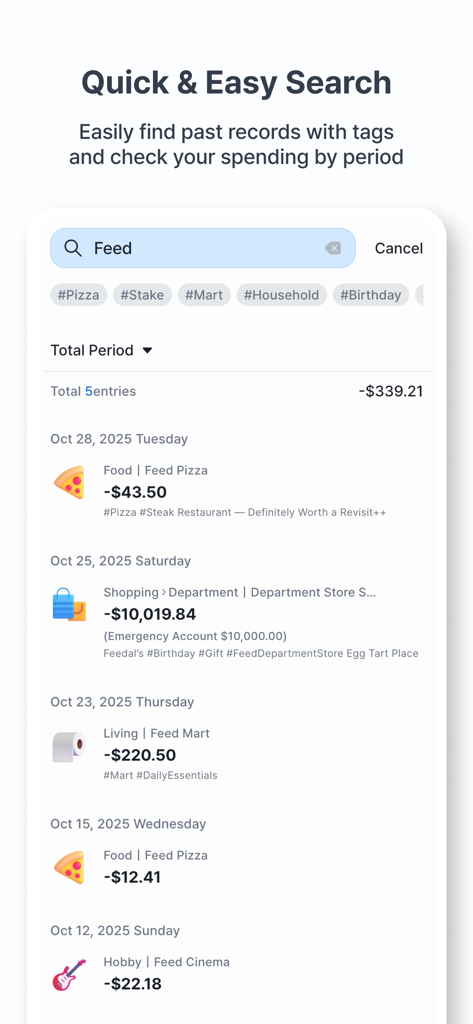
Feed MoneyBook Pro - Feed MoneyBook Proアプリの検索インターフェース。タグと日付で整理された金融取引のリストが可愛いアイコンと共に表示されています。
Feed MoneyBook Proアプリの検索インターフェース。タグと日付で整理された金融取引のリストが可愛いアイコンと共に表示されています。

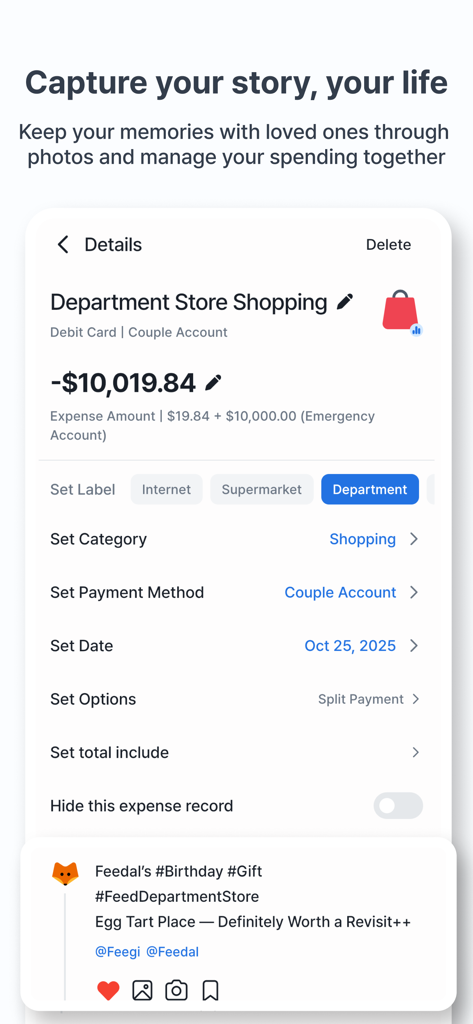
Feed MoneyBook Pro - デパートでの買い物に対する支出エントリの詳細画面。ソーシャルフィードのメモとカテゴリラベルが特徴です。
デパートでの買い物に対する支出エントリの詳細画面。ソーシャルフィードのメモとカテゴリラベルが特徴です。

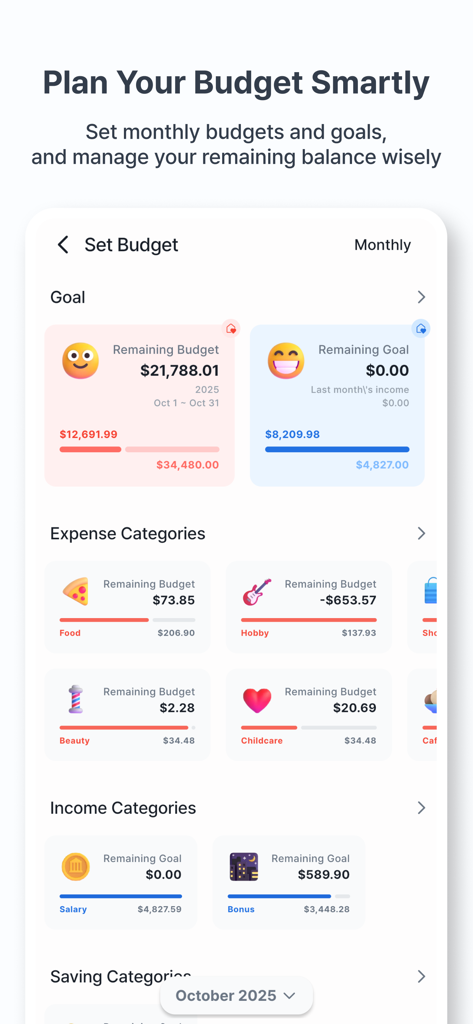
Feed MoneyBook Pro - カラフルな進捗バーと可愛い支出カテゴリアイコン付きの予算計画画面

カラフルな進捗バーと可愛い支出カテゴリアイコン付きの予算計画画面

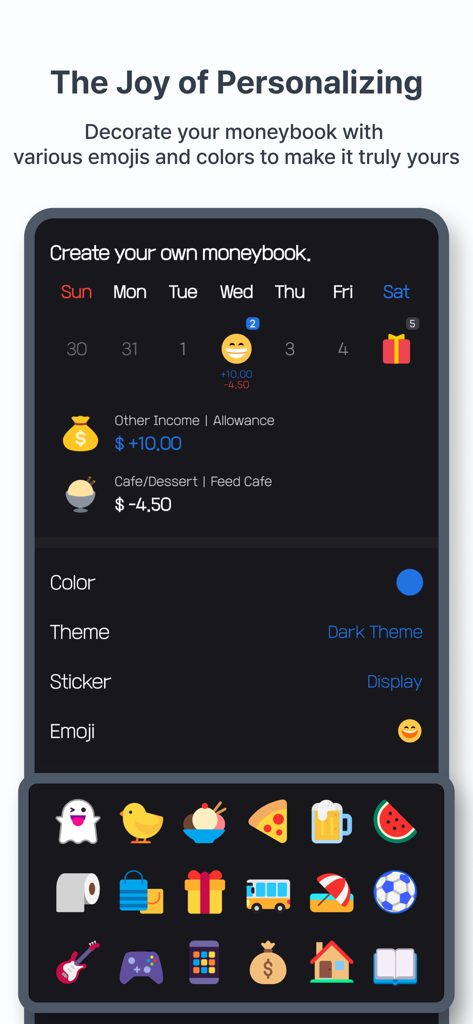
Feed MoneyBook Pro - Feed MoneyBook Proのパーソナライゼーション画面。ダークテーマと支出追跡用の絵文字アイコンが特徴です。

Feed MoneyBook Proのパーソナライゼーション画面。ダークテーマと支出追跡用の絵文字アイコンが特徴です。

説明

● Theme Function to Create Your Own Cute MoneyBook · You can customize the colors, backgrounds, and emojis to your liking. · Use various icons to create a cute MoneyBook. · You can also register your own icons by using the gallery or taking photos. ● A feed screen where you can reminisce about your MoneyBook entries · Customize your income, expenses, and savings entries in your personal feed. · Record who you were with and follow them to see everything at a glance. · You can register up to three photos per MoneyBook entry. · View only the entries with registered photos in a separate collection. · If you add notes or hashtags, you can also view them in the feed. ● A Clean but Powerful Calendar Screen · View a clear summary of your entries for the entire month or just for a selected date. · Select a range to see the entries and totals for that period. · Use the filter function to view only the entries you want. · Quickly search using tags or places of use. ● Easy-to-Use Entry Screen · Quickly enter income, expenses, and savings with auto-focus. · Easily input previous entries with the autocomplete feature. · Register entries not only in the default currency but also in foreign currencies. · Leave complex calculations to the handy calculator ● Analysis Screen to Check Your Status from All Angles · Analyze your data easily and enjoyably with various charts. · View detailed analyses of your income, expenses, and savings entries. · Compare income/expenses, income/savings, and expenses/savings side by side. · Choose to view weekly, monthly, or yearly analyses. · We also provide analysis for foreign currency entries. · Set target amounts to increase your income/savings and reduce your expenses. ● Menu Screen for Managing Your Data · Manage categories, payment methods, and the people you were with. · Change the app to various languages, with more languages to be supported in the future. · Change the app's default currency; any other currency will be recognized as foreign. · Easily back up and restore your data via email or file. · Reset your data to its original state. ● And Many More Features · You can navigate to the detailed screen from anywhere to edit your entries. Changes are reflected in real time. · Landscape mode is supported, and we are continuously improving to support various form factors. · The app is designed to work smoothly even when the screen is zoomed in for users with low vision. · You can use the app without a network connection. Network usage is only for Firebase analytics and displaying ads in the free version. * Developer's Tip: If ads are bothersome, try using the app without a network connection. If that's still inconvenient, consider upgrading to the paid version. ● Additional Information · There is no server for the Feed MoneyBook. All data is stored solely in the app, and it will be deleted if you uninstall the app. · To optimize storage space, photos imported from the gallery are not stored in the app. If you delete them from the gallery, they will no longer be visible in the app. · Feed MoneyBook does not require any personal information. ● Paid Version · The paid version is ad-free. · Exclusive features will be added to the paid version in the future. ● Permissions [Required Permissions] · None [Optional Permissions] · Camera: Needed to take and register photos or icons.

Download

ダウンロード: App Store

このページはアプリまたはその開発者の公式ページではなく、情報提供および論評を目的として作成された独立した編集出版物です。明示的に別段の記載がない限り、アプリおよびその開発者は、MWM、Apple、Google Play、アプリのパブリッシャー、またはアプリの開発者と提携、承認、後援、認可、またはその他の公式的な関係はなく、このページのいかなる内容も、アプリがMWMのサービスを使用して開発されたことを意味するものではありません。すべての商標、ロゴ、スクリーンショット、その他のコンテンツはそれぞれの所有者の財産です。