
このページはアプリまたはその開発者の公式ページではなく、情報提供および論評を目的として作成された独立した編集出版物です。明示的に別段の記載がない限り、アプリおよびその開発者は、MWM、Apple、Google Play、アプリのパブリッシャー、またはアプリの開発者と提携、承認、後援、認可、またはその他の公式的な関係はなく、このページのいかなる内容も、アプリがMWMのサービスを使用して開発されたことを意味するものではありません。すべての商標、ロゴ、スクリーンショット、その他のコンテンツはそれぞれの所有者の財産です。


FlipStudio: Draw & Animate App
指先一つで、アイデアが躍動する。このアプリは、静止画に命を吹き込む能力をユーザーに与えている。
ダウンロード
1M+ユーザー評価
評価数
22.3K開発元
カテゴリ
Games対応言語
2最新バージョン
1.47サイズ
383.0 MBリリース日
2020年11月16日フリップブックアニメーションとデジタルアートのための主要機能分析
FlipStudio: Draw & Animate App の評価
直感的なフレームバイフレームアニメーション
ユーザーは、フリップブック形式の高品質なアニメーションを簡単かつ強力なツールで制作できます。
マテリアルシステムによる学習と共有
ユーザーは、他のクリエイターのプロジェクトファイルをダウンロードしてアニメーションスキルやヒントを学ぶことができ、自身の作品に活用したり、自身の作品を共有したりできます。
多機能な描画ツールとレイヤー管理
最大6層のレイヤー、変形機能、エフェクト機能、投げ縄ツールなどを利用して、詳細で複雑な描画やアニメーションを作成できます。Apple Pencilにも対応しており、精密な作業が可能です。
包括的なオーディオ編集機能
最大8つのオーディオトラックを無料で利用でき、サウンドの録音、ボイスチェンジャー、ピッチ/スピード変更、独自のオーディオファイルインポートなど、アニメーションに音声を簡単に追加・編集できます。
オニオンスキン機能によるスムーズな動きの実現
ユーザーは、前後のフレームを半透明で表示するオニオンスキン機能により、キャラクターの動きやオブジェクトの変形をスムーズに調整し、自然なアニメーションを効率的に作成できます。
イラスト制作過程ビデオ作成機能
ユーザーは、イラストの描画プロセスを記録したビデオを簡単に作成でき、作品のメイキング過程を共有したり、チュートリアルとして活用したりすることが可能です。
ワールドギャラリーでの作品共有と発見
ユーザーは、世界中のクリエイターが公開した作品を閲覧し、インスピレーションを得たり、自身の作品を公開してコミュニティと交流したりできます。
プレミアムメンバーシップによる機能拡張
プレミアムメンバーシップに加入することで、広告なしでの利用、キャラクタースタジオのアンロック、キャンバスタイプの追加、マテリアルシステムの制限解除、フレーム数の上限増加など、より高度な機能と快適な制作環境が提供されます。
よくある質問
について知っておくべきこと FlipStudio: Draw & Animate App
What is FlipStudio used for?
FlipStudio is a drawing application designed for creating flipbooks and high-quality animations. It provides powerful tools for sketching, drawing, and bringing creations to life.
Does FlipStudio support multiple layers for drawing?
Yes, FlipStudio supports up to 6 layers for free. It includes features like a favorite frame, layer function, and a frames viewer for efficient drawing.
Can I add sound effects and music to my animations in FlipStudio?
Yes, FlipStudio allows users to add and edit audio clips with up to eight free tracks. It supports recording sounds, special effects, and importing audio files.
What is the 'material system' in FlipStudio?
The 'material system' in FlipStudio allows users to share animation project files. This system enables learning animation skills and tips from expert works.
What benefits does FlipStudio Premium Membership offer?
Premium Membership offers no ads, unlocks Character Studio, two canvas types, removes material system limits, and increases the maximum frame count to 999.
How do I restore my FlipStudio purchases on a new device?
To restore FlipStudio purchases, click the "Restore purchase" button within the app. You must log in using the same Apple ID used for the initial purchase.
Where can I find FlipStudio's privacy policy?
The privacy policy for FlipStudio is available online at https://flipstudio-1.jimdosite.com/terms-of-service/. This link also includes the terms of service.
以下のスクリーンショットと説明は、アプリの公式ストアリスティングから直接取得されたものであり、アプリ開発者の所有物です。
アプリストア
スクリーンショット

本アプリは、レイヤー機能で複雑なアートワークを構築し、フレームビューアーでスムーズな動きを調整することにより、直感的なアニメーション制作を可能にします。
描画&アニメーション
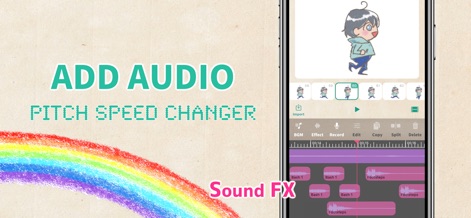
オーディオトラックを自由に編集し、ピッチ/スピードチェンジャーを駆使することで、アニメーションに最適な音響効果と感情豊かなサウンドスケープを追加できます。
サウンドを同期

グローバルギャラリーで他のユーザーの作品を探索し、マテリアルシステムを活用して自身のプロジェクトを共有したり、インスピレーションを得たりすることが可能です。
コミュニティと交流
説明
Download
類似アプリ
同じカテゴリのトップランクアプリ

Block Blast!
ARETIS LIMITED

Heartopia
XD Entertainment Co., Ltd.

Solitaire Associations Journey
Hitapps Games LTD

Roblox
Roblox Corporation

Gossip Harbor®: Merge & Story
Microfun Limited

Arrows – Puzzle Escape
Lessmore UG haftungsbeschraenkt

Township
PLR Worldwide Sales Limited

Last War:Survival
FUNFLY PTE. LTD.

Vita Mahjong
VITA STUDIO PTE. LTD.
このページはアプリまたはその開発者の公式ページではなく、情報提供および論評を目的として作成された独立した編集出版物です。明示的に別段の記載がない限り、アプリおよびその開発者は、MWM、Apple、Google Play、アプリのパブリッシャー、またはアプリの開発者と提携、承認、後援、認可、またはその他の公式的な関係はなく、このページのいかなる内容も、アプリがMWMのサービスを使用して開発されたことを意味するものではありません。すべての商標、ロゴ、スクリーンショット、その他のコンテンツはそれぞれの所有者の財産です。