
このページはアプリまたはその開発者の公式ページではなく、情報提供および論評を目的として作成された独立した編集出版物です。明示的に別段の記載がない限り、アプリおよびその開発者は、MWM、Apple、Google Play、アプリのパブリッシャー、またはアプリの開発者と提携、承認、後援、認可、またはその他の公式的な関係はなく、このページのいかなる内容も、アプリがMWMのサービスを使用して開発されたことを意味するものではありません。すべての商標、ロゴ、スクリーンショット、その他のコンテンツはそれぞれの所有者の財産です。


ダウンロード
2.5M+ユーザー評価
評価数
11.6K開発元
カテゴリ
Photo & Video対応言語
21最新バージョン
6.4.9サイズ
177.6 MBリリース日
2014年8月4日プロの検査と診断を強化する熱画像ソリューション
Flir One アプリ主要機能分析
熱画像表示とキャプチャ
アプリは、フリアーワンシリーズのサーマルカメラビューを介して故障をスキャンし、写真やビデオをギャラリーに保存する機能を提供します。
最高・最低温度スポット自動追跡
アプリは、最も高温および低温のスポットを自動的に追跡することで、ユーザーが効率的なトラブルシューティングを行えるように支援します(EdgeおよびProシリーズのみ)。
温度スポット測定
ユーザーは、温度スポット測定機能を使用して、特定の箇所の温度を分析し、故障の原因を特定することが可能です。
IRスケール調整
問題領域をより明確に強調するために、IRスケールを調整する機能が提供されます(EdgeおよびProシリーズのみ)。
クラウド連携 (FLIR Ignite)
FLIR Igniteへの接続により、ユーザーはファイルを即座にクラウドにアップロードし、任意のデバイスからアクセスし、整理、編集、レポート作成、共同作業者や顧客との共有が可能となります。
写真へのテキストメモ追加
ユーザーは、発見事項を記録するために、写真にテキストメモを追加する機能を利用できます。
FLIR ONE検査ガイド
この有料機能により、ユーザーは水分、断熱材、空気漏れの問題を特定するためのステップバイステップのガイドを通じて、自信を持って問題を特定できるようになります。
カラーパレット選択
最高の視覚化のために、様々なカラーパレットから選択する機能が提供されます。
よくある質問
について知っておくべきこと Flir One
What is the main purpose of the Flir One app?
The Flir One app connects FLIR ONE® series Thermal Cameras to smartphones for efficient troubleshooting and inspection. It helps users find hidden problems like electrical faults, HVAC failures, or water damage with precision.
Does the Flir One app require a thermal camera?
Yes, the Flir One app requires a FLIR ONE® series Thermal Camera connected to your smartphone to see the thermal view. Users can still explore the app's interface and features without a connected device.
Can the Flir One app capture thermal photos and videos?
Yes, the Flir One app enables users to scan for faults with the thermal camera view and capture both photos and videos. These media files are saved directly to the user's gallery for documentation.
How does the Flir One app enhance thermal imagery?
The Flir One app uses advanced image enhancement features like FLIR MSX® and FLIR VividIR™. These deliver best-in-class thermal imagery for smartphones, ensuring problems are detected with high precision.
Can users adjust color palettes in the Flir One app?
Yes, the Flir One app offers a variety of color palettes. Users can choose different palettes for optimal visualization, which aids in analyzing thermal images and highlighting specific problem areas effectively.
What is FLIR Ignite™ integration in the Flir One app?
FLIR Ignite™ allows the Flir One app to instantly upload files to the cloud. Users can then access, organize, edit images, create reports, and share findings with clients and co-workers from any device.
Does the Flir One app offer inspection guides?
Yes, the Flir One app includes FLIR ONE Inspection Guides, a paid feature. These provide step-by-step instructions and tips to confidently identify issues such as moisture, insulation, and air leak problems.
Can I add notes to thermal images using the Flir One app?
Yes, the Flir One app allows users to add text notes directly to photos. This feature helps in accurately documenting specific findings and observations from captured thermal images for later reference.
Does the Flir One app automatically track hot and cold spots?
Yes, the Flir One app automatically tracks the hottest and coldest spots within the thermal view. This feature is specifically available for FLIR ONE Edge Series and Pro Series cameras to aid in troubleshooting.
以下のスクリーンショットと説明は、アプリの公式ストアリスティングから直接取得されたものであり、アプリ開発者の所有物です。
アプリストア
スクリーンショット

このアプリは、一般的なドアフレームの壁に隠れた熱異常を可視化し、非破壊で問題箇所を特定するのに役立ちます。
隠れた問題を発見

本アプリを使用すると、対象物の詳細な熱画像をキャプチャし、画面右端のリアルタイムの温度スケールと中央に表示されるスポット温度を把握できます。
熱画像を記録
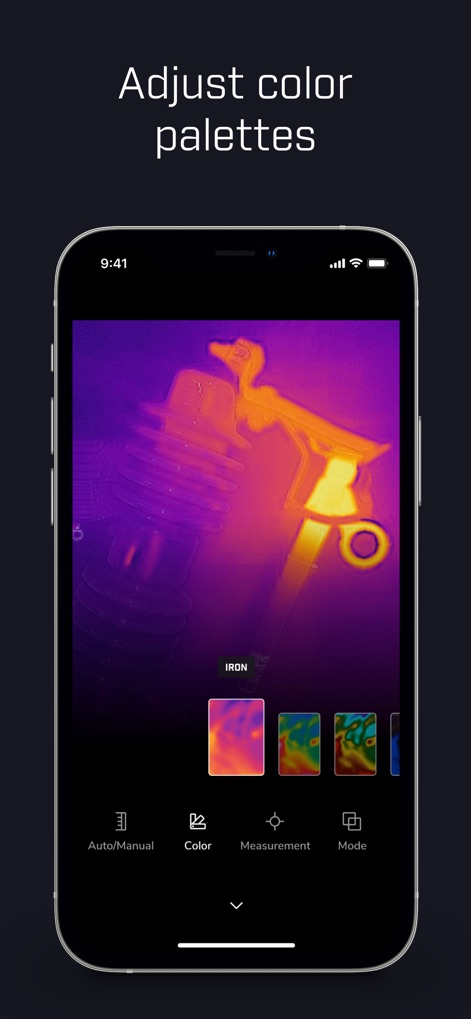
ユーザーは、提供された豊富なカラーパレットオプションから選択し、温度分布の視覚的な強調と明瞭なコントラストで熱画像を表示できます。
カラーパレット調整
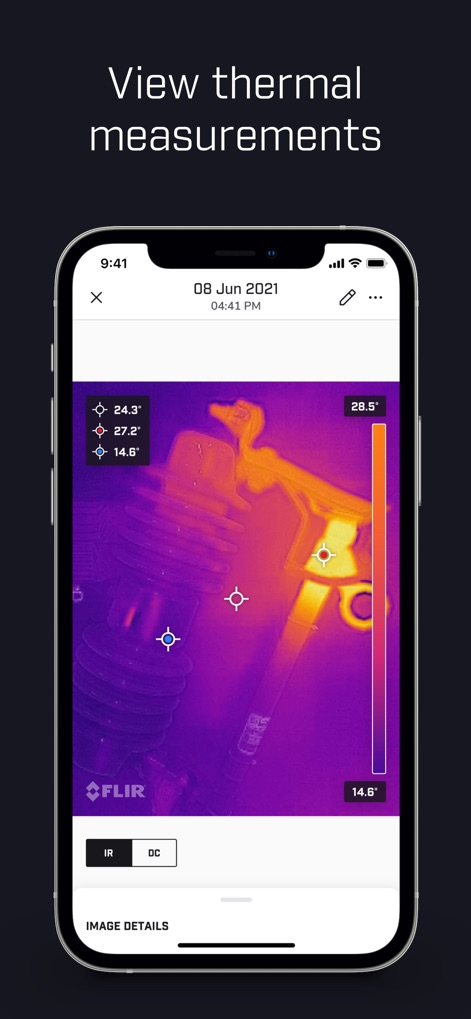
このアプリは、熱画像上の複数箇所で正確な温度測定値を提供し、画像右側に表示される温度スケールで全体の温度範囲を視覚的に示します。
温度測定値表示
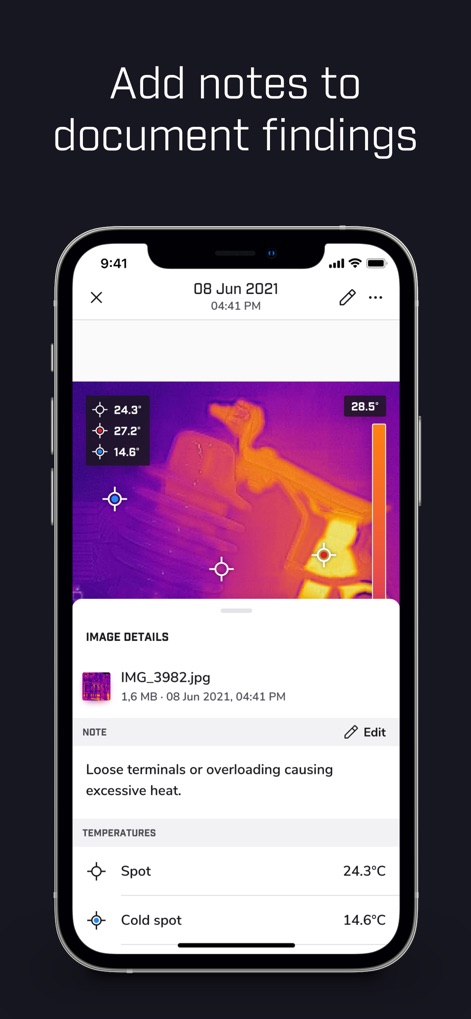
検査結果を効率的に記録するため、ユーザーは熱画像に詳細なテキストメモを追加でき、「Spot」および「Cold spot」の具体的な温度測定値も併せて保存できます。
所見を記録
説明
Download
類似アプリ
似た機能とユーザー体験を持つアプリ

Doximity
Doximity

PrepWizard
CyberDynamite LLC

MaintainX Work Orders
MAINTAINX INC.

WAGO
WAGO Kontakttechnik GmbH & Co. KG

Flash.It
Structured Steel Pty Ltd

iCoder CPT RVU ICD10 HCPCS
StarInix Corporation

Summons Partner+
n.u. logistics

OneClick Code - Building Codes
One Click Reports

德馨ּּ维修
小东 何
このページはアプリまたはその開発者の公式ページではなく、情報提供および論評を目的として作成された独立した編集出版物です。明示的に別段の記載がない限り、アプリおよびその開発者は、MWM、Apple、Google Play、アプリのパブリッシャー、またはアプリの開発者と提携、承認、後援、認可、またはその他の公式的な関係はなく、このページのいかなる内容も、アプリがMWMのサービスを使用して開発されたことを意味するものではありません。すべての商標、ロゴ、スクリーンショット、その他のコンテンツはそれぞれの所有者の財産です。