FontStack
FontStack
ダウンロード: App Store

このページはアプリまたはその開発者の公式ページではなく、情報提供および論評を目的として作成された独立した編集出版物です。明示的に別段の記載がない限り、アプリおよびその開発者は、MWM、Apple、Google Play、アプリのパブリッシャー、またはアプリの開発者と提携、承認、後援、認可、またはその他の公式的な関係はなく、このページのいかなる内容も、アプリがMWMのサービスを使用して開発されたことを意味するものではありません。すべての商標、ロゴ、スクリーンショット、その他のコンテンツはそれぞれの所有者の財産です。

ロゴ: FontStack
ダウンロード: App Store

FontStack

90年代の象徴的なサウンドをモバイルDAWで蘇らせましょう。最大4つのSF2サウンドフォントをレイヤーし、複雑なキーボードスプリットを作成し、ディスクから大規模なライブラリを直接ストリーミングして、プロフェッショナルグレードのパフォーマンスを実現します。

主要数値

ダウンロード

2K+

ユーザー評価

5.0/5

評価数

0

開発元

Limelight Software

カテゴリ

Music

対応言語

1

最新バージョン

1.06

サイズ

308.3 MB

リリース日

2025年4月1日
機能

サンプリングの黄金時代を蘇らせる

次世代のプロデューサーのために設計された強力なAUv3プラグインで、90年代のサウンドフォントの伝説的なグリットを、最新のモバイルDAWに持ち込みましょう。

4レイヤーマルチティンバーラルスタッキング

4つの異なるサウンドフォントをレイヤーしたり、正確なキーボードスプリットを作成してカスタムパフォーマンスセットアップを行うことで、巨大で複雑なテクスチャを作成できます。

高性能ディスクストリーミング

iPadのRAMを消費することなく、ギガバイト規模のヴィンテージインストゥルメントをロードし、クリエイティブなワークフローをスムーズでクラッシュフリーに保ちます。

以下のスクリーンショットと説明は、アプリの公式ストアリスティングから直接取得されたものであり、アプリ開発者の所有物です。

アプリストア

スクリーンショット
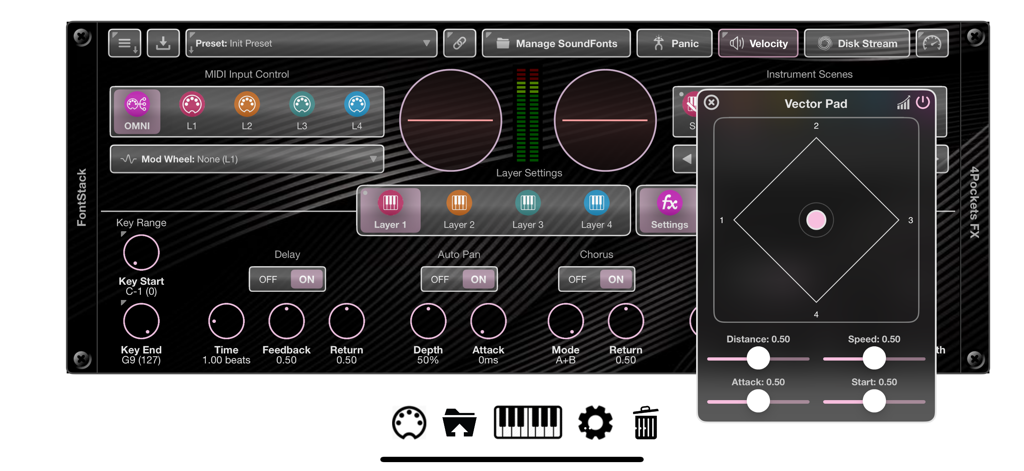
FontStack - サウンドレイヤーコントロールとフローティングベクターパッドウィンドウを表示するFontStackアプリインターフェイス
サウンドレイヤーコントロールとフローティングベクターパッドウィンドウを表示するFontStackアプリインターフェイス

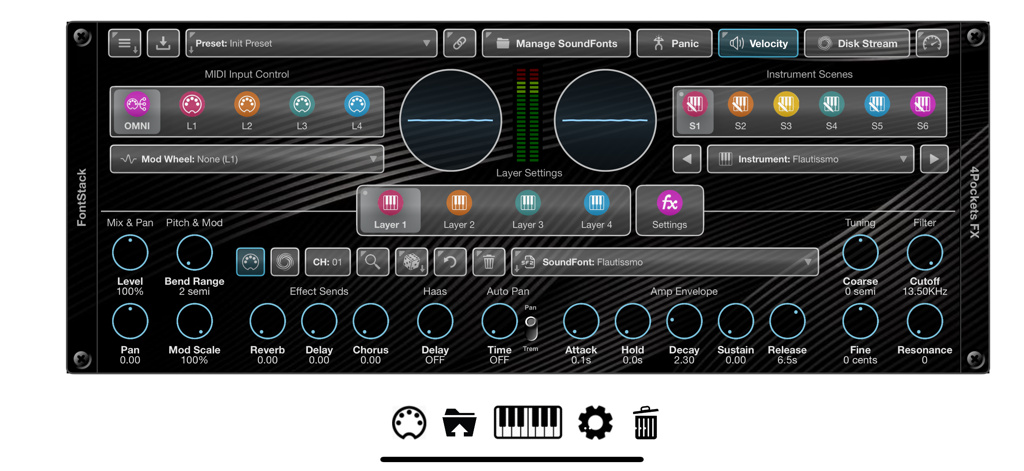
FontStack - MIDI入力、レイヤー設定、サウンドモジュレーションコントロールを表示するFontStack AUv3プラグインのメインユーザーインターフェイス
MIDI入力、レイヤー設定、サウンドモジュレーションコントロールを表示するFontStack AUv3プラグインのメインユーザーインターフェイス

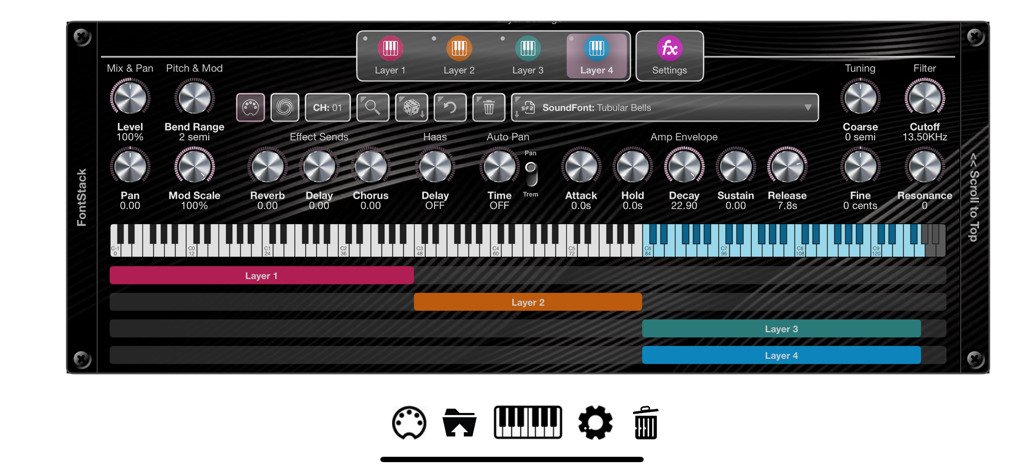
FontStack - キーボードスプリット範囲とオーディオコントロールノブを備えた4つのレイヤーサウンドフォントを示すFontStackアプリのインターフェイス
キーボードスプリット範囲とオーディオコントロールノブを備えた4つのレイヤーサウンドフォントを示すFontStackアプリのインターフェイス

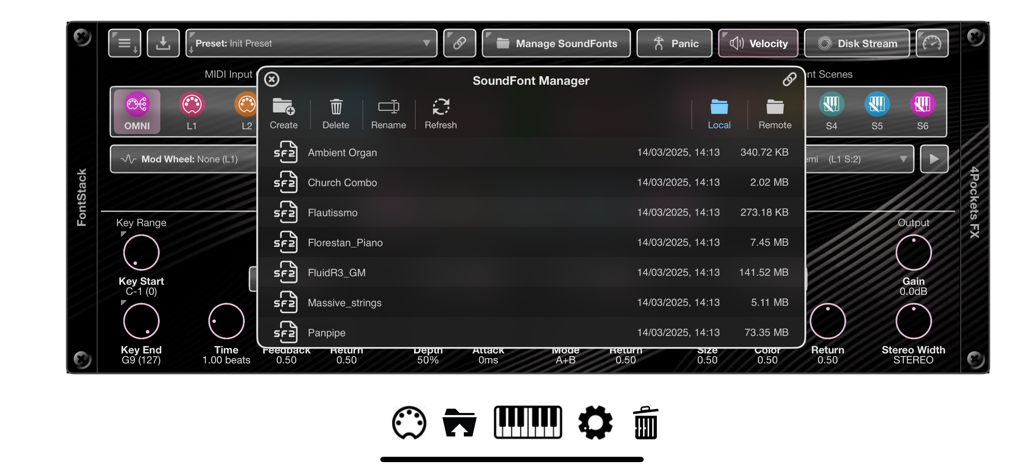
FontStack - SF2サウンドファイルリストを表示するサウンドフォントマネージャーウィンドウを示すFontStackアプリのインターフェイス
SF2サウンドファイルリストを表示するサウンドフォントマネージャーウィンドウを示すFontStackアプリのインターフェイス

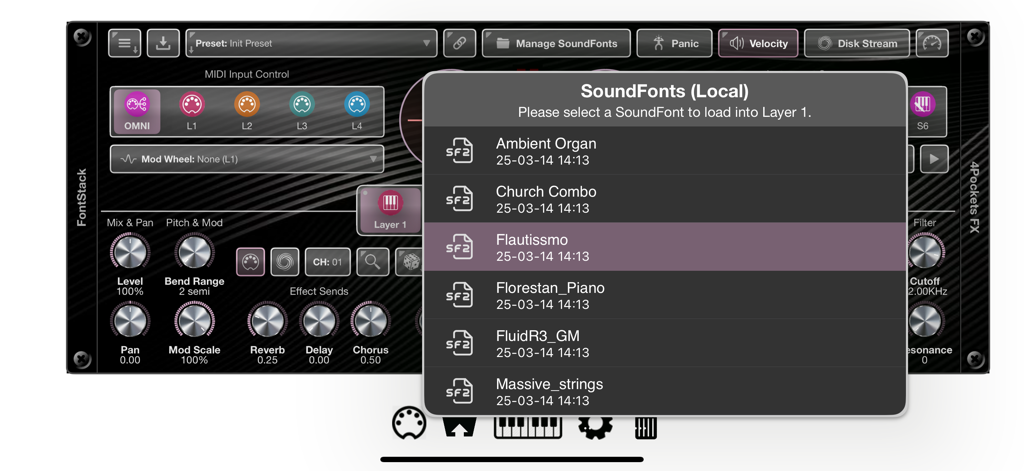
FontStack - FontStack iOSミュージックアプリインターフェイスでSF2サウンドフォントインストゥルメントを選択する様子

FontStack iOSミュージックアプリインターフェイスでSF2サウンドフォントインストゥルメントを選択する様子

説明

FontStack is a 'fontastic' new AUv3 plugin for iOS which can be loaded into your favourite DAW allowing you to utilise all those wonderful and nostalgic SF2 SoundFonts you've collected over the years. The SoundFont standard was created back in the early 90s, and made famous by the SoundBlaster series of sound cards. With the introduction of the Amiga, it spawned a host of musical creation tools called Trackers, which allowed the Amiga to load these SoundFonts and create sophisticated musical scores of 4 or 8 tracks. These days we don't use this standard so much, but there is a wealth of free SF2 files available on the internet just waiting to be loaded into FontStack. A SoundFont comprises a file with an .sf2 file extension. This file contains a set of samples, instruments, and presets. FontStack enables you to load one or more SoundFonts into its 4 layers, and use them in lots of creative ways. You can stack layers to create a rich combination of multiple tones, or assign each layer its own key range on the keyboard to create virtual splits, or a mixture of the two. Each layer can also be assigned its own MIDI channel for true OMNI mode. One great feature of FontStack is its ability to cache all your SoundFonts and the instruments they contain. This allows quick searching for specific instrument types without the need to physically search through SoundFonts to find them. Another great feature is the ability to optionally link to a remote folder containing a global set of SoundFonts, so that they can be shared between apps. Both internal and external SoundFonts and their instruments will be cached and searching is just as easy as it is using internal SoundFonts. FontStack features: ○ 4 SoundFont Layers which can be stacked, layered or played on different channels. ○ 6 Scenes per Layer containing different SoundFont instruments and settings. ○ Keyboard Splits can be created spreading multiple SoundFonts over a single keyboard. ○ SoundFont Stacks can be created, stacking multiple SoundFonts to produce a bigger, thicker sound. ○ Disk Streaming allows you to stream a SoundFont directly from disk saving physical memory. ○ File Manager allowing local and remote file management. ○ Symbolic Link allows you to specify a remote/external folder from which to access your SoundFonts. ○ Instrument Search allows you to search the content of local and remote SoundFonts folders. ○ Drag and Drop your sound fonts directly into the SoundFont Manager. ○ Reverb, Delay & Chorus effects can be applied to each instrument layer. ○ Haas and Stereo Width can be used to simulate virtual STEREO on SoundFonts with MONO samples. ○ Allows direct control of the SoundFonts Amp Envelope and Filter settings.

Download

ダウンロード: App Store

このページはアプリまたはその開発者の公式ページではなく、情報提供および論評を目的として作成された独立した編集出版物です。明示的に別段の記載がない限り、アプリおよびその開発者は、MWM、Apple、Google Play、アプリのパブリッシャー、またはアプリの開発者と提携、承認、後援、認可、またはその他の公式的な関係はなく、このページのいかなる内容も、アプリがMWMのサービスを使用して開発されたことを意味するものではありません。すべての商標、ロゴ、スクリーンショット、その他のコンテンツはそれぞれの所有者の財産です。







