
このページはアプリまたはその開発者の公式ページではなく、情報提供および論評を目的として作成された独立した編集出版物です。明示的に別段の記載がない限り、アプリおよびその開発者は、MWM、Apple、Google Play、アプリのパブリッシャー、またはアプリの開発者と提携、承認、後援、認可、またはその他の公式的な関係はなく、このページのいかなる内容も、アプリがMWMのサービスを使用して開発されたことを意味するものではありません。すべての商標、ロゴ、スクリーンショット、その他のコンテンツはそれぞれの所有者の財産です。


GIF Keyboard
本アプリは、ユーザーが言葉の枠を超え、感情、ユーモア、そして鋭い反応をデジタル空間に瞬時に解き放つ、視覚的コミュニケーションの新たな武器を提供している。
ダウンロード
12.5M+ユーザー評価
評価数
1.6M開発元
カテゴリ
Utilities対応言語
23最新バージョン
4.23サイズ
239.9 MBリリース日
2014年9月23日GIF Keyboardアプリ分析
デジタルコミュニケーションを豊かにする主要機能
豊富なGIF/動画検索と発見
何百万ものGIFや動画を、絵文字検索やカテゴリ別に参照して、瞬時に適切なコンテンツを見つけ出すことが可能です。
キーボードからの直接送信
メッセージアプリ内で、キーボードから直接GIFや動画を検索し、会話に挿入できるため、スムーズなコミュニケーションを実現します。
オリジナルGIFの作成
フロントカメラやバックカメラを使用して独自のGIFを作成し、テキストや手書きのメモ、描画でパーソナライズすることが可能です。
幅広いメッセージアプリ対応
iMessage、Facebook Messenger、WhatsApp、Facebook、Eメールなど、主要なメッセージングアプリやソーシャルネットワークでGIFや動画を共有できます。
GIFからのステッカー作成(iMessage)
任意のGIFを長押しすることでステッカーを作成し、iMessageのテキスト、画像、または他のGIFにドラッグ&ドロップして使用できます。
ウェブからのGIF保存機能
Safariなどのブラウザで気に入ったGIFを見つけた際に、共有ボタンを使って直接GIF Keyboardに保存し、すぐに利用できます。
GIFパックの作成と共有
お気に入りのステッカーやGIFをパックとしてまとめ、友人や家族と簡単に共有できます。
お気に入り機能とパーソナライズ
気に入ったGIFをダブルタップしてお気に入りに追加し、自分専用のGIFライブラリを構築して、迅速なアクセスを可能にします。
よくある質問
について知っておくべきこと GIF Keyboard
What is GIF Keyboard by Tenor?
GIF Keyboard by Tenor is an application for iPhone, iPad, and iMessage that enables users to discover, create, and share GIFs and videos directly from their keyboard to express emotions and communicate.
Does GIF Keyboard by Tenor allow users to create custom GIFs?
Yes, GIF Keyboard by Tenor allows users to create their own GIFs using their device's front or back camera. Users can personalize these GIFs with text, handwritten notes, or drawings.
Which messaging platforms support GIF Keyboard by Tenor?
Yes, the GIF Keyboard by Tenor is compatible with various messaging apps and social networks. These include iMessage, Facebook Messenger, WhatsApp, Facebook, and email for sharing content.
Does GIF Keyboard by Tenor require full access on iOS devices?
Yes, Tenor's GIF Keyboard requires 'full access' in your iPhone settings. This is necessary for the keyboard to access the internet, enabling GIF searches and keeping its library updated with content.
Does GIF Keyboard by Tenor record user keystrokes?
No, GIF Keyboard by Tenor does not log keystrokes or send them to its servers. The only exception is using key terms to search for GIFs, which is essential for its functionality.
Can I upload my own GIFs to Tenor GIF Keyboard?
Yes, users can upload their own GIFs to the Tenor GIF Keyboard platform. This feature enables users to share their creations and gain exposure within the app's community.
How do I create stickers using GIF Keyboard by Tenor?
Users can create stickers within GIF Keyboard by Tenor by pressing and holding on any GIF. These custom stickers can then be dragged and dropped into texts, images, or GIFs in iMessage conversations.
以下のスクリーンショットと説明は、アプリの公式ストアリスティングから直接取得されたものであり、アプリ開発者の所有物です。
アプリストア
スクリーンショット
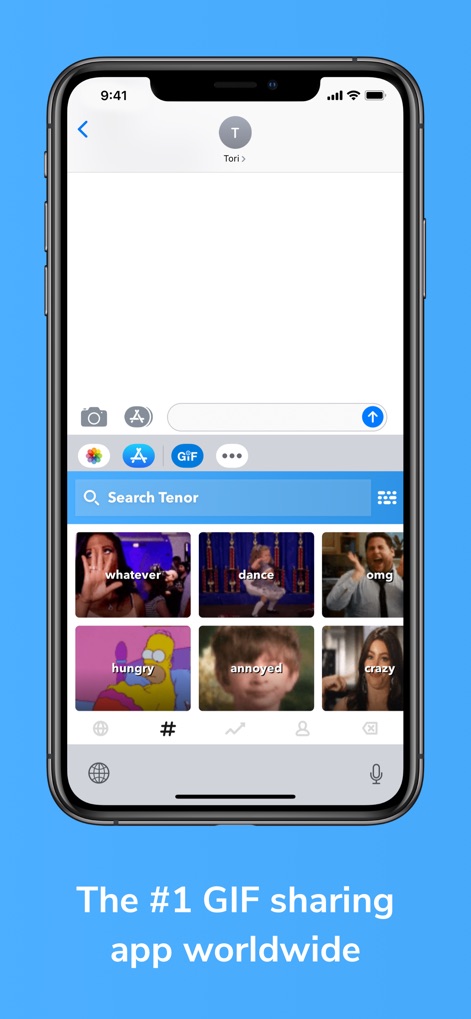
即座にGIF検索
このアプリは、チャット画面に統合されたキーボードから、GIFを直接検索・送信することを可能にします。ユーザーは「Search Tenor」バーからキーワードで検索したり、視覚的に表示される感情や行動のカテゴリー(例: 「whatever」「omg」)をタップして選んだりできます。
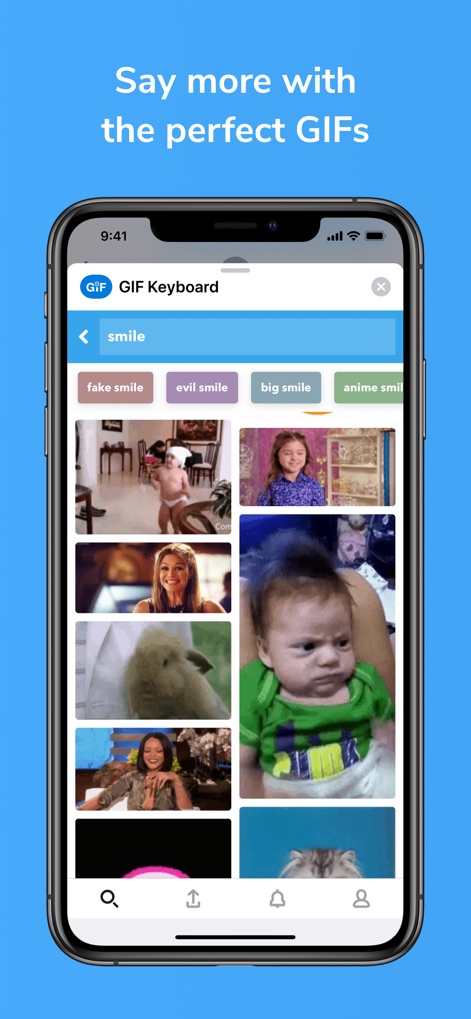
精密な検索結果
ユーザーは検索バーに特定のキーワード(例: 「smile」)を入力することで、関連性の高い豊富なGIFのリストを瞬時に表示できます。また、「fake smile」や「anime smile」のような具体的なサジェストキーワードを活用し、探している表現にぴったりのGIFを効率的に見つけることが可能です。
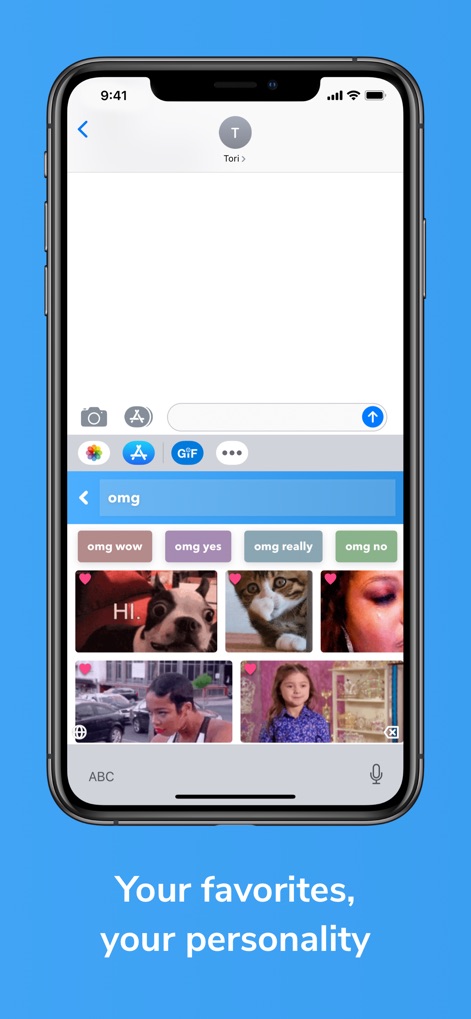
個性を表現
本アプリでは、ユーザーがお気に入りのGIFをハートアイコンで保存し、いつでも素早くアクセスできるようにします。さらに、「omg wow」や「omg yes」のような関連キーワードの提案機能を通じて、個人の好みやコミュニケーションスタイルに合ったGIFを容易に発見できます。
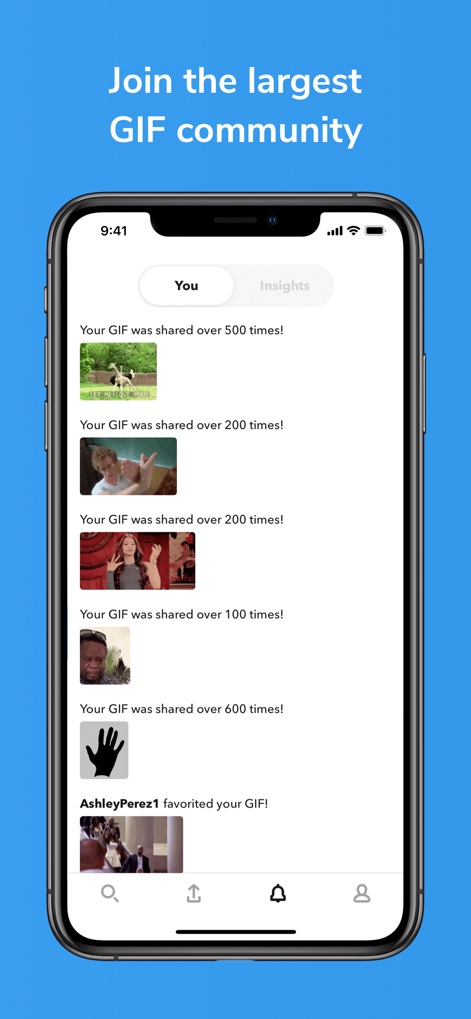
活発なコミュニティ
ユーザーは自身がアップロードしたGIFのパフォーマンスを、「Your GIF was shared over 500 times!」といった具体的な共有数で確認できます。また、「AshleyPerez1 favorited your GIF!」のようなお気に入り登録通知を受け取ることで、他のユーザーとの交流と自身の貢献を実感できます。
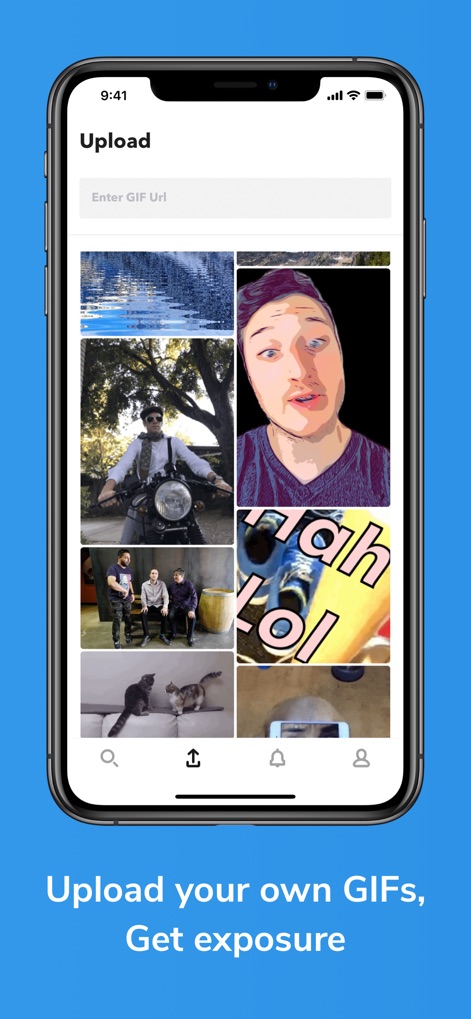
GIFをアップロード
このアプリは、ユーザーが独自のGIFコンテンツをコミュニティに共有できるアップロード機能を提供します。ユーザーは「Enter GIF Url」フィールドにURLを入力して既存のGIFを取り込んだり、スマートフォンのギャラリーから写真を選択して新しいGIFを作成したりできます。
説明
Download
類似アプリ
似た機能とユーザー体験を持つアプリ

KK键盘-语音变声字体美化表情包输入法
Beijing iShion Tech Co., Ltd.

GIPHY: The GIF Search Engine
Giphy, Inc.
Facemoji AI Emoji Keyboard
NEXILEAP PRIVATE LIMITED
Fonts Art: Keyboard for iPhone
AIBY Incorporated
Kika Keyboard: Custom Themes
Beijing Xinmeihutong Technology Co., Ltd.

Litstick - Best Stickers App
Sociaaal LLC

Keyboard Fonts++ | Kibik
Cosmic Taps SL
Fonts for iPhones
Inner Grow Limited

Font Keyboard - Auto Paste
Pro App Company Limited
このページはアプリまたはその開発者の公式ページではなく、情報提供および論評を目的として作成された独立した編集出版物です。明示的に別段の記載がない限り、アプリおよびその開発者は、MWM、Apple、Google Play、アプリのパブリッシャー、またはアプリの開発者と提携、承認、後援、認可、またはその他の公式的な関係はなく、このページのいかなる内容も、アプリがMWMのサービスを使用して開発されたことを意味するものではありません。すべての商標、ロゴ、スクリーンショット、その他のコンテンツはそれぞれの所有者の財産です。