Golfboy:Launch Monitor
ダウンロード: App Store

このページはアプリまたはその開発者の公式ページではなく、情報提供および論評を目的として作成された独立した編集出版物です。明示的に別段の記載がない限り、アプリおよびその開発者は、MWM、Apple、Google Play、アプリのパブリッシャー、またはアプリの開発者と提携、承認、後援、認可、またはその他の公式的な関係はなく、このページのいかなる内容も、アプリがMWMのサービスを使用して開発されたことを意味するものではありません。すべての商標、ロゴ、スクリーンショット、その他のコンテンツはそれぞれの所有者の財産です。


ロゴ: Golfboy:Launch Monitor
ダウンロード: App Store

Golfboy:Launch Monitor

推測はやめ、測定を始めましょう。iPhoneカメラだけで、プロレベルのボール速度、飛距離、打ち上げ角度のデータを取得できます。高価なハードウェアは捨てて、リアルタイムのフィードバックと自動ビデオ分析でスイングをマスターしましょう。

主要数値

ダウンロード

219K+

ユーザー評価

4.6/5

評価数

2K+

開発元

Qoncept, Inc.

カテゴリ

Sports

対応言語

2

最新バージョン

19.4.5

サイズ

169.2 MB

リリース日

2022年1月21日
機能

精密データでゲームをマスターする

iPhoneをプロ仕様の打ち上げモニターに変えましょう。すべてのショットを追跡し、スイングを分析し、バーチャルラウンドをプレイして、ハンディキャップをより速く下げましょう。

リアルタイムショット追跡

高価なハードウェアなしで、iPhoneだけでボール速度、打ち上げ角度、キャリー飛距離の即時フィードバックを取得できます。

スマートスイング録画

自動ビデオキャプチャとデータオーバーレイでフォームを分析し、感覚と実際のパフォーマンスを同期させます。

以下のスクリーンショットと説明は、アプリの公式ストアリスティングから直接取得されたものであり、アプリ開発者の所有物です。

アプリストア

スクリーンショット
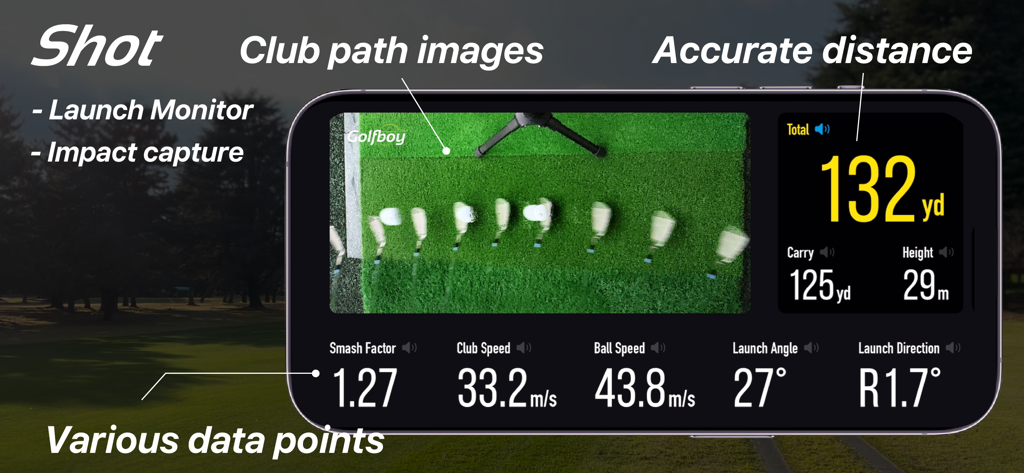
Golfboy:Launch Monitor - Golfboyアプリの打ち上げモニターインターフェース。クラブパス分析と、飛距離やボール速度などのショットメトリクスを表示。
Golfboyアプリの打ち上げモニターインターフェース。クラブパス分析と、飛距離やボール速度などのショットメトリクスを表示。

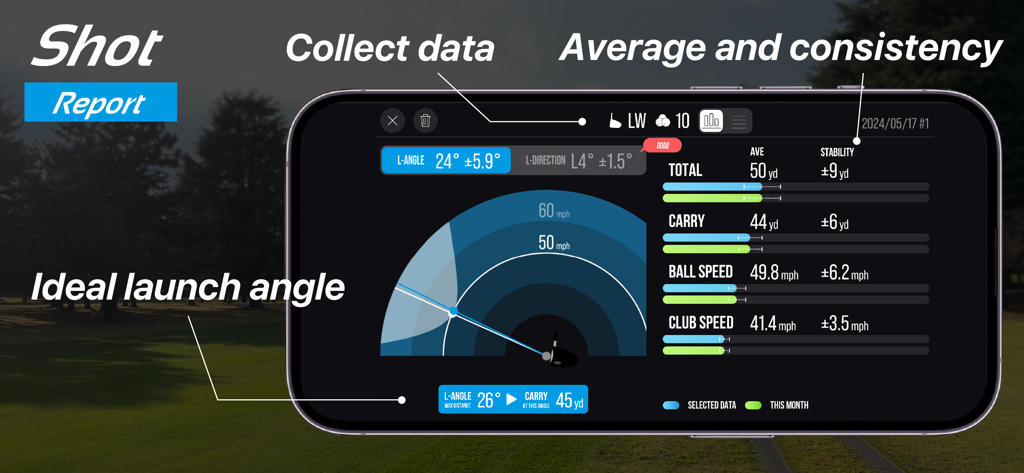
Golfboy:Launch Monitor - Golfboyアプリのショットレポート。スマートフォンで打ち上げ角度、ボール速度、飛距離のメトリクスを表示。
Golfboyアプリのショットレポート。スマートフォンで打ち上げ角度、ボール速度、飛距離のメトリクスを表示。

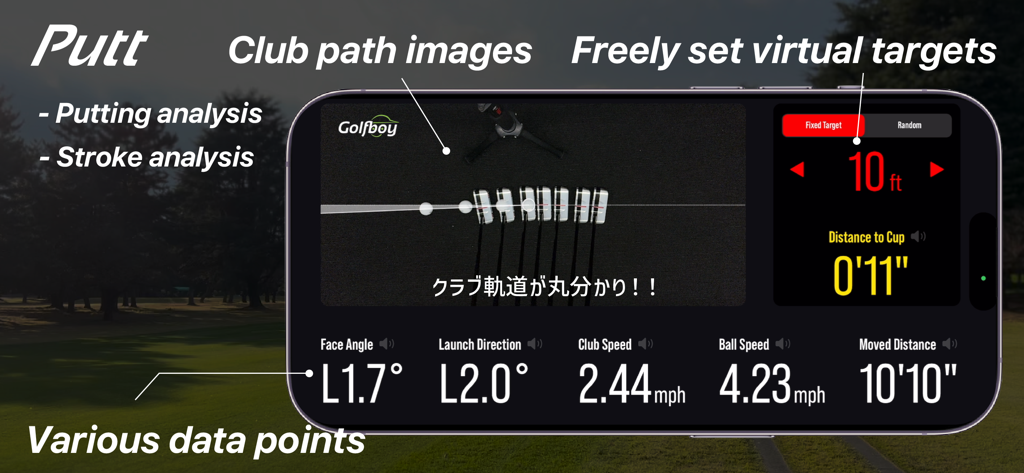
Golfboy:Launch Monitor - Golfboyアプリのスクリーンショット。パッティングストローク分析を表示し、クラブパス画像とショットデータを表示。
Golfboyアプリのスクリーンショット。パッティングストローク分析を表示し、クラブパス画像とショットデータを表示。

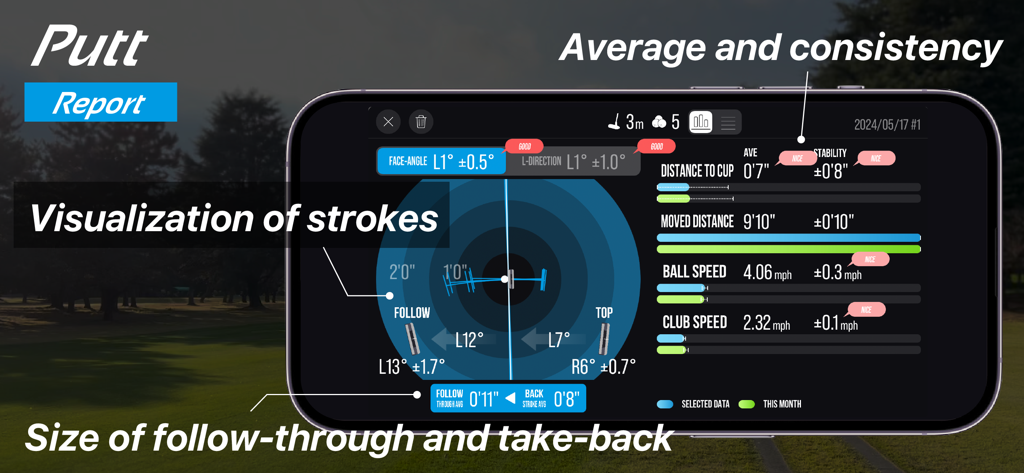
Golfboy:Launch Monitor - Golfboyアプリの画面。パッティングデータとストロークの視覚化を含む詳細なパットレポートを表示。
Golfboyアプリの画面。パッティングデータとストロークの視覚化を含む詳細なパットレポートを表示。

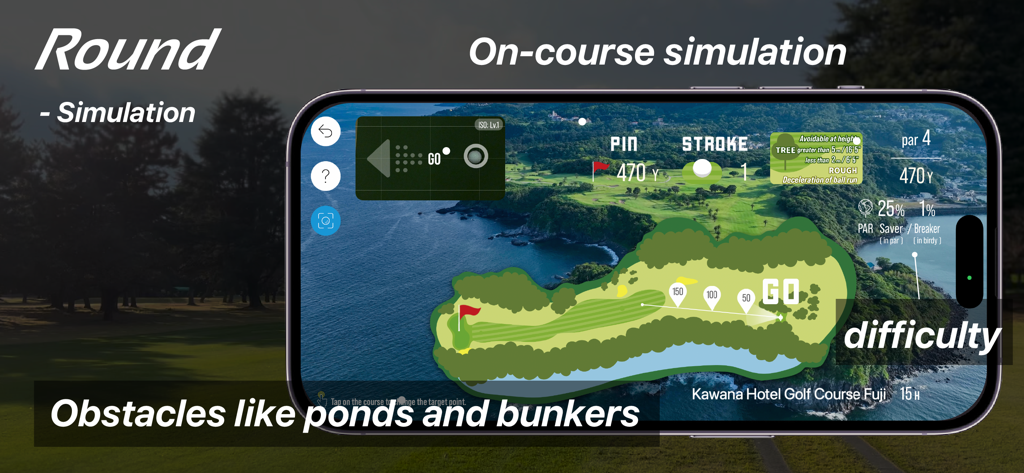
Golfboy:Launch Monitor - Golfboyアプリのラウンドモードインターフェース。池やバンカーを含むゴルフホールの仮想マップを表示するコース上のシミュレーションを表示。
Golfboyアプリのラウンドモードインターフェース。池やバンカーを含むゴルフホールの仮想マップを表示するコース上のシミュレーションを表示。

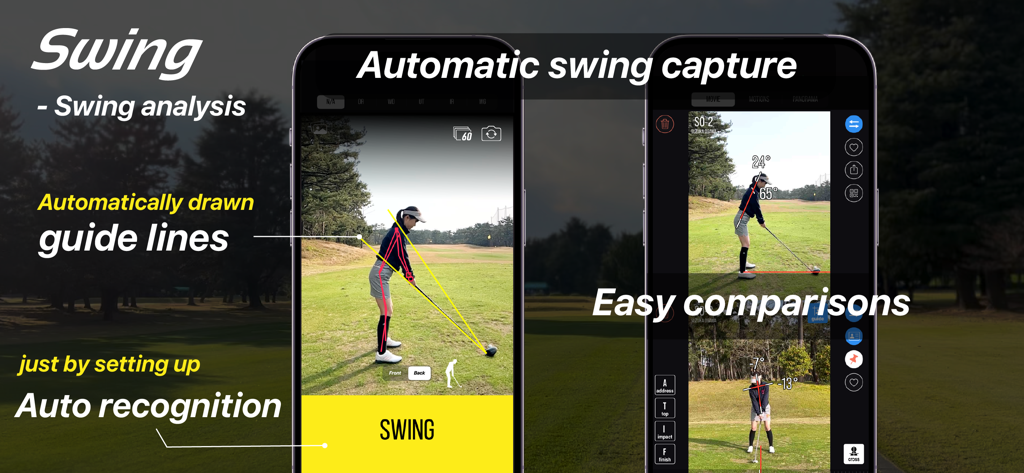
Golfboy:Launch Monitor - Golfboyアプリの自動スイング分析インターフェース。ガイドラインと並べて比較表示。
Golfboyアプリの自動スイング分析インターフェース。ガイドラインと並べて比較表示。

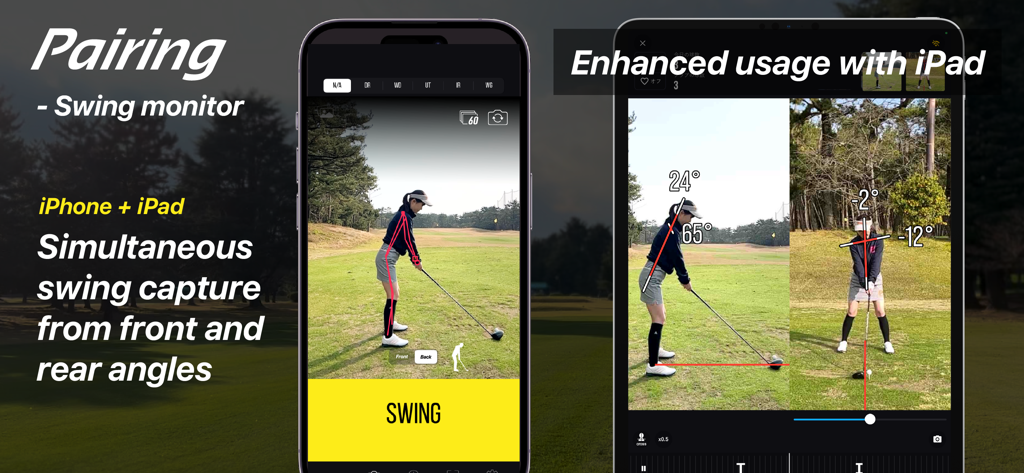
Golfboy:Launch Monitor - Golfboyアプリ。ペアリングされたiPhoneとiPadを使用した、正面と後方の両方の角度からのゴルフスイングキャプチャを同時に表示。
Golfboyアプリ。ペアリングされたiPhoneとiPadを使用した、正面と後方の両方の角度からのゴルフスイングキャプチャを同時に表示。

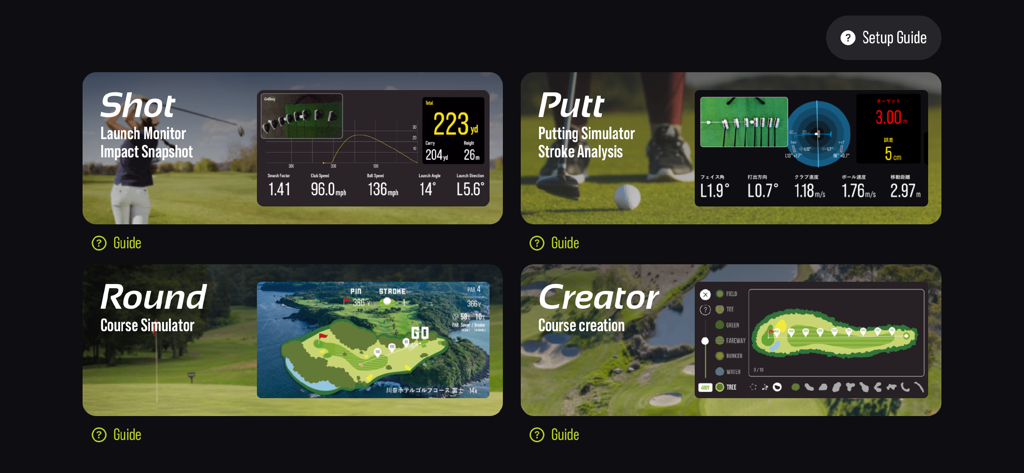
Golfboy:Launch Monitor - Golfboyアプリのインターフェース。ショット、パット、ラウンド、クリエイターの機能モードとデータ分析を表示。

Golfboyアプリのインターフェース。ショット、パット、ラウンド、クリエイターの機能モードとデータ分析を表示。

説明

Golfboy is a golf shot measurement app designed for iPhone users. Since it works with just an iPhone, anyone can use it easily with a simple tripod setup. Using advanced image analysis technology, the app provides real-time measurements for distance, ball speed, launch angle, and club speed. It also features a course simulation function, allowing users to practice in realistic scenarios. Additional features include a putting mode and automatic swing video recording, offering comprehensive support for various golf training needs. Leveraging our expertise in professional sports analysis, we developed Golfboy to make golf practice easier, more enjoyable, and more efficient for everyone. We’ve conducted numerous accuracy comparison tests against existing laser-based distance measuring devices, refining the app’s precision to meet real-world demands. Use Golfboy to take your game to the next level! ■ Key Features: + Real-time feedback on shot data allows for precise adjustments after every swing. + Practice while visualizing the distance and trajectory of your ideal shot. + Usable both indoors and outdoors, including at golf courses. + If you have a second iPhone, pair it to automatically record swing videos with shot data when practicing with friends. + In Round Mode, experience simulated practice on original Golfboy courses for more realistic training. + Putter Mode lets you specify target distances and quantify your putting shots. ■ Supported Devices: iPhone 8, iPhone SE (2nd generation) or later Note: Form analysis features are available on iPhone SE2, iPhone 11, and later models. ■ Measurable Distances: The maximum measurable distance varies depending on your iPhone’s lens: - iPhones with ultra-wide lenses (using a tripod at 1.2m height): Up to 280 yards - iPhones without ultra-wide lenses (using a tripod at 1.2m height): Up to 220 yards Raising the tripod height can extend the measurement range. Measurements may be inaccurate in low-light environments or when the ball blends into the background. Please test the app in your environment during the free trial period. ■ Subscription Plans: Golfboy is free to download, but a subscription is required to access measurement features. Start with a free trial, then continue with a subscription based on rates set for your country. Subscriptions automatically renew unless canceled at least 24 hours before the current period ends. Charges for the next period will be billed 24 hours before the current subscription expires. ・Available Plans: 1)Basic Plan (Monthly) Unlocks shot, putting, swing functions, and device-pairing features. 2)Premium Plan (Monthly/Yearly) Includes all Basic Plan features plus access to all in-app purchases during the subscription period. 3)Business [Commercial] Plan (Monthly) Grants a commercial license for business use (e.g., lessons, rentals). Includes the Basic Plan features, as well as operational support tools like Data Auto-Deletion and Settings Lock. *Commercial use refers to using the app for profit-driven purposes such as lessons, rentals, or business operations. ■ Free Features Without Subscription: Trial versions of Round Mode, Creator Mode, and Swing Mode are available for free. ■ One-Time Paid Features: These are available for purchase alongside the Basic or Business plans: - Shot Cast – Displays measurement results in various modes on a external display. - Putter Cast – Displays putting results on a external display. - Swing Cast – Displays camera and swing videos in various modes. - Round Cast - Play 3D courses on a external display or on a iPad display. - Customization Skins – Personalize the app’s appearance. ■ Terms of Use & Privacy Policy: You can review both directly within the app. ■ Contact & Support golfboy@qoncept.co.jp

Download

ダウンロード: App Store

このページはアプリまたはその開発者の公式ページではなく、情報提供および論評を目的として作成された独立した編集出版物です。明示的に別段の記載がない限り、アプリおよびその開発者は、MWM、Apple、Google Play、アプリのパブリッシャー、またはアプリの開発者と提携、承認、後援、認可、またはその他の公式的な関係はなく、このページのいかなる内容も、アプリがMWMのサービスを使用して開発されたことを意味するものではありません。すべての商標、ロゴ、スクリーンショット、その他のコンテンツはそれぞれの所有者の財産です。