
このページはアプリまたはその開発者の公式ページではなく、情報提供および論評を目的として作成された独立した編集出版物です。明示的に別段の記載がない限り、アプリおよびその開発者は、MWM、Apple、Google Play、アプリのパブリッシャー、またはアプリの開発者と提携、承認、後援、認可、またはその他の公式的な関係はなく、このページのいかなる内容も、アプリがMWMのサービスを使用して開発されたことを意味するものではありません。すべての商標、ロゴ、スクリーンショット、その他のコンテンツはそれぞれの所有者の財産です。


ダウンロード
25M+ユーザー評価
評価数
34.2K開発元
カテゴリ
Entertainment対応言語
38最新バージョン
3.30.00001サイズ
82.0 MBリリース日
2014年1月15日ストリーミングコンテンツの一元管理と発見を強化する主要機能
Google TV: Watch Movies & TV アプリ詳細分析
統合されたコンテンツ発見とパーソナライズされたおすすめ
複数のストリーミングアプリからの映画やテレビ番組を一つにまとめ、トピックやジャンルで整理して表示します。ユーザーの視聴履歴やトレンドに基づいたおすすめにより、新しいエンターテイメントを効率的に発見できます。また、タイトルを検索し、どのアプリでストリーミング可能かを確認できます。
デバイスをまたがるウォッチリストの同期
興味のある番組や映画をウォッチリストに追加して追跡し、後で視聴できるようにします。このウォッチリストは、テレビ、スマートフォン、PCなど、ユーザーが所有するすべてのデバイス間で共有され、どこからでも追加・確認が可能です。
モバイルでのアクセスとオフライン視聴
おすすめ、ライブラリ、ウォッチリストがモバイルデバイスと同期され、外出先でも利用できます。モバイルデバイスで直接ストリーミング視聴を開始したり、以前購入したエンターテイメントをライブラリからダウンロードして、インターネット接続がない場所でも視聴できます。
スマートフォンをGoogle TV / Android TVのリモコンとして利用
アプリに内蔵されたリモコン機能により、Google TVやAndroid TV OSデバイスをスマートフォンから操作できます。これにより、物理的なリモコンが見つからない場合でも、簡単にコンテンツを検索・選択できます。スマートフォンのキーボードを使用して、複雑なパスワード、映画のタイトル、検索語句を素早く入力することも可能です。
よくある質問
について知っておくべきこと Google TV: Watch Movies & TV
What is the Google TV app?
The Google TV app, previously Play Movies & TV, consolidates entertainment from all your streaming apps into one place. It helps users find and enjoy content efficiently.
How does Google TV help me find content?
Google TV allows users to browse movies and TV episodes across their streaming apps, organized by topics and genres. It provides recommendations based on preferences and trending content. Users can also search for specific titles.
Can I create a watchlist in Google TV?
Yes, the Google TV app allows users to create a Watchlist for new discoveries. This Watchlist syncs across all devices, including TV, phone, and laptop via Search on any browser.
Can I watch my purchased content offline using the Google TV app?
Yes, the Google TV app allows users to download previously purchased entertainment from their Library. This enables watching content even when not connected to the internet.
Does the Google TV app function as a remote control?
Yes, the Google TV app includes a built-in remote control function. Users can use their phone to navigate Google TV or other Android TV OS devices and type with the phone's keyboard.
Does Google TV offer personalized recommendations?
Yes, Google TV offers recommendations based on what users love and what's trending across their accessible services. These recommendations are part of the "For you" section.
Is my Watchlist shared across devices in Google TV?
Yes, the Watchlist in Google TV is shared across all your devices. Users can add items from their TV, phone, or laptop via Search on any browser.
Can I resume watching content from where I left off in Google TV?
Yes, Google TV enables users to jump right back into content from where they left off. The app features a dedicated "Continue watching" section for this purpose.
Does Google TV integrate with Chromecast?
Yes, the Google TV app integrates with Chromecast. Users can get Google TV content on a big screen using a Chromecast device, as shown in the app's promotional material.
以下のスクリーンショットと説明は、アプリの公式ストアリスティングから直接取得されたものであり、アプリ開発者の所有物です。
アプリストア
スクリーンショット
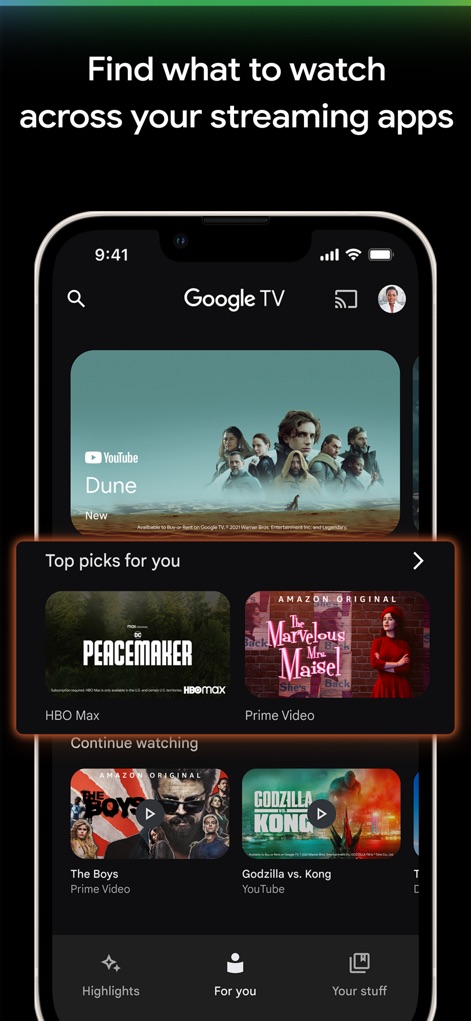
このアプリは、Prime VideoやHBO Maxなど複数のストリーミングサービスからのコンテンツを統合し、ユーザーに合わせた「あなたへのおすすめ」や「視聴を続ける」といったパーソナライズされたコンテンツを提供します。
統合されたエンタメ発見

ユーザーは、厳選された「ウォッチリスト」機能を利用して、興味のある番組や映画を簡単に追跡できます。各コンテンツには、後で視聴するために「ブックマーク」アイコンが表示されます。
ウォッチリストで管理

アプリは「視聴を続ける」セクションで、ユーザーが中断したエンターテイメントに簡単に戻れるようにします。例えば、「The Boys」や「Godzilla vs. Kong」といった視聴途中の作品が明確に表示されます。
中断した場所から再開

このアプリは、スマートフォンとテレビの両方でシームレスな視聴体験を提供します。Chromecastデバイスと連携することで、ユーザーはモバイルデバイスから簡単に大画面へコンテンツをキャストできます。
どこでも大画面で
説明
Download
類似アプリ
似た機能とユーザー体験を持つアプリ

JioHotstar
JIOSTAR INDIA PRIVATE LIMITED

百搜视频-原百度视频
Xiaodu TV Co., Ltd

MagentaTV: TV & Streaming
Telekom Deutschland GmbH

今日影视大全 - 电影电视剧视频大全
Mertkan YASA
百搜视频HD-原百度视频HD 电影电视剧影视大全
Xiaodu TV Co., Ltd
Apple TV
Apple Inc.

MEGOGO: TV, Movies, Audiobooks
MEGOGO LLC
OTTplay
HT Media Ltd.

KPN TV+ App
KPN B.V.
このページはアプリまたはその開発者の公式ページではなく、情報提供および論評を目的として作成された独立した編集出版物です。明示的に別段の記載がない限り、アプリおよびその開発者は、MWM、Apple、Google Play、アプリのパブリッシャー、またはアプリの開発者と提携、承認、後援、認可、またはその他の公式的な関係はなく、このページのいかなる内容も、アプリがMWMのサービスを使用して開発されたことを意味するものではありません。すべての商標、ロゴ、スクリーンショット、その他のコンテンツはそれぞれの所有者の財産です。