GPS Tracker - Mobile Tracking
ダウンロード: App Store

このページはアプリまたはその開発者の公式ページではなく、情報提供および論評を目的として作成された独立した編集出版物です。明示的に別段の記載がない限り、アプリおよびその開発者は、MWM、Apple、Google Play、アプリのパブリッシャー、またはアプリの開発者と提携、承認、後援、認可、またはその他の公式的な関係はなく、このページのいかなる内容も、アプリがMWMのサービスを使用して開発されたことを意味するものではありません。すべての商標、ロゴ、スクリーンショット、その他のコンテンツはそれぞれの所有者の財産です。


ロゴ: GPS Tracker - Mobile Tracking
ダウンロード: App Store

GPS Tracker - Mobile Tracking

お使いのモバイルデバイスを高精度な追跡ハブに変身させます。マイクロフリートの監視、ビジネスレポートの自動化、リアルタイムの位置データと高度なジオフェンスにより、究極の安心を提供します。

主要数値

ダウンロード

195K+

ユーザー評価

3.4/5

評価数

0

開発元

Edvin Zacharevic

カテゴリ

Navigation

対応言語

1

最新バージョン

2.11

サイズ

64.4 MB

リリース日

2015年9月26日
機能

ポケットの中のプロフェッショナルなフリート管理

あらゆるiOSデバイスを強力なGPS追跡ツールに変えます。専用ハードウェアのコストをかけずに、パフォーマンスの監視、レポートの自動化、ビジネス運営の最適化を実現します。

リアルタイムのフリート可視化

10秒ごとのライブアップデートでチームを追跡します。速度、場所、ステータスを監視し、勤務時間のすべての分が把握され、最適化されていることを確認します。

自動レポートとコンプライアンス

走行距離、燃料使用量、運転行動に関する詳細なXLSまたはPDFレポートを生成します。エンタープライズグレードのデータで税務申告を簡素化し、間接費を管理します。

以下のスクリーンショットと説明は、アプリの公式ストアリスティングから直接取得されたものであり、アプリ開発者の所有物です。

アプリストア

スクリーンショット
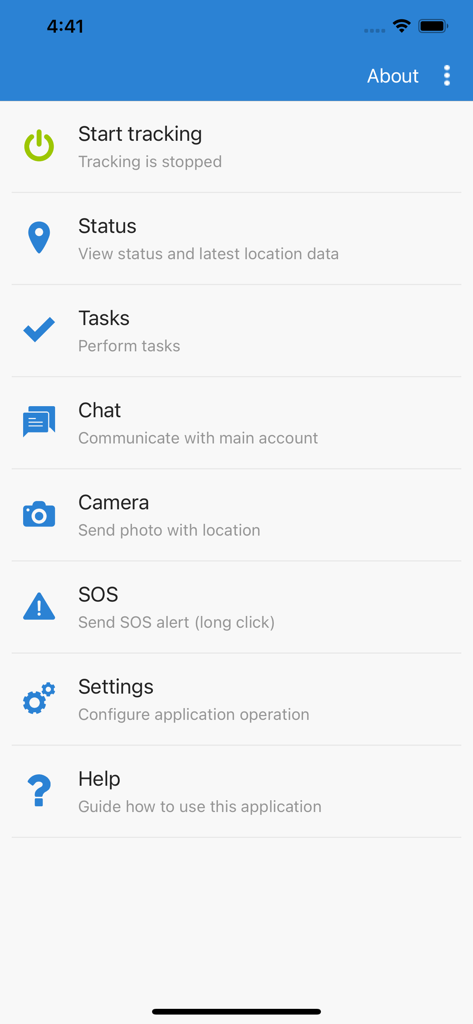
GPS Tracker - Mobile Tracking - 追跡、タスク、チャット機能を表示するGPSトラッカーモバイルアプリのメインメニュー
追跡、タスク、チャット機能を表示するGPSトラッカーモバイルアプリのメインメニュー

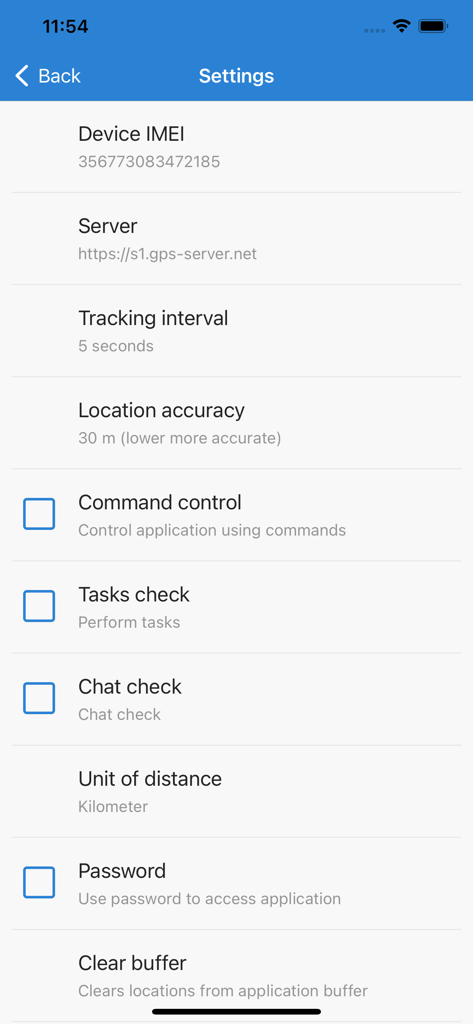
GPS Tracker - Mobile Tracking - デバイス設定、追跡間隔、位置情報の精度オプションを表示するGPSトラッカーアプリの設定メニュー

デバイス設定、追跡間隔、位置情報の精度オプションを表示するGPSトラッカーアプリの設定メニュー

説明

With GPS Tracker application you can transform your iOS mobile device to GPS tracker (GPS tracking device) and use all GPS-server.net features. In order to use this application, you must have personal account or hosted software. NOTE: Continued use of GPS Tracker running in the background can dramatically decrease battery life. If you want better battery life, set tracking interval to at least 60-120 seconds. GPS Tracker features: - Track your device online in real time; - Record and review tracks, generate reports; - Configure various kinds of events and notifications; - Assign or schedule various tasks and delivery times; - Communicate with the person at the other end using built-in chat function; - Make photos and upload to user account with current location; - Possibility to change tracking interval; - Phone battery level is sent together with every location; - If Internet is lost, application will save locations and upload them later; - Possibility to control application via web browser using commands; - Password protection; - Application runs in background. GPS-server.net features: - Real time tracking mode represents live data of tracked objects. Information is updated every ten seconds without need to refresh page or relogin to account. Monitored data contains vehicle status, latitude, longitude, altitude, address, speed, connection time, ignition status, fuel consumption, sensor data, nearest geozone and much more. - Widgets display recent object information which is updated every ten seconds without need to refresh web page. Send commands to control device, view recent events and mileage graph. - Events is one of the most important feature which our software offers. Events are used to trigger actions by important or disruptive activities. Customer will get instant SMS/E-mail/Push notifications triggered by different event types. - History shows all stored data which server has collected from connected devices for chosen period of time. Software stores information received from GPS tracking devices, such as speed, time, location, stops, reports, events, etc. History is displayed in different ways: visually on the map, in a graph or HTML/XLS format. - POI (Points of Interest) allow you to put markers at the locations that might be interesting or useful. You can also name the place, add short description, attach an image or even video to it. - Routes feature is a helpful tool to mark an important section of the road by drawing virtual path on the map. Additionally, get notifications if vehicle is within or out of route. This feature is useful to analyze vehicle dependency to the road. - With geofences you are able to make a virtual perimeter on geographic areas that have specific interest for you. The main reason to have geofences is to control whether the unit stays within it or not, so that when the geofencing unit enters or exits the area a notification is generated. - Get detailed reports about trips, mileage, driving behavior, fuel usage and thefts, activity in particular zone or route. Reports are used for data analysis of particular vehicle or entire group. Reports can be exported or sent instantly to E-mail addresses in HTML/PDF/XLS format. - Tasks make it easy to create and manage entries related to upcoming work which should be accomplished. Set start and end address, priority, task status. - The Maintenance schedule reminds you when you should have your vehicle serviced, such as an oil change or technical inspection. It can also serve as a reminder to take out insurance. - Use the Expenses function to track the amount spent on an object maintenance. Evaluate the economic benefit of vehicle usage with the Expenditure report on a daily, weekly, or monthly basis.

Download

ダウンロード: App Store

このページはアプリまたはその開発者の公式ページではなく、情報提供および論評を目的として作成された独立した編集出版物です。明示的に別段の記載がない限り、アプリおよびその開発者は、MWM、Apple、Google Play、アプリのパブリッシャー、またはアプリの開発者と提携、承認、後援、認可、またはその他の公式的な関係はなく、このページのいかなる内容も、アプリがMWMのサービスを使用して開発されたことを意味するものではありません。すべての商標、ロゴ、スクリーンショット、その他のコンテンツはそれぞれの所有者の財産です。








