
このページはアプリまたはその開発者の公式ページではなく、情報提供および論評を目的として作成された独立した編集出版物です。明示的に別段の記載がない限り、アプリおよびその開発者は、MWM、Apple、Google Play、アプリのパブリッシャー、またはアプリの開発者と提携、承認、後援、認可、またはその他の公式的な関係はなく、このページのいかなる内容も、アプリがMWMのサービスを使用して開発されたことを意味するものではありません。すべての商標、ロゴ、スクリーンショット、その他のコンテンツはそれぞれの所有者の財産です。


ダウンロード
750k+ユーザー評価
評価数
10.7K開発元
カテゴリ
Lifestyle対応言語
17最新バージョン
6.0.0サイズ
242.3 MBリリース日
2022年3月9日セキュリティに特化したテックアナリストによる詳細評価
ieGeek Cam アプリの主要機能分析
即時プッシュ通知
異常な動きが検知されると、本システムはユーザーに即座にプッシュ通知を送信し、迅速な対応を可能にします。
リアルタイムライブ映像
このアプリは、現在の状況を即座に把握できるよう、カメラからのライブ映像をリアルタイムで提供します。
リモート監視アクセス
ユーザーは、どこにいてもスマートフォンを通じてカメラシステムにアクセスし、自宅やビジネスを監視することが可能です。
モーション検知録画
動きが検出された際に自動的に録画を開始し、重要なイベントを見逃さないようにします。本機能はユーザーの財産保護に貢献します。
録画映像の再生と確認
ユーザーは、過去に記録された映像をいつでも再生し、詳細を確認することが可能です。
スマート検知ゾーンのカスタマイズ
ユーザーは、監視が必要な特定のエリアを細かく設定し、不要なアラートを減らすことが可能です。
映像共有機能
ユーザーは、カメラで撮影された重要な映像や画像を、必要に応じて他のユーザーと安全に共有できます。
時間とメッセージのリマインダー
この機能は、重要なイベントや設定された時間に基づいてユーザーにリマインダーを提供します。
よくある質問
について知っておくべきこと ieGeek Cam
What is ieGeek Cam?
ieGeek Cam is a security camera system surveillance app. It provides live video, motion detection recording, and instant push messages to inform users of their home's security status.
Does ieGeek Cam offer live video surveillance?
Yes, ieGeek Cam offers real-time live video surveillance. Users can view their camera feeds live through the app interface.
How does ieGeek Cam handle motion detection alerts?
ieGeek Cam sends instant push messages via its alarm system when motion is detected. This functionality enables users to take protective measures promptly.
Can I customize motion detection zones in ieGeek Cam?
Yes, ieGeek Cam allows users to customize smart detection zones. This feature helps define specific areas within the camera's view for motion monitoring.
What are the main features of the ieGeek Cam app?
The main functions of ieGeek Cam include real video playing, video image sharing, playback image checking, time and message reminding, and customizable smart detection zones.
Can I share camera access with others using ieGeek Cam?
Yes, ieGeek Cam allows users to share device access. Sharing can be performed by scanning a QR code or by entering an account within the app.
How can I review past events in ieGeek Cam?
ieGeek Cam provides a playback image checking feature to review past events. Users can access a history of motion detection events with corresponding timestamps.
Does ieGeek Cam offer different alarm working modes?
Yes, ieGeek Cam offers Power Saving Mode, Performance Mode, and Custom Mode for alarm working. Each mode features distinct settings for video length, power consumption, and humanoid detection.
How long are video clips in ieGeek Cam's Power Saving Mode?
In ieGeek Cam's Power Saving Mode, the length of video clips does not exceed 10 seconds. People Detection is enabled by default in this mode for efficient monitoring.
Does ieGeek Cam support humanoid detection?
Yes, ieGeek Cam supports humanoid detection. It is enabled by default in Power Saving Mode and can be customized further in the Custom Mode settings.
Where can I find the privacy policy for ieGeek Cam?
The privacy policy for ieGeek Cam is available via the link provided in the app description: "https://meari-us.s3.us-west-1.amazonaws.com/html/audit/81/storage_server.html".
Can I adjust the motion detection sensitivity in ieGeek Cam?
Yes, ieGeek Cam allows users to adjust motion detection sensitivity. The sensitivity can be precisely set on a numerical scale ranging from 1 to 10.
Does ieGeek Cam offer cloud storage?
Yes, ieGeek Cam offers cloud storage capabilities. This feature is indicated by the presence of a dedicated "Cloud" tab within the app's live view interface.
以下のスクリーンショットと説明は、アプリの公式ストアリスティングから直接取得されたものであり、アプリ開発者の所有物です。
アプリストア
スクリーンショット

自宅のライブ映像をリアルタイムで確認し、動きを検知した際には即座に通知を受け取るモーション検知機能、さらに緊急時に効果的なサイレン機能も搭載されています。
ライブ映像と機能
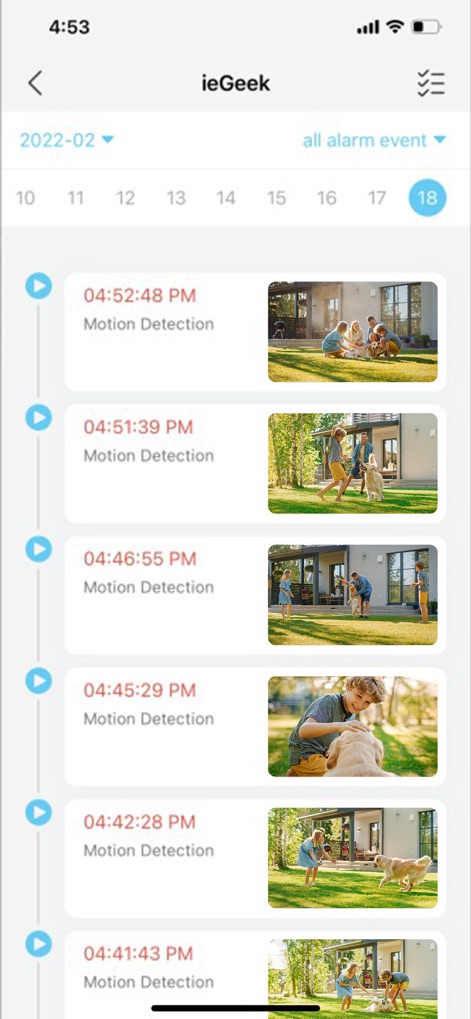
過去のモーション検知イベントがタイムスタンプ付きで一覧表示され、各イベントの状況を視覚的に確認できるサムネイル画像が提供されます。
イベント履歴

ユーザーは、QRコードスキャンまたはアカウント情報の入力により、複数のデバイス間でカメラアクセスを簡単かつ安全に共有できます。
デバイス共有

個人アカウント情報が一覧表示され、家族メンバーとのアクセスを管理するファミリー管理機能や、共有設定を調整するオプションが提供されます。
アカウント管理

ユーザーは、モーション検知機能のオン/オフを簡単に切り替え、検出感度を1から10の範囲で細かく調整して最適な監視を実現できます。
検知設定をカスタマイズ

省電力モードやパフォーマンスモードといった異なるアラーム動作モードから選択でき、ユーザーのニーズに合わせて録画期間やアラーム間隔をカスタマイズできる柔軟な設定が可能です。
動作モード選択

複数の監視デバイスを一元的に管理でき、リビングルームや寝室など場所別にデバイスを整理して効率的な監視環境を構築できます。
複数デバイス管理
説明
Download
類似アプリ
似た機能とユーザー体験を持つアプリ

DMSS
Hangzhou Dong Bin Information Technology Co., Ltd.

Joolink
Shenzhen Jooan Technology Company

VicoHome: Smart Home Camera
PHOTON SAIL TECHNOLOGIES PTE. LTD.

Ubox
洪波 王

SimpliSafe Home Security App
SimpliSafe, Inc.

Active Mobile V4
JFL Equipamentos Eletronicos Industria e Comercio Ltda.

Dzees Home
Shenzhen Weixi Technology Co., Ltd

Ring - Always Home
Bot Home Automation, INC

Hik-Connect - for End user
Hangzhou Hikvision Digital Technology Co., Ltd.
このページはアプリまたはその開発者の公式ページではなく、情報提供および論評を目的として作成された独立した編集出版物です。明示的に別段の記載がない限り、アプリおよびその開発者は、MWM、Apple、Google Play、アプリのパブリッシャー、またはアプリの開発者と提携、承認、後援、認可、またはその他の公式的な関係はなく、このページのいかなる内容も、アプリがMWMのサービスを使用して開発されたことを意味するものではありません。すべての商標、ロゴ、スクリーンショット、その他のコンテンツはそれぞれの所有者の財産です。