iMovie
iMovie
ダウンロード: App Store

このページはアプリまたはその開発者の公式ページではなく、情報提供および論評を目的として作成された独立した編集出版物です。明示的に別段の記載がない限り、アプリおよびその開発者は、MWM、Apple、Google Play、アプリのパブリッシャー、またはアプリの開発者と提携、承認、後援、認可、またはその他の公式的な関係はなく、このページのいかなる内容も、アプリがMWMのサービスを使用して開発されたことを意味するものではありません。すべての商標、ロゴ、スクリーンショット、その他のコンテンツはそれぞれの所有者の財産です。


ロゴ: iMovie
ダウンロード: App Store

iMovie

凡庸な映像を、瞬時に映画へと変貌させる。iMovieがユーザーに与えるのは、誰もが羨む映像表現の掌握だ。

主要数値

ダウンロード

50M+

ユーザー評価

4.2/5

評価数

855.2K

開発元

Apple Inc.

カテゴリ

Photo & Video

対応言語

33

最新バージョン

3.0.5

サイズ

660.0 MB

リリース日

2010年6月24日
機能

iMovie アプリの機能分析

ユーザーフレンドリーなインターフェースと強力な動画編集機能が魅力

マジックムービーによる自動動画作成

ユーザーは、選択したメディアからタイトル、トランジション、音楽が自動的に追加された美しいカスタムビデオを数タップで作成できます。動画編集の経験がなくても高品質なコンテンツを生み出すことが可能です。

多様な共有オプションと高解像度エクスポート

ユーザーは作成した動画をメールやメッセージで共有したり、写真ライブラリに最大4K/60fpsで保存したり、Instagram、YouTubeなどの人気プラットフォーム向けに最適化された形式でエクスポートしたりすることができます。

ストーリーボードによるガイド付き動画制作

人気のある動画タイプに対応した20種類のストーリーボードテンプレートから選択でき、ユーザーは物語の構成を学びながら、視覚的に魅力的な動画を簡単に作成できます。各プレースホルダーにメディアを追加するだけで、プロのような構成が可能です。

以下のスクリーンショットと説明は、アプリの公式ストアリスティングから直接取得されたものであり、アプリ開発者の所有物です。

アプリストア

スクリーンショット
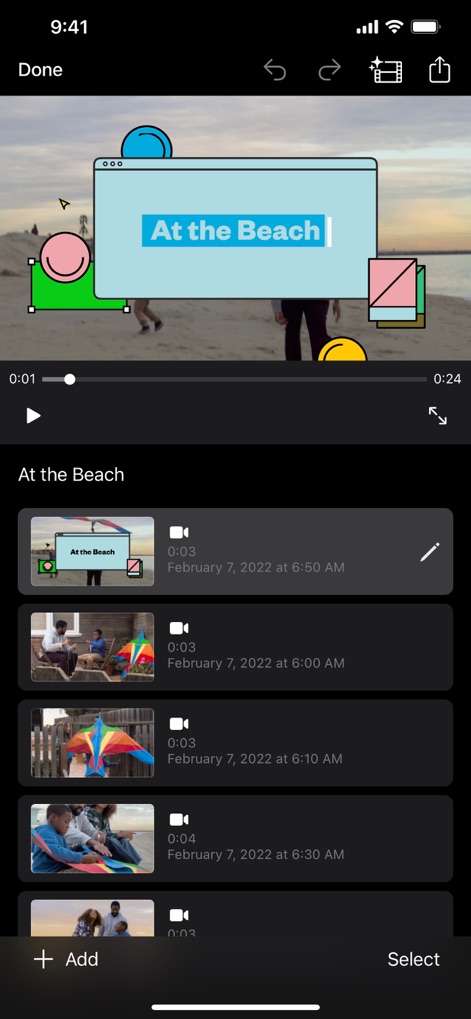
iMovie - 簡単編集、動画プレビュー

簡単編集、動画プレビュー

この画面では、動画のリアルタイムプレビューと、直感的なクリップリストによる簡単なプロジェクト管理が可能です。

iMovie - ストーリーボードで制作開始

ストーリーボードで制作開始

ユーザーは「About Me」や「DIY」などの多彩なテンプレートから選択し、コンテンツ作成のインスピレーションを得ることができます。
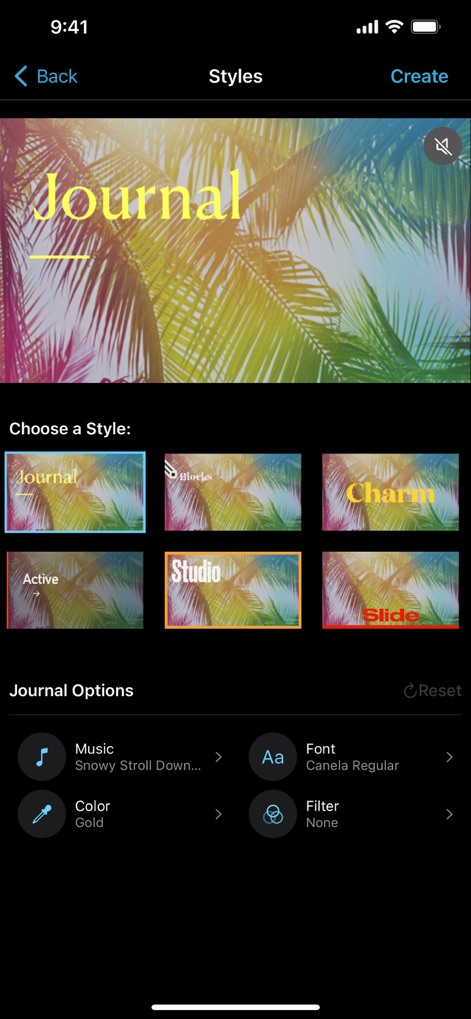
iMovie - 魅力的なスタイル選択

魅力的なスタイル選択

ビデオ全体に「Journal」のような視覚的スタイルを適用したり、音楽やフォント、フィルターなどの詳細設定を調整して、個性を表現できます。
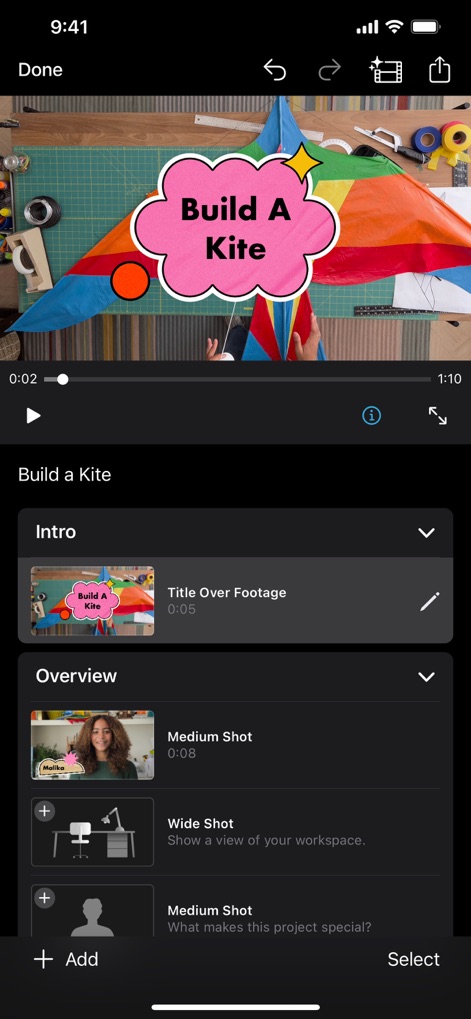
iMovie - ストーリー構成をガイド

ストーリー構成をガイド

「Intro」や「Overview」といったガイド付きのクリッププレースホルダーと、「Build A Kite」のようなタイトルオーバーレイ機能で、効率的に動画を構成できます。

iMovie - シネマティック編集

シネマティック編集

このツールは、動画内の被写体に焦点を合わせる「シネマティックモード」の調整機能と、背景のぼかし具合を細かく設定する「深度調整 (f3.5)」を提供します。

iMovie - テキスト演出で魅せる

テキスト演出で魅せる

ユーザーは「TOLUCA TREK」のようなタイトルテキストを動画に追加し、「SLIDE」や「SPLIT」などの多様なアニメーションスタイルを選択して、視覚的な魅力を高めることができます。

iMovie - 高度なエフェクト

高度なエフェクト

この画面では、「グリーンバック」合成による背景の置き換えや、「ピクチャインピクチャ」効果を使用して、複数の映像レイヤーを巧みに組み合わせることができます。

iMovie - 創造的なフィルター

創造的なフィルター

「Comic」や「B&W」といった多彩なビデオフィルターを適用し、スライダーで効果の強度を調整することで、独自の映像表現を追求できます。

説明

With a streamlined design and intuitive Multi-Touch gestures, iMovie lets you create Hollywood-style trailers and beautiful movies like never before. Instantly create Magic Movies • With just a few taps, you can create and share a beautiful, custom video • Select an album or group of videos or images and iMovie will create a video for you—no video editing required—with titles, transitions, and music • Easily rearrange or delete clips in the simplified shot list • Apply a different style to change up the look and feel of the whole video Learn storytelling with Storyboards • Choose from 20 Storyboards that help you get started with popular video types • Record video or take photos right into each placeholder clip, or add media from your Photos library • Add, reorder, and delete clips as needed to organize and customize your story • Apply a dynamic visual style that includes title layouts, fonts, filters, color palettes, and music Make Hollywood-style trailers • Choose from 14 trailer templates with stunning graphics and original scores by some of the world’s top film composers • Customize movie studio logos, cast names, and credits • Select videos and photos for your trailer or record video right in iMovie Create beautiful movies • Choose from 8 unique themes with matching titles, transitions, and music • Give your movie the perfect look with 13 Apple-designed video filters • Choose from 11 animated title styles like Split, Reveal or Pop-up • Adjust any title by changing its font, color, size, location, and more • Add solid, gradient, and patterned backgrounds to your movie • Import and edit video captured in Cinematic mode on iPhone 13 or later • Add, adjust, and delete focus points and modify the depth of field effect in video recorded in Cinematic mode* • Easily add picture in picture, green screen, and split screen effects • Select from more than 130 soundtracks that automatically adjust to the length of your movie • Add sound effects, songs from your music library, and your own narration • Connect a keyboard and use simple shortcuts to edit movies quickly • Connect a trackpad or mouse to iPad for fast and accurate moviemaking iMovie everywhere • Transfer projects between your iPhone and iPad using AirDrop or iCloud Drive • Send projects to your Mac via AirDrop or iCloud Drive to finish editing with iMovie or Final Cut Pro • Connect an external display to your iPhone or iPad and choose to mirror the iMovie interface or display your video fullscreen while you edit** Share with friends and family • Send videos with Mail and Messages • Save to your Photos library in resolutions up to 4K at 60 frames per second*** • Export videos optimized for Instagram, YouTube, and other popular video destinations * Requires iPhone XS or later, iPad mini (5th generation or later), iPad Air (3rd generation or later), iPad Pro 11-inch or iPad Pro 12.9-inch (3rd generation or later) ** External display support requires iPhone 7 or later, iPad (6th generation) or later, iPad Air 3 or later, iPad Pro 12.9-inch (2nd generation) or later *** 4K at 60 frames per second support requires iPod touch (7th generation), iPhone SE (2nd generation), iPhone 7, iPad (6th generation) or later, iPad mini (5th generation), iPad Air 3 or later, iPad Pro 10.5-inch or later

Download

ダウンロード: App Store

このページはアプリまたはその開発者の公式ページではなく、情報提供および論評を目的として作成された独立した編集出版物です。明示的に別段の記載がない限り、アプリおよびその開発者は、MWM、Apple、Google Play、アプリのパブリッシャー、またはアプリの開発者と提携、承認、後援、認可、またはその他の公式的な関係はなく、このページのいかなる内容も、アプリがMWMのサービスを使用して開発されたことを意味するものではありません。すべての商標、ロゴ、スクリーンショット、その他のコンテンツはそれぞれの所有者の財産です。