Invoice Pro. Invoice on the go
ダウンロード: App Store

このページはアプリまたはその開発者の公式ページではなく、情報提供および論評を目的として作成された独立した編集出版物です。明示的に別段の記載がない限り、アプリおよびその開発者は、MWM、Apple、Google Play、アプリのパブリッシャー、またはアプリの開発者と提携、承認、後援、認可、またはその他の公式的な関係はなく、このページのいかなる内容も、アプリがMWMのサービスを使用して開発されたことを意味するものではありません。すべての商標、ロゴ、スクリーンショット、その他のコンテンツはそれぞれの所有者の財産です。

ロゴ: Invoice Pro. Invoice on the go
ダウンロード: App Store

Invoice Pro. Invoice on the go

週末を事務作業で無駄にするのはもうやめましょう。現場から直接、ロゴ入りのPDF請求書作成、在庫管理、PayPal連携による迅速な入金を実現します。

主要数値

ダウンロード

8K+

ユーザー評価

4.1/5

評価数

200

開発元

Anurag Bhartia

カテゴリ

Business

対応言語

9

最新バージョン

5.8

サイズ

53.1 MB

リリース日

2016年8月9日
機能

手のひらでビジネスを運営

モバイルプロフェッショナルのために設計された、請求書作成、在庫管理、迅速な入金を可能にするオールインワンツールキットです。場所を選ばず仕事ができます。

数秒でプロ仕様の請求書

見積書をロゴや署名入りのPDF請求書に変換。現場を離れる前に送信できます。

2倍速い入金

PDFにPayPalの「今すぐ支払う」ボタンを直接配置。クライアントはクレジットカードやPayPalで即座に支払いが可能です。

以下のスクリーンショットと説明は、アプリの公式ストアリスティングから直接取得されたものであり、アプリ開発者の所有物です。

アプリストア

スクリーンショット
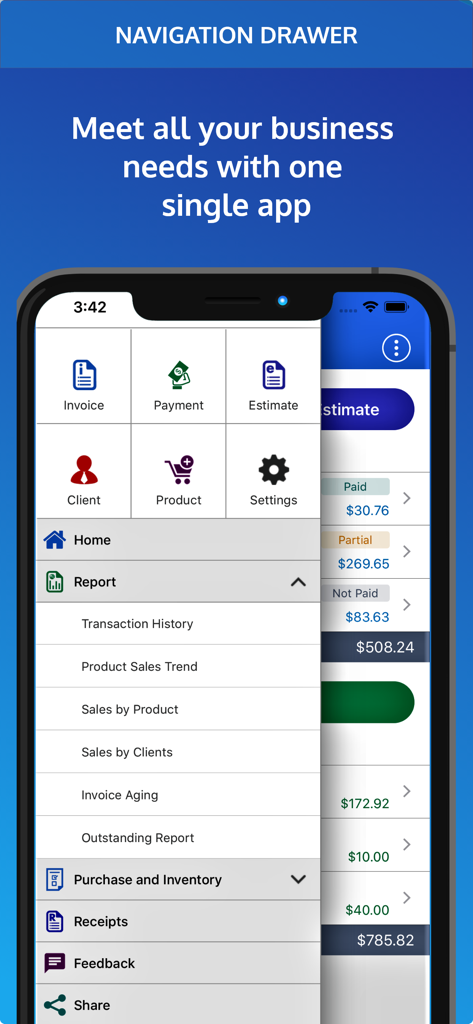
Invoice Pro. Invoice on the go - 請求書、支払い、ビジネスレポートのツールを表示するInvoice Proモバイルアプリのナビゲーションメニュー
請求書、支払い、ビジネスレポートのツールを表示するInvoice Proモバイルアプリのナビゲーションメニュー

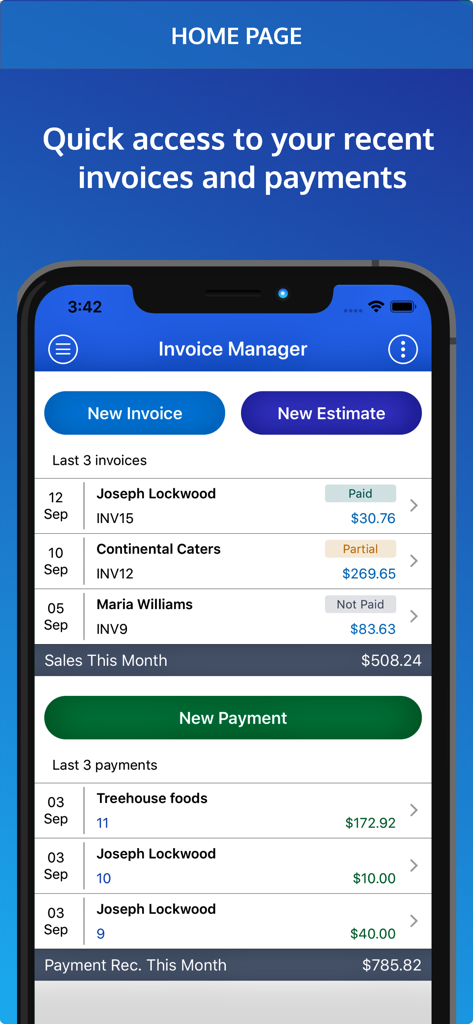
Invoice Pro. Invoice on the go - 最近の請求書と支払いを表示するInvoice Proアプリのダッシュボード(スマートフォン画面)
最近の請求書と支払いを表示するInvoice Proアプリのダッシュボード(スマートフォン画面)

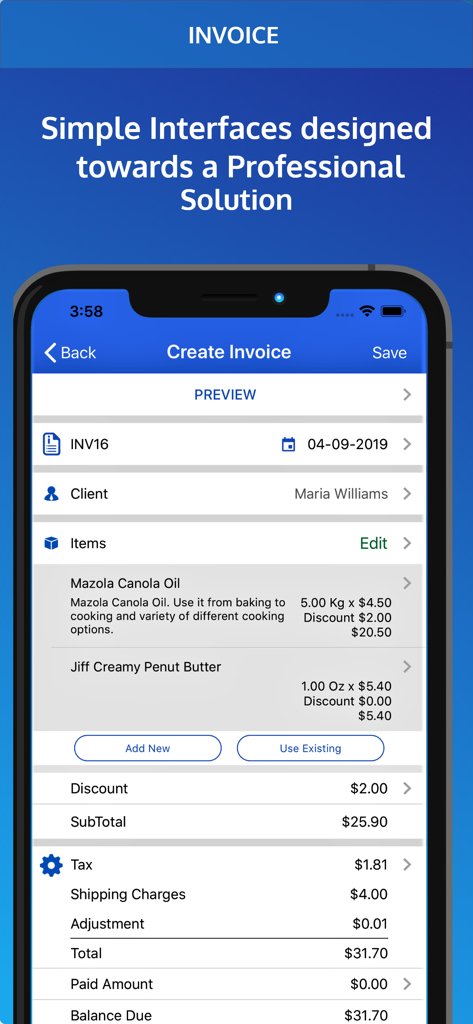
Invoice Pro. Invoice on the go - 項目別の請求内容と合計金額を表示するInvoice Proアプリの請求書作成画面
項目別の請求内容と合計金額を表示するInvoice Proアプリの請求書作成画面

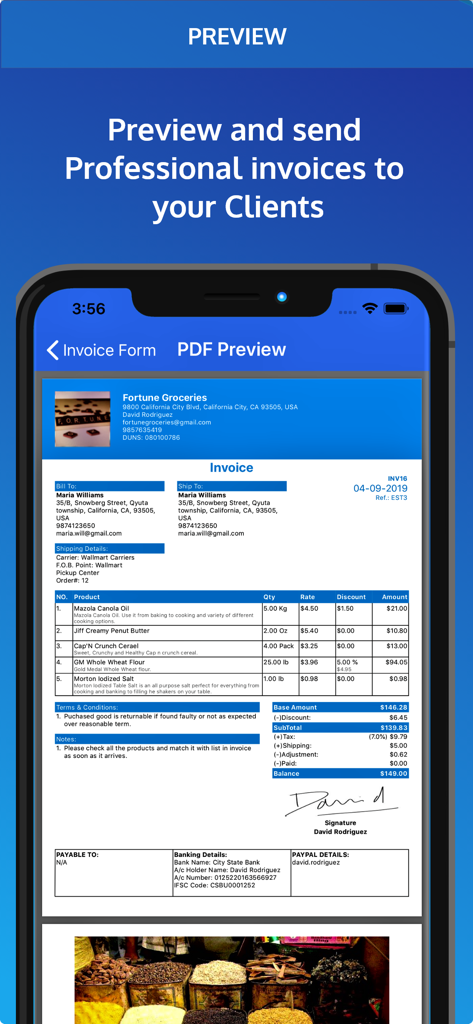
Invoice Pro. Invoice on the go - 項目別の請求内容とデジタル署名を含むプロ仕様の請求書プレビュー画面

項目別の請求内容とデジタル署名を含むプロ仕様の請求書プレビュー画面

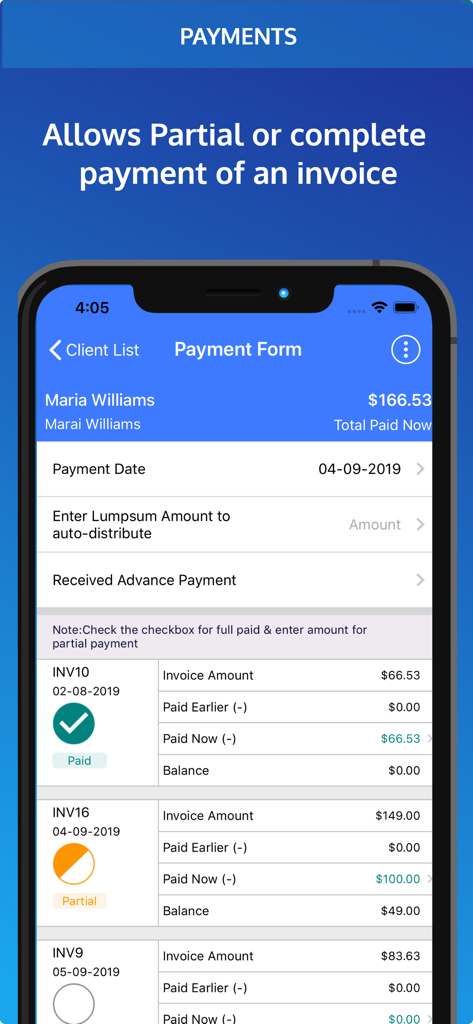
Invoice Pro. Invoice on the go - 一括および分割の請求支払いを記録するオプションを備えた、支払いフォーム画面
一括および分割の請求支払いを記録するオプションを備えた、支払いフォーム画面

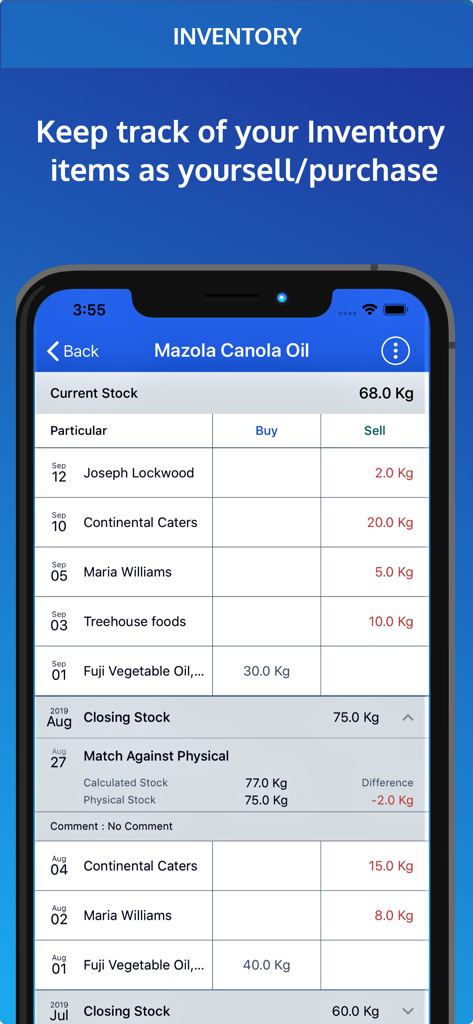
Invoice Pro. Invoice on the go - ビジネスアイテムの在庫管理と在庫レベルの追跡を表示するInvoice Proアプリのインターフェース
ビジネスアイテムの在庫管理と在庫レベルの追跡を表示するInvoice Proアプリのインターフェース

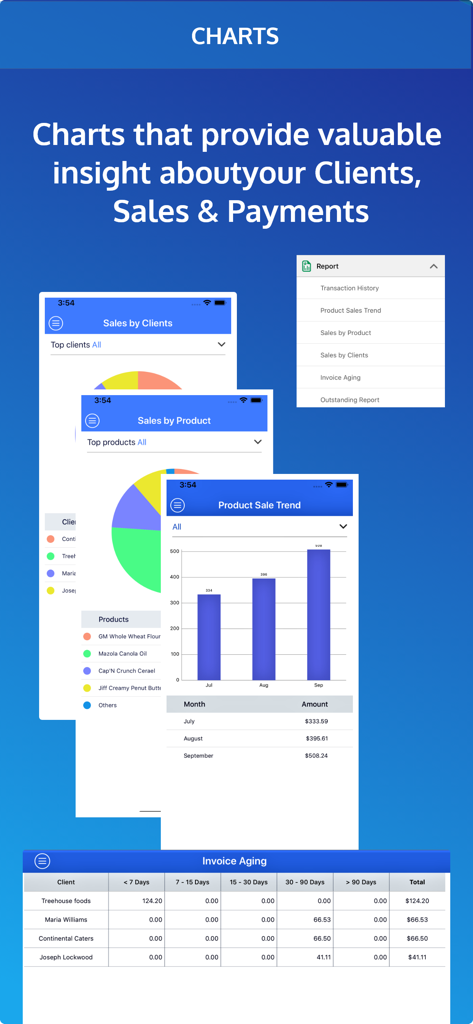
Invoice Pro. Invoice on the go - 売上の円グラフと製品販売傾向の棒グラフを表示するInvoice Proアプリのビジネス分析ダッシュボード

売上の円グラフと製品販売傾向の棒グラフを表示するInvoice Proアプリのビジネス分析ダッシュボード

説明

Invoice Manager is a complete app for managing invoices and Bills. Invoice manager app helps you right from raising an invoice to recording payment up to providing a receipt for the invoice. Generating invoice is simple and fast and you can create and send invoices immediately, track overdue invoices and make sure to get paid for your invoice on time. ESTIMATE / QUOTATION : You prepare and send an Estimate INVOICE : Convert that Estimate to an Invoice (or create a new one) PAYMENT : Record the payment received for that invoice Some Exclusive Features: ( Optional) INVENTORY: Inventory is automatically deducted as you create invoices RECEIPT : Send signed Receipts for the payment received PURCHASE: Manage your purchases. Add them to inventory. Keep track of payments to your vendors/ suppliers ADVANCE PAYMENT: Record Advance payments. Adjust them when invoicing Application Features - Generate PDF Invoice and mail to your clients directly. - Add Logo and Signature to your invoice - Set Due Dates on Invoice - Inventory tables automatically reflect current stock levels Payments and Receipts - Support for Lump sum Payments, Partial Payments and Combined Payment for multiple Invoices - Graphs show your cash-flow and your sales and payment cycle. Taxes and Discounts - Taxes and Discounts at Total Bill level or Item level - Discount in % or fixed amount Charts and Graphs - Analyse Invoice & Payment data - Client Receivable History over past few weeks / months - Which Products / Services & Clients generate maximum revenue - Invoice Aging Report helps analyse payments which are long overdue Purchase & Inventory - You can record your purchases and payments made to your suppliers - Manual entries are permitted to manage stock levels - Match your calculated stock levels against physical levels and correct discrepancies (e.g wastage, lost or defective items) Backup and Restore - Link your Dropbox account to Invoice Manager & Backup your data on Dropbox Export Invoice Data - Export details of invoice and payments as CSV and open it in Microsoft Excel Duplicate Invoices - Create duplicate of an existing invoice with a single tap - Say if similar invoice is to be generated again but with minor edits this new feature will save you some time and efforts - Invoices, Estimates and Purchase Entries all can be duplicated Advance Payments - Now you can enter the details of Advance Payments made to you or made by you. - Adjust these advance payments when you generate invoices Custom Fields - With this feature you can set customized name of fields on your PDF. PayPal.me - You can now take payments from your client via Paypal.me - Just provide us with your PayPal.me ID and there will be a Pay Now button on your PDF. - Payment is transferred by the client directly to your Paypal account. We DO NOT CHARGE anything to you or your client Draft - Create an Invoice,Purchase Order or Estimate and save it as draft for later use Shipping & Banking Details - Shipping Details : Order Number, Carrier Details & F.O.B Point. - Banking Details : Bank Name, Account number etc. In-App Details - All the features are free to try for 1 month - After one month you can subscribe for monthly or yearly packages - This app has auto-renewable subscription. - Subscription Details are as follows : 1. Monthly subscription: $3.99 2. Yearly subscription: $27.99 - Subscription will automatically renew itself unless auto-renew is turned off at least 24-hours before the end of the current period. Links to the privacy policy : http://www.simpleinvoicemanager.com/privacy Link to Terms of Service / Terms of Use: https://www.simpleinvoicemanager.com/tos.html

Download

ダウンロード: App Store

このページはアプリまたはその開発者の公式ページではなく、情報提供および論評を目的として作成された独立した編集出版物です。明示的に別段の記載がない限り、アプリおよびその開発者は、MWM、Apple、Google Play、アプリのパブリッシャー、またはアプリの開発者と提携、承認、後援、認可、またはその他の公式的な関係はなく、このページのいかなる内容も、アプリがMWMのサービスを使用して開発されたことを意味するものではありません。すべての商標、ロゴ、スクリーンショット、その他のコンテンツはそれぞれの所有者の財産です。