Jana Bank Mobile Banking
ダウンロード: App Store

このページはアプリまたはその開発者の公式ページではなく、情報提供および論評を目的として作成された独立した編集出版物です。明示的に別段の記載がない限り、アプリおよびその開発者は、MWM、Apple、Google Play、アプリのパブリッシャー、またはアプリの開発者と提携、承認、後援、認可、またはその他の公式的な関係はなく、このページのいかなる内容も、アプリがMWMのサービスを使用して開発されたことを意味するものではありません。すべての商標、ロゴ、スクリーンショット、その他のコンテンツはそれぞれの所有者の財産です。

ロゴ: Jana Bank Mobile Banking
ダウンロード: App Store

Jana Bank Mobile Banking

インドの口座を簡単に管理。高利回りFD、2クリックで明細書、実家への安全な請求書支払いまで、グローバルなライフスタイルに合わせたエリートバンキングを体験。

主要数値

ダウンロード

81K+

ユーザー評価

4.1/5

評価数

600

開発元

JANA SMALL FINANCE BANK LIMITED

カテゴリ

Finance

対応言語

1

最新バージョン

70

サイズ

87.7 MB

リリース日

2018年8月12日
機能

あなたのインドの銀行が、米国のあなたの生活に合わせて再設計されました

あなたの米国での生活とインドでの金融目標のギャップを、現代のNRIのために設計された強力で安全なオールインワンモバイルバンキングスイートで埋めましょう。

高利回り資産成長

世界中どこからでも2クリックで開設できるFDおよびRD口座で、業界をリードする金利を活用してインド・ルピーの貯蓄を最大化。

家族のためのリモートサポート

インドのご家族の光熱費の支払いを即座に行い、不動産ローンを管理し、携帯電話のチャージを処理することで、ルーツとのつながりを保ちましょう。

安全なクロスボーダーバンキング

高度なSIMバインディング、Face ID認証、エンタープライズグレードのAES-256暗号化により、すべてのトランザクションを保護し、完全な安心感を得られます。

以下のスクリーンショットと説明は、アプリの公式ストアリスティングから直接取得されたものであり、アプリ開発者の所有物です。

アプリストア

スクリーンショット
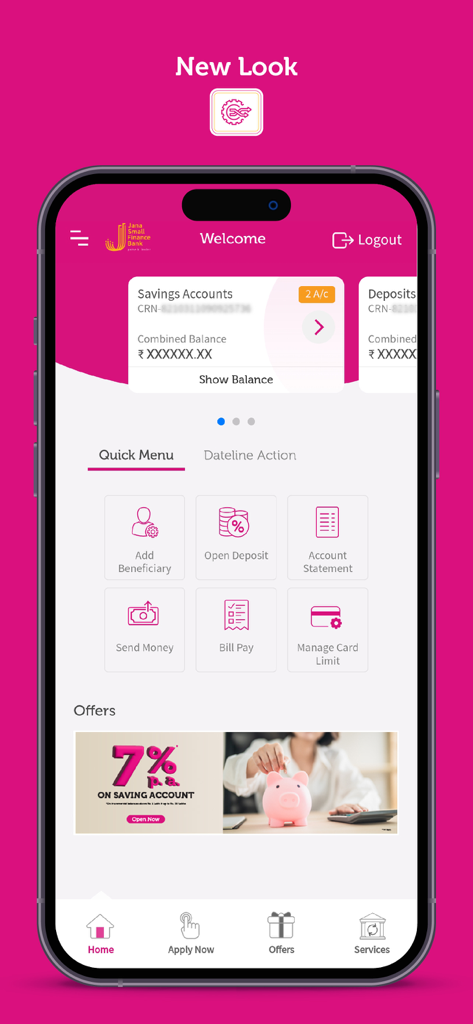
Jana Bank Mobile Banking - Jana Bankモバイルアプリのダッシュボード、口座残高、クイックメニューオプション、金利オファーを表示
Jana Bankモバイルアプリのダッシュボード、口座残高、クイックメニューオプション、金利オファーを表示

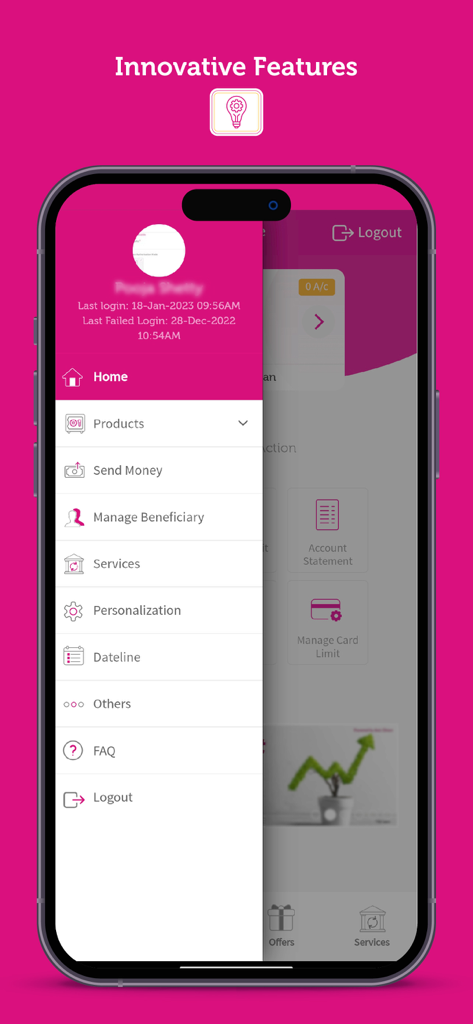
Jana Bank Mobile Banking - Jana Bankモバイルアプリのサイドナビゲーションドロワー、送金や受取人管理などの機能を表示
Jana Bankモバイルアプリのサイドナビゲーションドロワー、送金や受取人管理などの機能を表示

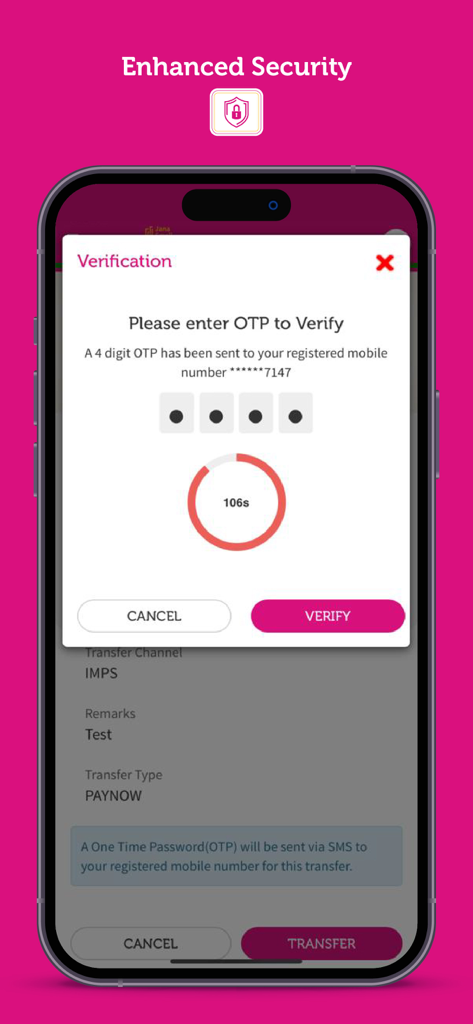
Jana Bank Mobile Banking - Jana Bank Mobile BankingアプリのOTP検証画面、強化されたセキュリティ機能を表示

Jana Bank Mobile BankingアプリのOTP検証画面、強化されたセキュリティ機能を表示

説明

This revamped version of Jana Bank Mobile Banking – Jana Small Finance Bank’s mobile banking application comes with more user-friendly and advanced features than its earlier version, ensuring a richer and more Intuitive experience for its users. We have a host of new features and services to make it a one stop shop for all your banking needs. Enriched with new banking and payment features, this version of the app is a complete package, which enables users to access and manage their accounts from anywhere, anytime. It enables the user to undertake Financial as well as Non-financial transactions. Experience the joy of Simple and Safe banking • 360 degree view of all the accounts held with Jana Small Finance Bank • Open an FD/RD in just 2 clicks • Download and Share account statement within 2 clicks • Manage your Cards at Convenience - Block/Unblock Card, Hotlist Card, Re-issue card, Set/Reset PIN, Manage Card Limit • Apply for Plethora of Loans – Housing Loan, Business Loan, 2 Wheeler loan etc. • Invest and manage your portfolio • Secure your Login with your Face ID and Fingerprint • 2 factor authentication for all transactions. End to End AES-256 bit Encryption • Set Payment reminders for Birthdays, Anniversaries, Rents on the go and never miss a Payment Secure Fund Transfers & Payments: * Quick fund transfers to any bank account without adding beneficiary * Easy bill payment and recharge – mobile recharge, DTH and utility bills * Pay your loan instalments on the go Other Banking Services: * Place Cheque book request * Submit 15G/H forms for your term deposits * Apply various filters to view transactions * Manage your Debit card on the go * Quick Payment and Recharge of Pre-paid and Post-paid Bills * Invest in Mutual Funds * Get personalized offers across loans Banking services made accessible in your Mobile phone. If you are an existing Online banking customer, get started in 3 easy steps: Download the Jana Mobile banking app from App store * Log in via MPIN, Set up Face ID/ Fingerprint * Log in subsequently for mobile banking through Face ID or Thumb (biometric) * SIM Binding feature for a secure banking experience If you are New to Jana Online banking; get registered in 3 quick steps: Step 1: Choose to register through Debit card OR CRN (If Registration is through Debit Card, there shall be a full access to the application. If the registration is through CRN, there shall only be view access and financial transactions are restricted). Step 2: The details of the Debit card and PIN shall be verified in case if the registration is through Debit card. If CRN is chosen as registration option, then CRN, Name and Date of Birth combination shall be verified Step 3: Post the verification is successful, set MPIN and confirm with the OTP. Our Digital team are still fine tuning the app to help you serve better Terms and conditions: https://www.janabank.com/terms-conditions//#online-banking To experience the ease and convenience of all the financial and non-financial services of a Bank branch, download the Jana Mobile Banking application now. For more details visit https://www.janabank.com. For any feedback, queries or issues pertaining to Jana Mobile Banking application please write to customercare@janabank.com or call at 18002080

Download

ダウンロード: App Store

このページはアプリまたはその開発者の公式ページではなく、情報提供および論評を目的として作成された独立した編集出版物です。明示的に別段の記載がない限り、アプリおよびその開発者は、MWM、Apple、Google Play、アプリのパブリッシャー、またはアプリの開発者と提携、承認、後援、認可、またはその他の公式的な関係はなく、このページのいかなる内容も、アプリがMWMのサービスを使用して開発されたことを意味するものではありません。すべての商標、ロゴ、スクリーンショット、その他のコンテンツはそれぞれの所有者の財産です。








