JUMP PAINT by MediBang

JUMP PAINT by MediBang

ダウンロード: App Store
ロゴ: JUMP PAINT by MediBang

JUMP PAINT:公式少年ジャンプ漫画を無料で描こう

週刊少年ジャンプ編集者による限定レッスンで漫画の技術をマスターしよう。プロ仕様のGペン、スクリーントーン、フォントを使って傑作を作り、iPhoneから直接公式コンテストに応募しよう。

開発元

MediBang inc.

カテゴリ

Entertainment

ダウンロード

1M+

ユーザー評価

4.5/5

評価数

11K+

対応言語

18

クリエイターズスタジオ内部

このインターフェースを利用する 1M+ 人のユーザー.

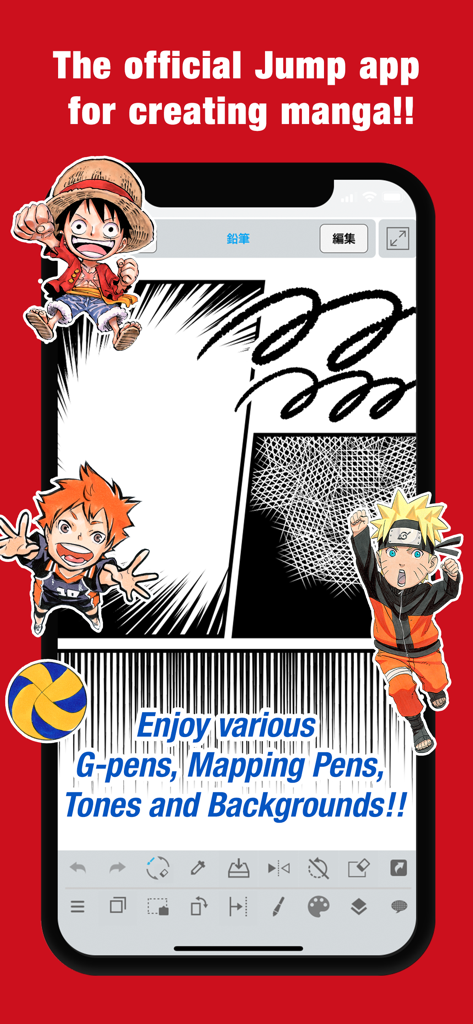
モバイルインターフェースのJUMP PAINTアプリ。漫画パネルや、ナルトやルフィのようなキャラクターが表示されています。
モバイルインターフェースのJUMP PAINTアプリ。漫画パネルや、ナルトやルフィのようなキャラクターが表示されています。

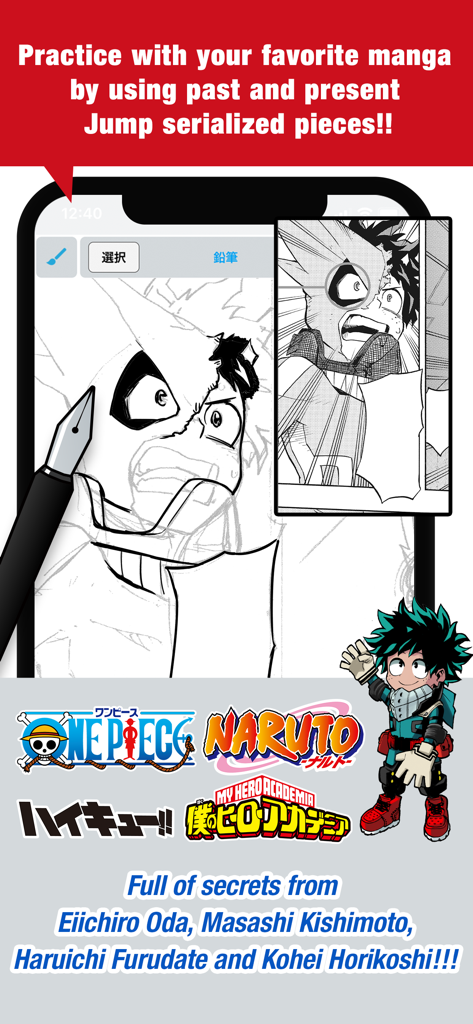
JUMP PAINTアプリの画面。僕のヒーローアカデミアのキャラクターや人気少年ジャンプシリーズのロゴと一緒に漫画の描画練習が表示されています。
JUMP PAINTアプリの画面。僕のヒーローアカデミアのキャラクターや人気少年ジャンプシリーズのロゴと一緒に漫画の描画練習が表示されています。

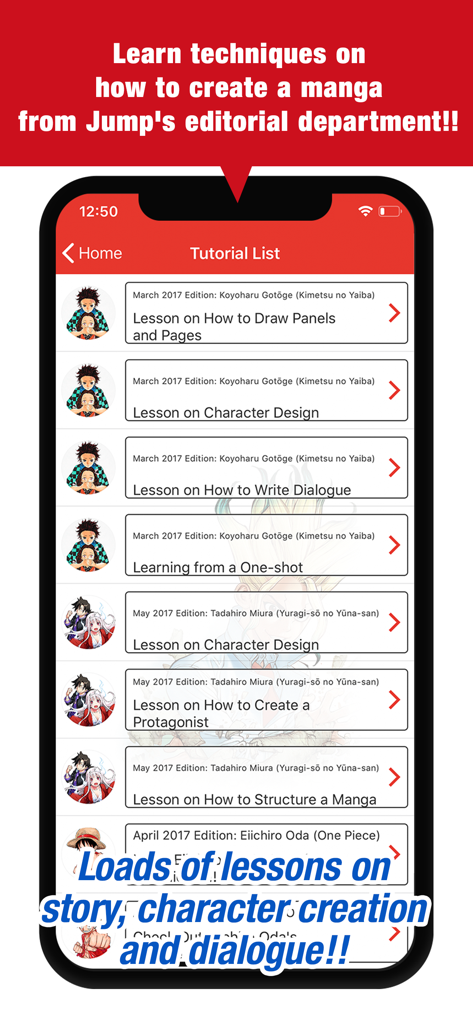
JUMP PAINTアプリのスクリーンショット。少年ジャンプの作家による公式漫画作成チュートリアルのリストが表示されています。

JUMP PAINTアプリのスクリーンショット。少年ジャンプの作家による公式漫画作成チュートリアルのリストが表示されています。

漫画の技術をマスターする

このアプリを際立たせるツール、 1M+ 人のユーザーが選択.

🖋️

プロ仕様の漫画ツール

本物のGペンや丸ペンを含む90種類以上の無料ブラシ、800以上のプロ仕様スクリーントーンや背景にアクセスできます。

🎓

週刊少年ジャンプのレッスン

世界トップクラスの漫画編集者から直接、ストーリーボード、キャラクターデザイン、セリフに関する限定チュートリアルで技術をマスターしましょう。

🏆

公式コンテストに応募する

世界中どこからでも、作品を公式ジャンプコンペティションに直接提出して、ファンからプロへの道を切り開きましょう。

アプリについて

について知っておくべきこと JUMP PAINT by MediBang.

説明

■A completely free app for creating official Weekly Shonen Jump manga and illustrations!! G-pens, Mapping Pens, Tones and Backgrounds are all free to use!! ■Learn techniques on how to create a manga from Jump's editorial department!! Loads of lessons on story, character creation and dialogue!! ■You can also enter Jump contests!! The app will give you information on each contest. Don't miss out!! What is JUMP PAINT? It's the ultimate app for creating manga and illustrations -- a collaboration between MediBang Paint (12 million downloads) and Weekly Shonen Jump. JUMP PAINT was developed to provide an environment for creators to draw anytime and anywhere using MediBang Paint's features. JUMP PAINT is the perfect paint software for creating illustrations and manga. It comes with many features to enjoy drawing illustrations and manga, like a multitude of brushes, materials and manga fonts. ■ Draw Anywhere!   ・With JUMP PAINT you can have almost all the features of a desktop painting program in your pocket.   ・Despite being packed with so many features, the interface of JUMP PAINT has been designed especially for the iPhone in mind.   ・The UI can be closed and opened in one touch.   ・The sleek interface allows users to change brush sizes or color modes with ease. ■ Painting Tools   ・90 free brushes!!   ・In addition to the Pen, Pencil, Watercolor, Blur, Smudge, G Pen, Mapping Pen, Rotation Symmetry and Edge Pens, we have added over 50 different kinds of brushes, including the Brush, Flat Brush, Round Brush, Acrylic, School Pen, and Soft Pastel.   ・Force Fade In and Out make your lines sharp even if you’re drawing with your fingers. ・Users can create their own custom brushes. ■ Pen Pressure on the iPhone   ・The 3D Touch on iPhone 6 and iPhone 6 Plus is now supported to enable you to use pen pressure when drawing. ■ Free Resources ・800 different types of free tones and backgrounds. ・Premade clouds, buildings, and vehicles are included. ・Tones can be added with one simple touch. ■ Layers ・Comes with layers complete with blending modes. ・Can be used to preserves different elements of you work. ■ Comic Fonts ・Use them to change the atmosphere of your comics. ・Use them to define your character’s moods or personalities. ・50 fonts used by industry professionals available. ■Comic Creation ・Just drag across the screen to create comic panels. ・Freely transform their shape. ■ User Friendly ・Includes customizable shortcuts ・Geared towards first time users. ・Has an interface designed to give artists room to draw. ・One touch to access full-screen mode. ■ Other Tools ・Guides for drawing in perspective, or creating lines, and curves. ・Correction to stabilize your line strokes. ■ Photo Reference   ・You can take photos in the app and use them as references on a different layer.   ・Use them for reference or learning how to draw new things. ■ Cloud Storage ・You can backup and manage your data safely. ・Easily transfer your work. ■ Manage Project ・Save and manage multipage documents. ■ Syncability ・You can sync your preset settings with the PC version of JUMP PAINT. ■ Team Creation ・You can collaborate on work with friends no matter where you are. ■ Auto Recovery ・Your data is automatically backed up if your device crashes. IMPORTANT In order to use the app’s cloud features a MediBang account is required(https://medibang.com/). Recommended Specs   ・iPhone 5s and above

最新バージョン

6.4

サイズ

81.2 MB

リリース日

2017年6月22日

自分だけの少年ジャンプ伝説を描く準備はできたか?

週刊少年ジャンプ編集チームの公式ツール、ブラシ、プロのレッスンを使用する1200万人以上のクリエイターに参加しよう。ファンから漫画家への旅を今すぐ始めよう – 完全無料。

ダウンロード: App Store
FAQ

よくある質問

について知っておくべきこと JUMP PAINT by MediBang

JUMP PAINTとは何ですか?

JUMP PAINTは、週刊少年ジャンプの公式マンガやイラストを制作するための、完全に無料のアプリです。MediBang Paintと週刊少年ジャンプの協力により、ツール、ブラシ、素材、マンガフォントが提供されています。

JUMP PAINTは無料で使用できますか?

はい、JUMP PAINTは完全に無料のアプリです。マンガやイラスト制作のために、Gペン、丸ペン、トーン、背景などを無料で提供しています。

JUMP PAINTではどのような描画ツールが利用できますか?

JUMP PAINTには、ペン、鉛筆、水彩、Gペン、丸ペン、アクリルなど、90種類以上の無料ブラシが含まれています。カスタムブラシを作成したり、正確な線を描くための「フェードイン・フェードアウト」のような機能を利用することもできます。

JUMP PAINTはマンガ制作のための学習リソースを提供していますか?

はい、JUMP PAINTはマンガ制作のための豊富な学習リソースを提供しています。ジャンプ編集部が提供するストーリー、キャラクターデザイン、セリフに関するレッスンがアプリ内で直接利用できます。

JUMP PAINTを通じてマンガコンテストに応募できますか?

はい、JUMP PAINTアプリから直接ジャンプコンテストに応募できます。各コンテストの情報が提供されており、クリエイターが作品を応募する機会を把握できます。

JUMP PAINTはiPhoneでペン圧に対応していますか?

はい、JUMP PAINTは互換性のあるiPhoneモデルでペン圧に対応しています。具体的には、iPhone 6およびiPhone 6 Plusの3D Touch機能により、アプリ内で描画する際にペン圧を適用できます。

JUMP PAINTでは、背景やトーンのためにどのような無料リソースが利用できますか?

JUMP PAINTでは、800種類もの無料トーンや背景を提供しています。これらのリソースには、あらかじめ用意された雲、建物、乗り物などが含まれており、ワンタッチで簡単に作品に追加できます。

JUMP PAINTのユーザーはプロジェクトで共同作業できますか?

はい、JUMP PAINTではチーム制作が可能で、どこからでも友人と共同で作業できます。この機能により、複数のユーザー間での共同制作プロジェクトが容易になります。

JUMP PAINTのクラウド機能を使用するにはMediBangアカウントが必要ですか?

はい、JUMP PAINTのクラウド機能にアクセスするにはMediBangアカウントが必要です。クラウドストレージやデータバックアップなどの機能を利用するには、medibang.comでアカウントを作成する必要があります。

JUMP PAINTはコミック用のどのようなフォントを提供していますか?

JUMP PAINTは50種類のプロフェッショナルなコミックフォントを提供しています。これらのフォントは、コミックの雰囲気を設定したり、キャラクターのムードや個性を効果的に表現したりするのに役立ちます。

App information, icons, screenshots, and descriptions displayed on this page are sourced from the Apple App Store and are the property of their respective developers. Download estimates and rankings are based on MWM's proprietary models and may not reflect actual figures. This page is provided for informational and analytical purposes only.

Believe this page infringes your intellectual property? File a dispute