
このページはアプリまたはその開発者の公式ページではなく、情報提供および論評を目的として作成された独立した編集出版物です。明示的に別段の記載がない限り、アプリおよびその開発者は、MWM、Apple、Google Play、アプリのパブリッシャー、またはアプリの開発者と提携、承認、後援、認可、またはその他の公式的な関係はなく、このページのいかなる内容も、アプリがMWMのサービスを使用して開発されたことを意味するものではありません。すべての商標、ロゴ、スクリーンショット、その他のコンテンツはそれぞれの所有者の財産です。


ダウンロード
100M+ユーザー評価
評価数
2.4M開発元
カテゴリ
Photo & Video対応言語
23最新バージョン
11.2.2サイズ
316.4 MBリリース日
2014年6月22日Lightroom: AI Photo Editor 主要機能分析
テックアナリストが評価する、モバイル写真編集の次世代標準
AIスマート編集
AIが最適な編集を提案し、ワンタップで写真の品質を向上させるため、写真編集初心者でもプロ並みの結果を簡単に得られます。
AIオブジェクト除去
写真から不要なオブジェクトや写り込みをAIが簡単に削除し、完璧な構図を作成できます。モバイルでの手軽な修正に最適です。
背景ぼかし機能
写真の背景をぼかして被写体を際立たせ、ポートレート写真のようなプロフェッショナルな仕上がりを簡単に実現できます。
プロ仕様のカラー補正
世界中のクリエイターが作成したプリセットを利用したり、露出、色相、彩度などの詳細な調整を行って、写真の雰囲気を思い通りに変化させ、独自のスタイルを表現できます。
高機能動画編集
写真と同様の強力な編集ツール(光、色、プリセットなど)を動画コンテンツに適用し、モバイルで撮影した動画の質を高めて一貫したビジュアルスタイルを維持できます。
複数写真の一括処理
複数の写真に同じ編集設定を一度に適用できるため、イベントや旅行など、大量の写真を編集する際の作業効率を大幅に向上させ、アルバム全体の統一感を保てます。
光量コントロール
露出、ハイライト、シャドウなどを細かく調整することで、写真の明るさとコントラストを最適化し、暗い写真や明るすぎる写真も自然な見栄えに補正できます。
コミュニティプリセット
他のユーザーが共有する多様な写真フィルターやプリセットを探索し、インスピレーションを得ながら自身の写真編集に適用することで、新しい表現方法を発見できます。
よくある質問
について知っておくべきこと Lightroom: AI Photo Editor
Is Adobe Lightroom a free app?
Yes, Adobe Lightroom is a free photo and video editor. It helps users enhance photos and videos with powerful AI editor tools and creative controls.
What AI editing features does Adobe Lightroom offer?
Adobe Lightroom offers AI editor tools such as Generative Remove for object removal, Quick Actions for suggested edits, and Adaptive Presets for enhancing specific photo elements.
Can I remove unwanted objects from photos using Lightroom?
Yes, Adobe Lightroom features Generative Remove, an AI photo eraser tool. It allows users to remove unwanted distractions or objects from photos with a few taps.
Does Adobe Lightroom provide video editing capabilities?
Yes, Adobe Lightroom includes video editing features. Users can apply creative energy to clips using tools for light, color, and presets to match their style.
How does Adobe Lightroom help improve portrait photos?
Adobe Lightroom offers Adaptive Presets for portraits and retouching tools. Users can enhance portraits with one-tap adjustments, including options for blemishes, skin, teeth, and eyes.
Can I apply edits to multiple photos at once in Adobe Lightroom?
Yes, Adobe Lightroom enables batch editing. Users can apply edits once and then fix photos in batches to maintain consistent photo edits across multiple images quickly and easily.
How can I blur the background in my photos using Lightroom?
Adobe Lightroom allows users to blur photo backgrounds for a polished look. It provides a "Background Blur" tool with various shapes and adjustable blur amounts.
Does Adobe Lightroom allow users to adjust sky elements?
Yes, Adobe Lightroom features Adaptive: Sky presets that instantly transform the sky in photos. Users can enhance specific parts of a photo like the sky.
Where can I find the Terms & Conditions for Adobe Lightroom?
The Terms & Conditions for Adobe Lightroom are available at http://www.adobe.com/go/terms_linkfree_en. This link is provided within the app's description.
Does Adobe Lightroom offer color correction tools?
Yes, Adobe Lightroom provides tools to boost color with precision. Users can adjust hue, saturation, color grading, and temperature to achieve the desired look for their photos.
以下のスクリーンショットと説明は、アプリの公式ストアリスティングから直接取得されたものであり、アプリ開発者の所有物です。
アプリストア
スクリーンショット

プロ品質の編集
ユーザーは複数のプリセットを適用して写真にプロのような仕上がりを与え、さらにエディターズチョイスの評価が本アプリの品質を保証します。

AIで不要物を削除
ユーザーはGenerative Remove機能を使って写真から不要なオブジェクトをAIで正確に削除し、被写体を際立たせることができます。

空を一瞬で加工
本アプリは「空」に特化したアダプティブプリセットを多数提供し、ユーザーは空の表現を瞬時に劇的に変更することが可能です。

簡単な顔のレタッチ
ユーザーはタップ操作で顔の肌のシミやニキビなどの気になる部分を簡単に修正し、自然で美しい仕上がりを実現できます。

ポートレートを強化
ユーザーは「ポートレート」に最適化されたアダプティブプリセットをワンタップで適用し、写真の雰囲気を一変させることができます。
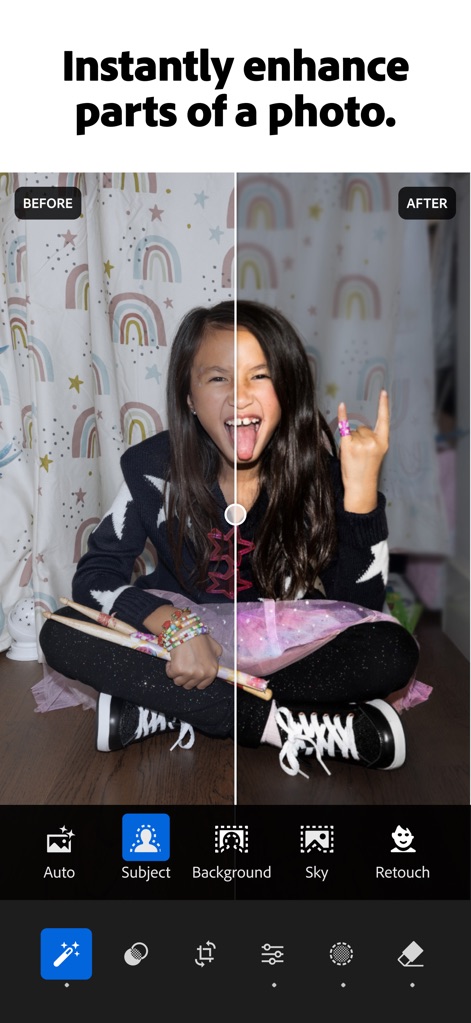
写真の部分補正
ユーザーは被写体や背景、空といった写真の特定の部分を自動的に選択し、ピンポイントで細かく編集することで理想の表現を追求できます。

背景を素早くぼかす
本アプリは背景のぼかし量を細かく調整できる機能を提供し、さらに「円形」や「リング」など複数のぼかし形状を選択して、プロのようなボケ効果を演出できます。
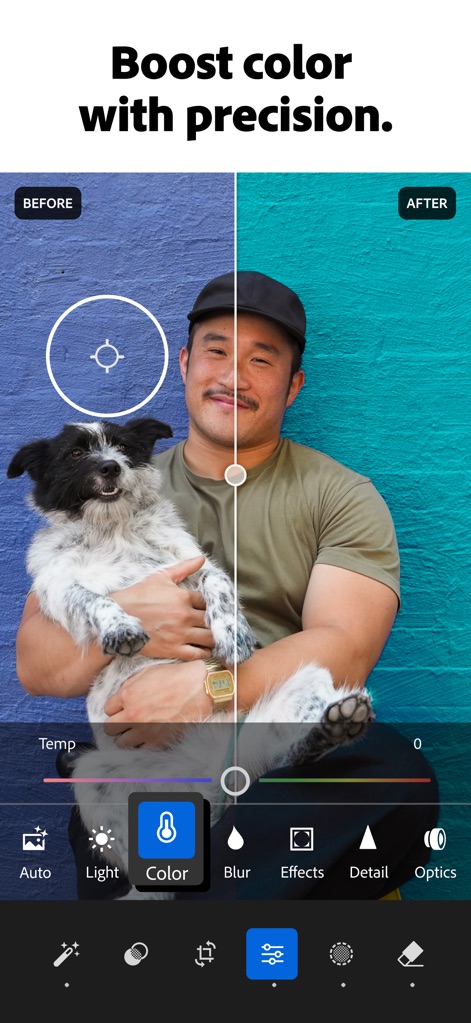
色を精密に調整
ユーザーは色温度を細かく調整できるツールを使い、写真全体の色彩バランスを最適化し、被写体の魅力を最大限に引き出すことが可能です。

動画もスタイリッシュに
本アプリは写真編集ツールと同じ感覚で動画の色味を調整できる機能を搭載し、ユーザーは一貫したスタイルで動画コンテンツを制作できます。
説明
Download
類似アプリ
似た機能とユーザー体験を持つアプリ

MIX-Photo Editor & Filters
灏 徐

Presets for Lightroom - FLTR
Onelight Apps CY Ltd

Colorby: AI Photo Color Editor
Zhanghan Ke

PRESETS: Filters for Pictures
Gustas Brazaitis

Edith: Presets for Lightroom
MWM

Soft Focus Lite 〜beauty selfie
handyCloset Inc.

BerryFilm - Korean Style Cam
Seungyun Kim

Presets for Lightroom: Filters
Alenrom sp. z o.o.

Video Filters Photo Editor TON
Onelight Apps CY Ltd
このページはアプリまたはその開発者の公式ページではなく、情報提供および論評を目的として作成された独立した編集出版物です。明示的に別段の記載がない限り、アプリおよびその開発者は、MWM、Apple、Google Play、アプリのパブリッシャー、またはアプリの開発者と提携、承認、後援、認可、またはその他の公式的な関係はなく、このページのいかなる内容も、アプリがMWMのサービスを使用して開発されたことを意味するものではありません。すべての商標、ロゴ、スクリーンショット、その他のコンテンツはそれぞれの所有者の財産です。