
このページはアプリまたはその開発者の公式ページではなく、情報提供および論評を目的として作成された独立した編集出版物です。明示的に別段の記載がない限り、アプリおよびその開発者は、MWM、Apple、Google Play、アプリのパブリッシャー、またはアプリの開発者と提携、承認、後援、認可、またはその他の公式的な関係はなく、このページのいかなる内容も、アプリがMWMのサービスを使用して開発されたことを意味するものではありません。すべての商標、ロゴ、スクリーンショット、その他のコンテンツはそれぞれの所有者の財産です。


ダウンロード
250k+ユーザー評価
評価数
1.8K開発元
カテゴリ
Utilities対応言語
32最新バージョン
1.9サイズ
203.1 MBリリース日
2025年3月28日リアルタイム世界探索アプリの主要機能と評価
Live Earth Camera: 詳細分析
リアルタイム世界探索
ユーザーは世界中の公開ウェブカメラをリアルタイムで視聴でき、遠隔地からの視覚的な探索を可能にします。
カスタムカメラインポート
ユーザーは、.m3u/.jsonファイルまたは直接リンクを使用して、独自の厳選されたウェブカメラを追加し、視聴体験をカスタマイズできます。
プレミアム機能(ストリートビュー・アースビュー)
プレミアムユーザーは、無制限のストリートビューとアースビューを利用でき、より没入感のある探索体験が可能です。
インタラクティブな3D地球モデル
本アプリは、インタラクティブな3D地球モデルを通じて、任意の場所からカメラを選択し、世界を視覚的に探索することを可能にします。
グローバルマップからのカメラ選択
本アプリは、都市の通り、ビーチ、ランドマーク、街並みなど、世界中のウェブカメラをグローバルマップから直感的に選択できる機能を提供します。
お気に入りリスト
ユーザーは、お気に入りのカメラをブックマークし、必要なときにいつでも簡単にアクセスできます。
人気のライブストリーム
本ツールは、世界中で最も視聴されている人気のライブストリームにアクセスする機能を提供します。
広告なし体験
プレミアムプランでは、ユーザーは広告なしでアプリケーションを利用でき、中断のない視聴体験を享受できます。
よくある質問
について知っておくべきこと Live Earth Camera
Does Live Earth Camera allow users to explore the world in real-time?
Yes, Live Earth Camera allows users to explore the world in real-time. It provides access to public webcams globally through an interactive 3D Earth model. Users select a camera from any location to start watching.
Does Live Earth Camera come with preloaded webcams?
No, Live Earth Camera does not include a preloaded list of cameras. Users must import their own webcam sources by adding links manually or uploading camera collections via supported file formats.
How can users add their own webcams to Live Earth Camera?
Users can add their own webcams to Live Earth Camera by using .m3u or .json files, or by providing direct links. This feature enables personalized content viewing within the app.
What are the main features of the Live Earth Camera app?
Live Earth Camera offers key features including a Global Map with Webcams, access to Popular Cams, a Saved List for favorites, and Camera Import functionality for user-provided streams.
What are the subscription costs for Live Earth Camera Premium?
Live Earth Camera offers a weekly subscription for $4.99 and an annual subscription for $39.99. These options provide premium access to additional features.
Can Live Earth Camera users save their favorite webcams?
Yes, Live Earth Camera allows users to bookmark favorite cameras using the 'Saved List' feature. This provides easy access to preferred live streams anytime.
What benefits does Live Earth Camera Premium offer?
The Live Earth Camera Premium upgrade provides unlimited Street View, unlimited Earth View, unlocks all themes, and removes advertisements for an enhanced user experience.
Who is responsible for content submitted to Live Earth Camera?
Users are solely responsible for any content, including camera URLs and metadata, submitted to Live Earth Camera. The app does not verify ownership or legality of submitted streams.
以下のスクリーンショットと説明は、アプリの公式ストアリスティングから直接取得されたものであり、アプリ開発者の所有物です。
アプリストア
スクリーンショット

地球の3Dモデルで世界中のライブカメラを探索し、選択した都市のリアルタイム映像を楽しめます。
世界をライブ探索
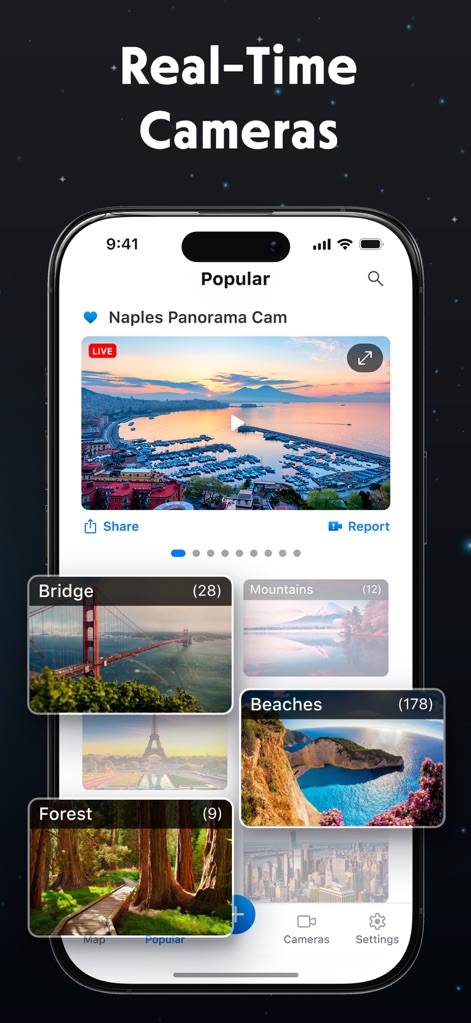
世界中で人気のライブストリームを閲覧し、美しい景色や都市のパノラマ映像をカテゴリ別に発見できます。
人気のライブ映像
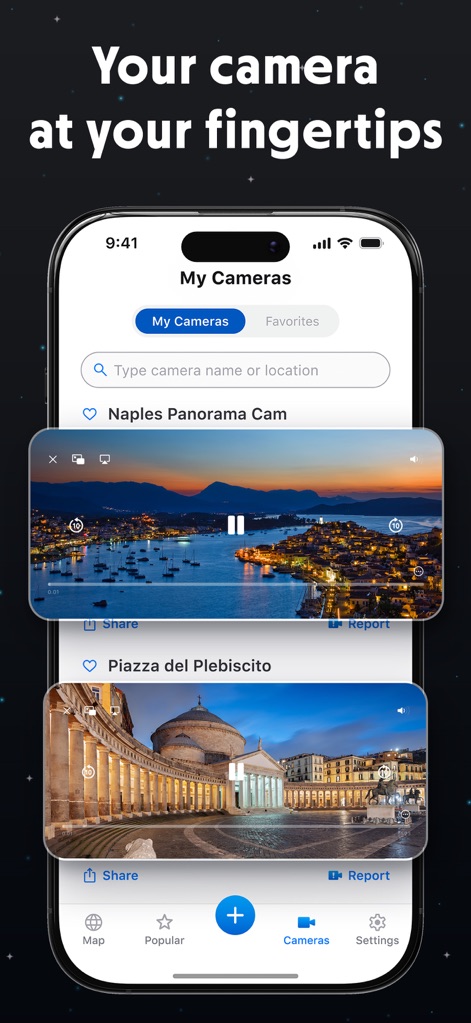
ユーザーは自分のお気に入りのカメラを保存・整理し、手動でURLを追加したり、コレクションをインポートしてカスタムリストを作成できます。
マイカメラを管理
説明
Download
類似アプリ
似た機能とユーザー体験を持つアプリ
LiveCam : Live Earth Camera
FS COOL HOUSE LLP

AIDA Cruises
AIDA Cruises - German Branch of Costa Crociere S.p.A.

Webcams – EarthCam
EarthCam, Inc.
Planet Cam: Earth Live Webcams
Heitz Bruno

Whale: Video Chat & Adventure
Taiki Shuho

iSpy Cameras
SKJM, LLC

Webcams World View: Discovery
Travel And Play OOO

Live Cams - HD
EarthCam, Inc.

Explore.org: Live Animal Cams
explore Annenberg LLC
このページはアプリまたはその開発者の公式ページではなく、情報提供および論評を目的として作成された独立した編集出版物です。明示的に別段の記載がない限り、アプリおよびその開発者は、MWM、Apple、Google Play、アプリのパブリッシャー、またはアプリの開発者と提携、承認、後援、認可、またはその他の公式的な関係はなく、このページのいかなる内容も、アプリがMWMのサービスを使用して開発されたことを意味するものではありません。すべての商標、ロゴ、スクリーンショット、その他のコンテンツはそれぞれの所有者の財産です。