Lyric Creator
Lyric Creator
ダウンロード: App Store

このページはアプリまたはその開発者の公式ページではなく、情報提供および論評を目的として作成された独立した編集出版物です。明示的に別段の記載がない限り、アプリおよびその開発者は、MWM、Apple、Google Play、アプリのパブリッシャー、またはアプリの開発者と提携、承認、後援、認可、またはその他の公式的な関係はなく、このページのいかなる内容も、アプリがMWMのサービスを使用して開発されたことを意味するものではありません。すべての商標、ロゴ、スクリーンショット、その他のコンテンツはそれぞれの所有者の財産です。


ロゴ: Lyric Creator
ダウンロード: App Store

Lyric Creator

カシオ CT-S1000V の究極のコンパニオン。カスタムボーカリストをデザインし、詳細な音素を編集し、あなたの歌詞とハードウェアのギャップをプロフェッショナルなリズムコントロールで埋めましょう。

主要数値

ダウンロード

2K+

ユーザー評価

3.8/5

評価数

0

開発元

CASIO COMPUTER CO., LTD.

カテゴリ

Music

対応言語

2

最新バージョン

2.0.2

サイズ

396.5 MB

リリース日

2022年1月20日
機能

ボーカルシンセシスをマスターする

カシオ CT-S1000V の究極のコンパニオン。精密な歌詞プログラミングとカスタムボーカリストデザインで、テキストとサウンドのギャップを埋めましょう。

直感的な歌詞プログラミング

ハードウェアメニューはスキップ。歌詞を直接入力またはインポートし、ドラッグ&ドロップのグリッドを使用して音節の音符値を割り当て、完璧なリズムフレーズを作成します。

オリジナルボーカリストを作成

独自の 10 秒 WAV サンプルをアップロードして、カスタムボーカリストパッチを作成します。年齢、性別、ビブラートを微調整して、際立つシグネチャーサウンドを作りましょう。

以下のスクリーンショットと説明は、アプリの公式ストアリスティングから直接取得されたものであり、アプリ開発者の所有物です。

アプリストア

スクリーンショット
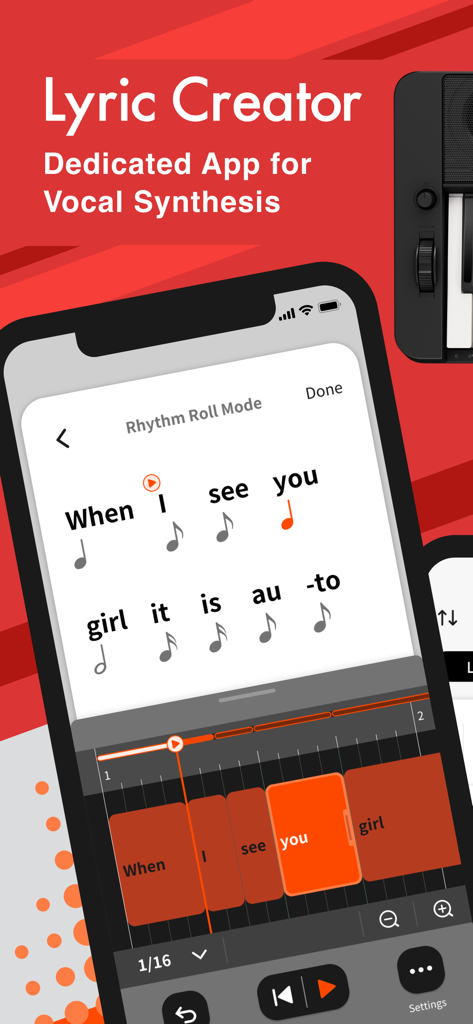
Lyric Creator - Rhythm Roll Mode の音節を音符値に割り当てた Lyric Creator アプリのインターフェースが表示されている
Rhythm Roll Mode の音節を音符値に割り当てた Lyric Creator アプリのインターフェースが表示されている

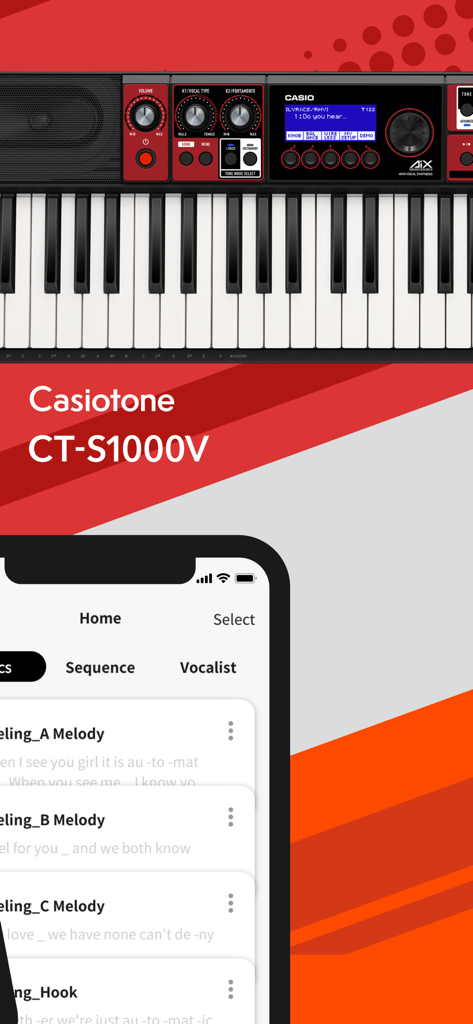
Lyric Creator - カシオ CT-S1000V キーボードと並べて表示されたスマートフォン上の Lyric Creator アプリのインターフェース
カシオ CT-S1000V キーボードと並べて表示されたスマートフォン上の Lyric Creator アプリのインターフェース

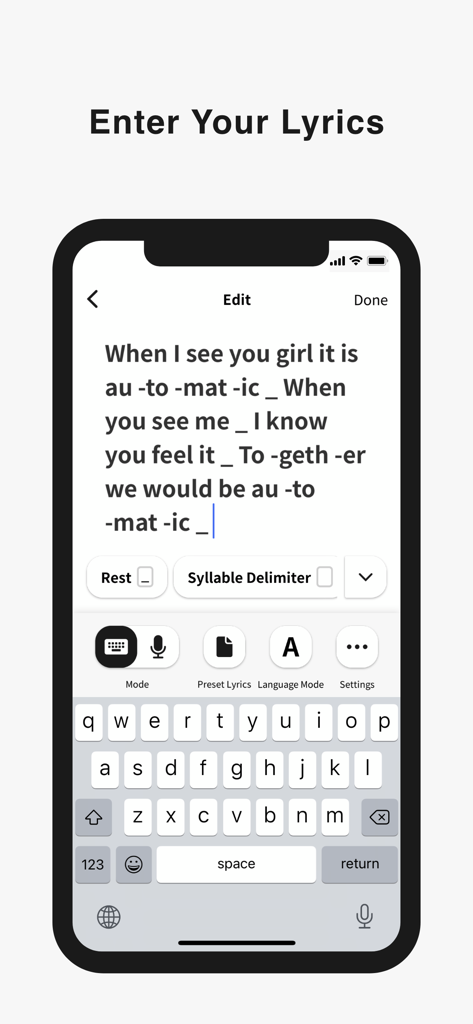
Lyric Creator - 携帯電話に表示された Lyric Creator アプリのインターフェース。歌詞の入力と、音節の区切りを含むフォーマット
携帯電話に表示された Lyric Creator アプリのインターフェース。歌詞の入力と、音節の区切りを含むフォーマット

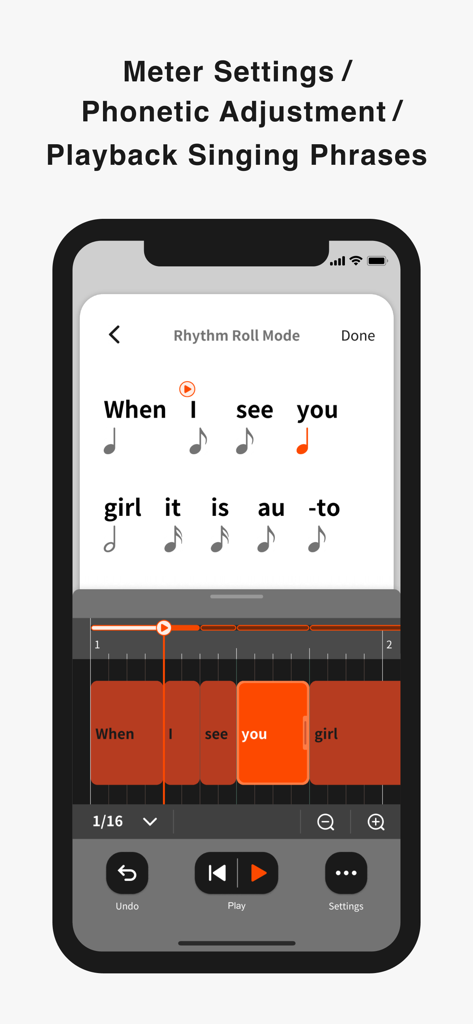
Lyric Creator - ボーカルフレーズのタイミングとメーターを調整するための Rhythm Roll Mode インターフェースを表示する Lyric Creator アプリのスクリーンショット
ボーカルフレーズのタイミングとメーターを調整するための Rhythm Roll Mode インターフェースを表示する Lyric Creator アプリのスクリーンショット

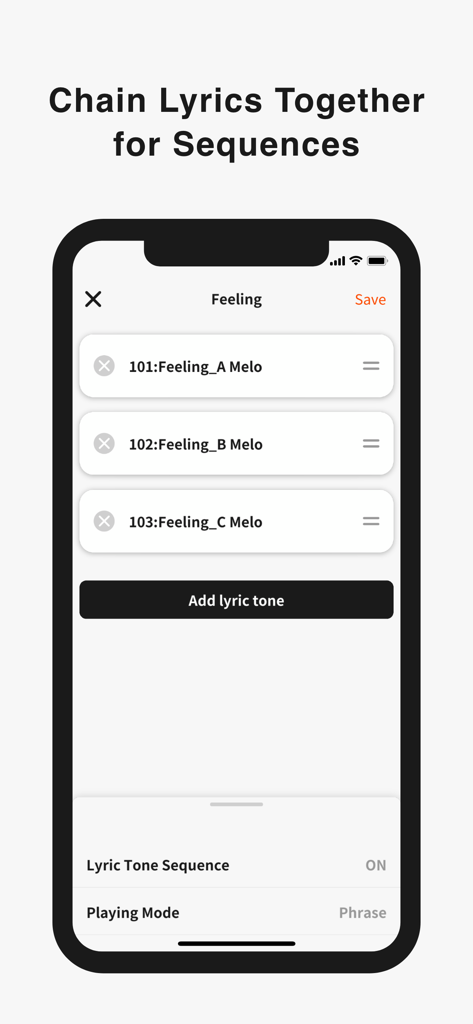
Lyric Creator - 音楽シーケンスのために連鎖された歌詞トーンのリストを表示する Lyric Creator アプリのインターフェース
音楽シーケンスのために連鎖された歌詞トーンのリストを表示する Lyric Creator アプリのインターフェース

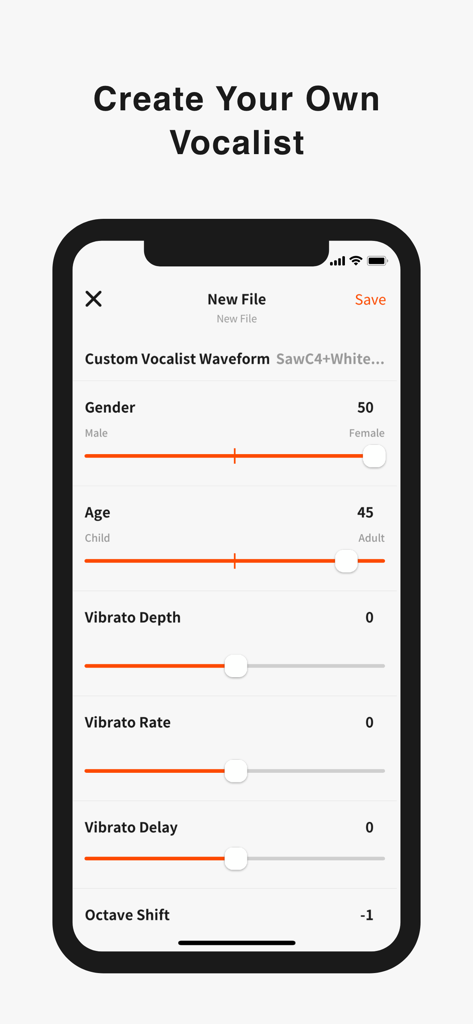
Lyric Creator - 年齢、性別、ビブラートコントロールでボーカリストをカスタマイズするための Lyric Creator アプリのインターフェース
年齢、性別、ビブラートコントロールでボーカリストをカスタマイズするための Lyric Creator アプリのインターフェース

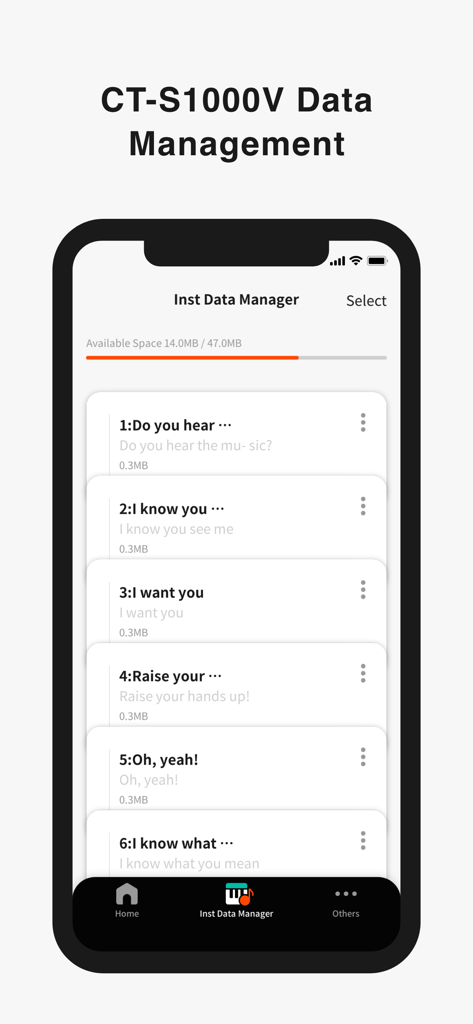
Lyric Creator - カシオキーボード用の保存された歌詞ファイルのリストを含む Instrument Data Manager を表示する Lyric Creator アプリのインターフェース

カシオキーボード用の保存された歌詞ファイルのリストを含む Instrument Data Manager を表示する Lyric Creator アプリのインターフェース

説明

Enter Your Lyrics Favorite song lyrics and original creations alike can be entered in English and Japanese using your iOS device via Casio’s own Lyric Creator app. This text is automatically divided into syllable units (though you can also assign divisions manually and group multiple syllables together), and after exporting the resulting data to your CT-S1000V, you’re ready to play. Set the Meter In Phrase Mode, the playback meter of the lyrics is determined by assigning note values (8th notes, quarter notes, etc.) to the individual syllable units and inserting rests. In addition to the traditional input of note symbols, you can now also edit the note values by visually dragging boxes along grid lines for more intuitive control. Individual lyric tones include tempo data, which can be adjusted both during the playback of singing phrases in the app as well as when playing on the CT-S1000V. Tempo can also be synced to the MIDI clock from your DAW or other external MIDI device to ensure that your vocal phrasing always remains in time regardless of how adventurous you get. Get Granular with Phrasing and Diction Users with the appetite for a truly granular approach can go even deeper and edit the phonemes that comprise individual syllables. And besides crafting clearer vocal diction, this process can be used to approximate regional accents or mimic the pronunciation of words in languages other than English and Japanese. (Note that the available phoneme library consists only of sounds that occur in standard English and Japanese.) Playback Singing Phrases Preview lyrics phrases directly in the app, in any tempo. Instantly check the rhythm and how the lyric phrase will sound before transferring the lyric data to an instrument. Chain Lyrics Together for Longer Sequences While Lyric Creator places a limit on the length of lyric that can be entered (up to 100 eighth-note syllables), once uploaded to your CT-S1000V, individual lyrics can be chained together into much longer sequences. This function allows you to fine tune individual sections at the input stage before combining them within your CT-S1000V to create a complete song. Create Your Own Vocalists The Lyric Creator app can also be used to transform a WAV audio sample (16bit/44.1kHz, mono/stereo, max. 10 seconds in length) stored within your mobile device into an original Vocalist patch that can then be loaded into the CT-S1000V. The editing interface allows you to set characteristics such as age, gender, vocal range, and vibrato. The CT-S1000V’s 22 Vocalist presets have each been designed for maximum clarity of enunciation by blending different waveforms with elements such as white noise, and as such User Vocalist waveforms may not achieve the same level of articulation. But with some experimentation you can create new sounds, including abstract ones akin to the CT-SV1000V’s Animal preset. Connecting the CT-S1000V to Your Smart Device Once the Lyric Creator app is installed on your smartphone or tablet, you can start transferring lyrics, sequences, vocal samples, etc., by connecting your device to your CT-S1000V via a USB cable. While connected, you can also use the app to view how much space is available on the CT-S1000V’s internal drive, delete files, and edit file names. Program files are exported using a proprietary format that enables sharing between CT-S1000V users. You can also import Music XML lyric data and note values from your DAW.

Download

ダウンロード: App Store

このページはアプリまたはその開発者の公式ページではなく、情報提供および論評を目的として作成された独立した編集出版物です。明示的に別段の記載がない限り、アプリおよびその開発者は、MWM、Apple、Google Play、アプリのパブリッシャー、またはアプリの開発者と提携、承認、後援、認可、またはその他の公式的な関係はなく、このページのいかなる内容も、アプリがMWMのサービスを使用して開発されたことを意味するものではありません。すべての商標、ロゴ、スクリーンショット、その他のコンテンツはそれぞれの所有者の財産です。







