MealBoard - Meal Planner
ダウンロード: App Store

このページはアプリまたはその開発者の公式ページではなく、情報提供および論評を目的として作成された独立した編集出版物です。明示的に別段の記載がない限り、アプリおよびその開発者は、MWM、Apple、Google Play、アプリのパブリッシャー、またはアプリの開発者と提携、承認、後援、認可、またはその他の公式的な関係はなく、このページのいかなる内容も、アプリがMWMのサービスを使用して開発されたことを意味するものではありません。すべての商標、ロゴ、スクリーンショット、その他のコンテンツはそれぞれの所有者の財産です。


ロゴ: MealBoard - Meal Planner
ダウンロード: App Store

MealBoard - Meal Planner

「今日の夕食は何にしよう?」というストレスから解放されます。お気に入りのレシピをインポートし、パントリーを管理し、賢いキッチンコマンドセンターで食料品の買い物を節約しましょう。忙しい毎日のために設計されており、買い切り型です。

主要数値

ダウンロード

434K+

ユーザー評価

4.4/5

評価数

4K+

開発元

Ray Bernardo

カテゴリ

Food & Drink

対応言語

1

最新バージョン

5.0.7

サイズ

13.2 MB

リリース日

2009年10月9日
機能

キッチンルーチンをマスターする

レシピの整理、週の計画、食料品の買い物の最適化を、月額料金なしのオールインワンシステムで、毎日の夕食のストレスを解消しましょう。

簡単な食事計画

お気に入りのウェブレシピをインポートし、数分でデジタルカレンダーに一週間の計画を立てることで、意思決定の疲れをなくしましょう。

スマートな買い物リスト

店内の通路ごとに商品をグループ化し、チェックアウト前に合計金額を追跡する自動リストで、時間とお金を節約しましょう。

以下のスクリーンショットと説明は、アプリの公式ストアリスティングから直接取得されたものであり、アプリ開発者の所有物です。

アプリストア

スクリーンショット
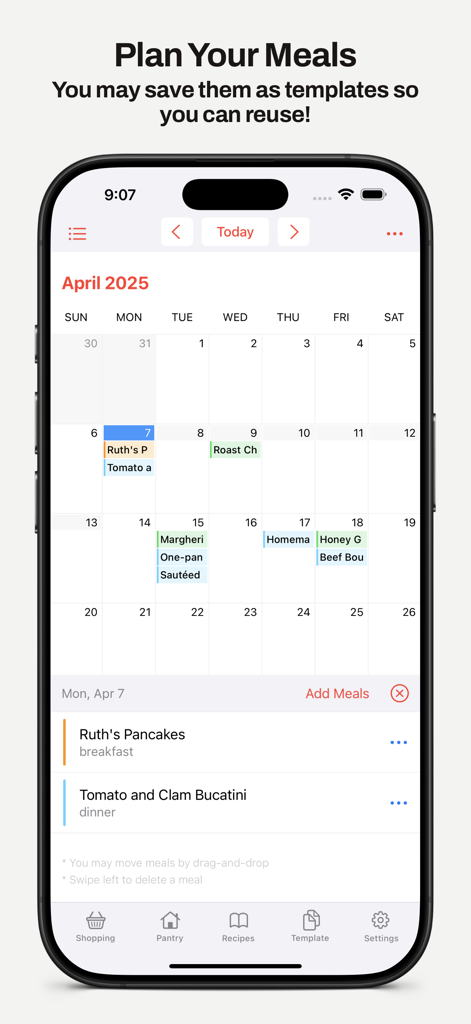
MealBoard - Meal Planner - MealBoardアプリのインターフェース。朝食と夕食のレシピがスケジュールされた月間食事計画カレンダーを表示
MealBoardアプリのインターフェース。朝食と夕食のレシピがスケジュールされた月間食事計画カレンダーを表示

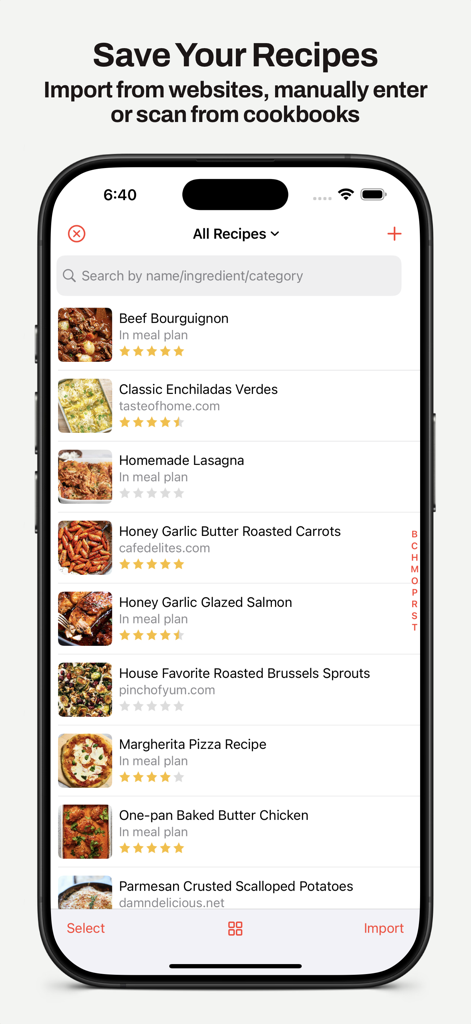
MealBoard - Meal Planner - MealBoardアプリの画面。写真、評価、ウェブサイトソース付きの保存済みレシピリストを表示
MealBoardアプリの画面。写真、評価、ウェブサイトソース付きの保存済みレシピリストを表示

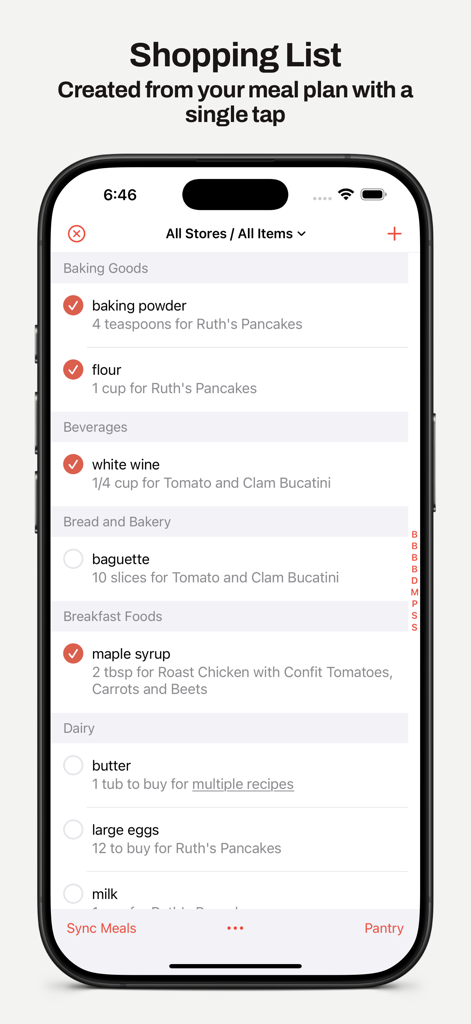
MealBoard - Meal Planner - MealBoardアプリの買い物リスト。ベーキング用品や飲料などの通路カテゴリ別に整理
MealBoardアプリの買い物リスト。ベーキング用品や飲料などの通路カテゴリ別に整理

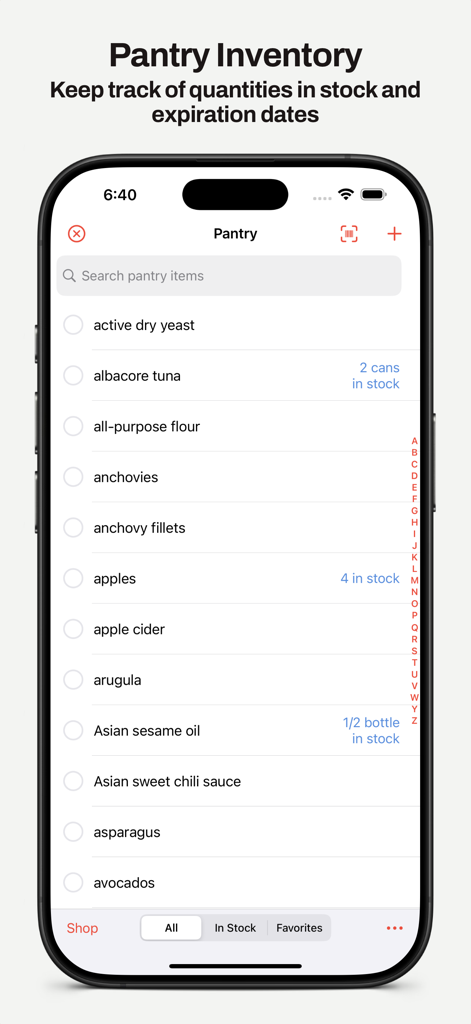
MealBoard - Meal Planner - MealBoardアプリのインターフェース。アイテムの数量が表示されたデジタルパントリー在庫リストを表示
MealBoardアプリのインターフェース。アイテムの数量が表示されたデジタルパントリー在庫リストを表示

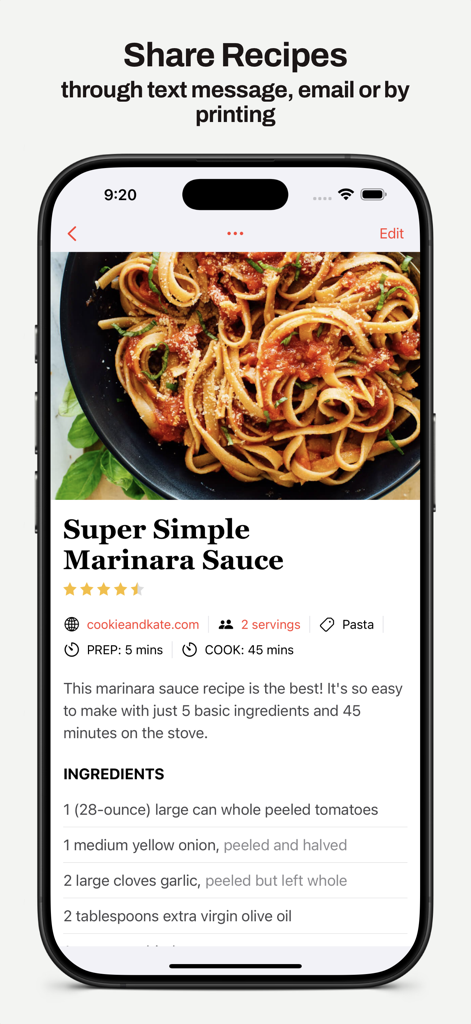
MealBoard - Meal Planner - MealBoardアプリにマリンソースのレシピを表示。詳細とテキストメッセージまたはメールでの共有オプション

MealBoardアプリにマリンソースのレシピを表示。詳細とテキストメッセージまたはメールでの共有オプション

MealBoard - Meal Planner - iPhone、iPad、ラップトップに表示されたMealBoardの食事計画カレンダー。デバイス間のデータ同期を示しています。
iPhone、iPad、ラップトップに表示されたMealBoardの食事計画カレンダー。デバイス間のデータ同期を示しています。

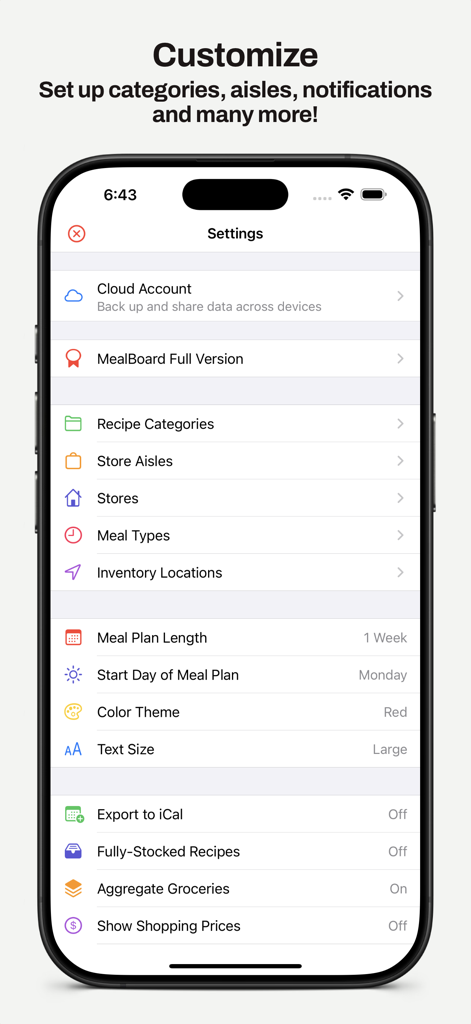
MealBoard - Meal Planner - iPhone上のMealBoardアプリの設定画面。レシピカテゴリ、店舗の通路、食事計画の好みのカスタマイズオプションを表示。

iPhone上のMealBoardアプリの設定画面。レシピカテゴリ、店舗の通路、食事計画の好みのカスタマイズオプションを表示。

説明

Organize your recipes, create meal plans and grocery lists, keep track of your pantry inventory. All in one app! Recipe Management • Import recipes from recipe websites, or add you own recipes • Scan recipes from cookbooks and magazines • Organize recipes by categories • Search recipes by name or ingredient • Scale your recipe by specifying the number of servings you need • Convert between metric and imperial measurements • Link related recipes together • Manage your recipes through the web interface (Log in at www.mealboard.com from your computer) Meal Planning • Create meal plans, organized by day and meal type • Reuse meal plans by creating templates • Set up recipe prep notifications to remind you of tasks ahead of time • Mark meals as leftovers • Export meal plans to the Calendar app • Check off ingredients and directions while cooking • Screen lock disabled while viewing recipes Grocery List • Generate your grocery list from the meal plan you created • Smart shopping list aggregation that combines similar ingredients and organize them by aisle • Scale grocery quantities • Input grocery prices and see the total price you're spending • Add product photos • Support for multiple grocery stores • Check off grocery items as you shop • Move bought items to your pantry Pantry Inventory • Keep track of what you have in your pantry • Specify expiration dates and inventory locations • Use the barcode scanner to input items • Move out-of-stock items from the pantry to the shopping list • Find recipes with ingredients that will expire soon! Share • Share your recipes, meal plan and shopping list via email or text messaging • Import recipes and meal plans sent by other MealBoard users • Print your recipes, meal plan and shopping list • Sync your data across multiple devices (You will need to create an account. Doing so will also back up your data.) MealBoard is fully customizable. You can manage your recipes, ingredients, food categories, meal types, stores, store aisles, grocery items and many more! To understand how the app works, detailed screenshot tutorials can be found at https://www.mealboard.com NOTES: • This app is preloaded with a few recipes that are for illustration purposes only. Users are expected to input/import the recipes that they use. • Cloud syncing requires that you upgrade to the full version. The full version is an in-app purchase (it is a one-time purchase, not a subscription). • This free app is restricted to 20 recipes only. Upgrade to the full version to have an unlimited number of recipes. Terms of Use: https://www.apple.com/legal/internet-services/itunes/dev/stdeula/

Download

ダウンロード: App Store

このページはアプリまたはその開発者の公式ページではなく、情報提供および論評を目的として作成された独立した編集出版物です。明示的に別段の記載がない限り、アプリおよびその開発者は、MWM、Apple、Google Play、アプリのパブリッシャー、またはアプリの開発者と提携、承認、後援、認可、またはその他の公式的な関係はなく、このページのいかなる内容も、アプリがMWMのサービスを使用して開発されたことを意味するものではありません。すべての商標、ロゴ、スクリーンショット、その他のコンテンツはそれぞれの所有者の財産です。