MediBang Paletta:Drawing App

MediBang Paletta:Drawing App

ダウンロード: App Store
ロゴ: MediBang Paletta:Drawing App

MediBang Paletta: プロフェッショナルな芸術性を最もピュアな形で

サブスクリプションの疲れやソフトウェアの肥大化から解放されましょう。あなたのiPadを創造的な自由の聖域に変えるために設計された、ミニマリストで高性能なスタジオを体験してください。

開発元

MediBang inc.

カテゴリ

Graphics & Design

ダウンロード

259K+

ユーザー評価

4.5/5

評価数

3K+

対応言語

18

あなたのキャンバスが待っています

このインターフェースを利用する 259K+ 人のユーザー.

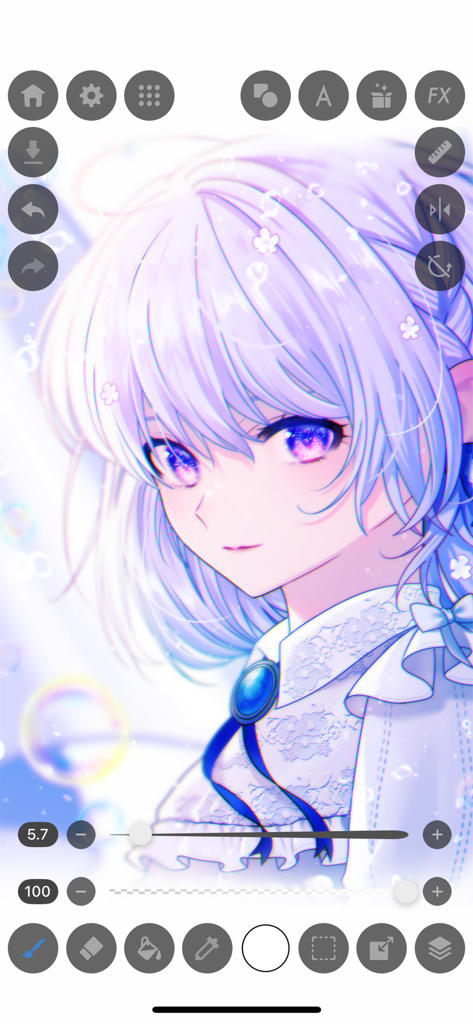
MediBang Palettaアプリのインターフェースを示すスクリーンショット。詳細なアニメの女の子のイラストとデジタルペイントツールが表示されています。

MediBang Palettaアプリのインターフェースを示すスクリーンショット。詳細なアニメの女の子のイラストとデジタルペイントツールが表示されています。

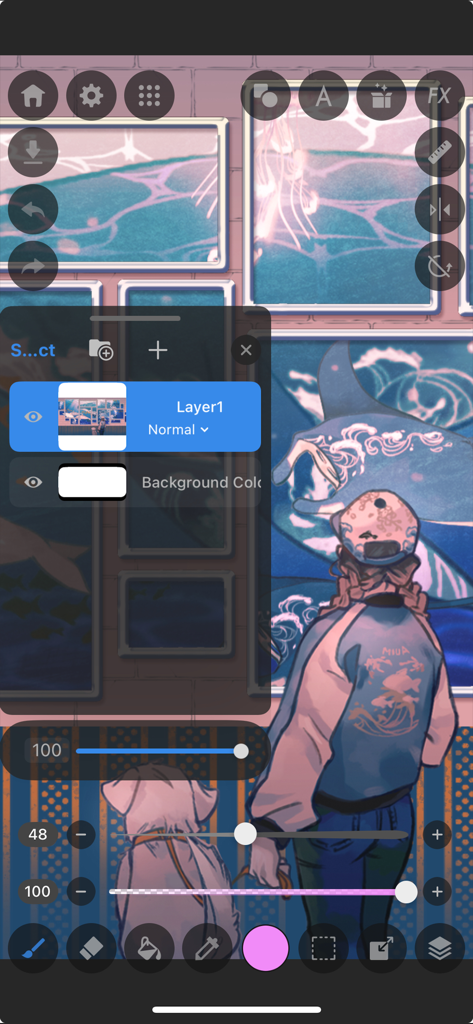
MediBang Palettaのデジタルイラストインターフェース。レイヤーと描画ツールが表示されています。

MediBang Palettaのデジタルイラストインターフェース。レイヤーと描画ツールが表示されています。

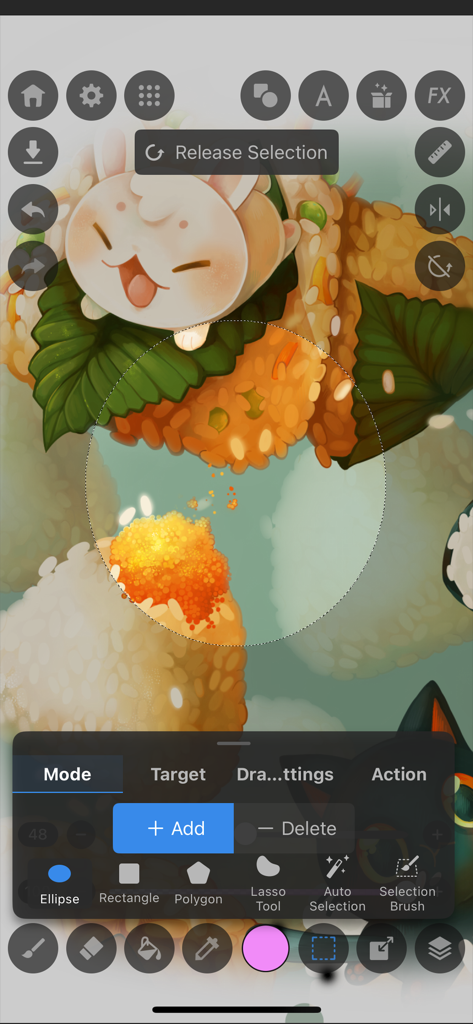
MediBang Paletta描画アプリの選択ツールインターフェース。食品のイラストが表示されています。

MediBang Paletta描画アプリの選択ツールインターフェース。食品のイラストが表示されています。

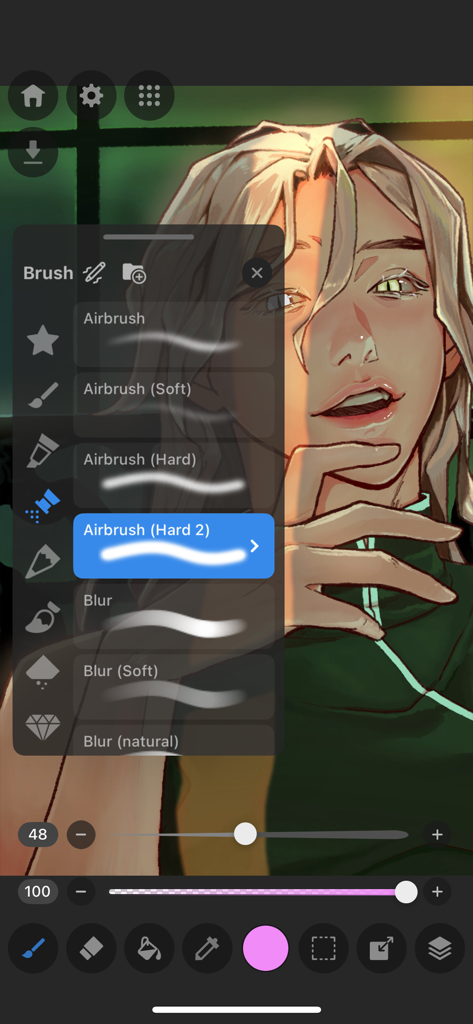
MediBang Paletta描画アプリのインターフェースのスクリーンショット。デジタルポートレートの上にエアブラシとぼかしオプションを含むブラシ選択メニューが表示されています。

MediBang Paletta描画アプリのインターフェースのスクリーンショット。デジタルポートレートの上にエアブラシとぼかしオプションを含むブラシ選択メニューが表示されています。

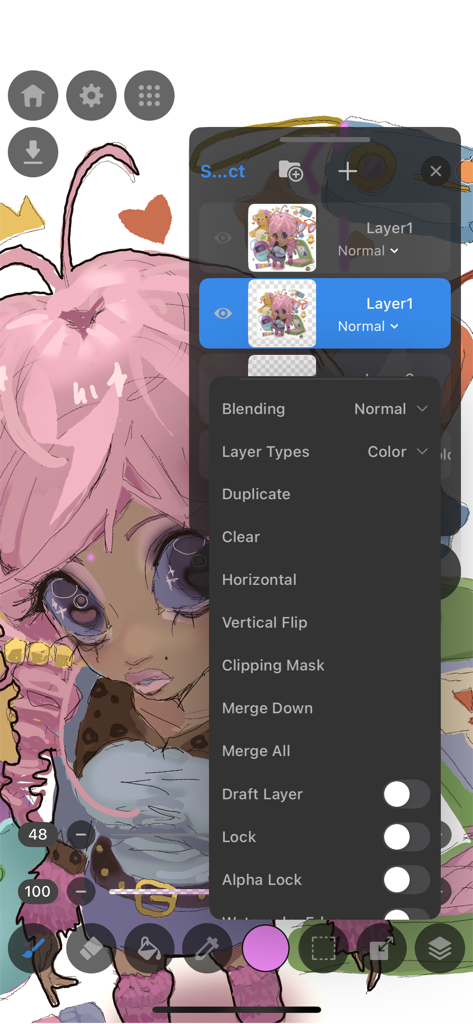
MediBang Paletta描画アプリのインターフェースのスクリーンショット。プロフェッショナルな編集オプションを表示するレイヤーメニューが表示されています。

MediBang Paletta描画アプリのインターフェースのスクリーンショット。プロフェッショナルな編集オプションを表示するレイヤーメニューが表示されています。

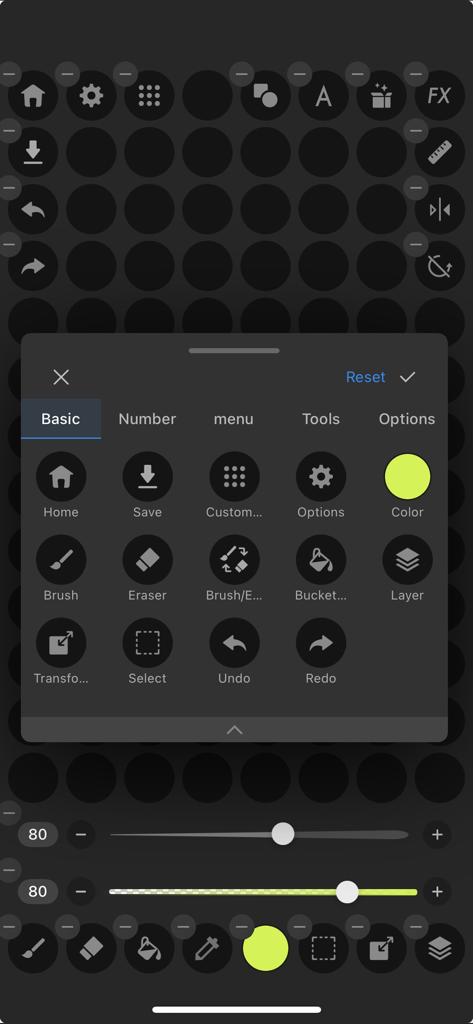
MediBang Paletta描画アプリのインターフェースのスクリーンショット。ブラシ、レイヤー、元に戻すオプションなどの基本的なツールのカスタマイズメニューが表示されています。

MediBang Paletta描画アプリのインターフェースのスクリーンショット。ブラシ、レイヤー、元に戻すオプションなどの基本的なツールのカスタマイズメニューが表示されています。

散らかりのない環境でスキルをマスターする

このアプリを際立たせるツール、 259K+ 人のユーザーが選択.

💸

サブスクリプションは一切なし

月額料金から解放されましょう。サブスクリプション疲れの負担なしに、世界クラスのブラシとプロフェッショナルツールにアクセスできます。

🚀

ゼロ遅延パフォーマンス

iPad向けに最適化された、ミニマリストで高速なエンジンで、あなたの描画が途切れることなく、クリエイティブな流れに集中してください。

📂

プログレードのワークフロー

繊細なレイヤーからPSDエクスポートまで、副業でも個人的な傑作でも、必要なプロフェッショナルなコントロールを手に入れましょう。

アプリについて

について知っておくべきこと MediBang Paletta:Drawing App.

説明

Draw for yourself, in your time, by you like. MediBang Paletta is the painting app for you. We made this for you. The latest work in the MediBang Paint series, which boasts 100 million downloads. This is a new proposal from MediBang. The app's beautiful canvas is waiting for you to create art. Today, try MediBang Paletta and watch your improvement skyrocket! Crafted by the minds behind MediBang Paint, MediBang Paletta gives you a perfectly designed experience to reach creative heights never thought possible, no subscription required. Key Highlights: ・User-Friendly Interface: Work effortlessly with an intuitive interface. ・World-Class Brushes: Enjoy meticulously crafted brushes for the iPad experience. ・Auto-Save: Never worry about losing a sketch again. ・Nuanced Layering: Exercise precise control over your art. Your Perfect Brushes ・Customizable Default Brushes: Tailor any default brushes to match your style. ・Stabilization Tool: Create your smoothest lines ever. ・Creative Effects: Add intricate details with cool effect and stamp brushes. ・Pen Pressure Settings: Responsive and adjustable settings to suit you. ・Unique Brushes: Explore dozens of brushes designed exclusively for MediBang Paletta's brush engine. Effortless Layers and Colors ・Clipping Masks: Edit without compromising your initial art. ・Layer Groups: Keep your work neat and tidy. ・Blending Modes: Nearly 20 blending modes to adjust your art as you desire. Professional Finishing Touches ・Artistic Filters: Add captivating effects to give your work a professional look. ・Blur Tool: Achieve softness, movement, and depth. ・Easy Edits: Refine your work's proportions using the Transformation Tool. Intuitive and Lightweight ・Artist-First Design: Enjoy an app designed with giving you the best artistic experience in mind. ・Simplicity is Key: Focus on your creativity with a simple, lightweight interface that transforms your screen into a studio. ・Efficient Storage: Save your work in MediBang Paletta export it to the Files app. ・No Lag: Bid farewell to brush lag and slow loading times forever. Share Your Masterpieces ・Pro Export: Import or export your art in various formats, including Adobe® Photoshop® PSD files. ・Seamless Saving and Backups: Save your art locally in MediBang Paletta and find your files backed up to the app itself in the event of a crash. Operating Environment ・OS: iOS 18 or later ・Recommended Devices: iPhone13 or later / iPad 9th generation or later / iPad Air 5th generation or later / iPad mini 6th generation or later / iPad Pro 5th generation or later *App performance may vary depending on the device condition Crafted by visionaries and tailored for artists, MediBang Paletta is here to provide the ultimate digital art experience. With a canvas and tools that are convenient yet unobtrusive, this app transforms your iPad screen into an inviting workspace, allowing your creativity to flow freely. Every element is meticulously decided by MediBang Paletta's designers to ensure the most immersive and intuitive experience that maximizes all the best parts of working on the iPad for the individual creator experience. MediBang Paletta is more than just an app, it's a creator-centric space that gives you what you need to translate vision into reality. No compromises or limitations—just pure creative freedom. Bid farewell to confusing design, and software bloat. Say hello to MediBang Paletta.

最新バージョン

4.0.1

サイズ

189.0 MB

リリース日

2024年1月11日

限界なく制作する準備はできましたか?

あなたが待ち望んでいた、ミニマリストで遅延のないスタジオで、iPadとiPhoneでプロレベルの描画を体験してください。サブスクリプションなし、肥大化なし—純粋な創造的自由だけがあります。

ダウンロード: App Store
FAQ

よくある質問

について知っておくべきこと MediBang Paletta:Drawing App

MediBang Palettaとは何ですか?

MediBang Palettaは、MediBang Paintの開発者によって作られた、デジタルアーティスト向けに設計されたペイントアプリです。世界クラスのブラシと高度なレイヤー機能により、クリエイティブな表現を容易にするユーザーフレンドリーなインターフェースを提供します。

MediBang Palettaの主な機能は何ですか?

MediBang Palettaは、使いやすいインターフェース、カスタマイズ可能なブラシ、自動保存、ニュアンスのあるレイヤー、さまざまなブレンドモード、アートフィルター、PSDファイルを含むプロフェッショナルなエクスポートオプションを備えています。

MediBang Palettaは無料で使用できますか?

はい、MediBang Palettaはすべての機能を無料で提供しますが、30分ごとに1回動画広告が表示されます。これらの広告を削除するための買い切りライセンスも購入可能です。

MediBang Palettaはサブスクリプションが必要ですか?

いいえ、MediBang Palettaはサブスクリプションを必要としません。ユーザーはすべての機能を無料で利用するか、広告を削除するための買い切りライセンスを購入できます。

MediBang Palettaはどのオペレーティングシステムをサポートしていますか?

MediBang PalettaはiOS 18以降をサポートしています。iPhone 13以降、iPad 第9世代以降などの特定のiPhoneおよびiPadモデルに最適化されています。

MediBang Palettaにはどのデバイスが推奨されますか?

MediBang Palettaには、iPhone 13以降、iPad 第9世代以降、iPad Air 第5世代以降、iPad mini 第6世代以降、iPad Pro 第5世代以降が推奨されます。

MediBang Palettaには自動保存機能がありますか?

はい、MediBang Palettaには自動保存機能が搭載されています。この機能により、スケッチが自動的に保存され、クリエイティブな作品を失うことを防ぎます。

MediBang PalettaはPhotoshop PSDファイルにエクスポートできますか?

はい、MediBang Palettaでは、Adobe® Photoshop® PSDファイルを含むさまざまな形式でアートをインポートまたはエクスポートでき、プロフェッショナルなワークフローとの統合が可能です。

MediBang Palettaはレイヤーをどのように扱いますか?

MediBang Palettaは、非破壊編集のためのクリッピングマスクや整理のためのレイヤーグループを含む、ニュアンスのあるレイヤー機能を提供します。また、約20種類のブレンドモードも提供します。

MediBang Palettaでブラシをカスタマイズできますか?

はい、MediBang Palettaでは、個々のアーティストのスタイルに合わせてデフォルトのブラシをカスタマイズできます。また、安定化ツール、クリエイティブエフェクト、調整可能な筆圧設定も提供します。

MediBang Palettaにはぼかしツールが含まれていますか?

はい、MediBang Palettaにはぼかしツールが含まれています。このツールは、アートワークに柔らかさ、動き、深みなどの効果を達成するのに役立ちます。

MediBang Palettaで利用できる選択ツールは何ですか?

MediBang Palettaは、楕円、長方形、ポリゴン、投げ縄ツール、自動選択、選択ブラシなど、さまざまな選択ツールを提供しています。ユーザーは選択範囲を追加または削除できます。

MediBang Palettaでブラシの遅延は発生しますか?

いいえ、MediBang Palettaは遅延なく動作するように設計されており、ブラシストロークや読み込み時間に遅延のない、スムーズで応答性の高い描画体験を保証します。

MediBang Palettaでローカルに作業を保存できますか?

はい、ユーザーはMediBang Paletta内でローカルにアートを保存できます。クラッシュした場合に備えて、ファイルはアプリ自体にもバックアップされます。

MediBang Palettaはどのような広告を使用していますか?

MediBang Palettaは、30分ごとに1回の動画広告を使用します。ユーザーは買い切りライセンスを購入することで、これらの広告を削除できます。

MediBang Palettaは筆圧感度をサポートしていますか?

はい、MediBang Palettaには応答性の高い調整可能な筆圧設定が含まれています。これにより、アーティストは個々の描画スタイルに合わせてブラシの応答を調整できます。

MediBang Palettaで利用できるブレンドモードの数はいくつですか?

MediBang Palettaは、約20種類のブレンドモードを提供しています。これらのモードにより、アーティストはアートを希望どおりに調整でき、レイヤー間の相互作用を包括的に制御できます。

App information, icons, screenshots, and descriptions displayed on this page are sourced from the Apple App Store and are the property of their respective developers. Download estimates and rankings are based on MWM's proprietary models and may not reflect actual figures. This page is provided for informational and analytical purposes only.

Believe this page infringes your intellectual property? File a dispute