
このページはアプリまたはその開発者の公式ページではなく、情報提供および論評を目的として作成された独立した編集出版物です。明示的に別段の記載がない限り、アプリおよびその開発者は、MWM、Apple、Google Play、アプリのパブリッシャー、またはアプリの開発者と提携、承認、後援、認可、またはその他の公式的な関係はなく、このページのいかなる内容も、アプリがMWMのサービスを使用して開発されたことを意味するものではありません。すべての商標、ロゴ、スクリーンショット、その他のコンテンツはそれぞれの所有者の財産です。


mem
ライトナーシステムを活用して記憶を最適化しましょう。物理的なカードをスキャンし、Dropbox経由で同期し、優秀な学生や専門家向けの究極のツールで学習セッションを完全に制御します。
ダウンロード
22K+ユーザー評価
評価数
0開発元
カテゴリ
Reference対応言語
3最新バージョン
2.1.11サイズ
13.8 MBリリース日
2014年2月15日科学的な精度で複雑な科目をマスターする
優秀な学習者のために設計されたmemは、実証済みのライトナーシステムを使用して、圧倒的な学習負荷を管理可能で長期的な知識に変えます。
証拠に基づいた間隔反復
ライトナーシステムを使用して、数学的に最適化された間隔でカードをレビューし、情報を短期記憶から長期記憶に移行します。
シームレスなデータ所有権
非プロプライエタリなCSVファイルと、Mac、PC、モバイルデバイス間でのインスタントDropbox同期により、完全な制御を維持します。
よくある質問
について知っておくべきこと mem
ハンドコンピューターアプリとは何ですか?
ハンドコンピューターアプリは、ライトナーシステムをシミュレートし、シンプルで効果的な記憶ツールを提供します。間隔反復フラッシュカードを使用して、外国語学習者やあらゆる科目を学習する個人が単語やフレーズを覚えるのを支援します。
ハンドコンピューターアプリはどのように機能しますか?
ハンドコンピューターアプリはライトナーシステムをシミュレートします。ユーザーは新しいカードを最初のコンパートメントに追加します。レビュー中に覚えている場合、カードは次のコンパートメントに移動します。忘れた場合は、最初のコンパートメントに戻ります。これにより間隔反復が利用されます。
ハンドコンピューターアプリにおけるライトナーシステムとは何ですか?
ハンドコンピューターアプリは、フラッシュカードベースの記憶ツールであるライトナーシステムを使用しています。セバスティアン・ライトナーによって設計されたこのシステムは、記憶保持を高めるために、さまざまなコンパートメントでカードを増加する間隔でレビューすることにより、間隔反復を適用します。
ハンドコンピューターアプリで独自のカードを作成できますか?
はい、ハンドコンピューターアプリではユーザーが独自のカードを作成できます。これは、「+」ボタンをタップし、次にカメラボタンをタップし、アプリ内で「複数のカードをスキャン」を選択することで行います。
ハンドコンピューターアプリはDropboxとの同期をサポートしていますか?
はい、ハンドコンピューターアプリはDropbox経由での同期をサポートしています。この機能により、ユーザーはMacまたはPCでドキュメントを編集でき、デバイス間でデータの整合性を確保できます。
ハンドコンピューターアプリにはナイトモードがありますか?
はい、ハンドコンピューターアプリにはナイトモードが含まれています。この機能は、より穏やかな視覚体験を提供し、夜間に学習するユーザーに役立ちます。
ハンドコンピューターアプリはどのようなファイル形式でカードを使用しますか?
ハンドコンピューターアプリは、非プロプライエタリなプレーンテキストCSVファイル形式でドキュメントを保存します。これにより互換性が確保され、ユーザーはカードデータを簡単に管理および編集できます。
Dropboxを使用してハンドコンピューターアプリに複数の単語を追加するにはどうすればよいですか?
ユーザーはDropbox経由でハンドコンピューターに複数の単語を追加します。「単語、定義」形式のCSVファイルをMac/PCで準備し、Dropbox内のハンドコンピューターフォルダに保存します。
ハンドコンピューターアプリには単語の音声が含まれていますか?
はい、ハンドコンピューターアプリでは単語を聞くことができます。この音声機能は、言語学習者や新しい語彙を学習する人の記憶保持と発音の向上を目的としています。
ハンドコンピューターアプリは間隔反復を使用しますか?
はい、ハンドコンピューターアプリは間隔反復を取り入れています。これはライトナーシステムシミュレーションの核となる原則であり、効果的な記憶保持のために最適な増加間隔でカードがレビューされることを保証します。
以下のスクリーンショットと説明は、アプリの公式ストアリスティングから直接取得されたものであり、アプリ開発者の所有物です。
アプリストア
スクリーンショット
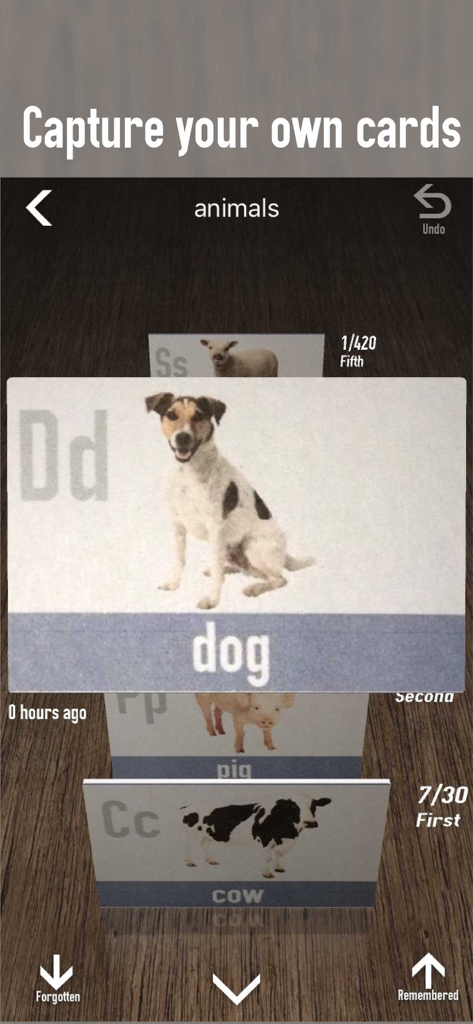
memアプリのモバイルインターフェイス。動物のフラッシュカードの3Dスタックが表示され、カードを記憶したか忘れたかをマークするオプションがあります。
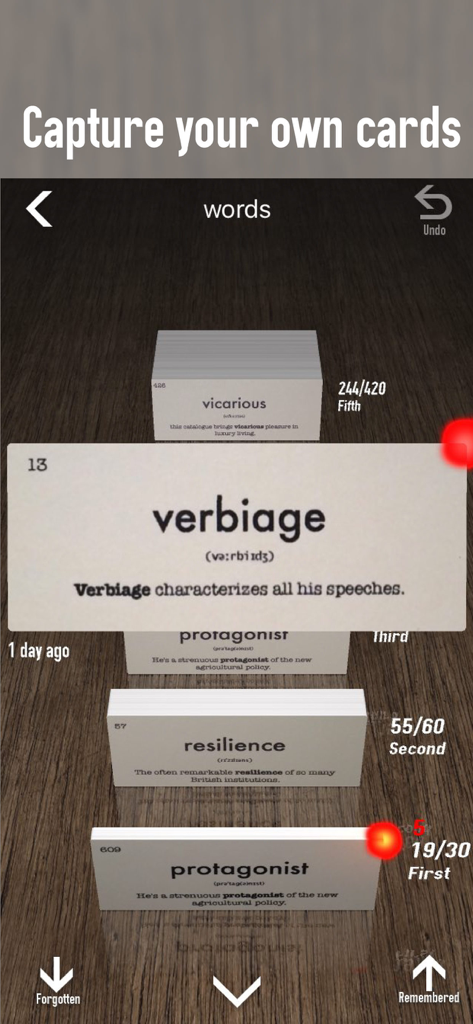
memアプリでライトナーシステムによって整理された、verbiageやresilienceなどの語彙単語を表示するデジタルフラッシュカードインターフェイス。
説明
Download
類似アプリ
同じカテゴリのトップランクアプリ

Google Translate
Google LLC

火箭沙盒
P2E CO., LTD.

Bible
Life.Church

Bible Chat: Daily Devotional
BookVitals APP SRL

Youdao Dictionary
Beijing NetEase Youdao Computer System Co.,Ltd

Translate Now - AI Translator
AIR APPS SYSTEMS, UNIPESSOAL, LDA

Naver Papago - AI Translator
NAVER Corp.

ΗiΤV - Endless Movies & Shows
学 张

Live Translator - AI Translate
DigitalSail (HK) Limited
このページはアプリまたはその開発者の公式ページではなく、情報提供および論評を目的として作成された独立した編集出版物です。明示的に別段の記載がない限り、アプリおよびその開発者は、MWM、Apple、Google Play、アプリのパブリッシャー、またはアプリの開発者と提携、承認、後援、認可、またはその他の公式的な関係はなく、このページのいかなる内容も、アプリがMWMのサービスを使用して開発されたことを意味するものではありません。すべての商標、ロゴ、スクリーンショット、その他のコンテンツはそれぞれの所有者の財産です。