
このページはアプリまたはその開発者の公式ページではなく、情報提供および論評を目的として作成された独立した編集出版物です。明示的に別段の記載がない限り、アプリおよびその開発者は、MWM、Apple、Google Play、アプリのパブリッシャー、またはアプリの開発者と提携、承認、後援、認可、またはその他の公式的な関係はなく、このページのいかなる内容も、アプリがMWMのサービスを使用して開発されたことを意味するものではありません。すべての商標、ロゴ、スクリーンショット、その他のコンテンツはそれぞれの所有者の財産です。

ダウンロード
1M+ユーザー評価
評価数
6.1K開発元
カテゴリ
Music対応言語
99最新バージョン
2026.02.13サイズ
107.7 MBリリース日
2020年5月23日テックアナリストによる主要機能とユーザーインパクト評価
Mic to Speaker - Virtual Mic アプリケーション分析
ライブマイク機能
本アプリは、ユーザーのモバイルデバイスをライブマイクとして機能させ、高価な専用ハードウェアが不要な、安価で汎用性の高いオーディオ入力ソリューションを提供します。
多目的利用シナリオ
ライブストリーミング、ゲーミング、ポッドキャスト、ビデオ通話、カラオケなど、ターゲットユーザーの多様なデジタル活動に柔軟に対応し、それぞれの用途でクリアな音声体験を可能にします。
リアルタイム音声調整とエフェクト
エコーやリバーブの追加、音量、低音、高音のリアルタイム調整機能により、ユーザーは自身の音声を最適化し、コンテンツ制作やエンターテイメント用途で表現豊かな効果を生み出すことができます。
自動録音と編集、共有機能
全てのセッションは自動的に保存され、アプリ内で簡単に編集、トリミング、友人との共有、PCへのエクスポートが可能であるため、ポッドキャスターやミュージシャンなどのコンテンツ制作プロセスを効率化します。
幅広いスピーカー互換性
Bluetoothスピーカー、AirPlayデバイス、有線スピーカー、ホームステレオシステム、カーオーディオシステムなど、既存の多様なオーディオ機器とのシームレスな接続を保証し、本アプリの汎用性を高めます。
直感的で簡単な操作性
ワンタップでのオン/オフ切り替え、バックグラウンドでの動作、画面ロック時の継続実行、複雑な設定が不要な設計により、ユーザーは技術的な知識を問わず、すぐに本アプリを使い始めることができます。
詳細なオーディオ設定
音量レベル、音質、使用するマイクの選択、オーディオフォーマット(MP3、WAV、M4A)の細かな調整を提供し、ユーザーは自身のニーズに合わせて最適なオーディオ環境を構築できます。
柔軟な録音保存オプション
録音データをiCloud Drive、Dropbox、Google Drive、またはローカルデバイスに保存する複数の選択肢が提供されており、ユーザーは自身のデータを容易に管理し、アクセスすることができます。
よくある質問
について知っておくべきこと Mic to Speaker - Virtual Mic
How does the Mic to Speaker - Virtual Mic app function as a live microphone?
The Mic to Speaker app functions by connecting your device to a speaker via Bluetooth, AirPlay, or cable. Tapping the screen activates the microphone, and your voice plays through the speaker, even when the screen is locked.
Can the Mic to Speaker app connect to Bluetooth speakers?
Yes, the Mic to Speaker app connects to Bluetooth speakers and headphones. It also supports AirPlay devices, wired speakers, home stereo, and car audio systems for output.
Does Mic to Speaker - Virtual Mic automatically record audio sessions?
Yes, the Mic to Speaker app automatically saves every recording session. Users can listen back, edit, trim, share, and export these recordings after they are captured.
What sound effects are available in the Mic to Speaker app?
The Mic to Speaker app provides echo and reverb effects. Users can also adjust bass, treble, and voice volume (louder or softer) in real-time to enhance their sound.
Is my privacy protected when using Mic to Speaker - Virtual Mic?
Yes, the Mic to Speaker app protects user privacy. Your recordings stay on your phone or personal cloud storage, and the app does not collect or share your data.
Can I edit recordings within the Mic to Speaker app?
Yes, the Mic to Speaker app allows users to edit and trim recordings. You can also share them with friends, export to your computer, and convert or transcribe them.
What cloud storage options are supported for Mic to Speaker recordings?
The Mic to Speaker app supports saving recordings to iCloud Drive, Dropbox, and Google Drive. Users also have the option to keep all recordings directly on their phone.
Can Mic to Speaker - Virtual Mic operate when the screen is locked?
Yes, the Mic to Speaker app works even when your device screen is locked. It operates in the background, allowing continuous microphone use without an active display.
What specific devices does Mic to Speaker - Virtual Mic require to function?
Mic to Speaker - Virtual Mic requires an iPhone or iPad with a microphone, along with a speaker or headphones for audio output. These are the only components needed.
Can I adjust the recording quality in the Mic to Speaker app?
Yes, the Mic to Speaker app allows users to choose sound quality and select their audio format (MP3, WAV, M4A). It also offers control over volume levels and microphone selection.
以下のスクリーンショットと説明は、アプリの公式ストアリスティングから直接取得されたものであり、アプリ開発者の所有物です。
アプリストア
スクリーンショット
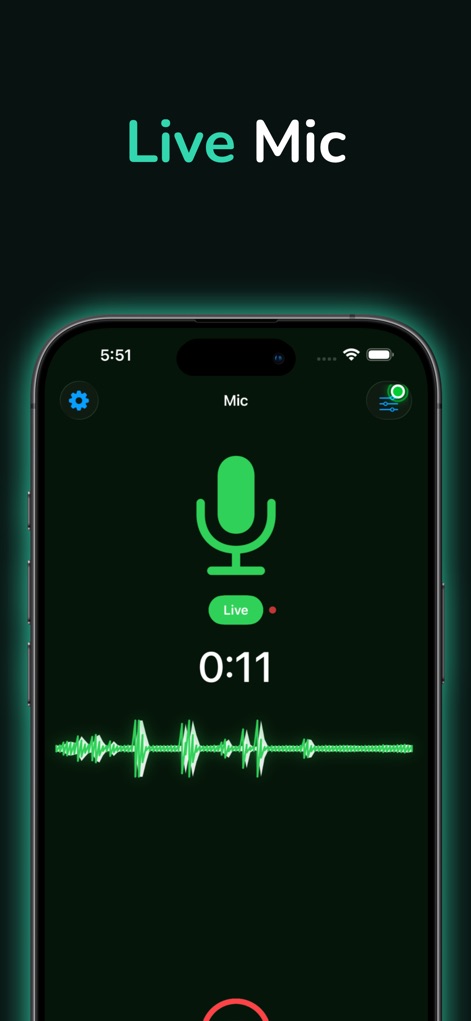
このアプリの直感的なインターフェースは、音声入力時にマイクアイコンと「Live」表示で即座のフィードバックを提供し、リアルタイムの音声波形で音量レベルを視覚的に示します。
リアルタイムマイク
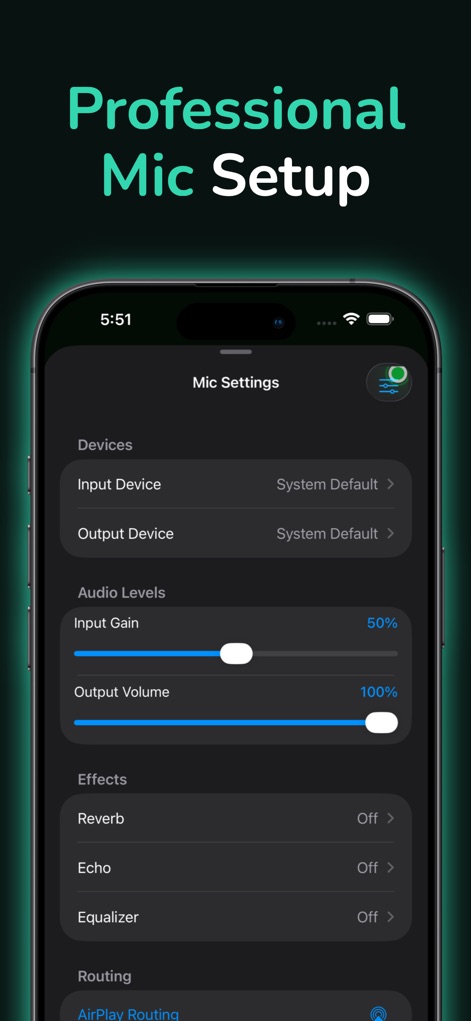
ユーザーは入力ゲインと出力ボリュームのスライダーで音量を正確に調整でき、リバーブやエコーなどのエフェクトで音質をさらにカスタマイズできます。
詳細な音声設定
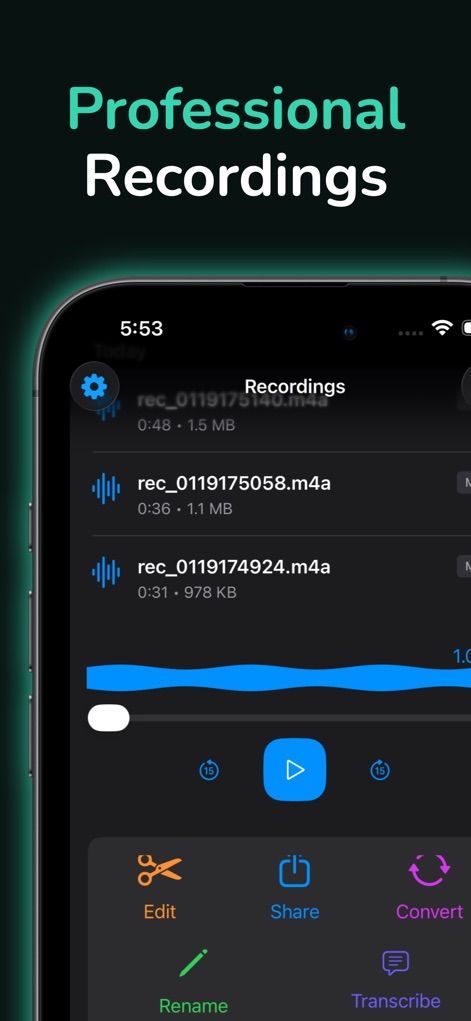
本ツールは、記録された音声ファイルのリストを分かりやすく表示し、編集、共有、変換、文字起こしなどの多機能な管理オプションを提供します。
高品質録音管理
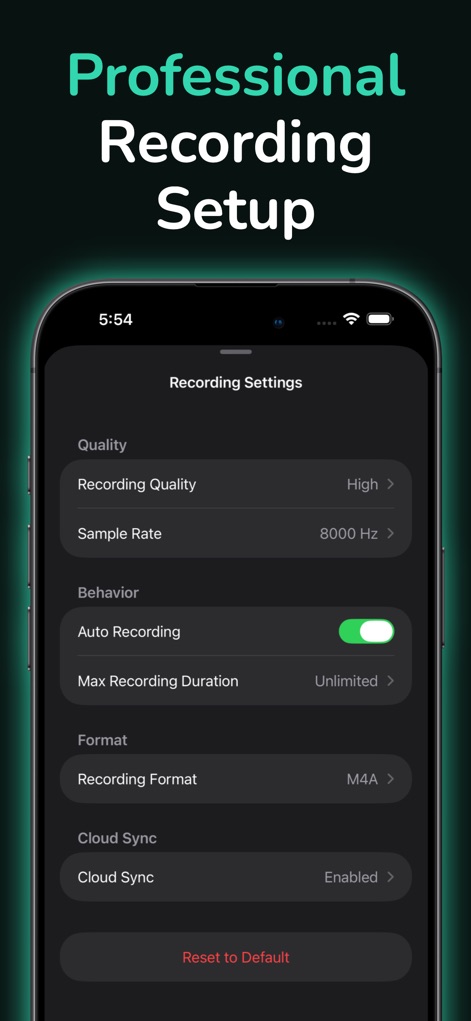
ユーザーは、録音品質やサンプルレートの選択により音質を最適化でき、自動録音機能とクラウド同期オプションを通じて、録音プロセスを効率化できます。
録音設定の最適化
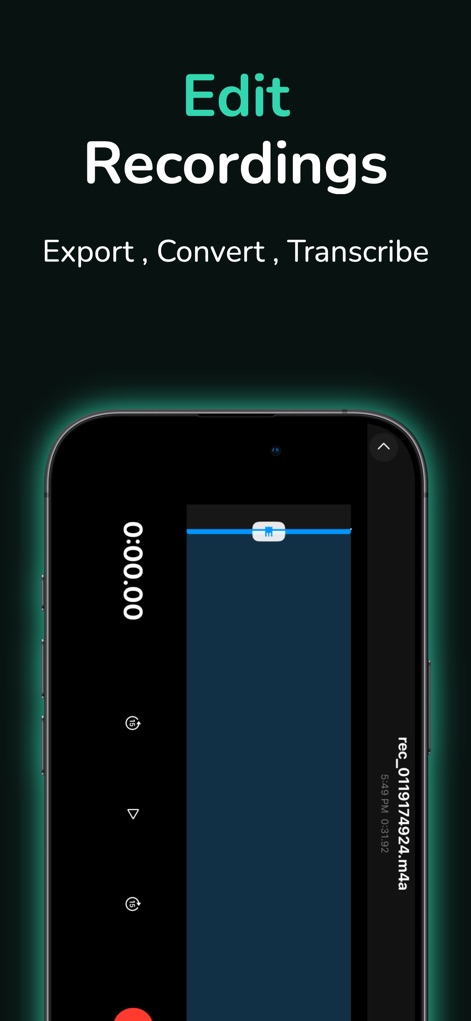
この編集画面では、視覚的な波形エディターを使用して録音をトリミング・調整でき、エクスポート、変換、文字起こし機能で作成したコンテンツを容易に活用できます。
簡単録音編集
説明
Download
このページはアプリまたはその開発者の公式ページではなく、情報提供および論評を目的として作成された独立した編集出版物です。明示的に別段の記載がない限り、アプリおよびその開発者は、MWM、Apple、Google Play、アプリのパブリッシャー、またはアプリの開発者と提携、承認、後援、認可、またはその他の公式的な関係はなく、このページのいかなる内容も、アプリがMWMのサービスを使用して開発されたことを意味するものではありません。すべての商標、ロゴ、スクリーンショット、その他のコンテンツはそれぞれの所有者の財産です。