
このページはアプリまたはその開発者の公式ページではなく、情報提供および論評を目的として作成された独立した編集出版物です。明示的に別段の記載がない限り、アプリおよびその開発者は、MWM、Apple、Google Play、アプリのパブリッシャー、またはアプリの開発者と提携、承認、後援、認可、またはその他の公式的な関係はなく、このページのいかなる内容も、アプリがMWMのサービスを使用して開発されたことを意味するものではありません。すべての商標、ロゴ、スクリーンショット、その他のコンテンツはそれぞれの所有者の財産です。


Microsoft Designer
AIがあなたの想像力を現実にする。ありふれたデザインツールとは一線を画し、ユーザーはAIを駆使して、頭の中に思い描くあらゆるビジュアルを即座に形にできる。これは単なる編集アプリではなく、創造性のブースターだ。
ダウンロード
1M+ユーザー評価
評価数
977開発元
カテゴリ
Graphics & Design対応言語
33最新バージョン
1.0.33サイズ
73.5 MBリリース日
2024年6月11日AIを活用した直感的なデザインツールが提供する価値とユーザー体験の評価
Microsoft Designer 主要機能分析
AI画像生成
ユーザーは、言葉の指示だけで、想像力に富んだ多様な画像をAIによって瞬時に生成できます。
パーソナルデザインコンテンツ作成
ユーザーは、誕生日カード、招待状、ソーシャルメディア投稿など、様々なパーソナライズされたビジュアルコンテンツを、手間なく魅力的に作成できます。
AIによる写真高度編集
ユーザーは、AIを活用して写真から不要な要素を自動で削除したり、背景を簡単に透過・ぼかしたりすることで、プロ品質の画像を素早く作成できます。
AI画像スタイル変換
ユーザーは、既存の写真をAIの力でアート作品のようなスタイルに変換し、ユニークで創造的な視覚効果を付加できます。
オリジナルステッカー作成
ユーザーは、メッセージアプリやSNSで利用できる、個性的で目を引くカスタムデザインのステッカーを簡単に作成できます。
思い出のコラージュ作成
ユーザーは、お気に入りの写真やスタイルを自由に組み合わせて、記憶に残るオリジナルのコラージュを視覚的に表現できます。
カスタム壁紙・背景作成
ユーザーは、現在の気分や特別な機会に合わせて、スマートフォンやPC用の独自の壁紙や背景画像を簡単にデザインできます。
オリジナル絵文字作成
ユーザーは、メッセージングで感情を豊かに表現できるよう、あらゆる気分や状況に合わせた独自の絵文字を作成できます。
よくある質問
について知っておくべきこと Microsoft Designer
What is Microsoft Designer?
Microsoft Designer is an AI-powered app that enables users to visually create, design, and edit images, designs, and photos. It uses generative AI to produce personalized content such as cards, wallpapers, and social posts.
Is Microsoft Designer free to use?
Yes, Microsoft Designer is available for free. Users access its features with a Microsoft account, which includes 5 GB of free cloud storage for saving designs, files, and photos across devices.
How do I create AI images with Microsoft Designer?
Microsoft Designer allows users to create unique images using generative AI. Users describe their desired image with words, and the AI then generates the visual content based on the text prompt.
Can Microsoft Designer remove backgrounds from photos?
Yes, Microsoft Designer includes an AI-powered feature called 'Remove background' that easily removes unwanted image backgrounds in one step. This helps users highlight subjects in their photos.
Does Microsoft Designer have a feature to erase objects from photos?
Microsoft Designer offers a 'Generative erase' feature that utilizes AI to remove distractions from photos. Users can make unwanted objects disappear from their images with precision.
What types of greeting cards can be made with Microsoft Designer?
Users can craft custom greeting cards in Microsoft Designer for various occasions, including birthdays and holidays. The app allows for personalized messages and images to be integrated into the designs.
Can I make custom stickers with Microsoft Designer?
Yes, Microsoft Designer enables users to create custom stickers. These personalized stickers can be used to stand out on messaging apps, social media, and other digital platforms.
以下のスクリーンショットと説明は、アプリの公式ストアリスティングから直接取得されたものであり、アプリ開発者の所有物です。
アプリストア
スクリーンショット
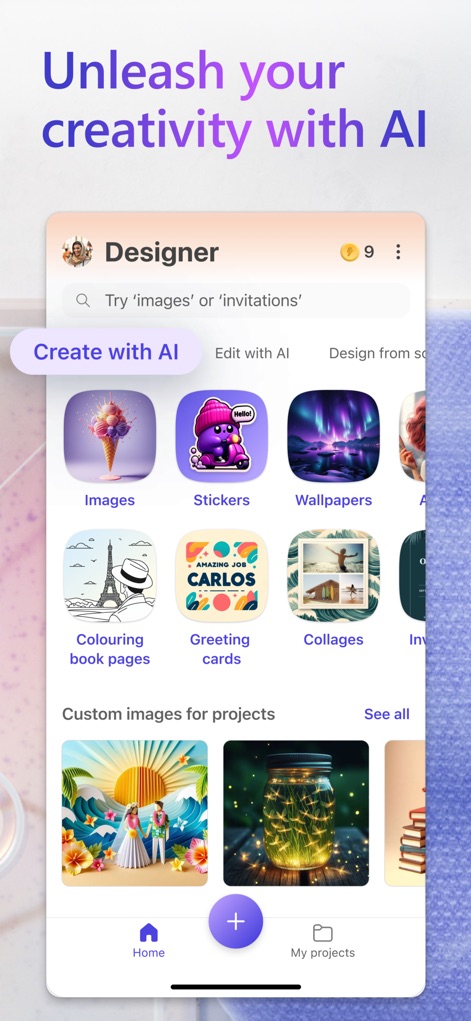
このアプリの直感的なホーム画面では、ユーザーは「Create with AI」タブから「Images」や「Stickers」といった様々なコンテンツタイプをAIで生成開始できます。
AIで創造性解き放つ
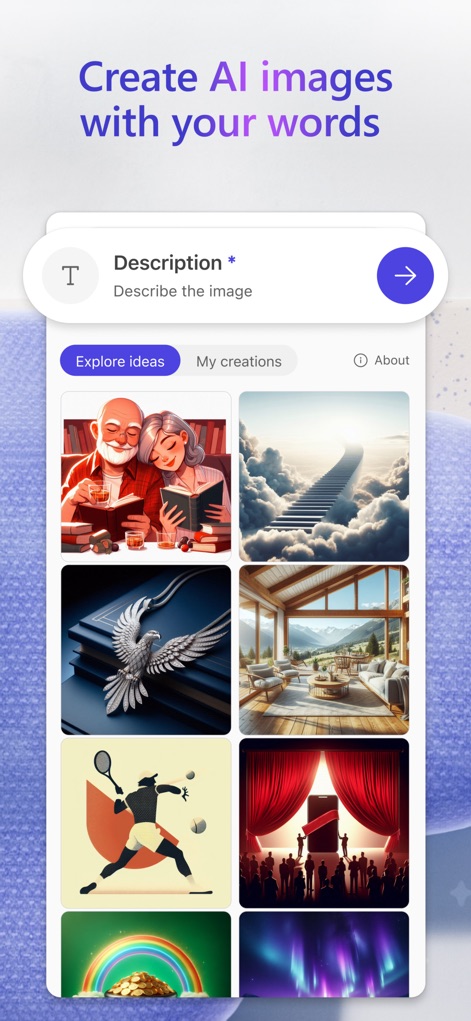
ユーザーは「Description」入力フィールドにテキストで説明を入力し、AIが生成した多様な「Explore ideas」画像ギャラリーからインスピレーションを得て、想像通りの画像を生成できます。
言葉で画像を生成
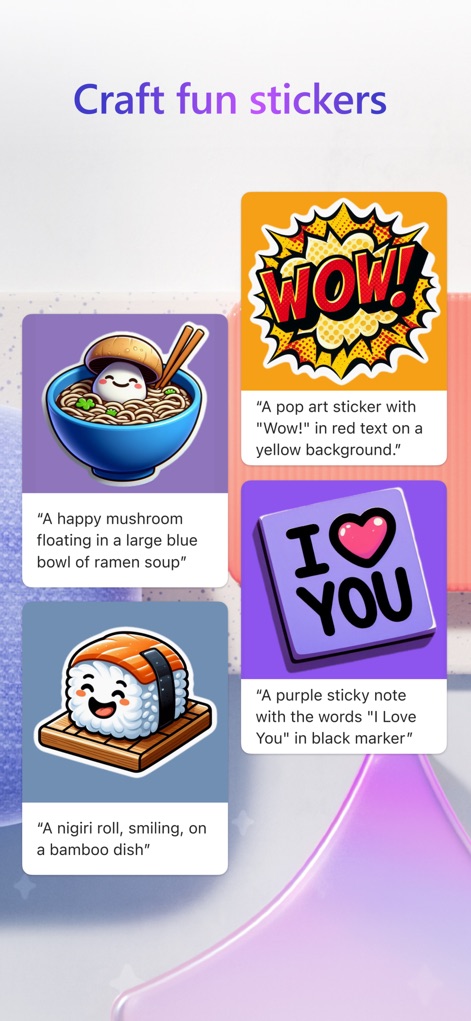
この機能では、ユーザーは「WOW!」と描かれたポップアート調のステッカーや、かわいい「ラーメン」のイラストステッカーのように、言葉やイメージを元に個性豊かなカスタムステッカーを作成できます。
楽しいカスタムステッカー
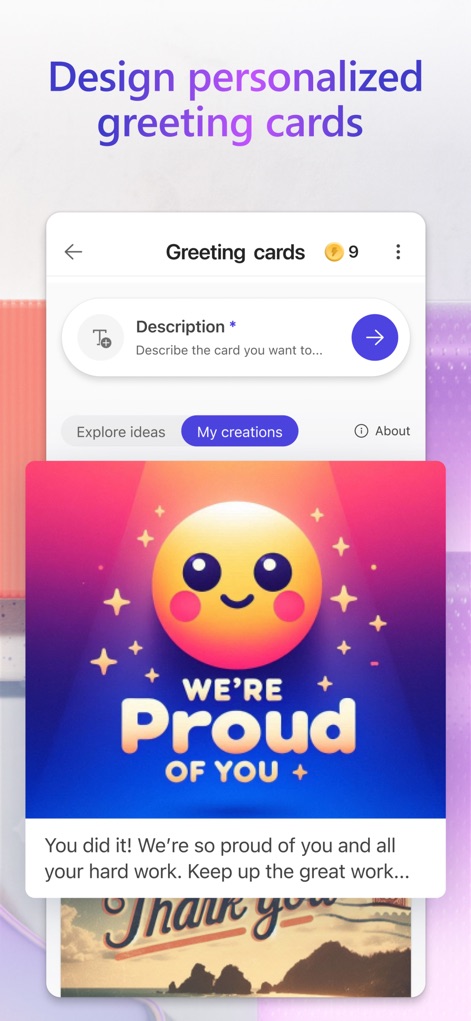
ユーザーは「Description」フィールドに内容を入力することで、笑顔の絵文字と「WE'RE Proud OF YOU」のメッセージが特徴的なカードのような、心温まるグリーティングカードを簡単にデザインし、大切な人に送ることができます。
パーソナルなグリーティングカード
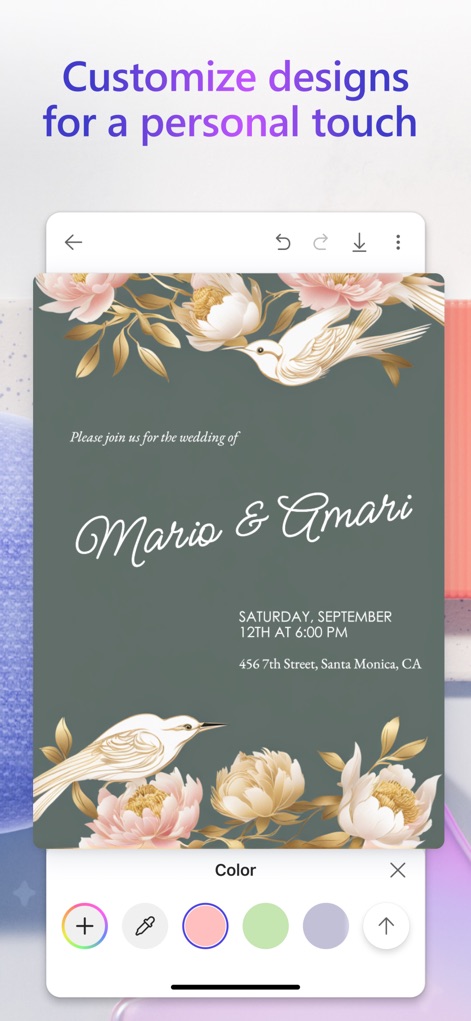
この画面では、ユーザーはエレガントな「Mario & Amari」の結婚式招待状を例に、下部の「カラーパレット」から背景色を選択したり、デザイン要素を調整したりして、細部にまでこだわったパーソナルなタッチを加えることができます。
デザインを自由自在に
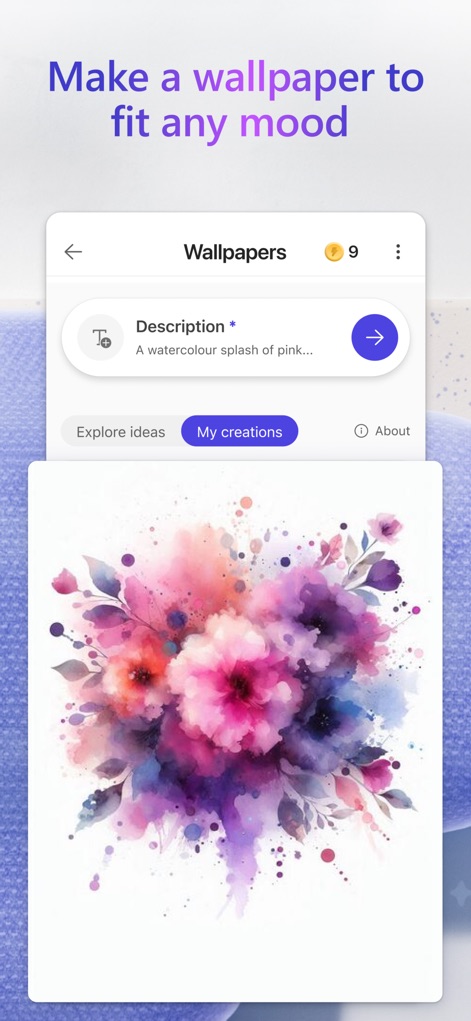
ユーザーは「Description」に「A watercolour splash of pink...」のような説明を入力し、その言葉から生成された美しい水彩画風の「花の壁紙」など、気分に合わせた魅力的な壁紙を簡単に作成できます。
気分に合う壁紙
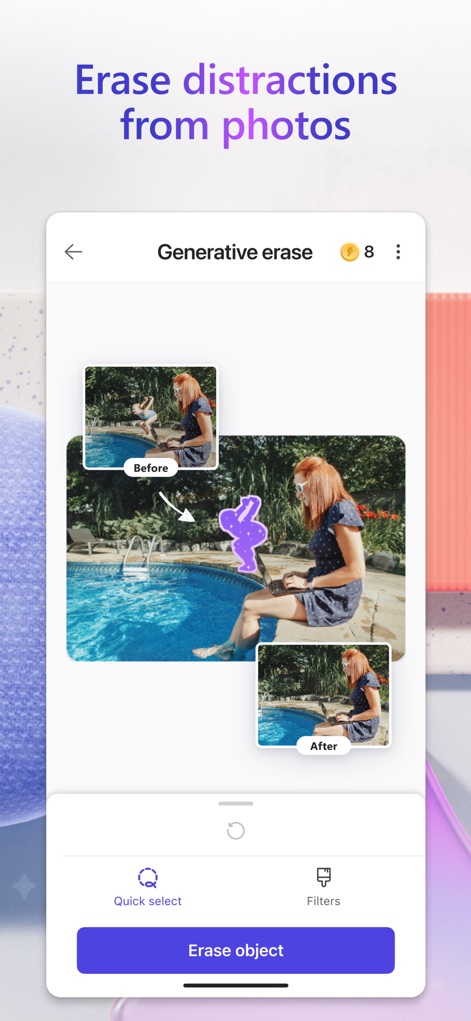
「Generative erase」機能により、ユーザーはプールのそばにいる女性の「Before」画像から不要な人物を消去し、「After」画像のように背景を自然に補完することで、写真の邪魔な要素を簡単に除去できます。
写真から邪魔なものを消去
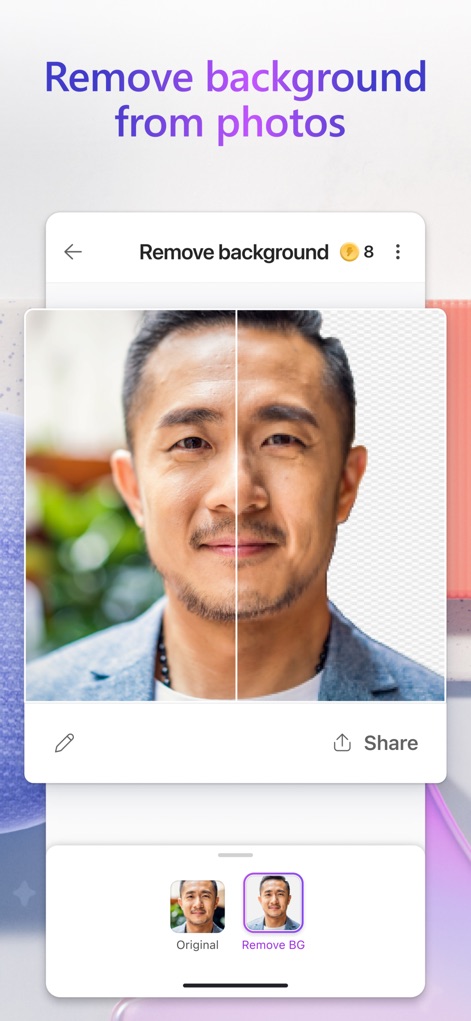
このツールを使えば、ユーザーは人物のポートレート画像の「Original」背景を、数タップで瞬時に透明な「Remove BG」背景に変換し、被写体を際立たせるプロフェッショナルな編集が可能です。
背景を瞬時に削除
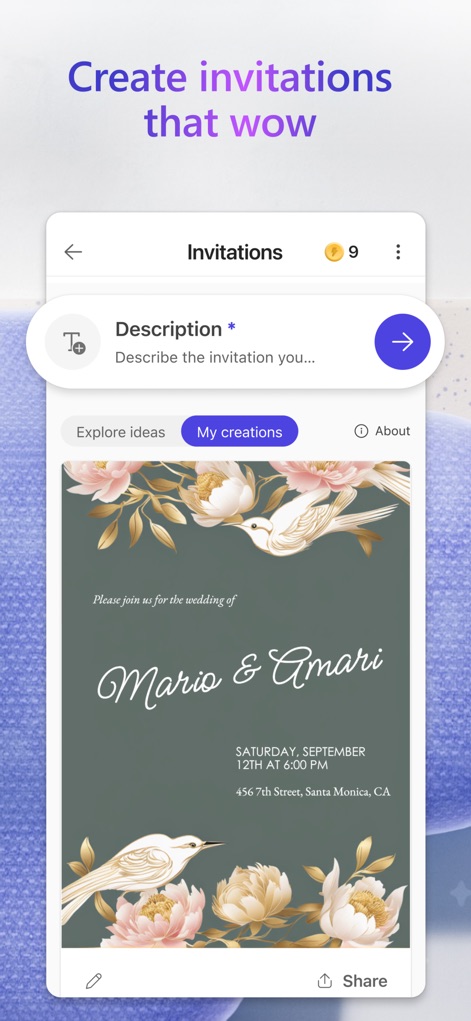
ユーザーは「Description」入力フィールドにイベントの詳細を入力することで、華やかな「Mario & Amari」の結婚式招待状のような、ゲストを魅了する美しいデザインの招待状を簡単に作成できます。
魅力的な招待状を作成
説明
Download
類似アプリ
似た機能とユーザー体験を持つアプリ
17V28: Creative Carousel
17V28 LTD
Vivisticker: Story Maker
Printage inc.

简篇创作-AI智能排版
Beijing Jianpian Intelligent Technology Co., Ltd.

Text Art: Typography & Word
Appostrophe AB
Flyer AI. Poster design maker
Dmitry Marchenkov
Word Swag - Cool Fonts
Oringe Inc.
Storyluxe: Templates & Filters
Luxe Studio Apps LLC
IG: Story Maker & Insta Editor
APPSLAB.IO - FZCO

UniStory -Story Maker, Collage
SHANTANU PTE. LTD.
このページはアプリまたはその開発者の公式ページではなく、情報提供および論評を目的として作成された独立した編集出版物です。明示的に別段の記載がない限り、アプリおよびその開発者は、MWM、Apple、Google Play、アプリのパブリッシャー、またはアプリの開発者と提携、承認、後援、認可、またはその他の公式的な関係はなく、このページのいかなる内容も、アプリがMWMのサービスを使用して開発されたことを意味するものではありません。すべての商標、ロゴ、スクリーンショット、その他のコンテンツはそれぞれの所有者の財産です。