
このページはアプリまたはその開発者の公式ページではなく、情報提供および論評を目的として作成された独立した編集出版物です。明示的に別段の記載がない限り、アプリおよびその開発者は、MWM、Apple、Google Play、アプリのパブリッシャー、またはアプリの開発者と提携、承認、後援、認可、またはその他の公式的な関係はなく、このページのいかなる内容も、アプリがMWMのサービスを使用して開発されたことを意味するものではありません。すべての商標、ロゴ、スクリーンショット、その他のコンテンツはそれぞれの所有者の財産です。


MoneyTrack: Expense Tracker
支出をねじ伏せ、収益を支配する。MoneyTrackは、あなたの金を完全にコントロールするための生々しいデータを提供する。広告なし、無駄なし、言い訳なし。
ダウンロード
1M+ユーザー評価
評価数
16.5K開発元
カテゴリ
Finance対応言語
4最新バージョン
4.4.3サイズ
58.3 MBリリース日
2019年9月8日財務管理に意識の高い大人向けに最適化された主要機能の評価
MoneyTrack: Expense Tracker アプリの専門的分析
高度なクロスプラットフォーム同期
本アプリは、iPhone、iPadに加え、他のモバイルプラットフォームやMac/PC用の専用デスクトップ版にも対応しており、リアルタイムのクラウド同期により、ユーザーはいつでもどこでも支出を追跡できます。
多通貨対応
このツールは、リアルタイムの為替レートに対応した複数通貨をサポートしており、旅行、留学、越境ショッピングなど、多様な金融ポートフォリオを持つユーザーにとって不可欠な機能です。
純粋な広告なし体験
このアプリは、広告、プッシュ通知、金融商品の推奨が一切ない、純粋な家計簿体験を提供します。ユーザーは中断されることなく、迅速な記録管理が可能です。
強固なデータセキュリティとプライバシー
本アプリは、無料のクラウドバックアップを提供し、iPhone、iPad、Mac、PC間でデータを同期します。ユーザーのデータは厳格なプライバシーポリシーに従って保護され、悪用されることはありません。
高度な予算管理
ユーザーは月ごとおよびカテゴリーごとの予算を設定でき、利用可能な資金を動的に監視することで、支出を管理し、より多くの貯蓄を達成することが可能です。
AIによる自動支出追跡
本ツールは、iOSショートカットとAIアルゴリズムを深く統合しており、ユーザーはアプリを開くことなく、ワンタップで支出を自動的に高精度で分類することが可能です。
統合資産管理
このアプリは、現金、銀行口座、クレジットカード、電子ウォレット、投資を含む資産を一元的に管理し、ユーザーは自身の純資産を明確に把握することができます。
共有台帳機能
本アプリは、家族やパートナーを共有台帳に招待する機能を提供し、ユーザーは完全な透明性を持って家計を共同で管理することが可能です。
貯蓄目標追跡
ユーザーは、車購入や旅行などの目標を設定し、その進捗を追跡することで、貯蓄へのモチベーションを維持することが可能です。
経費精算管理
このアプリは、費用を「払い戻し可能」としてマークする機能を提供し、ユーザーは個人の支出とビジネス経費を簡単に分離し、出張時の経費処理を効率化できます。
よくある質問
について知っておくべきこと MoneyTrack: Expense Tracker
Does MoneyTrack display advertisements or financial promotions?
No, MoneyTrack strictly adheres to a "Three NOs" principle: no ads, no splash screens, and no financial promotions. It provides a pure, ad-free bookkeeping experience for expense tracking.
Can MoneyTrack automatically categorize my expenses?
Yes, MoneyTrack utilizes Smart AI Algorithms and iOS Shortcuts for AI auto-tracking. It categorizes spending with high precision, allowing for single-tap expense tracking without fully opening the app.
Is MoneyTrack compatible with multiple devices and platforms?
Yes, MoneyTrack offers true cross-platform sync. It supports iPhone, iPad, other mobile platforms, and a dedicated Pro Desktop Version for Mac and PC, ensuring real-time cloud ledger synchronization.
Does MoneyTrack allow users to set budgets and track their spending?
Yes, MoneyTrack supports comprehensive budget control. Users can set monthly and category-based budgets and dynamically monitor available funds to effectively manage spending and save more.
What kind of financial reports does MoneyTrack provide?
MoneyTrack generates professional-grade financial reports and provides a balance sheet feature. Users gain clear insights into personal or family financial health in real-time, including detailed category statistics.
Does MoneyTrack support managing multiple types of assets and liabilities?
Yes, MoneyTrack offers comprehensive asset management. It provides a unified view of cash, bank accounts, credit cards, e-wallets, investments, debts, and liabilities, showing your net worth at a glance.
Can I customize expense categories in MoneyTrack?
Yes, MoneyTrack provides custom categories with 2-level support and unlimited customization. Users can tailor their expense tracking system precisely to fit their specific financial needs.
Is my financial data secure with MoneyTrack?
Yes, MoneyTrack ensures data security with free cloud backup and sync across all devices. The app strictly follows privacy policies and guarantees that user data is never misused.
Can MoneyTrack track recurring expenses and installment payments?
Yes, MoneyTrack allows setting up recurring expenses like rent or subscriptions for automatic recording. It also tracks credit card installments and loans, auto-calculating monthly repayments for better cash flow planning.
Does MoneyTrack offer widgets for quick access on my phone?
Yes, MoneyTrack provides various Home Screen widgets. These widgets allow users to check daily spending or quick-add expenses directly from their device's home screen for convenience.
以下のスクリーンショットと説明は、アプリの公式ストアリスティングから直接取得されたものであり、アプリ開発者の所有物です。
アプリストア
スクリーンショット
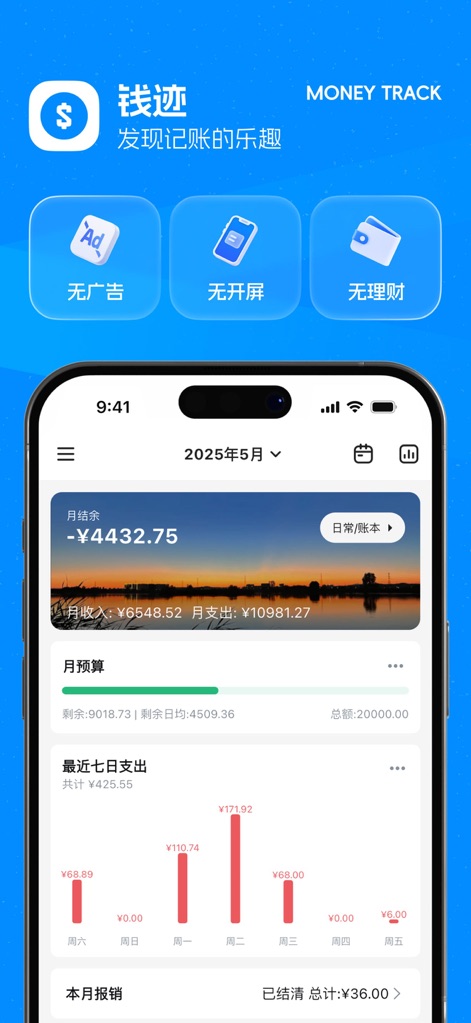
このアプリのダッシュボードでは、「月次残高」で現在の財務状況を素早く把握し、「最近7日間の支出」グラフで支出の傾向を視覚的に追跡できます。
ダッシュボード概要
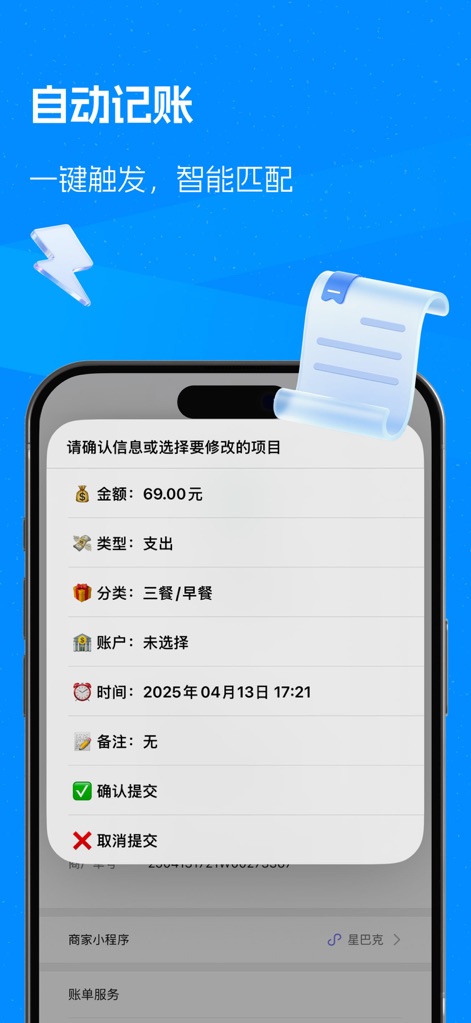
自動記帳機能により、ユーザーはポップアップで表示される「金額」と「分類」などの取引詳細を簡単に確認・修正でき、効率的な記録が可能です。
スマート自動入力

支出入力画面では、多様な「カテゴリ」から選択し、下部の「数字キーパッド」で素早く金額を入力することで、スムーズな記帳を体験できます。
直感的な支出記録

「分類統計」の円グラフは支出の内訳を視覚的に示し、「支出詳細リスト」では各カテゴリの具体的な金額とパーセンテージを深く分析できます。
詳細な収支分析
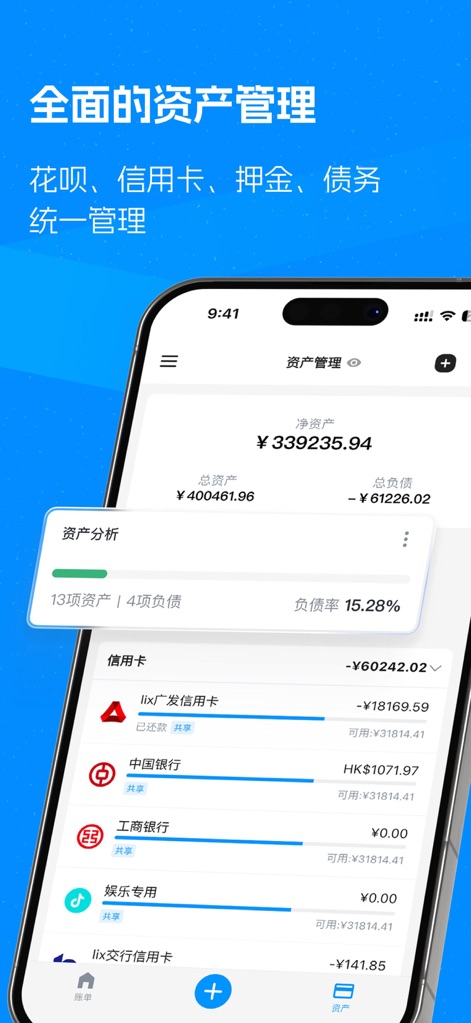
アプリは「純資産」の明確な概要を提供し、ユーザーは「クレジットカード」のリストを通じて、すべての金融負債と資産を一元的に管理できます。
包括的な資産管理
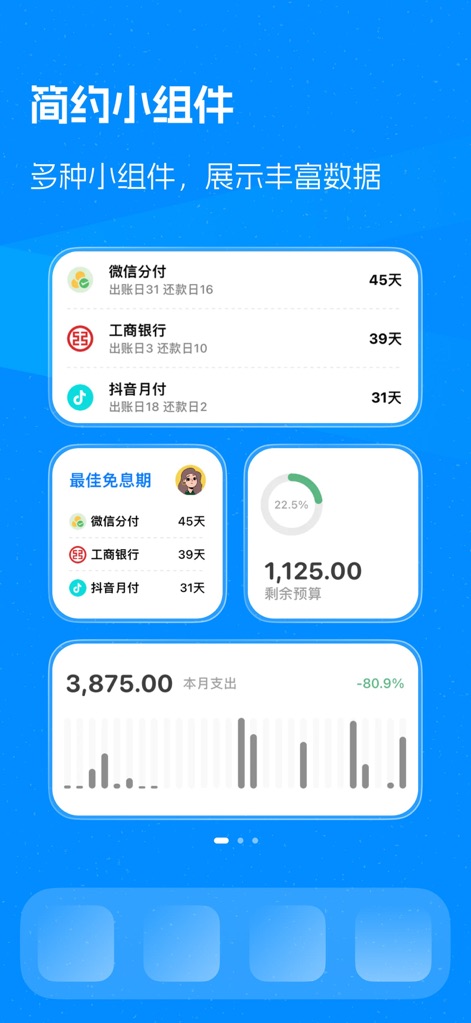
ホーム画面ウィジェットにより、「支払い期日」を簡単に確認でき、また「利用可能な予算」の残りを常に表示することで支出管理を支援します。
カスタマイズウィジェット

洗練された「夜間モード」は、暗い環境下でも快適な操作を提供し、「月次残高」や「支出入力」など主要機能の視認性を高めます。
美しい夜間モード
説明
Download
類似アプリ
似た機能とユーザー体験を持つアプリ

鲨鱼记账本-城市理财圈子必备工具软件
Beijing Shark Pioneer Network Technology Co.,Ltd

咔皮记账 -自动记账 AI记账 预算 多账本 资产管理 存钱
Shanghai Yuhuan Technology Co., Ltd.

Money manager, expense tracker
Orange dog d.o.o.

Money Manager Expense & Budget
Realbyte Inc.

Budget Planner App - Fleur
Akash Jain

iCost记账-快速简洁好用的记账理财助手&记账软件
Guangzhou Quji Technology Co., Ltd.

YNAB
You Need A Budget LLC

Copilot: Track & Budget Money
Copilot Money, Inc.

小青账记账-存钱记账本理财购物清单
YouQian
このページはアプリまたはその開発者の公式ページではなく、情報提供および論評を目的として作成された独立した編集出版物です。明示的に別段の記載がない限り、アプリおよびその開発者は、MWM、Apple、Google Play、アプリのパブリッシャー、またはアプリの開発者と提携、承認、後援、認可、またはその他の公式的な関係はなく、このページのいかなる内容も、アプリがMWMのサービスを使用して開発されたことを意味するものではありません。すべての商標、ロゴ、スクリーンショット、その他のコンテンツはそれぞれの所有者の財産です。