MOZE
MOZE
ダウンロード: App Store

このページはアプリまたはその開発者の公式ページではなく、情報提供および論評を目的として作成された独立した編集出版物です。明示的に別段の記載がない限り、アプリおよびその開発者は、MWM、Apple、Google Play、アプリのパブリッシャー、またはアプリの開発者と提携、承認、後援、認可、またはその他の公式的な関係はなく、このページのいかなる内容も、アプリがMWMのサービスを使用して開発されたことを意味するものではありません。すべての商標、ロゴ、スクリーンショット、その他のコンテンツはそれぞれの所有者の財産です。


ロゴ: MOZE
ダウンロード: App Store

MOZE

パーソナルファイナンスにおける10年間の洗練された卓越性を体験してください。高度なクレジットカード管理から仮想通貨追跡まで、安全で美的、そして強力なインターフェースであなたの富を完全に管理しましょう。

主要数値

ダウンロード

556K+

ユーザー評価

4.5/5

評価数

2K+

開発元

MOZE Co., Ltd.

カテゴリ

Finance

対応言語

3

最新バージョン

4.1.3

サイズ

188.7 MB

リリース日

2019年7月2日
機能

あなたの富をコマンドする

毎日の経費から仮想通貨ポートフォリオまで、MOZE 4.0はAppleエコシステム内であなたの財務生活を追跡、分析、最適化するために必要なプロフェッショナルグレードのツールを提供します。

超高速入力

Apple Watch、ホーム画面ウィジェット、Siriショートカットを使用して、数秒で取引を記録—手間のかからないモダンなワークフローのために設計されています。

高度なクレジットカードハブ

すべてのカードにわたる分割払い、返金、複雑な請求サイクルを高度に追跡して、特典と締め日をマスターしましょう。

以下のスクリーンショットと説明は、アプリの公式ストアリスティングから直接取得されたものであり、アプリ開発者の所有物です。

アプリストア

スクリーンショット
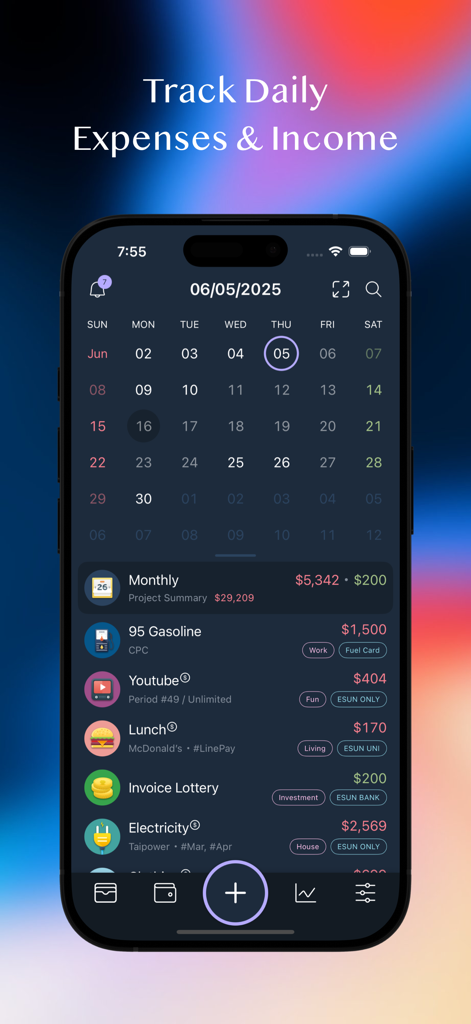
MOZE - iPhoneに表示されたMOZEアプリのインターフェース。カレンダービューと日々の収入・支出取引のリストが表示されています。
iPhoneに表示されたMOZEアプリのインターフェース。カレンダービューと日々の収入・支出取引のリストが表示されています。

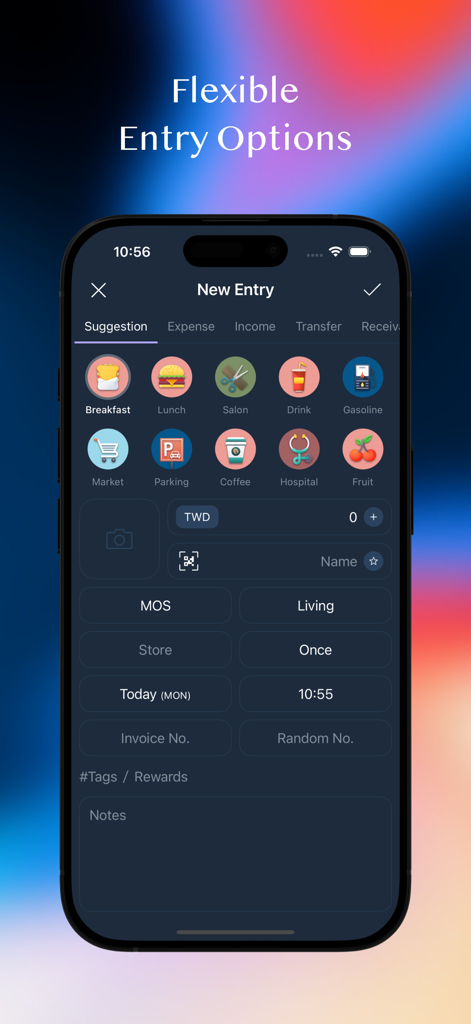
MOZE - カラフルなカテゴリアイコンを備えたMOZEアプリの柔軟な取引入力オプションを示すiPhone画面
カラフルなカテゴリアイコンを備えたMOZEアプリの柔軟な取引入力オプションを示すiPhone画面

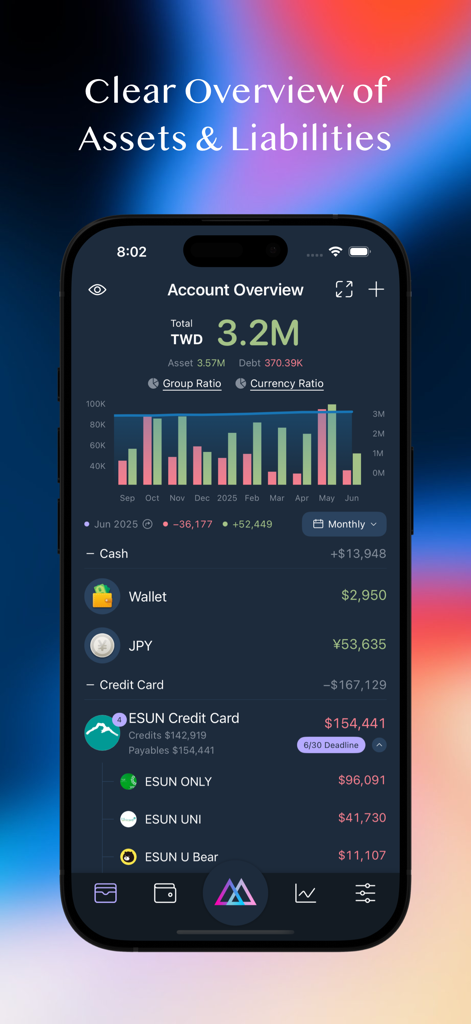
MOZE - 資産と負債の包括的なアカウント概要と、財務トレンドを示す棒グラフを表示するMOZEアプリのモバイルインターフェース。
資産と負債の包括的なアカウント概要と、財務トレンドを示す棒グラフを表示するMOZEアプリのモバイルインターフェース。

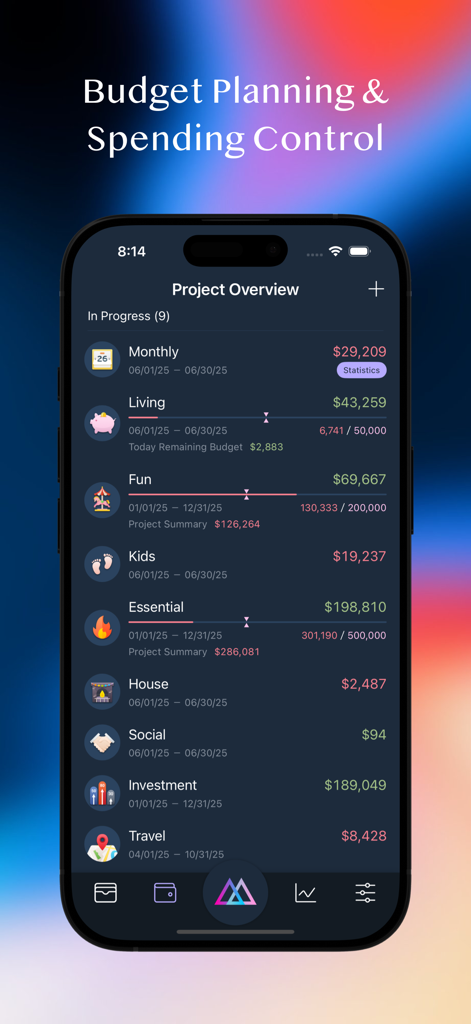
MOZE - 複数のカテゴリと進捗バーを備えた予算計画と支出管理のためのプロジェクト概要を表示するiPhone上のMOZEアプリインターフェース。
複数のカテゴリと進捗バーを備えた予算計画と支出管理のためのプロジェクト概要を表示するiPhone上のMOZEアプリインターフェース。

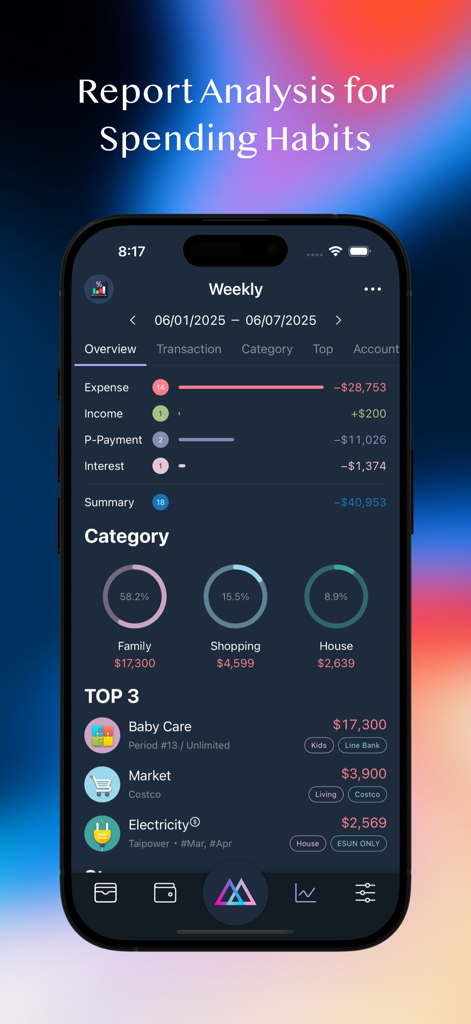
MOZE - 週間の支出チャートとカテゴリで、MOZEアプリの支出習慣分析レポートを表示するスマートフォン
週間の支出チャートとカテゴリで、MOZEアプリの支出習慣分析レポートを表示するスマートフォン

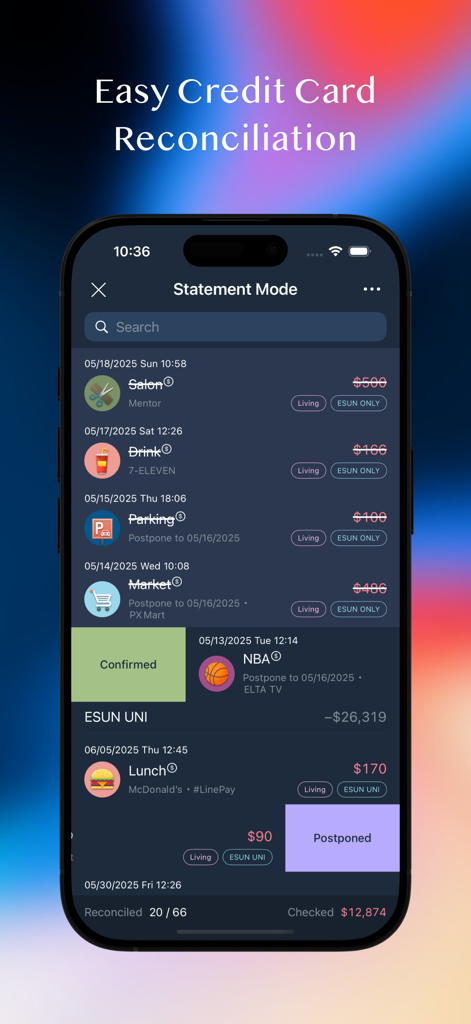
MOZE - 締め日モードでのクレジットカード照合を表示するMOZEアプリのiPhoneインターフェース
締め日モードでのクレジットカード照合を表示するMOZEアプリのiPhoneインターフェース

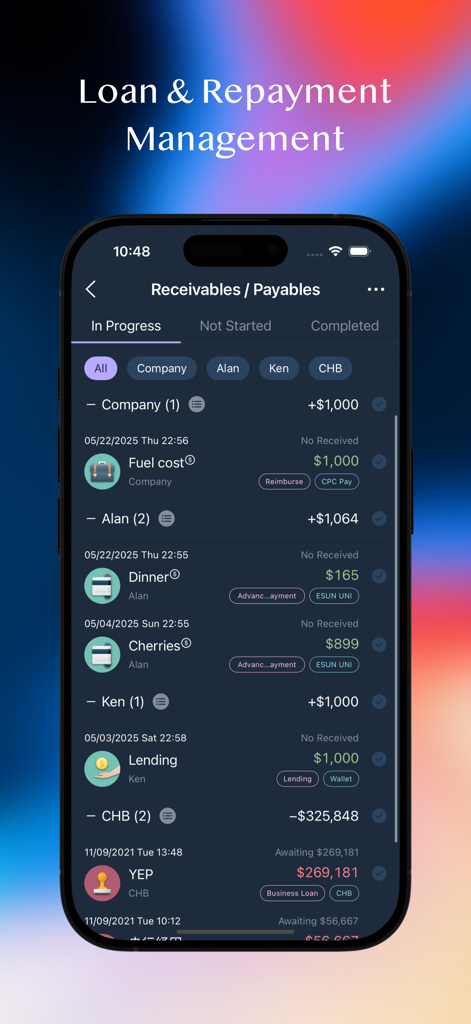
MOZE - ローンと払い戻しの詳細な取引追跡を備えた、受取債権と支払債権管理を表示するMOZEアプリインターフェース
ローンと払い戻しの詳細な取引追跡を備えた、受取債権と支払債権管理を表示するMOZEアプリインターフェース

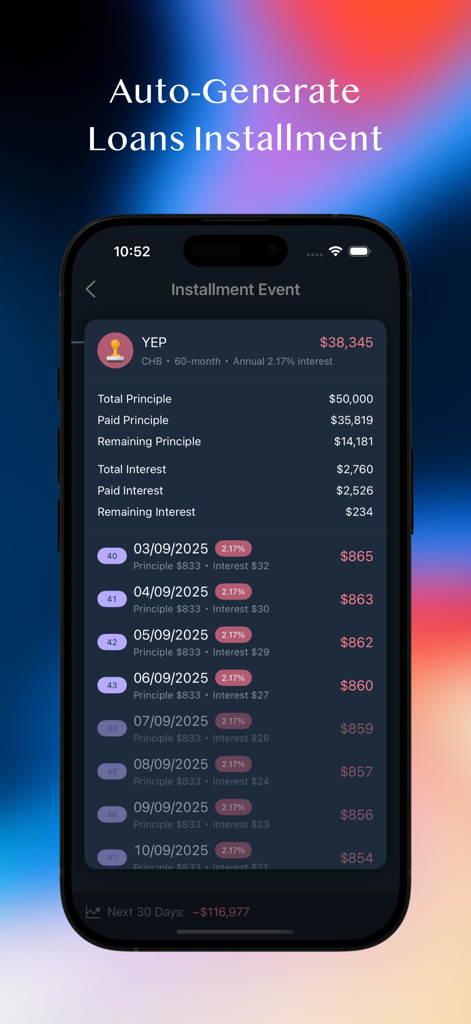
MOZE - 元金と利息の内訳を含む詳細なローン分割払い追跡を表示するモバイルインターフェース
元金と利息の内訳を含む詳細なローン分割払い追跡を表示するモバイルインターフェース

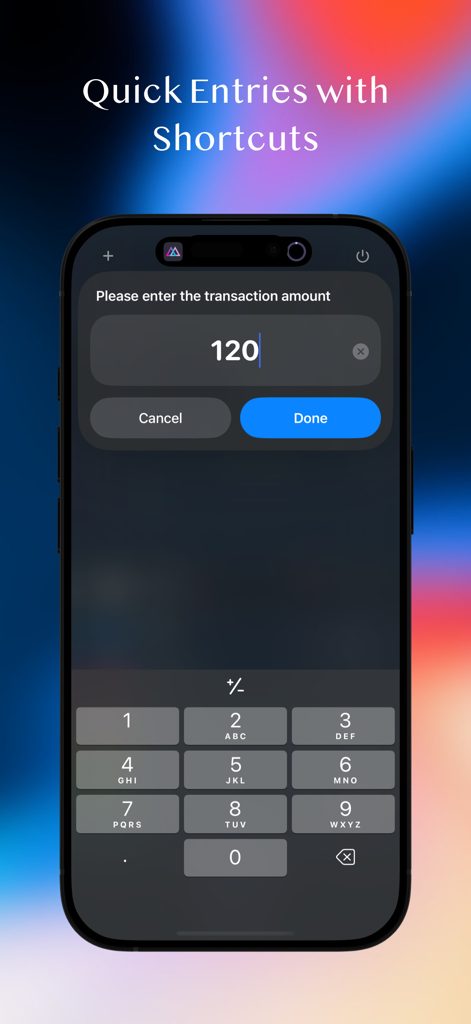
MOZE - 取引金額を入力するためのテンキーを備えたiPhone上のクイック入力ショートカット機能を示すMOZEアプリのスクリーンショット。

取引金額を入力するためのテンキーを備えたiPhone上のクイック入力ショートカット機能を示すMOZEアプリのスクリーンショット。

説明

MOZE 4.0 – 10 Years of Excellence, Trusted by Millions Beautiful Interface × Powerful Features × Ultimate Experience Turn bookkeeping into pure enjoyment! Tired of your money disappearing without a trace? Want to take control of your finances but don’t know where to start? MOZE helps you effortlessly build bookkeeping habits and regain control over your money! --- 【 What’s New in 4.0 】 iPad Version – Designed for large screens with cross-device synchronization Shortcut Quick Entry – Log a transaction in seconds without opening the app Enhanced Statistics Reports – Multi-dimensional analysis by account, project, target, and more Comparison Reports – Cross-period comparisons to track financial trends Multiple Invoices Linking – Attach several invoices to a single transaction entry Entry Modes Switch – Context-based quick selection of account and category presets Full-Screen Calendar View – Monitor daily income and expenses at a glance Sign in with Apple & Sync – Automatically back up data to MOZE Cloud Crypto Tracking – Follow the top 100 cryptocurrencies by market cap 30+ Updates and Optimizations – Better UX, smoother performance, more power --- 【 Core Features Overview 】 Powerful Financial Management • Multi-account support, cross-currency bookkeeping • Project grouping, budget planning • Payables & receivables tracking, interest calculations Daily Use Scenarios • Comprehensive support for recurring expenses, installments, refunds, fees, discounts, and more Credit Card Center • Advanced features including shared credits, statement mode, billing installments, rewards tracking, auto deposit, balance adjustments Rich Report Analysis • Various types of statistical reports • Comparison tables across different time periods Taiwan E-Invoice Integration • Mobile barcode carrier, QR code scanning, automatic lottery checking, invoice linking Privacy & Security • ISO-27001 certified • Cloud encryption and password protection to safeguard your data Personalization • Over 100 built-in common categories, fully customizable to personal preferences • Multiple theme options, downloadable account and color icons to create your unique style Other Features • Search, batch processing, CSV import/export, cloud backup / restore Widget • Instantly check accounts, budgets, notifications, rewards, and more Apple Watch • Quick entry, recent records, credit card payment reminders, transaction reminders, mobile barcode --- Why Choose MOZE? • 10 years of continuous development, full-featured and refined • Trusted by millions of users • Taiwan-localized design that truly understands your needs --- Contact & Support • Facebook Page: https://moze.to/moze_fb • Facebook Group: https://moze.to/moze_group • Email: hello@moze.app • Website: https://moze.app • Pricing: https://moze.app/pricing • FAQ: https://faq.moze.app/ • Features: https://doc.moze.app/ Legal • Privacy Policy: https://moze.to/website_privacy • Terms of Use: https://moze.to/website_terms --- Ready to make money management effortless? Download MOZE 4.0 and start your 14-day free trial today!

Download

ダウンロード: App Store

このページはアプリまたはその開発者の公式ページではなく、情報提供および論評を目的として作成された独立した編集出版物です。明示的に別段の記載がない限り、アプリおよびその開発者は、MWM、Apple、Google Play、アプリのパブリッシャー、またはアプリの開発者と提携、承認、後援、認可、またはその他の公式的な関係はなく、このページのいかなる内容も、アプリがMWMのサービスを使用して開発されたことを意味するものではありません。すべての商標、ロゴ、スクリーンショット、その他のコンテンツはそれぞれの所有者の財産です。








