
このページはアプリまたはその開発者の公式ページではなく、情報提供および論評を目的として作成された独立した編集出版物です。明示的に別段の記載がない限り、アプリおよびその開発者は、MWM、Apple、Google Play、アプリのパブリッシャー、またはアプリの開発者と提携、承認、後援、認可、またはその他の公式的な関係はなく、このページのいかなる内容も、アプリがMWMのサービスを使用して開発されたことを意味するものではありません。すべての商標、ロゴ、スクリーンショット、その他のコンテンツはそれぞれの所有者の財産です。


NetBenefits
このアプリは、あなたの職場の福利厚生をデジタル化し、それらをあなたの支配下に置く。煩雑な手続きに別れを告げ、自分の財務を直接管理する力を手に入れる。
ダウンロード
7.5M+ユーザー評価
評価数
28.7K開発元
カテゴリ
Finance対応言語
2最新バージョン
4.31.0サイズ
277.5 MBリリース日
2013年5月8日Fidelity NetBenefits アプリが提供する主要な機能とユーザーへの影響度に関するテックアナリストの評価
NetBenefits アプリケーションの機能分析
強固なセキュリティ
このアプリは、顧客認証や生体認証などの高度な対策を組み合わせ、ユーザーのアカウントの安全性を確保します。
退職金および投資状況の確認
ユーザーは退職金口座、その他の投資口座(529プラン、証券口座を含む)の残高、パフォーマンス、最近の拠出金を確認できます。
拠出率と投資の変更
ユーザーは401K、403B、および/またはHSA口座における拠出率や投資配分を直接変更できます。
退職計画ツール
ユーザーは退職までに必要となる可能性のある金額を把握し、Fidelity Retirement ScoreSM を取得することで、個別の退職計画を立てることができます。
HSAの管理
ユーザーはHSA(医療費貯蓄口座)の費用を管理し、投資状況を監視することができます。
健康保険情報の確認
本ツールは、ユーザーの健康保険プランに関する情報(被保険者、プロバイダーの電話番号、グループ番号など)への迅速なアクセスを提供します。
株式プランの管理
企業から提供された株式プランにおいて、オプションの行使や株式付与の承認を行うことができます。
総合的な教育リソース
本ツールは、ユーザーが情報に基づいた金融上の意思決定を行うために、記事、ビデオ、ポッドキャスト、およびインタラクティブなツールへのアクセスを提供します。
よくある質問
について知っておくべきこと NetBenefits
What is the NetBenefits app?
The NetBenefits app allows users to conveniently manage their workplace benefits from Fidelity, including retirement savings, stock options, health insurance, and HSAs. It provides access to account balances, investments, and performance.
Can I view my retirement savings in the NetBenefits app?
Yes, the NetBenefits app allows users to easily view their retirement savings. This includes account balances, investments, recent contributions, and overall account performance displayed with charts and returns.
How can I manage my Health Savings Account (HSA) using NetBenefits?
Users can manage their HSA expenses and investments within the NetBenefits app. The app allows viewing balances, tracking performance, paying expenses, and reimbursing themselves directly.
Does the NetBenefits app support sending documents via camera?
Yes, the NetBenefits app supports sending documents and rollover checks using the device's camera. The app provides a confirmation of successful delivery once documents are sent.
Can I access my health insurance information through the NetBenefits app?
Yes, users can quickly find their health insurance information in the NetBenefits app. This includes details like who is covered, provider phone numbers, and the group number for various health benefits.
What financial planning tools are available in NetBenefits?
The NetBenefits app offers personalized planning tools. Users can see how much they may need in retirement, get their Fidelity Retirement ScoreSM, and access Financial Wellness next steps for planning.
Is the NetBenefits app secure?
Yes, the NetBenefits app prioritizes security. It uses advanced measures like customer verification and biometrics to help ensure every visit is safe and secure for all users.
Can I change my contribution rates for retirement accounts in NetBenefits?
Yes, the NetBenefits app allows users to change their contribution rate and investments across 401K, 403B, and/or HSA accounts directly within the application.
What kind of educational materials does NetBenefits provide?
The NetBenefits app provides educational materials such as articles, videos, podcasts, and interactive tools. These resources help users make informed financial decisions and build confidence.
Who can use the NetBenefits smartphone app?
The NetBenefits smartphone app is available to individuals who have one or more workplace benefits provided by Fidelity Investments. It is specifically designed for managing these benefits.
以下のスクリーンショットと説明は、アプリの公式ストアリスティングから直接取得されたものであり、アプリ開発者の所有物です。
アプリストア
スクリーンショット

この画面では、ポートフォリオの合計額と、過去1年間のパフォーマンスを示すグラフという2つの具体的な視覚的機能を通じて、退職貯蓄の状況を一目で把握できます。
退職貯蓄を管理
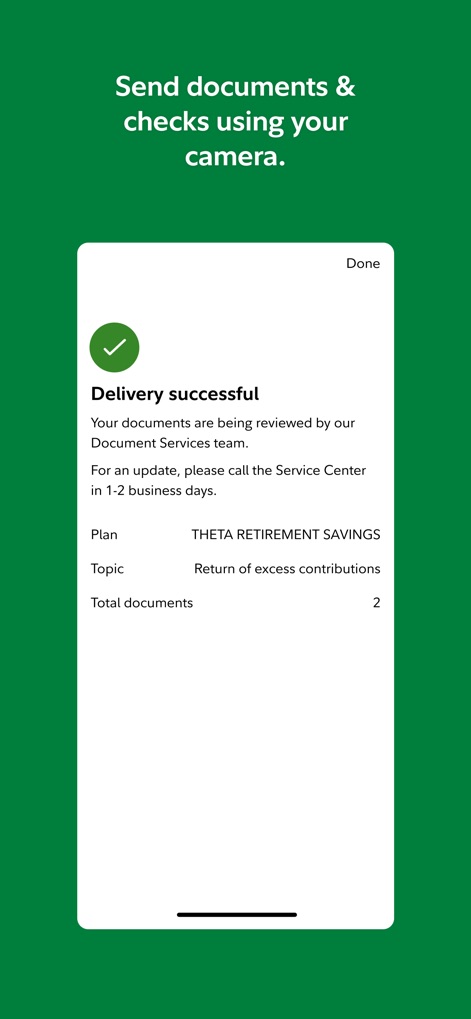
この画面は、書類の送付が成功したことを示す確認メッセージと、送付された書類が「合計2点」であるという詳細情報という2つの具体的な視覚的機能を提供し、ユーザーに安心感を与えます。
書類送付が完了

ユーザーは、現在の健康給付の概要と、メディカル、デンタル、ビジョンなどの詳細な健康プランという2つの具体的な視覚的機能から、健康保険の情報を簡単に確認できます。
健康福祉を表示

この画面では、HSAの残高と過去1ヶ月間の投資パフォーマンスを示すグラフという2つの具体的な視覚的機能により、ユーザーは自身のHSAを効果的に管理できます。
HSAを最適化
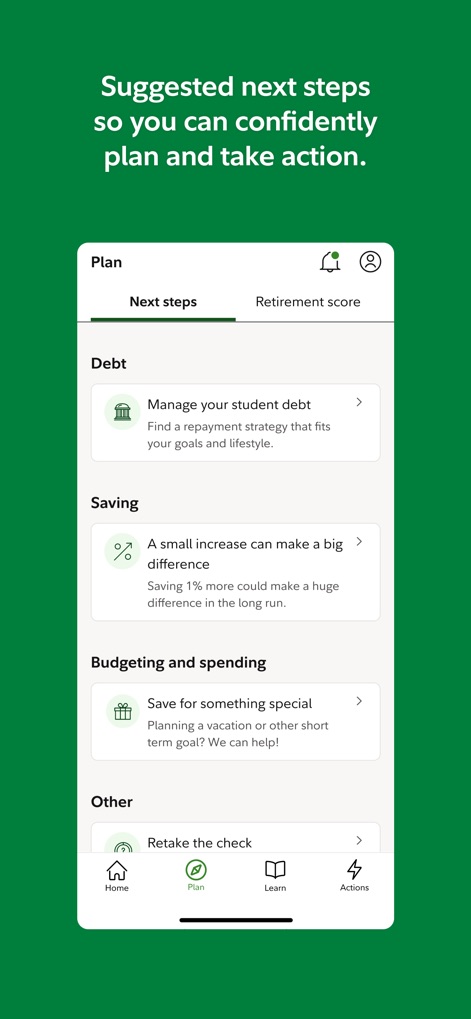
この画面は、「学生ローンの管理」や「貯蓄率の向上」といったパーソナライズされた次のステップという2つの具体的な視覚的機能を通じて、ユーザーが自信を持って計画を立て、行動を起こすためのガイダンスを提供します。
次のステップを計画

この画面には、「年間登録の時期」に関する重要な通知と、「受益者の追加」を促すメッセージという2つの具体的な視覚的機能が表示され、ユーザーはアカウントに関する重要な更新を見逃しません。
通知を受け取る
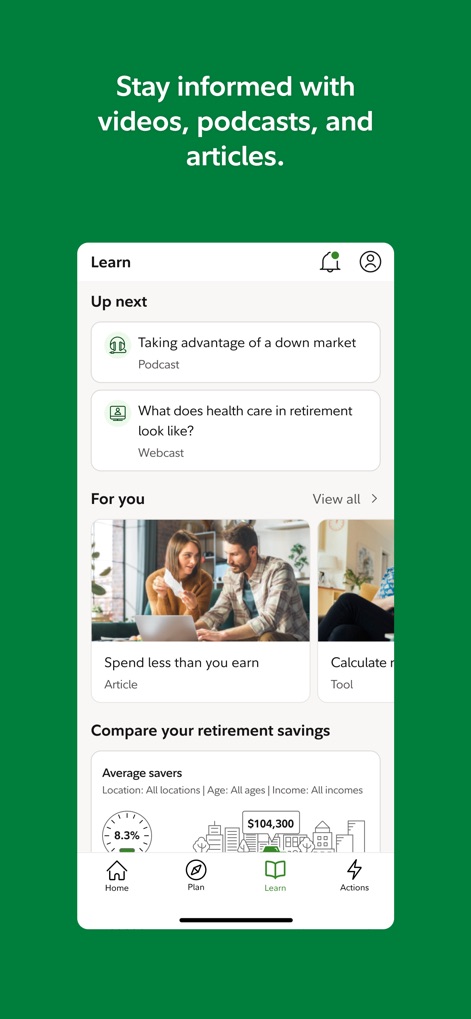
ユーザーは、退職後のヘルスケアに関する「ウェブキャスト」や、家計管理に役立つ「記事」といった2つの具体的な視覚的機能を含む豊富な教育コンテンツにアクセスし、金融リテラシーを高めることができます。
学習資料を活用
説明
Download
類似アプリ
似た機能とユーザー体験を持つアプリ

Alight Mobile
Alight Solutions, LLC

Principal®
Principal Financial Group
Voya
Voya Services Company

Fidelity Health®
Fidelity Investments

AHE Mobil
Anadolu Hayat Emeklilik Anonim Sirketi

Edward Jones
Edward D. Jones & Co., L.P.

bswift Mobile
bswift

Northwestern Mutual
THE NORTHWESTERN MUTUAL LIFE INSURANCE COMPANY INC

New York Life
New York Life Insurance Company
このページはアプリまたはその開発者の公式ページではなく、情報提供および論評を目的として作成された独立した編集出版物です。明示的に別段の記載がない限り、アプリおよびその開発者は、MWM、Apple、Google Play、アプリのパブリッシャー、またはアプリの開発者と提携、承認、後援、認可、またはその他の公式的な関係はなく、このページのいかなる内容も、アプリがMWMのサービスを使用して開発されたことを意味するものではありません。すべての商標、ロゴ、スクリーンショット、その他のコンテンツはそれぞれの所有者の財産です。