Nexans

Nexans

ダウンロード: App Store
ロゴ: Nexans

Nexans: 電気技術者のための必須デジタルツールキット

EASYCALC™配線サイズ計算、インスタント技術データシート、リアルタイム製品認証をポケットに入れて、現場作業を効率化しましょう。

開発元

Nexans France

カテゴリ

Business

ダウンロード

14K+

ユーザー評価

3.7/5

評価数

0

対応言語

-

あなたのデジタルツールボックス

このインターフェースを利用する 14K+ 人のユーザー.

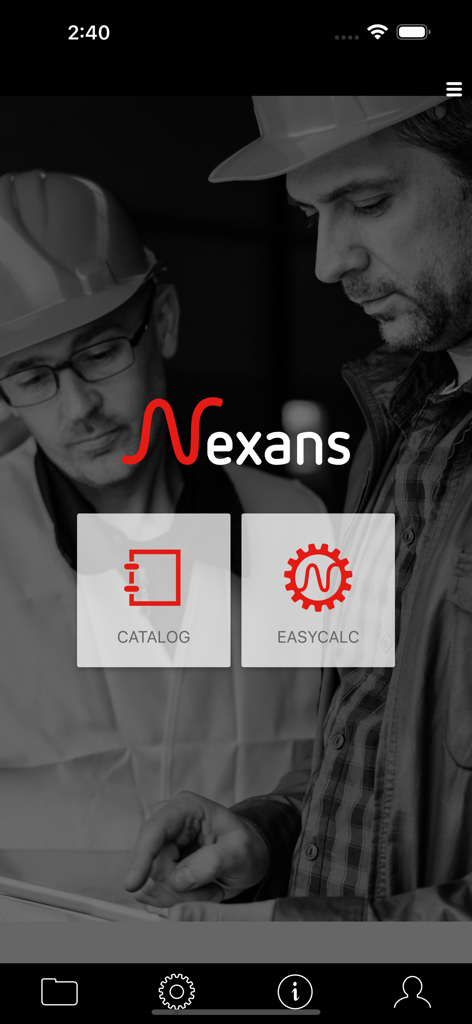
Nexansモバイルアプリのホーム画面。電気技師向けのカタログとEasyCalc機能が表示されています。
Nexansモバイルアプリのホーム画面。電気技師向けのカタログとEasyCalc機能が表示されています。

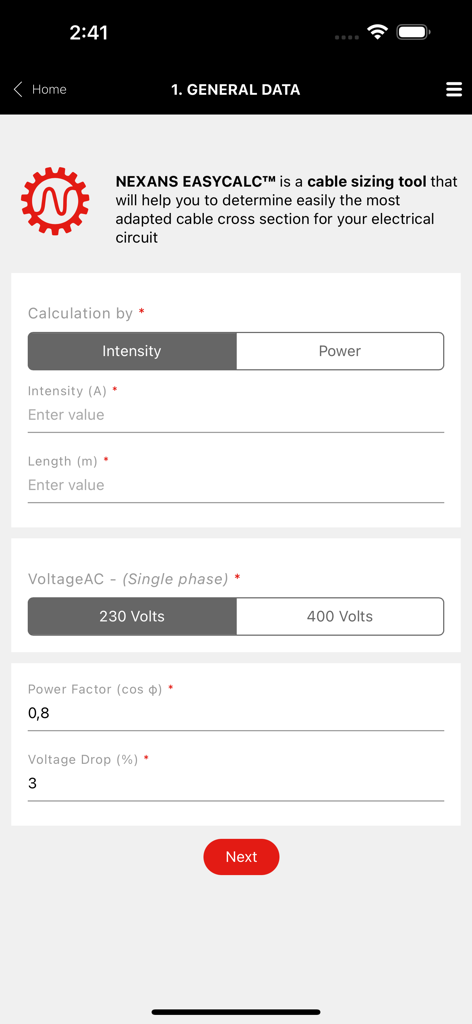
電気回路データを入力するためのNexans EasyCalcケーブルサイズ計算ツールのインターフェース
電気回路データを入力するためのNexans EasyCalcケーブルサイズ計算ツールのインターフェース

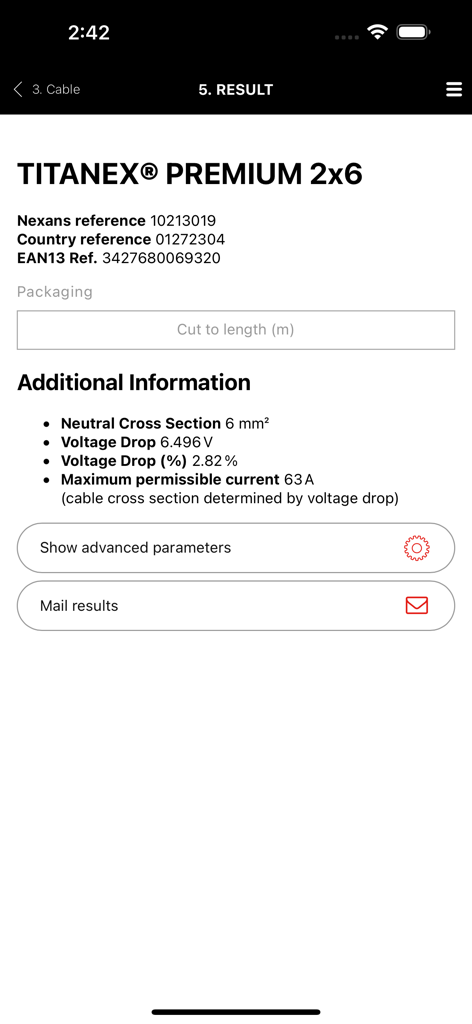
Titanex Premiumケーブルの技術データが表示されたNexansアプリEasyCalc結果画面
Titanex Premiumケーブルの技術データが表示されたNexansアプリEasyCalc結果画面

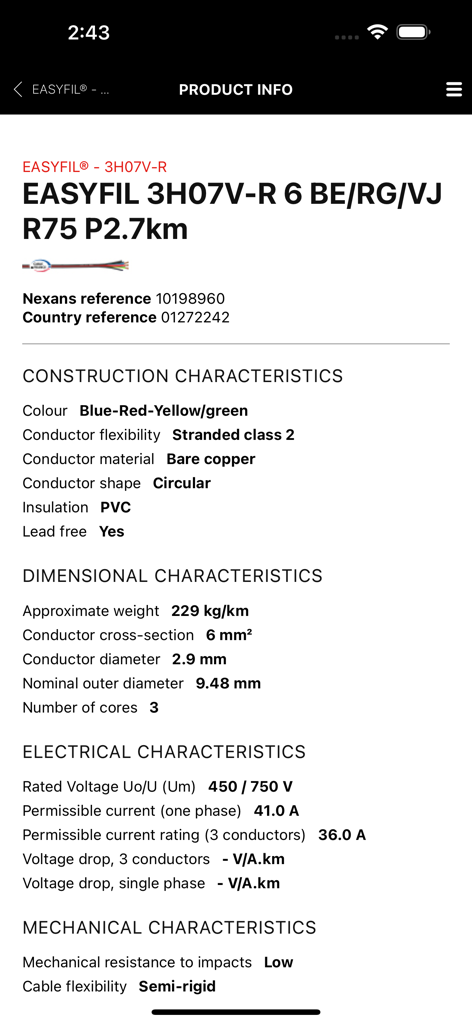
モバイルアプリ画面に表示されたNexans Easyfilケーブルの技術仕様と製品情報
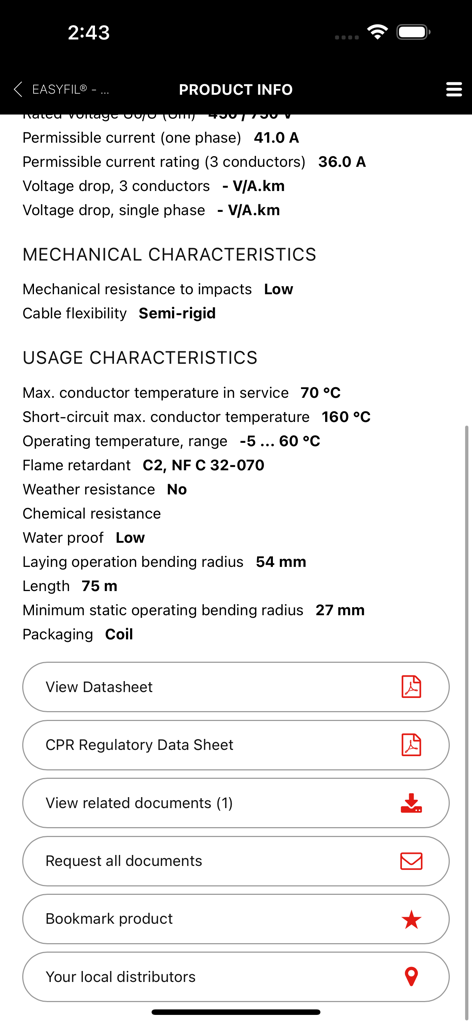
モバイルアプリ画面に表示されたNexans Easyfilケーブルの技術仕様と製品情報

ケーブルの技術仕様とデータシートのダウンロードオプションを表示するNexansアプリ画面

ケーブルの技術仕様とデータシートのダウンロードオプションを表示するNexansアプリ画面

電気技術者のための精密ツール

このアプリを際立たせるツール、 14K+ 人のユーザーが選択.

自動化されたEASYCALC™サイズ計算

手作業による計算ミスをなくします。特定の電力、長さ、環境条件に基づいて、4つの簡単なステップで理想的なケーブル断面積を決定します。

📸

インスタント技術ライブラリ

バーコードをスキャンするだけで、データシート、設置マニュアル、規制文書に即座にアクセスできます。書類のバインダーなしで必要なすべての技術データが揃います。

🛡️

偽造防止検証

あなたの評判を守り、現場の安全を確保します。Nexans製品の真正性を即座に検証し、本物の品質を設置していることを保証します。

アプリについて

について知っておくべきこと Nexans.

説明

Nexans’ app provides quick and efficient access to information about Nexans’ products, when you are on the move. Access to product datasheets, installation instructions, regulatory information, user manuals and all related documents. to find the product you want, just enter its reference number, perform a general search or just browse the catalogue. Once you have identified the product, you can access datasheets, installation instructions, user manuals, environmental declarations and other documents. Products can be easily identified thanks to product pictures. Documents can be downloaded and stored on your phone for later use, or sent to one or more e-mail addresses. Note that datasheets cannot be stored on the phone as they are subject to change and it is important to access only the latest version. Scanning a barcode on a Nexans’ product provides you with immediate access to product information without having to search. Depending on your country, the App may provide the following features EASYCALC: Our cable sizing tool– electrical installers, electricians, end-users – that will help you determine the most adapted cable cross section for your installation; Calculation is performed in 4 quick and easy steps. Step1: Fill in general information regarding your installation: intensity/power, length to be installed, voltage and current type (single phase, three phase) Step 2: Select the required cable and conductor types. You will be able to select the one you wish to use among the most common cable families. A short description and a picture of the cable will help you identify easily the one you need. Once the cable type has been chosen, you will have to specify the type of conductor (single core, multicore, with or without PE, with or without neutral) and the number of phases. Again, a corresponding picture will help you check your selection. Step 3: Specify installation conditions: environment (air/ground) and laying options. Pictograms illustrating the various options will facilitate your selection. Step 4: View calculation results: Nexans EASYCALC™ will provide you with the corresponding Nexans product reference. You can then send the results per email or contact Nexans to get additional information PRODUCT AUTHENTICATION You can now validate the authenticity of Nexans products by scanning the label available on the packaging. This module works with a specific sticker tagged on the products. It will allow to check if the product is not counterfeit. STORE LOCATOR Allow you to access the product reseller. The app makes use of your phone’s GPS for geolocation, allowing it to suggest addresses, but with a manual override for when your position is not accurately known. WARRANTY FORMS A facility for filling out warranty forms for heating cables. The procedure is the same as completing the form on paper, but with the added advantage that you can mail it to yourself, send a copy to Nexans, who will store it for you, and even mail it to your customer, for example. GENERAL INFORMATION The app requires a network connection to work properly. All the data are retrieved in real time direct from Nexans’ web servers, ensuring that the information is always up to date. The app is free to download and use, but your phone service provider may charge you for the data traffic, typically as part of your call and data plan. Optionally, in the app’s settings menu, you can define a data download limit.

最新バージョン

2.3.3

サイズ

27.1 MB

リリース日

2012年2月7日

次の設置作業をマスターする準備はできましたか?

Nexansでツールキットを充実させましょう。EasyCalc™、技術データシート、プロフェッショナル保証ツールに現場から即座にアクセスできるアプリを今すぐダウンロードしましょう。

ダウンロード: App Store

App information, icons, screenshots, and descriptions displayed on this page are sourced from the Apple App Store and are the property of their respective developers. Download estimates and rankings are based on MWM's proprietary models and may not reflect actual figures. This page is provided for informational and analytical purposes only.

Believe this page infringes your intellectual property? File a dispute