Notate + Play = music notebook
ダウンロード: App Store

このページはアプリまたはその開発者の公式ページではなく、情報提供および論評を目的として作成された独立した編集出版物です。明示的に別段の記載がない限り、アプリおよびその開発者は、MWM、Apple、Google Play、アプリのパブリッシャー、またはアプリの開発者と提携、承認、後援、認可、またはその他の公式的な関係はなく、このページのいかなる内容も、アプリがMWMのサービスを使用して開発されたことを意味するものではありません。すべての商標、ロゴ、スクリーンショット、その他のコンテンツはそれぞれの所有者の財産です。

ロゴ: Notate + Play = music notebook
ダウンロード: App Store

Notate + Play = music notebook

アプリの切り替えはもう不要です。Apple Musicや録音をスタッフに直接同期し、再生速度を落とし、独立したリズムとピッチ入力で正確に書き起こしましょう。

主要数値

ダウンロード

3K+

ユーザー評価

1.0/5

評価数

0

開発元

Kunio Arai

カテゴリ

Music

対応言語

2

最新バージョン

3.50

サイズ

12.7 MB

リリース日

2023年7月7日
機能

書き起こしワークフローをマスターする

耳と楽譜の間のギャップを埋めましょう。Notate + Playは、iPad上で録音を書き起こし、練習セッションを録音し、デジタル楽譜ライブラリを構築するためのプログレードのワークスペースを提供します。

統合された音声と記譜

アプリの切り替えをなくします。単一の同期画面で、Apple Musicやライブ録音からの楽譜と参照音声を表示します。

理論優先の入力方法

プロの音楽院のトレーニングを模倣するために、リズムとピッチを別々に入力することで、エラーを減らし、複雑なソロの書き起こしを容易にします。

以下のスクリーンショットと説明は、アプリの公式ストアリスティングから直接取得されたものであり、アプリ開発者の所有物です。

アプリストア

スクリーンショット
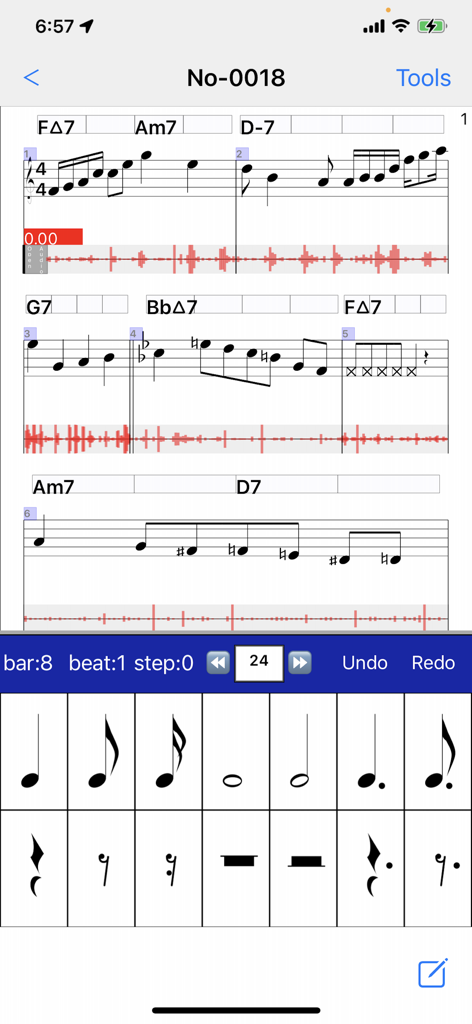
Notate + Play = music notebook - 楽譜と音声波形、およびリズム入力キーボードが同期された表示の音楽ノートアプリのインターフェース。
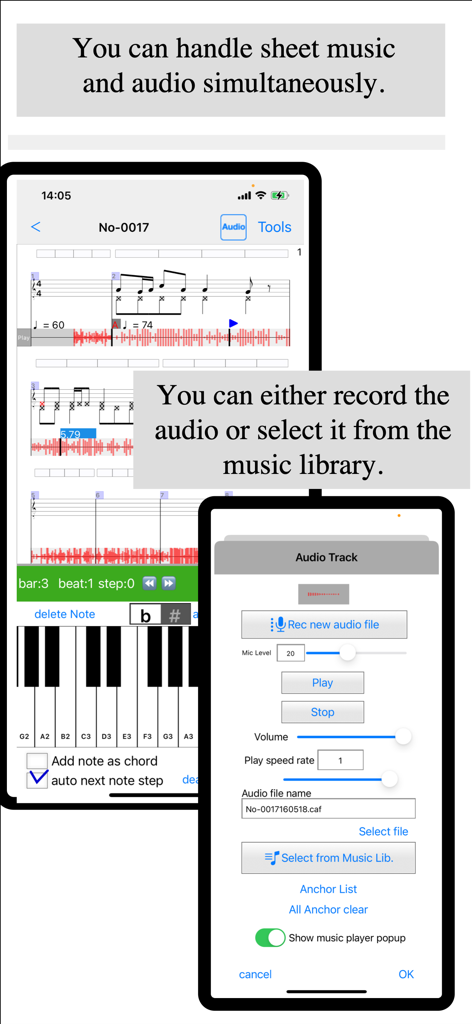
楽譜と音声波形、およびリズム入力キーボードが同期された表示の音楽ノートアプリのインターフェース。

Notate + Play = music notebook - 楽譜と音声波形、およびトラック録音メニューが同期された表示の音楽記譜インターフェース
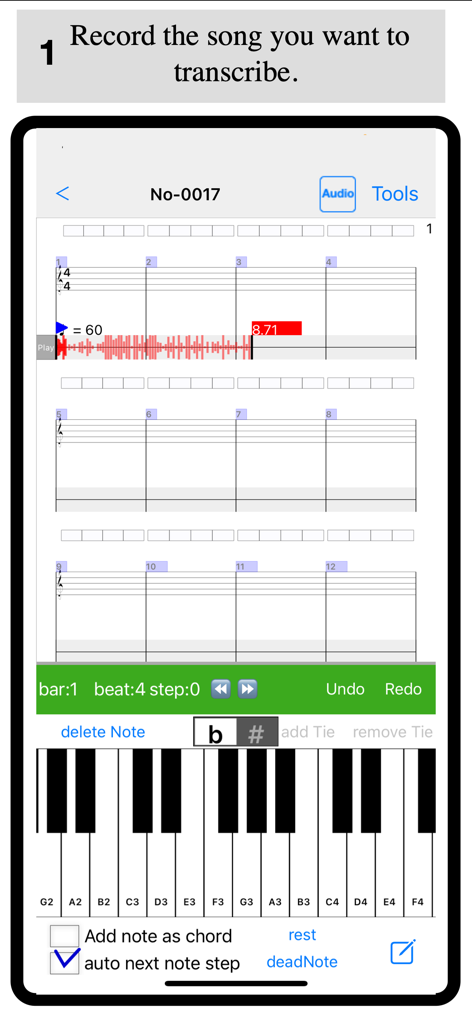
楽譜と音声波形、およびトラック録音メニューが同期された表示の音楽記譜インターフェース

Notate + Play = music notebook - 録音された音声波形が空白の五線譜と仮想ピアノキーボードの上に表示される音楽書き起こしインターフェース。
録音された音声波形が空白の五線譜と仮想ピアノキーボードの上に表示される音楽書き起こしインターフェース。

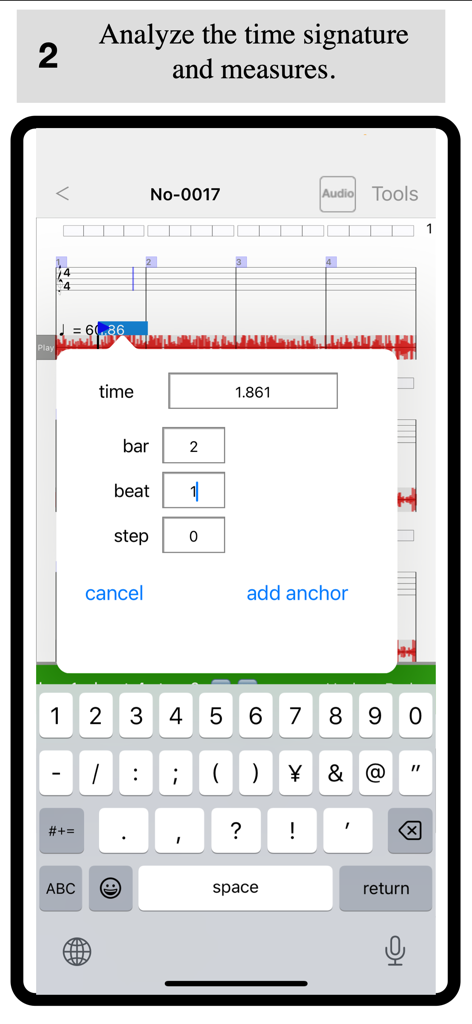
Notate + Play = music notebook - Notate Playアプリでオーディオを楽譜と同期するためにビートアンカーを追加するためのインターフェース。
Notate Playアプリでオーディオを楽譜と同期するためにビートアンカーを追加するためのインターフェース。

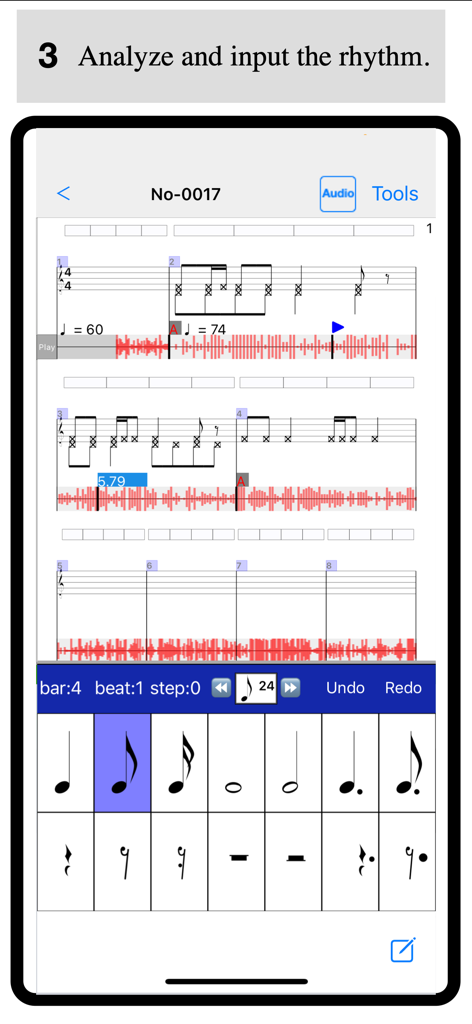
Notate + Play = music notebook - 音声波形と五線譜を使用した音楽リズムの分析と入力のためのNotate and Playアプリのインターフェース
音声波形と五線譜を使用した音楽リズムの分析と入力のためのNotate and Playアプリのインターフェース

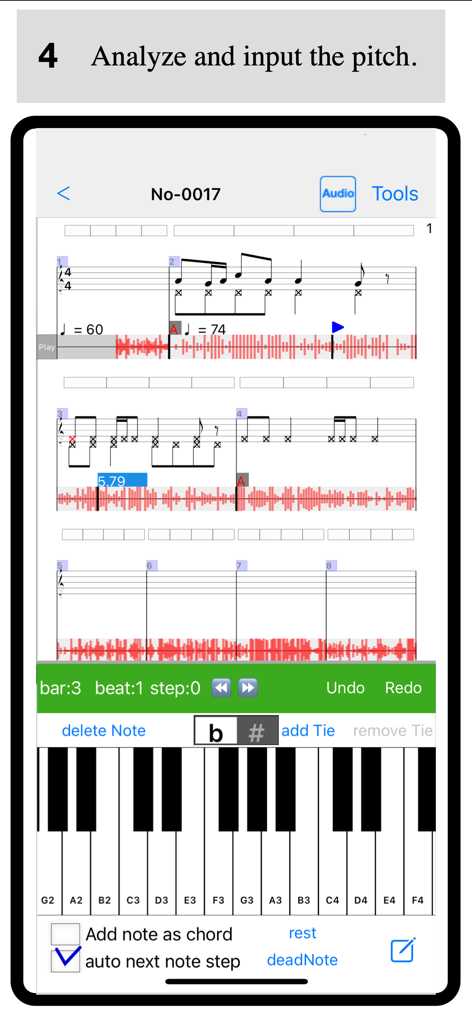
Notate + Play = music notebook - ピアノキーボードによるピッチ入力と音声波形付き楽譜を備えた音楽書き起こしアプリインターフェース
ピアノキーボードによるピッチ入力と音声波形付き楽譜を備えた音楽書き起こしアプリインターフェース

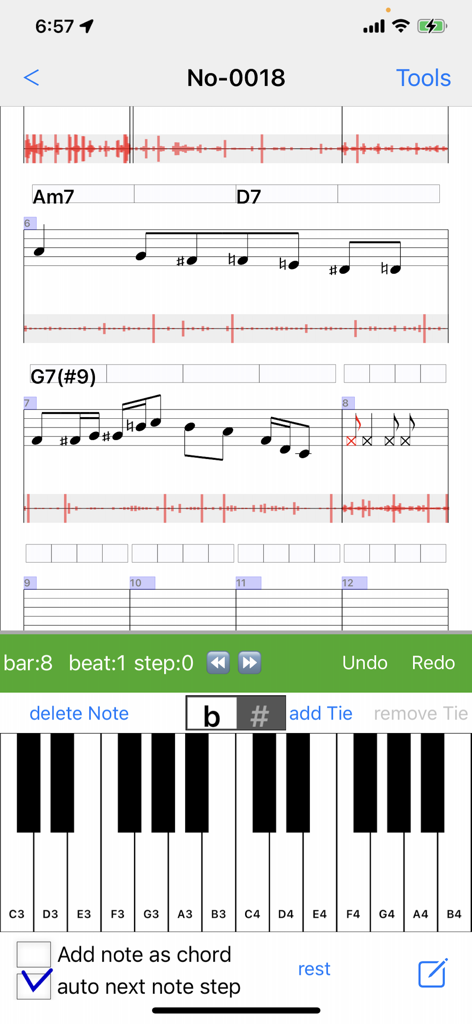
Notate + Play = music notebook - 音声波形と同期された楽譜、および書き起こし用の仮想ピアノキーボードを表示する音楽記譜アプリのインターフェース
音声波形と同期された楽譜、および書き起こし用の仮想ピアノキーボードを表示する音楽記譜アプリのインターフェース

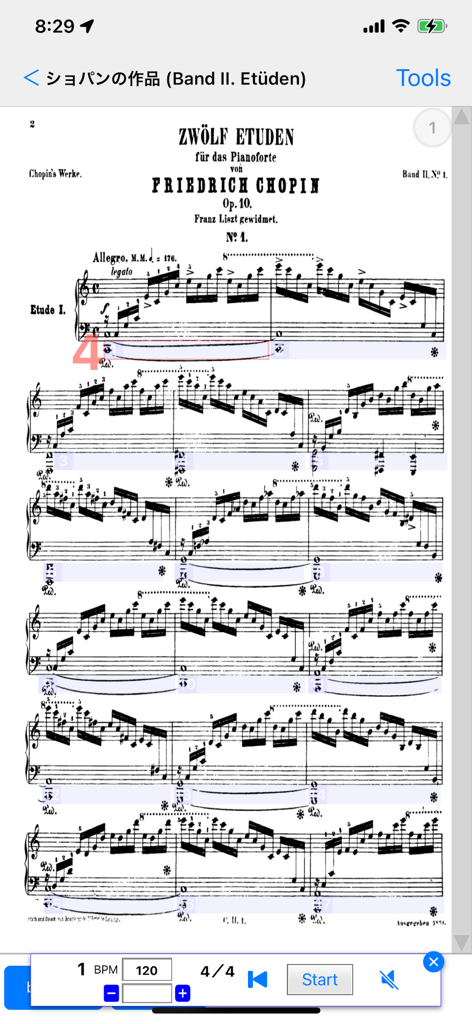
Notate + Play = music notebook - 統合されたメトロノームと再生設定を備えたNotate and Playアプリに表示されるショパンのピアノ楽譜

統合されたメトロノームと再生設定を備えたNotate and Playアプリに表示されるショパンのピアノ楽譜

説明

About This App This app is designed to support musical instrument practice.
It allows you to view and listen to both a reference audio file (such as a recording or a track from your music library) and sheet music on the same screen. By listening to the reference performance while writing or reviewing sheet music, you can strengthen the connection between the music and the notation, helping you achieve a more ideal performance.
Ultimately, you may even be able to reproduce the music in your head through your instrument. Selecting Audio There are two ways to choose a reference audio file: 1 Selecting from the Music Library
You can select a song from your Apple Music library. 2 Recording with a Microphone
You can record using the microphone on your iPad or iPhone. If no audio track is selected, tapping the track will open the recording screen. Press "Rec new audio file" to start recording.
To stop recording, tap the audio track and select "Stop Recording" from the dialog. The audio track functions as a player. You can tap any position on the track to start playback from that point. The player controls appear above the sheet music input dialog at the bottom of the screen, allowing you to play, stop, and adjust playback speed. Creating Sheet Music While using pre-existing sheet music is convenient, transcribing it yourself is a great way to improve your skills. 1 Setting the Time Signature and Tempo
First, determine the time signature and tempo of the piece. Since many popular songs use a 4/4 time signature, this is set as the default. The default tempo is 60 BPM, but you can adjust it using the "Tempo Change Dialog." 2 Synchronizing Sheet Music and Audio
While playing the audio, identify the starting points of measures. If the measure positions and the audio are misaligned, use the "Beat Anchor" feature to adjust them. By adding anchors, you can link playback time with measure positions, creating a more precise score.
Adding multiple anchors will allow the app to calculate the tempo automatically. If the time signature changes during the piece, you can add a time signature mark to any measure. Main Features 1 Linking Audio and Sheet Music
You can select a song from your music library or use a recorded audio file and link it to your sheet music. Setting anchors helps streamline the transcription process. 2 Separate Input for Rhythm and Pitch
The app supports a training-based approach by allowing users to input rhythm and pitch separately. Entering rhythm first and then pitch ensures more accurate transcription. 3 Vertical Scrolling for Sheet Music
The sheet music can be scrolled vertically for easier viewing. This option can be enabled in the settings. 4 Adding and Editing Tracks
You can freely add and edit tracks, including chords, notes, text, and audio. 5 Audio Playback Speed Adjustment
Adjust the playback speed to make transcription and practice easier. 6 Sheet Music Viewer
Import sheet music from PDF or images and view them easily within the app. 7 Metronome Feature
The built-in metronome automatically scrolls the sheet music according to the tempo and time signature set in the score. 8 Second Voice Part Notation
The app now supports second voice parts in sheet music. To enable this, go to "Edit Track(s)" and select an individual Note Track, then check "Second Voice Part." This allows you to enter a second voice part for that track.
To enter second voice notes, tap the lower area of the staff. You can also prioritize second voice selection by enabling the "2nd Voice" option in the note input view. 9 Adding Slurs and Text to Sheet Music
You can now input slurs and text onto the sheet music. Simply select a range of notes and use the popup menu to add them.

Download

ダウンロード: App Store

このページはアプリまたはその開発者の公式ページではなく、情報提供および論評を目的として作成された独立した編集出版物です。明示的に別段の記載がない限り、アプリおよびその開発者は、MWM、Apple、Google Play、アプリのパブリッシャー、またはアプリの開発者と提携、承認、後援、認可、またはその他の公式的な関係はなく、このページのいかなる内容も、アプリがMWMのサービスを使用して開発されたことを意味するものではありません。すべての商標、ロゴ、スクリーンショット、その他のコンテンツはそれぞれの所有者の財産です。







