
このページはアプリまたはその開発者の公式ページではなく、情報提供および論評を目的として作成された独立した編集出版物です。明示的に別段の記載がない限り、アプリおよびその開発者は、MWM、Apple、Google Play、アプリのパブリッシャー、またはアプリの開発者と提携、承認、後援、認可、またはその他の公式的な関係はなく、このページのいかなる内容も、アプリがMWMのサービスを使用して開発されたことを意味するものではありません。すべての商標、ロゴ、スクリーンショット、その他のコンテンツはそれぞれの所有者の財産です。


Owll: AI Note Taker & Record
耳を貸すだけで、AIが脳を拡張する。記録から要約まで、思考のすべてを自動で捉え、整理する。
ダウンロード
1M+ユーザー評価
評価数
2.6K開発元
カテゴリ
Utilities対応言語
8最新バージョン
3.13.1サイズ
144.1 MBリリース日
2023年7月18日生産性向上と効率化を追求する先進的なAI機能の評価
Owll: AI Note Taker & Record アプリ分析
AIによる録音、要約、ToDo生成
このアプリはAIを活用して音声の記録、テキスト化、要約生成、そしてToDoリストの作成を行います。これにより、ユーザーは会議や講義の重要な情報を見逃すことなく、効率的に議事録を管理できます。
オンライン会議の文字起こし
このツールはZoom、Google Meet、Microsoft Teamsといった主要なオンライン会議プラットフォームのセッションをリアルタイムで転写します。ユーザーは会議内容に集中しながら、正確な議事録を自動的に取得できます。
Appleエコシステム全体でのシームレスな同期
このアプリはApple Watch、iPhone、iPad、そしてウェブ間で記録とメモを瞬時に同期します。ユーザーはどのデバイスからでも自身の情報にアクセスし、作業の継続性を確保できます。
AI学習支援: フラッシュカード、クイズ、講義ノート
この機能は、音声を基にAIが自動的にフラッシュカード、クイズ、および講義ノートを作成します。これにより、学生は学習コンテンツを効率的に準備し、知識の定着を促進できます。
多言語対応の文字起こしと翻訳
このアプリは100以上の言語に対応した高精度な転写と翻訳機能を提供します。これにより、ユーザーは国際的な会議や多言語の学習環境におけるコミュニケーション障壁を克服できます。
スマートなメモレビュー: Owll AIに質問
このツールはAIを用いて主要なポイントを強調し、記録や文書の内容に関する質問に即座に回答します。ユーザーは情報を迅速に理解し、詳細な洞察を得ることが可能です。
営業および顧客ノート用AI連絡先管理
営業担当者はこの機能を利用して、名刺スキャンによるリード獲得、顧客とのやり取りの記録、自動要約、そして取引の追跡を効率的に行えます。これにより、販売プロセスが加速します。
スマートフォルダとメモ共有
ユーザーは記録とメモを整理するためのカスタムフォルダを作成し、チームメイトやクラスメートと容易に情報を共有できます。これにより、共同作業が円滑に進みます。
よくある質問
について知っておくべきこと Owll: AI Note Taker & Record
What is Owll:AI Note Taker & Assistant?
Owll AI is a smart assistant for AI note-taking, offering voice-to-text, real-time transcription, and AI summaries for meetings, lectures, and study sessions. It records audio, uploads files, and saves online calls.
How does Owll:AI Note Taker & Assistant transcribe online meetings?
Owll AI transcribes Zoom, Google Meet, and Microsoft Teams sessions in real-time. It provides clear meeting notes, allowing users to stay focused during the call.
Does Owll:AI Note Taker & Assistant provide AI-powered summaries?
Yes, Owll AI generates smart AI summaries and concise takeaways from transcripts, recordings, documents, or new topics in seconds. It highlights main points and answers questions.
What file types can Owll:AI Note Taker & Assistant import for transcription?
Owll AI imports audio from any app or device, supporting all formats for speech-to-text. It also imports YouTube videos for transcripts and summaries, and uses OCR for PDFs.
Does Owll:AI Note Taker & Assistant offer multilingual transcription?
Yes, Owll AI supports multiple languages for enhanced transcription and translation. This feature is ideal for global meetings, online classes, and cross-team collaboration.
What are the subscription options for Owll:AI Note Taker & Assistant?
Owll Plus offers subscription options including 1-Year, 1-Month, and 1-Week plans. Payments are billed via the App Store Account upon purchase.
How do users manage their Owll:AI Note Taker & Assistant subscriptions?
Users manage subscriptions through their Account Settings. Subscriptions auto-renew unless canceled 24 hours before the period ends.
Can Owll:AI Note Taker & Assistant create flashcards and quizzes?
Yes, Owll AI transforms notes into flashcards and study cards. Its AI quizzes generate practice questions to reinforce key ideas and prepare for exams.
Is Owll:AI Note Taker & Assistant compatible across multiple devices?
Yes, Owll AI offers multi-device compatibility. It works on iPhone, iPad, and the web, providing synced notes across all platforms.
Does Owll:AI Note Taker & Assistant include an AI Coach feature?
Yes, Owll AI includes a built-in AI Coach. This feature assists users by generating concise takeaways and to-do lists from recordings.
Where can I find the privacy policy for Owll:AI Note Taker & Assistant?
The Privacy Policy for Owll AI is available at https://owll.ai/user-agreement/#/privacy-policy/. This ensures transparency regarding data handling.
How does Owll:AI Note Taker & Assistant ensure data security and privacy?
Owll AI emphasizes that data is private and secure, with all user data always encrypted. Users own their data.
以下のスクリーンショットと説明は、アプリの公式ストアリスティングから直接取得されたものであり、アプリ開発者の所有物です。
アプリストア
スクリーンショット

このアプリは、iPhone、Apple Watch、Webなどの複数のデバイス間でシームレスに同期し、ユーザーは会議や通話を瞬時に記録し、AIによる要約を生成できます。
どこでも記録、どこでもアクセス

このアプリは、AIによる高精度な音声認識と文字起こし機能を搭載しており、ユーザーは会話内容をテキストで確認できるだけでなく、発言者ごとに内容を識別できます。
音声をテキスト化
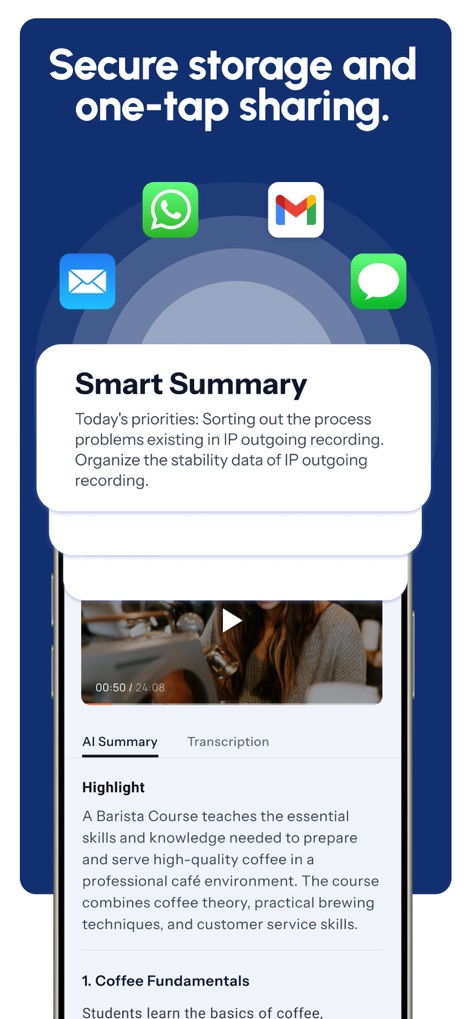
本ツールは、記録されたコンテンツからAIが自動でスマートな要約を生成し、ユーザーは重要な情報を迅速に把握できるほか、ワンタップでノートを簡単に共有できます。
重要な要点を抽出

このアプリにはAIコーチが組み込まれており、ユーザーはドキュメントに関する質問をしたり、具体的な情報(例:「会議のメモ」)を検索して、的確な回答や要約を得ることができます。
あなた専用AIアシスタント

記録された内容から自動でToDoリストが生成され、ユーザーは重要なアクションアイテムを把握できるほか、特定のテキストをハイライト表示して後から簡単に参照できます。
タスクを見える化

このアプリはユーザーのデータを常に暗号化して保護し、セキュリティを確保しており、100以上の言語に対応した多言語翻訳機能でグローバルなコミュニケーションをサポートします。
安全に多言語対応

このアプリは、セールス通話、会議、講義などの多様なカテゴリで利用でき、YouTube動画やオンライン会議(Zoom, Google Meet, Teams)からのインポートにも対応しています。
幅広い利用シーン

このアプリは、iPhone、iPad、Apple Watch、Web版の間でノートを瞬時に同期し、ユーザーはどのデバイスからでもシームレスに作業を継続できる優れた互換性を備えています。
マルチデバイス同期
説明
Download
類似アプリ
似た機能とユーザー体験を持つアプリ

Bible Note Taker & Recorder
TOPMUSE PTE. LTD.
Thea: Study Smart
Theaai Corporation

HyNote: AI Note Taker, Summary
Tuling Network Limited

Melonote:AI Voice to Text Note
Yan Cheng Cheok

StudyOS: Study with AI
DANIEL PONCELAS VARGAS

Genio AI: College Smart Tutor
Genio Tech, LLC

Nerdmask: Study Games
Supersmart LLC
Amazing Flash Cards
Erik Wegener

Studi - Learning Companion
Wesam Alzahir
このページはアプリまたはその開発者の公式ページではなく、情報提供および論評を目的として作成された独立した編集出版物です。明示的に別段の記載がない限り、アプリおよびその開発者は、MWM、Apple、Google Play、アプリのパブリッシャー、またはアプリの開発者と提携、承認、後援、認可、またはその他の公式的な関係はなく、このページのいかなる内容も、アプリがMWMのサービスを使用して開発されたことを意味するものではありません。すべての商標、ロゴ、スクリーンショット、その他のコンテンツはそれぞれの所有者の財産です。