PDF Joiner & Merger

PDF Joiner & Merger

ダウンロード: App Store
ロゴ: PDF Joiner & Merger

PDF結合・マージ:指先で精密なドキュメント結合

特定のページを結合し、パスワード保護されたファイルを扱い、すべての注釈を保持する最もスマートな方法。iPhoneとiPad用に構築されたプロフェッショナルグレードのツールで、何百ものPDFを瞬時に整理します。

開発元

Ruchira Ramesh

カテゴリ

Business

ダウンロード

93K+

ユーザー評価

4.5/5

評価数

0

対応言語

1

すべてのフレームに効率性

このインターフェースを利用する 93K+ 人のユーザー.

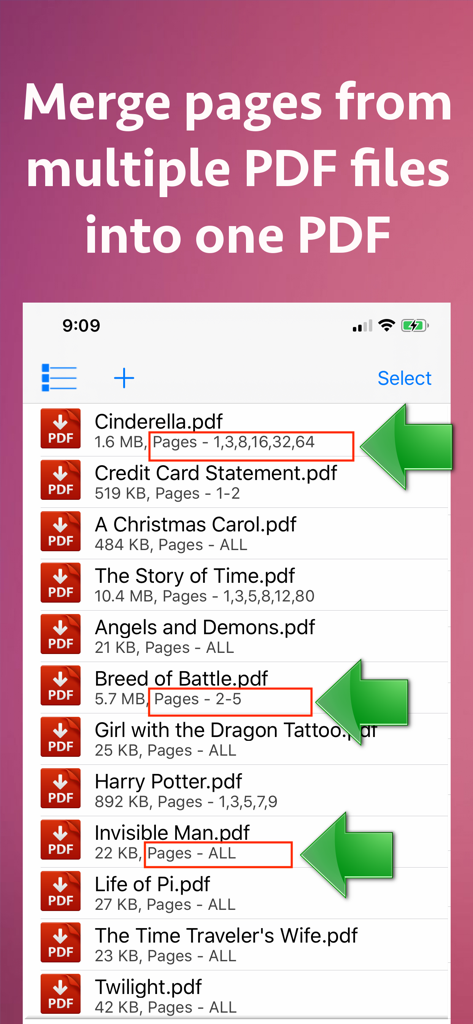
1つのファイルに結合するための特定のページ選択が表示されたPDFドキュメントのリストを表示するiPhoneアプリ画面

1つのファイルに結合するための特定のページ選択が表示されたPDFドキュメントのリストを表示するiPhoneアプリ画面

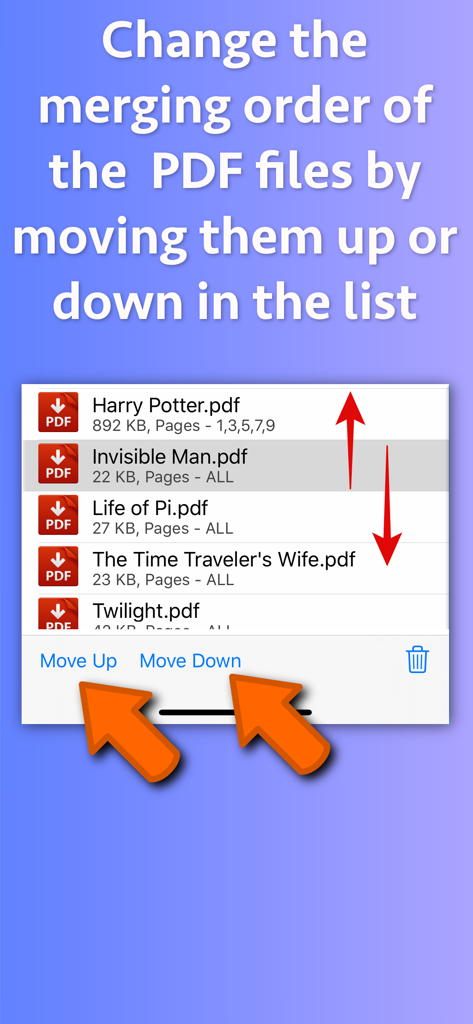
結合順序を変更するために上下に移動するボタンが表示されたPDFファイルリストを示すインターフェイス

結合順序を変更するために上下に移動するボタンが表示されたPDFファイルリストを示すインターフェイス

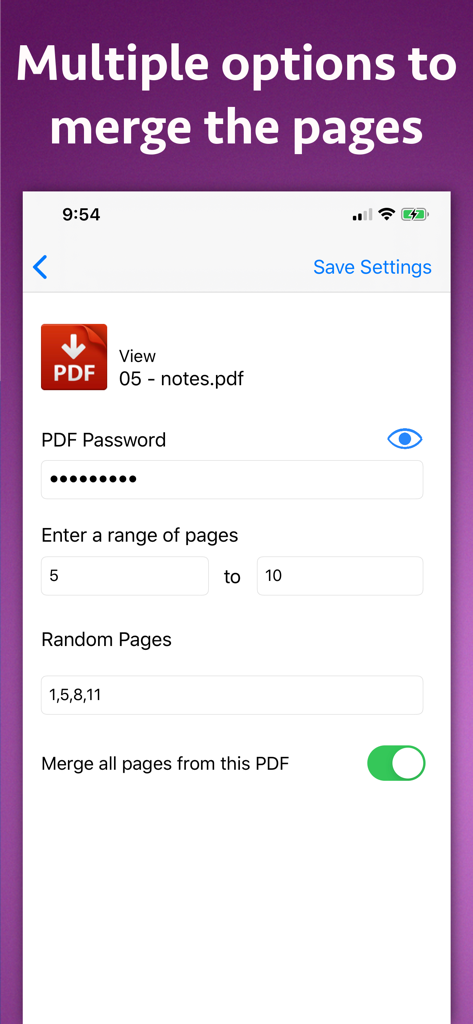
ページ範囲選択とパスワード入力の設定を示すPDF結合・マージアプリのスクリーンショット

ページ範囲選択とパスワード入力の設定を示すPDF結合・マージアプリのスクリーンショット

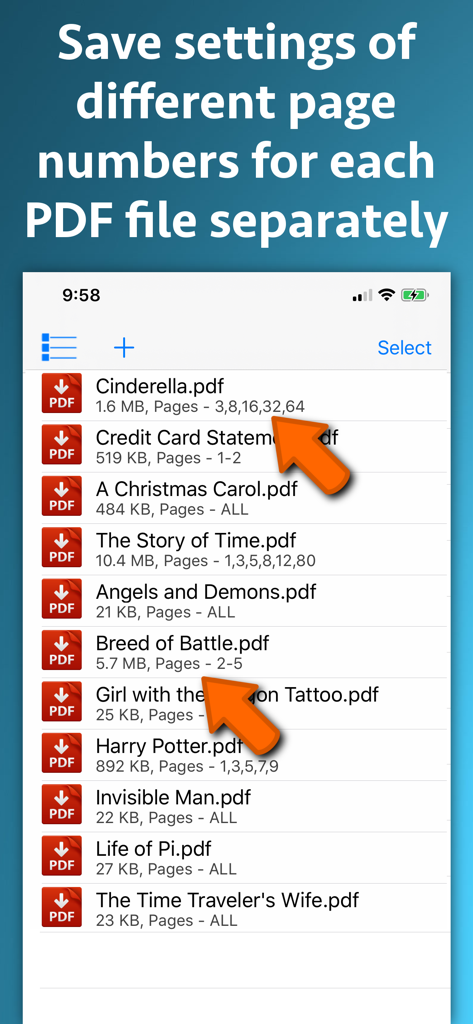
結合のためにカスタムページ範囲が選択されたドキュメントのリストを示すPDF結合・マージのインターフェイス

結合のためにカスタムページ範囲が選択されたドキュメントのリストを示すPDF結合・マージのインターフェイス

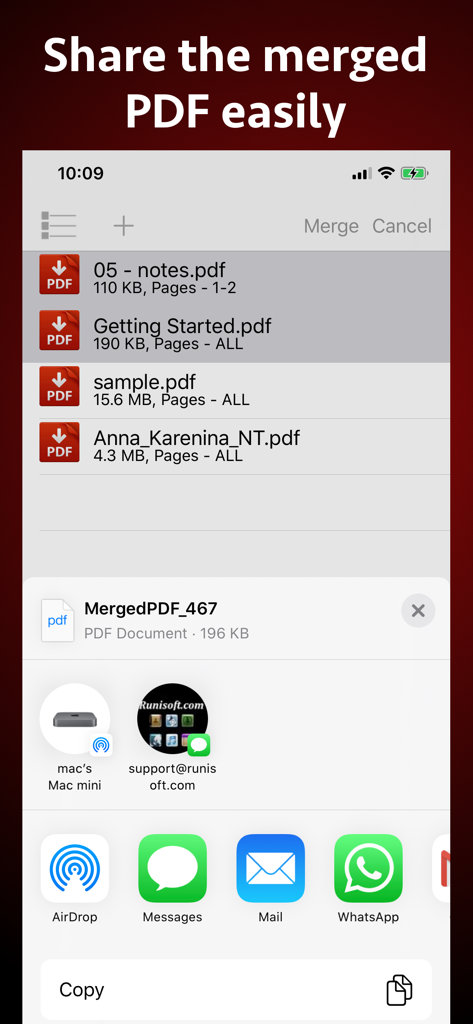
ドキュメントのリストと簡単なファイル共有のためのiOS共有シートを表示するPDF結合・マージアプリのiPhoneスクリーンショット

ドキュメントのリストと簡単なファイル共有のためのiOS共有シートを表示するPDF結合・マージアプリのiPhoneスクリーンショット

PDFドキュメントの結合による生産性向上効果を示すグラフが表示されたビジネスレポート

PDFドキュメントの結合による生産性向上効果を示すグラフが表示されたビジネスレポート

精密なドキュメント管理

このアプリを際立たせるツール、 93K+ 人のユーザーが選択.

🎯

精密なページ選択

すべてを結合するか、すべてを諦めるかの結合に満足しないでください。何百もの異なるPDFから特定のページまたはカスタム範囲を選択して、完全にキュレーションされた1つのドキュメントを作成します。

🔒

安全なワークフローを解除

パスワードで保護されたドキュメントを簡単に結合できます。当社のツールは、生産性を損なうことなく、機密ファイルを1つのアクセス可能で整理されたPDFにロック解除して結合します。

🖊️

コンテキストを維持

リサーチとノートの整合性を維持します。すべての注釈、ハイライト、インタラクティブリンクは、結合プロセス中に完全に保持されます。

アプリについて

について知っておくべきこと PDF Joiner & Merger.

説明

Merge pages of choice from one pdf with pages of another PDF files. The application offers various cutomizations to merge the PDF files. For example : You could merge page 2 and 4 of a PDF with page number 30 and 32 of another PDF.The resulting PDF will contain 4 combined pages from both PDF files. You could also merge a range of pages of a PDF with other PDF. For example : You could merge from page 5 to 10 of a PDF with page number 30 to 50 or another PDF. Apart from this, the entire PDF could be merged with the other PDF files as well. The application could combine pages of choice from even hundreds of PDF files at once. The application also supports Password protected PDF. This means that once you provide the password, the password protected PDF could be merged easily with other PDF files.The resulting PDF file will not ask for the password. The application also retains all annotations and links in the created PDF files.If you have added annotations and links to a PDF file, these will be retained when the application creates the Merged PDF files. Merging multiple PDF files help to reduce the clutter of PDF files. It also helps to organise the similar topics, novels, pages from books, study topics or the project documentations together. Using the application, you could have your own collection of various categorized PDF. You could combine and keep all of your favourite books, titles, topics or notes together.This will help to find and share these materials easily whenever required.This also simplifies managing PDF files. In order to merge the PDF files, just add them to the application.After you add the PDF files, their merging order could be adjusted using the "Move Up" and "Move Down" buttons. The application comes with its inbuilt PDF previewer.Using this, you could directly preview the PDF files that are added to the application.The previewer also previews the password protected PDF files. The below optional settings could be adjusted for each and every PDF separately as well : a) Password : Provide a password if applicable b) Page Range : Provide a range of pages if required.For example pages from 1 to 10 c) Random Pages : Provide a comma separated values of pages from PDF. For example : You could specify random page numbers like 1,3,5,7,9,42,95 If you want to consider all pages for merging, please check the checkbox named "Merge all pages from this PDF". Once all settings are made, please save these settings.Different settings of page numbers and passwords could be saved for each PDF separately. The application supports batch processing.This means that you could merge even hundreds of PDF files into one PDF.The Merged PDF files could be saved to cloud using the Files application.These could also be shared with other applications.

最新バージョン

15.2

サイズ

6.6 MB

リリース日

2018年4月22日

PDFワークフローを管理しよう

93,000人以上のプロフェッショナルや学生に加わり、手術のような精度でドキュメントを結合、整理、保護しましょう。今日、iPhoneとiPad用の究極のPDFパワーアップツールをダウンロードしてください。

ダウンロード: App Store
FAQ

よくある質問

について知っておくべきこと PDF Joiner & Merger

PDF Joiner & Merger の主な機能は何ですか?

PDF Joiner & Merger アプリケーションは、複数の PDF ファイルから選択したページを 1 つの結合された PDF ドキュメントにマージします。ページ選択のためのさまざまなカスタマイズをサポートしています。

PDF Joiner & Merger は、異なる PDF から特定のページを結合できますか?

はい、PDF Joiner & Merger は特定のページを結合できます。たとえば、ある PDF から選択したページと別の PDF から選択したページを、単一の結果ドキュメントに結合します。

PDF Joiner & Merger は、PDF ファイルからのページ範囲の結合をサポートしていますか?

はい、PDF Joiner & Merger はページ範囲の結合をサポートしています。ユーザーは、ある PDF の 5 ページから 10 ページのような連続したページシーケンスを、他の PDF のページと結合できます。

PDF Joiner & Merger は、パスワードで保護された PDF ファイルを処理できますか?

はい、PDF Joiner & Merger はパスワードで保護された PDF を処理します。ユーザーはパスワードを提供し、アプリケーションが PDF を処理します。結果として生成される結合された PDF ファイルにはパスワードは必要ありません。

PDF Joiner & Merger は、結合されたドキュメントで注釈とリンクを保持しますか?

はい、PDF Joiner & Merger は注釈とリンクを保持します。元の PDF ファイルに注釈やリンクが含まれている場合、アプリケーションによって作成された結合された PDF ドキュメントはそれらを保持します。

PDF Joiner & Merger で、ユーザーは PDF ファイルの結合順序をどのように整理しますか?

ユーザーは、PDF Joiner & Merger でファイルを the "Move Up" および "Move Down" ボタンを使用してアプリケーションインターフェイス内でシーケンスを調整することで、PDF の結合順序を整理します。

PDF Joiner & Merger には PDF プレビューアが含まれていますか?

はい、PDF Joiner & Merger には組み込みの PDF プレビューアが含まれています。この機能により、ユーザーは結合する前に、パスワードで保護されたファイルを含む、追加されたすべての PDF ファイルを直接表示できます。

PDF Joiner & Merger で、ユーザーは結合のためにランダムなページを指定できますか?

はい、ユーザーは PDF Joiner & Merger で結合のためにランダムなページを指定できます。ユーザーは、「1,3,5,7,9,42,95」のようなコンマ区切りの値を入力して、PDF から非連続なページを選択します。

PDF Joiner & Merger で、個々の PDF ファイルに利用可能なオプション設定は何ですか?

PDF Joiner & Merger の各 PDF のオプション設定には、パスワードの提供、ページ範囲の定義、ランダムなページの指定、またはすべてのページの結合の選択が含まれます。

PDF Joiner & Merger は、一度に数百の PDF ファイルを結合できますか?

はい、PDF Joiner & Merger はバッチ処理をサポートしています。この機能により、ユーザーは一度の操作で数百の PDF ファイルを単一の結合された PDF ドキュメントに結合できます。

PDF Joiner & Merger で作成された結合された PDF ファイルを、ユーザーはどのように保存または共有できますか?

ユーザーは、Files アプリケーション経由でクラウドに結合された PDF ファイルを保存します。また、作成後すぐに PDF Joiner & Merger からこれらのドキュメントを他のアプリケーションと共有することもできます。

App information, icons, screenshots, and descriptions displayed on this page are sourced from the Apple App Store and are the property of their respective developers. Download estimates and rankings are based on MWM's proprietary models and may not reflect actual figures. This page is provided for informational and analytical purposes only.

Believe this page infringes your intellectual property? File a dispute