
このページはアプリまたはその開発者の公式ページではなく、情報提供および論評を目的として作成された独立した編集出版物です。明示的に別段の記載がない限り、アプリおよびその開発者は、MWM、Apple、Google Play、アプリのパブリッシャー、またはアプリの開発者と提携、承認、後援、認可、またはその他の公式的な関係はなく、このページのいかなる内容も、アプリがMWMのサービスを使用して開発されたことを意味するものではありません。すべての商標、ロゴ、スクリーンショット、その他のコンテンツはそれぞれの所有者の財産です。


PNB ONE
PNB ONEは、金融のあらゆる側面を手のひらに収めることで、ユーザーに銀行の絶対的な支配力をもたらす。これは単なるアプリではなく、従来の銀行業務を過去のものにするためのデジタルコマンドセンターである。
ダウンロード
2.5M+ユーザー評価
評価数
34.5K開発元
カテゴリ
Finance対応言語
1最新バージョン
5.27サイズ
315.9 MBリリース日
2019年1月3日Punjab National Bankのモバイルバンキングソリューションの主要な側面を評価します。
PNB ONE アプリケーションの機能分析
高度なセキュリティ機能
指紋認証による迅速なログイン、2要素認証、暗号化などの堅牢なセキュリティプロトコルにより、ユーザーの取引と個人データの安全性が確保されます。
資金移動サービス
ユーザーは、PNB内および他銀行への送金、即時送金、インド-ネパール間の国際送金、UPI、QRコード決済を含む多様な資金移動手段を利用できます。
請求書支払い・リチャージ
ユーザーは、電気、通信、DTHサービス、クレジットカードの請求書など、登録済みの請求書発行元に対して直接支払いを実行できます。
総合口座管理
アプリケーションは、貯蓄、預金、ローン、当座預金など、複数の口座タイプにわたる残高照会や詳細な明細表示を提供し、ユーザーが自身の財務状況を一目で把握できるようにします。
デビットカード・クレジットカード管理
ユーザーは、デビットカードの利用限度額変更、紛失時の利用停止、クレジットカードのリンク/解除、利用限度額変更など、両方のカードを包括的に管理できます。
M-パスブック
この機能により、ユーザーはアカウントの取引明細をデジタル形式で閲覧し、オフライン利用のためにPDFとしてダウンロードすることが可能です。
投資商品へのアクセス
定期預金口座の開設、投資信託、保険商品へのアクセスを通じて、ユーザーはアプリケーション内で自身の資産形成を行う機会を得られます。
直感的なユーザーインターフェース
再設計されたダッシュボードは、より多くの機能を統合し、すべての口座情報にアクセスしやすいように表示することで、ユーザーエクスペリエンスを向上させます。
よくある質問
について知っておくべきこと PNB ONE
What is PNB ONE?
PNB ONE is an all-in-one mobile banking application that unifies various banking processes, allowing users to manage accounts, transfer funds, invest, and access other services from a single platform.
Can I transfer funds using the PNB ONE app?
Yes, PNB ONE allows fund transfers including 'Self', 'Within PNB', and 'Other Bank' transfers using NEFT/IMPS/UPI. It also supports instant transfers and Indo-Nepal Remittance.
How do I view my account statement in PNB ONE?
Yes, you can view detailed statements for various accounts like Savings, Deposits, Loans, Overdraft, and Current accounts within PNB ONE. The M-Passbook feature also allows statement viewing and PDF download.
Does PNB ONE offer options for investing funds?
Yes, PNB ONE provides options to invest funds. Users can open a term deposit account and invest in mutual funds and insurance products directly through the application.
Is PNB ONE a secure application?
Yes, PNB ONE ensures security with features like fingerprint sign-in, 2-factor authentication, and encryption to protect user data and transactions.
What debit card services are available in PNB ONE?
PNB ONE allows users to manage their debit cards by applying for a new card, updating ATM withdrawal and POS/Ecomm transaction limits, and hotlisting a lost or stolen debit card.
Can I pay bills and recharge through PNB ONE?
Yes, PNB ONE supports bill payments and recharges. Users can register billers for services like telecom, electricity, DTH, and credit cards, and pay bills directly.
What languages does the PNB ONE app support?
The PNB ONE application is available in two languages: English and Hindi, providing linguistic flexibility for its users.
Can I manage my credit card using the PNB ONE app?
Yes, PNB ONE offers credit card management. Users can link/delink cards, register/deregister auto payments, change card limits, request statements via email, and order damaged card replacements.
Does PNB ONE support UPI transactions?
Yes, PNB ONE fully supports Unified Payment Interface (UPI) transactions. Users can send and collect money, view transaction history, manage complaints, and deregister from UPI services.
How can I open a new Fixed Deposit or Recurring Deposit in PNB ONE?
Yes, you can open a new Fixed Deposit or Recurring Deposit directly within the PNB ONE app. This option is available from the deposit accounts section or the side menu.
以下のスクリーンショットと説明は、アプリの公式ストアリスティングから直接取得されたものであり、アプリ開発者の所有物です。
アプリストア
スクリーンショット
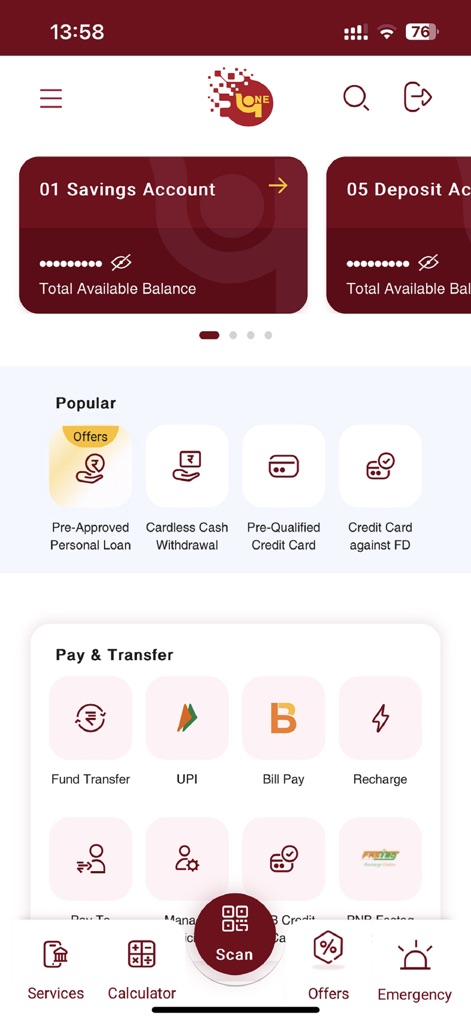
ユーザーは、利用可能な残高が表示された「01 Savings Account」や、便利な「Pay & Transfer」オプションから迅速に金融活動を開始できます。
スマートなダッシュボード
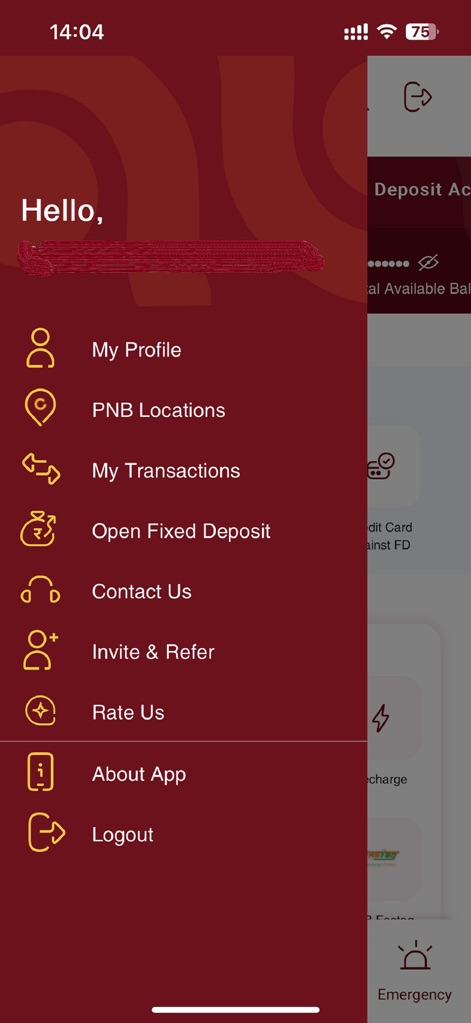
アプリは「Hello,」というパーソナライズされた挨拶でユーザーを歓迎し、「My Profile」や「Open Fixed Deposit」など、必要なサービスへ簡単にアクセスできるサイドメニューを提供します。
簡単ナビゲーション
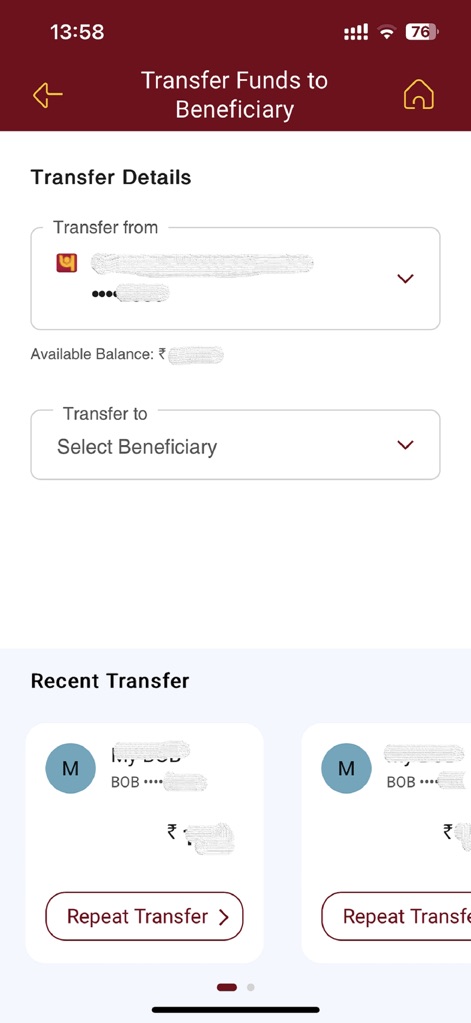
受益者への送金は、「Transfer from」と「Select Beneficiary」の明確なフィールドを通じて効率的に実行でき、「Recent Transfer」機能により過去の送金を簡単に繰り返すことができます。
スムーズな送金
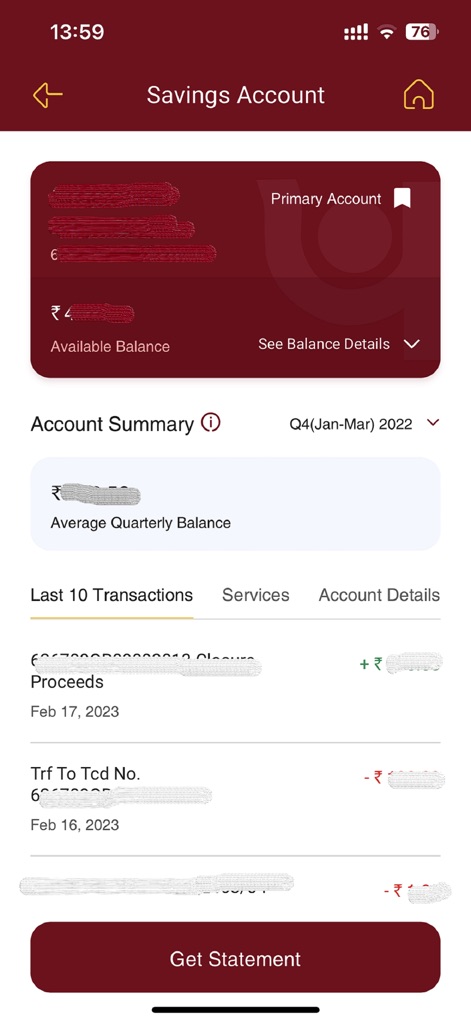
ユーザーは「Primary Account」の残高を簡単に確認でき、詳細な「Last 10 Transactions」リストで直近の取引履歴を素早く把握できます。
口座概要
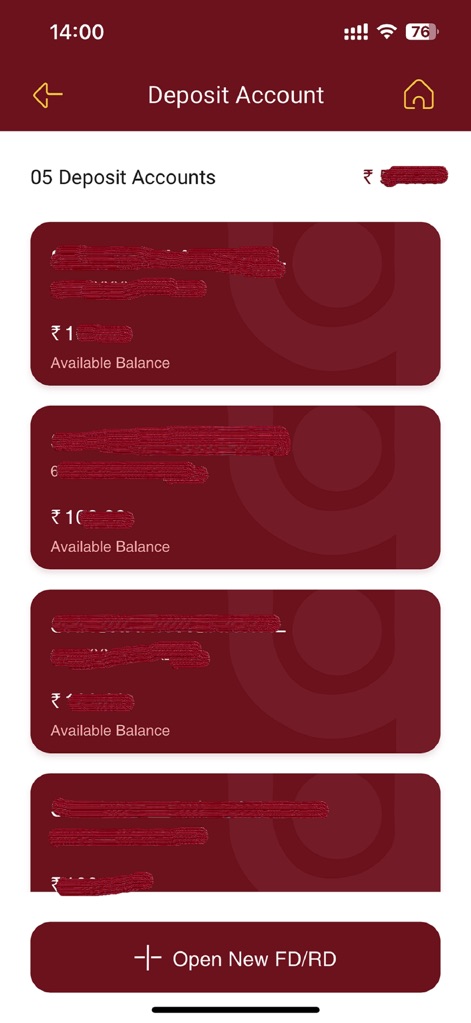
アプリは複数の預金口座を一覧表示し、それぞれの利用可能残高を示し、さらに「Open New FD/RD」ボタンから新規の定期預金や積立預金を開始できます。
預金管理
説明
Download
類似アプリ
似た機能とユーザー体験を持つアプリ

PayPal - Pay, Send, Save
PayPal, Inc.

中国农业银行
AGRICULTURAL BANK OF CHINA LIMITED

Mercado Pago: cuenta digital
MercadoLibre S.A.

中国工商银行
Industrial and Commercial Bank of China

Revolut: Send, spend and save
Revolut Ltd

HDFC Bank App (Early Access)
HDFC Bank Ltd

Zalopay - Quét Mọi QR
ZION JOINT STOCK COMPANY

Cash App
Block, Inc.

招商银行
CHINA MERCHANTS BANK CO.,LTD.
このページはアプリまたはその開発者の公式ページではなく、情報提供および論評を目的として作成された独立した編集出版物です。明示的に別段の記載がない限り、アプリおよびその開発者は、MWM、Apple、Google Play、アプリのパブリッシャー、またはアプリの開発者と提携、承認、後援、認可、またはその他の公式的な関係はなく、このページのいかなる内容も、アプリがMWMのサービスを使用して開発されたことを意味するものではありません。すべての商標、ロゴ、スクリーンショット、その他のコンテンツはそれぞれの所有者の財産です。