Quiver - 3D Coloring App

Quiver - 3D Coloring App

ダウンロード: App Storeダウンロード: Google Play
ロゴ: Quiver - 3D Coloring App

Quiver - 3D塗り絵アプリ:ARマジックで子供たちの創造性を解き放つ

テクノロジーに敏感な保護者や教育者向けの究極の「フィジタル」ツール。物理的な塗り絵を、好奇心を刺激し、教室やリビングルームを発見の世界に変える没入型3D学習体験に変えます。

開発元

QuiverVision Limited

カテゴリ

Entertainment

ダウンロード

2M+

ユーザー評価

3.4/5

評価数

2K+

対応言語

1

あなたの芸術が生き生きとするのを見る

このインターフェースを利用する 2M+ 人のユーザー.

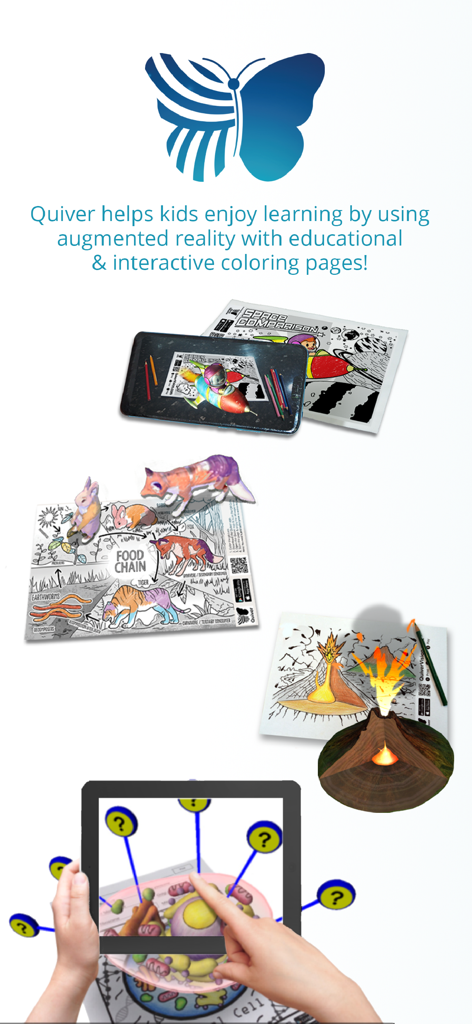
タブレット上の火山食物連鎖と細胞モデルを示す拡張現実3D塗り絵ページ

タブレット上の火山食物連鎖と細胞モデルを示す拡張現実3D塗り絵ページ

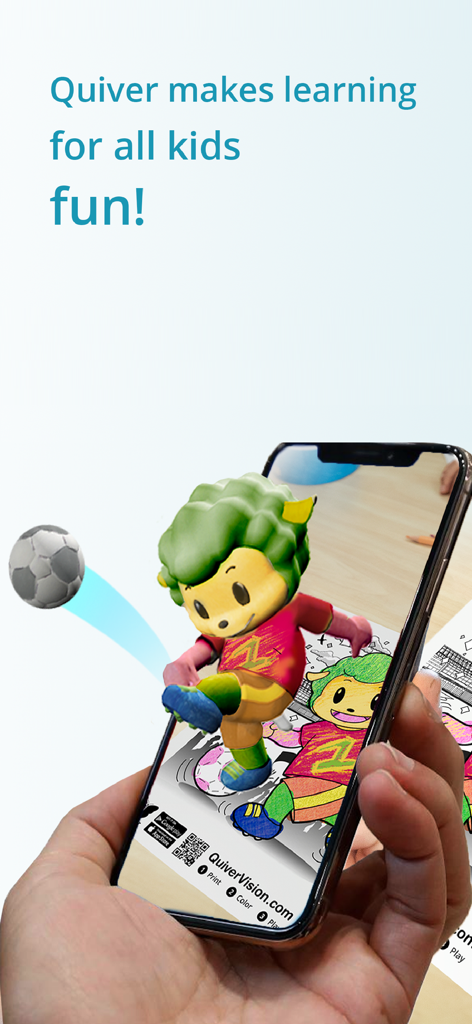
拡張現実を使用して物理的な塗り絵ページから飛び出す3Dアニメーションキャラクターを示すスマートフォンを持つ手。
拡張現実を使用して物理的な塗り絵ページから飛び出す3Dアニメーションキャラクターを示すスマートフォンを持つ手。

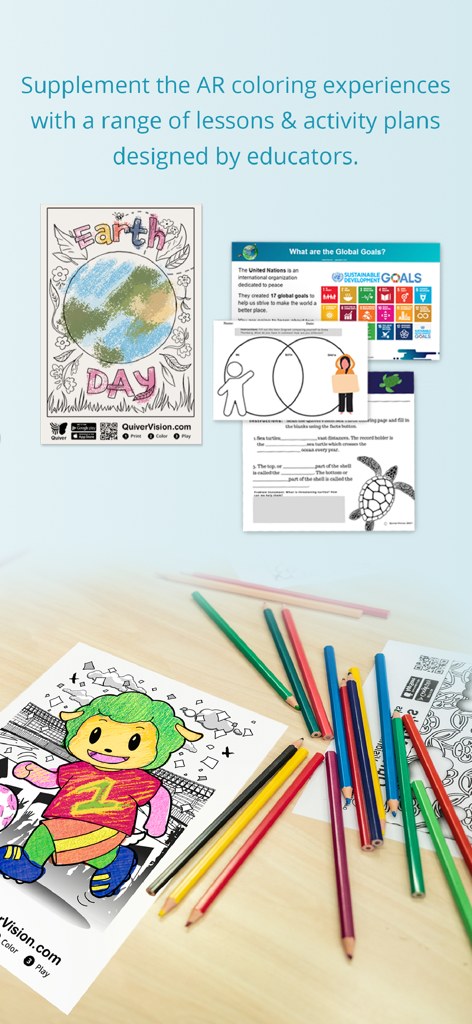
Quiverアプリの教育レッスンと塗り絵アクティビティシート
Quiverアプリの教育レッスンと塗り絵アクティビティシート

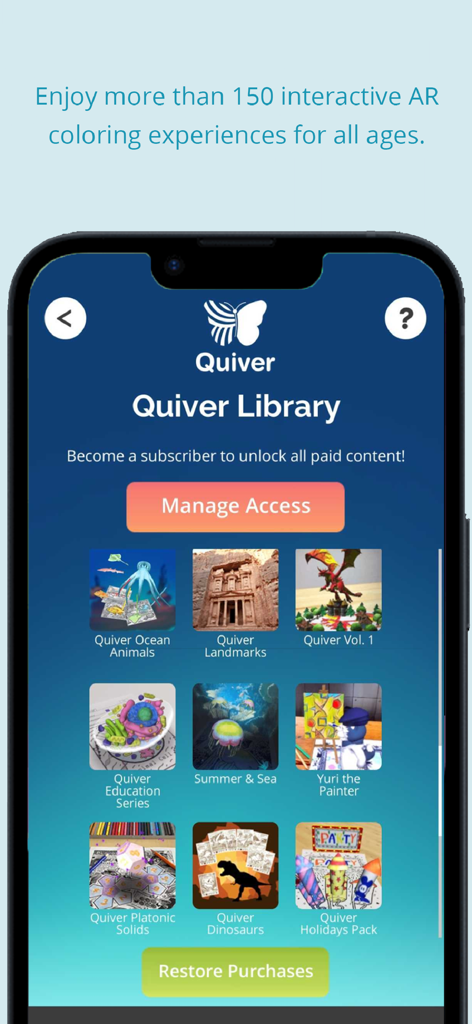
子供向けのさまざまな拡張現実塗り絵パックを示すQuiver 3D塗り絵アプリのライブラリスクリーン

子供向けのさまざまな拡張現実塗り絵パックを示すQuiver 3D塗り絵アプリのライブラリスクリーン

フィジタル学習の魔法を体験

このアプリを際立たせるツール、 2M+ 人のユーザーが選択.

🎨

触覚からデジタルへの遊び

物理的な塗り絵から始めて、受動的なスクリーンタイムを減らします。当社のARテクノロジーが、お子様のユニークなアートワークを驚くべき3Dで現実にします。

📚

教室で使えるSTEAM

科学、数学、地理をインタラクティブにする、教師作成の教材にアクセスできます。自宅や学校でK-4の生徒を引き付けるのに最適です。

即時の創造的な誇り

色やパターンが描いた通りに現れるのを見てください。子供たちは自分の傑作と対話して遊ぶことで、所有意識を育みます。

アプリについて

について知っておくべきこと Quiver - 3D Coloring App.

説明

The Quiver App makes learning fun by combining physical coloring with cool augmented reality technology to create an engaging, educational and magical experience. You can test our free pages by downloading them from our website (https://quivervision.com/). By using our expertise in augmented reality technology, the Quiver App makes a huge range of educational topics fun to learn about by letting the users creativity and imagination run wild. Every colored page comes to life in its uniquely colored way, giving the artist an immediate and special sense of ownership and pride! The Quiver App is immersive, educational, exciting and inspiring – a must have tool for the classroom or at home where kids can develop skills and retain knowledge like never before. Try it out yourself and we are sure you will agree. If you are willing to subscribe, Quiver is your one-stop shop for Augmented Reality content and lesson plans for Pre K to Year 4 and beyond. The Quiver App and website offer an educational platform that helps students better visualize & understand various learning subjects. Included for free on the website are a great range of augmented reality lessons, created by teachers & educators, and specifically designed to meet the needs of all students by incorporating a variety of activities. It’s now time for you to start using augmented reality in your classroom right away! The Quiver Education dashboard also allows the Quiver App to be deployed across multiple devices in the classroom using just one subscription. This then allows all of those devices to access and use all of the available Quiver App content during the term of the subscription. How to use: - Using Quiver couldn’t be simpler. - First, find our pages by downloading the app and on our website: https://quivervision.com/. - Next, save and print your pages from the computer and color away with your favorite colors. - Ready to bring your finished creation to life? Simply open the Quiver App, press the camera button, scan the page QR code, then scan the coloring page with your camera and watch your coloring leap from the page like magic! How cool is that? - No two pages are the same, making each new Quiver experience as memorable and exciting as the last. Visit our website (https://quivervision.com/coloring-packs) for a list of available Quiver coloring pages. The pages include a range of educational pages (e.g. abc’s, space, math, science, geography) plus a range of pure entertainment pages with lots of fun and games included. Features: - Traditional coloring with immersive educational augmented reality. - Learn and discover, with quizzes and other educational tools. - A range of free lesson and activity plans to match the available coloring pages. - Watch your creations magically come to life on your smart device screen. - Engage, interact and play games with your creations. - Capture photos and videos of your creations to share with friends. - Different sound effects associated with each page. Please Note: - The Quiver App requires physically printed coloring pages to enjoy the full experience. - To print out pages, visit https://quivervision.com/coloring-packs. - An Internet connection is required to download new content associated with the Quiver App. - The Quiver App only works with QuiverVision pages - look for the Quiver Butterfly logo to ensure the pages are compatible. - In-app purchases & Subscriptions give access to premium Quiver content. - For more information, visit https://quivervision.com/. - For additional assistance, please contact us at support@quivervision.com. - For our full terms of use, please visit https://quivervision.com/terms - The Quiver App collects anonymous, aggregated analytics data for the purpose of improving the app experience. No personally identifiable data is collected nor requested by QuiverVision. View our full privacy policy at https://quivervision.com/privacy-policy

最新バージョン

6.32

サイズ

265.2 MB

リリース日

2013年5月30日

あなたの芸術を現実にしませんか?

何百万人もの保護者や教育者に加わり、伝統的な塗り絵を魔法のような3Dアドベンチャーに変えましょう。今すぐQuiverをダウンロードして、子供の創造性がページから飛び出すのを見てください!

ダウンロード: App Storeダウンロード: Google Play
FAQ

よくある質問

について知っておくべきこと Quiver - 3D Coloring App

Quiver - 3D Coloring Appとは何ですか?

Quiverアプリは、物理的な塗り絵と拡張現実技術を組み合わせています。色を塗ったページをスマートデバイス上の3Dアニメーションとして表示し、魅力的で教育的、そして魔法のような体験を生み出します。

Quiverアプリはどのように機能しますか?

ユーザーはQuiverアプリをダウンロードし、ウェブサイトからページを印刷して色を塗り、その後、デバイスのカメラでQRコードと色を塗ったページをスキャンします。すると、Quiverアプリが拡張現実によって作成したものがページから飛び出してきます。

Quiver - 3D Coloring Appは無料コンテンツを提供していますか?

はい、Quiverアプリはウェブサイトからダウンロードできる無料のページを提供しています。これらの無料ページにより、ユーザーはサブスクリプションを検討する前に、拡張現実の塗り絵体験を試すことができます。

Quiverはどのような教育コンテンツを提供していますか?

Quiverは、ABC、宇宙、数学、科学、地理などの科目をはじめ、幅広い教育コンテンツを提供しています。また、学生が様々なトピックを視覚化し理解するのを助けるために、教育者によって作成されたレッスンやアクティビティプランも提供しています。

Quiverアプリのサブスクリプションは必要ですか?

Quiverアプリのサブスクリプションにより、有料のプレミアム拡張現実コンテンツやレッスン計画すべてが利用可能になります。無料のページも利用できますが、アプリ内購入やサブスクリプションで追加コンテンツにアクセスできます。

教室で複数のデバイスでQuiverアプリのサブスクリプションを1つ利用できますか?

はい、Quiver Educationダッシュボードを使用すると、単一のサブスクリプションで教室の複数のデバイスにQuiverアプリを展開できます。これらのデバイスはすべて、サブスクリプション期間中に利用可能なQuiverアプリコンテンツにアクセスして使用できます。

Quiver - 3D Coloring Appは個人データを収集しますか?

いいえ、Quiverアプリは個人を特定できるデータは収集しません。プライバシーポリシーを遵守し、アプリ体験を改善するために、匿名化された集計分析データのみを収集します。

Quiverアプリを使用するための技術要件は何ですか?

Quiverアプリを最大限に楽しむには、物理的に印刷された塗り絵ページ、新しいコンテンツをダウンロードするためのインターネット接続が必要です。また、Quiver Butterflyロゴが目印のQuiverVisionページでのみ機能します。

印刷用のQuiver塗り絵ページはどこで見つけられますか?

ユーザーは、Quiverアプリのウェブサイト、具体的にはquivervision.com/coloring-packsでQuiver塗り絵ページを見つけてダウンロードできます。これらのページを印刷して色を塗り、アプリで使用します。

App information, icons, screenshots, and descriptions displayed on this page are sourced from the Apple App Store and are the property of their respective developers. Download estimates and rankings are based on MWM's proprietary models and may not reflect actual figures. This page is provided for informational and analytical purposes only.

Believe this page infringes your intellectual property? File a dispute