
このページはアプリまたはその開発者の公式ページではなく、情報提供および論評を目的として作成された独立した編集出版物です。明示的に別段の記載がない限り、アプリおよびその開発者は、MWM、Apple、Google Play、アプリのパブリッシャー、またはアプリの開発者と提携、承認、後援、認可、またはその他の公式的な関係はなく、このページのいかなる内容も、アプリがMWMのサービスを使用して開発されたことを意味するものではありません。すべての商標、ロゴ、スクリーンショット、その他のコンテンツはそれぞれの所有者の財産です。


Resume Builder⁺
書式設定や文章作成で悩むのはもうおしまい。専門家がテストしたテンプレートとAIによるカバーレターを活用して、400万人以上のプロフェッショナルと共に、今すぐ採用を勝ち取りましょう。
ダウンロード
4M+ユーザー評価
評価数
163K+開発元
カテゴリ
Business対応言語
12最新バージョン
4.6.3サイズ
48.4 MBリリース日
2016年1月23日採用されるために必要なすべてがここに
書式設定や文章作成に時間を費やすのはやめましょう。400万人以上のプロフェッショナルと共に、AIと専門的なデザインを活用して、最短でより多くの面接を獲得しましょう。
数時間ではなく、数分で作成
書式設定の悩みから解放されます。iPhoneから直接、スムーズな3ステップで、外出先でもプロフェッショナルな履歴書を作成できます。
AIによるカバーレター作成
文章が書けない悩みも即座に解決。高度なAIが、応募先ごとに最適化されたユニークなカバーレターを作成し、採用の可能性を最大限に高めます。
よくある質問
について知っておくべきこと Resume Builder⁺
Resume Builder⁺は、どのようにして履歴書を迅速に作成できますか?
Resume Builder⁺は、情報入力、プロフェッショナルなテンプレートの選択、共有・印刷・メール送信の3つのステップで履歴書作成を効率化します。このプロセスにより、迅速かつ効率的な文書作成が可能です。
Resume Builder⁺は、カスタマイズ可能な履歴書テンプレートを提供していますか?
はい、Resume Builder⁺はカスタマイズ可能なテンプレートを提供しています。ユーザーは様々なスタイル、フォント、色で履歴書をパーソナライズし、注目を集めることができます。スクリーンショット#2にテンプレートオプションが表示されています。
Resume Builder⁺は、AI技術を使用してカバーレターを生成できますか?
はい、Resume Builder⁺は人工知能を使用してユニークなカバーレターを生成します。アプリのAIモデルは、ユーザーのニーズに合わせて各レターを具体的に調整し、就職活動の成功を最大化します。スクリーンショット#4にカバーレター機能が表示されています。
Resume Builder⁺で利用可能なエクスポートおよび共有オプションは何ですか?
Resume Builder⁺は、高度なエクスポートおよび共有オプションを提供します。ユーザーは、履歴書を直接メール、印刷、またはDropbox、Google Drive、Filesなどのクラウドサービスに保存できます。スクリーンショット#3にこれらのオプションが示されています。
ユーザーはResume Builder⁺のサブスクリプションをどのように管理またはキャンセルできますか?
ユーザーは、デバイスの「設定」アプリの「サブスクリプション」でResume Builder⁺のサブスクリプションを管理またはキャンセルできます。または、アプリの「設定」画面から「サブスクリプションの管理」にアクセスすることもできます。これはAppStoreにリンクされています。
Resume Builder⁺には、自動修正のようなテキストの正確性を高める機能が含まれていますか?
はい、Resume Builder⁺にはテキストの正確性を高める機能が含まれています。アプリは、ユーザーが履歴書のコンテンツを正確かつエラーなく作成できるように、テキストチェック、自動修正、予測テキストを提供します。
Resume Builder⁺で履歴書に個人の写真を追加することは可能ですか?
はい、Resume Builder⁺では、履歴書に個人の写真を追加できます。この機能により、就職活動のための履歴書をさらにパーソナライズすることが可能です。
Resume Builder⁺ Premium機能で利用可能なサブスクリプション期間は何ですか?
Resume Builder⁺は、柔軟なサブスクリプション期間でPremium機能を提供しています。ユーザーは、週次、月次、または学期ごとのサブスクリプション期間を選択して、強化された機能にアクセスできます。
以下のスクリーンショットと説明は、アプリの公式ストアリスティングから直接取得されたものであり、アプリ開発者の所有物です。
アプリストア
スクリーンショット
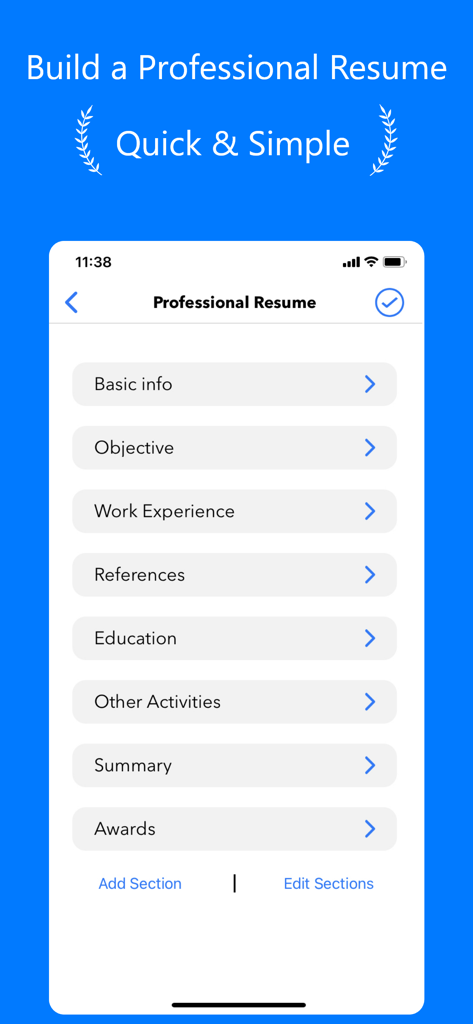
基本情報、職歴、学歴のカテゴリーが表示されたResume Builderアプリのインターフェース
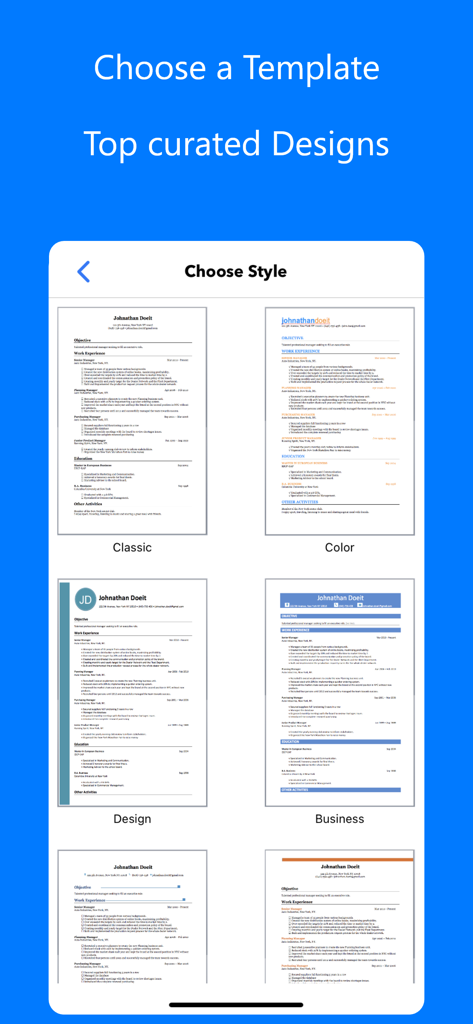
クラシックからモダンなビジネススタイルまで、厳選された履歴書テンプレートの選択画面が表示されたモバイル画面
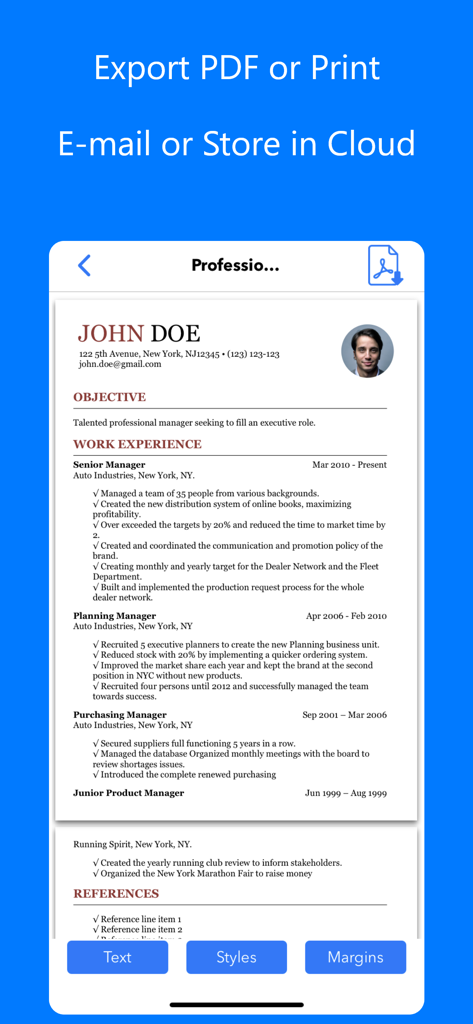
プロフェッショナルな履歴書のプレビューと、PDF書き出し、印刷、メールやクラウドストレージでの共有オプションが表示されたモバイル画面
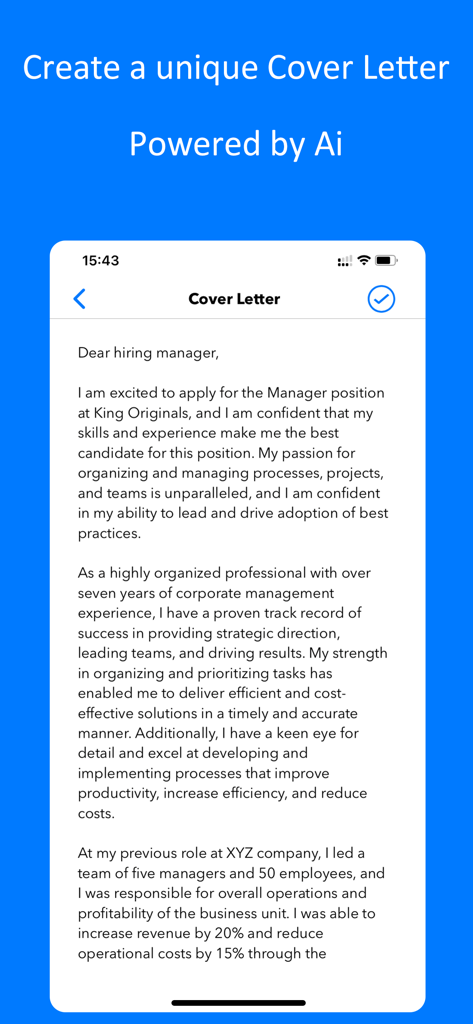
Resume Builderアプリ内のモバイルインターフェースで、AIによってプロフェッショナルなカバーレターが生成されている様子
説明
Download
類似アプリ
似た機能とユーザー体験を持つアプリ
Resume : Intelligent CV Maker
Intelligent CV

Resume Builder - CV Creator
Clebson Pereira

Resume Builder - CV Engineer
First Pick Ltd
Resume Builder Pro with AI
Uncaught Exception Inc.
Quick & Easy Resume Builder CV
Wiliam Goncalves Pinto

Resume Maker, CV Job Builder
Oleg Yuriev

履歴書作成(インディード)
Indeed Inc.

履歴書作成
WEBDIA INC.

Resume AI – Intelligent CV App
Giovanna Clemente
このページはアプリまたはその開発者の公式ページではなく、情報提供および論評を目的として作成された独立した編集出版物です。明示的に別段の記載がない限り、アプリおよびその開発者は、MWM、Apple、Google Play、アプリのパブリッシャー、またはアプリの開発者と提携、承認、後援、認可、またはその他の公式的な関係はなく、このページのいかなる内容も、アプリがMWMのサービスを使用して開発されたことを意味するものではありません。すべての商標、ロゴ、スクリーンショット、その他のコンテンツはそれぞれの所有者の財産です。