Route Optimizer - Easy Way
ダウンロード: App Store

このページはアプリまたはその開発者の公式ページではなく、情報提供および論評を目的として作成された独立した編集出版物です。明示的に別段の記載がない限り、アプリおよびその開発者は、MWM、Apple、Google Play、アプリのパブリッシャー、またはアプリの開発者と提携、承認、後援、認可、またはその他の公式的な関係はなく、このページのいかなる内容も、アプリがMWMのサービスを使用して開発されたことを意味するものではありません。すべての商標、ロゴ、スクリーンショット、その他のコンテンツはそれぞれの所有者の財産です。


ロゴ: Route Optimizer - Easy Way
ダウンロード: App Store

Route Optimizer - Easy Way

効率を求めるフィールドセールス担当者向けに作られた直感的な個人CRM。毎日のルートを最適化し、外出先で新規見込み顧客を見つけ、使いにくい企業ソフトウェアから時間を奪い返しましょう。

主要数値

ダウンロード

1K+

ユーザー評価

5.0/5

評価数

0

開発元

Starship Coder

カテゴリ

Navigation

対応言語

2

最新バージョン

4.8.8

サイズ

117.8 MB

リリース日

2024年5月22日
機能

セールスインパクトを最大化し、移動時間を最小化

時間と結果を重視するフィールドセールス担当者向けに作られた、モバイルファーストの個人CRMおよびインテリジェントルートプランナー。

スマートルート最適化

手作業の計画時間を数秒に短縮します。当社のアルゴリズムは最速の旅程を計算するため、より多くのアポイントメントに立ち寄り、「移動時間」を取り戻すことができます。

インスタント見込み顧客発見

会議の間に「デッドアワー」はもうありません。近くの新規潜在顧客をルートに即座に見つけて追加し、テリトリーカバレッジを最大化します。

以下のスクリーンショットと説明は、アプリの公式ストアリスティングから直接取得されたものであり、アプリ開発者の所有物です。

アプリストア

スクリーンショット

Route Optimizer - Easy Way - 幸せそうなフィールドセールス担当者が、ルート最適化マップを表示したスマートフォンを持って走っている
幸せそうなフィールドセールス担当者が、ルート最適化マップを表示したスマートフォンを持って走っている

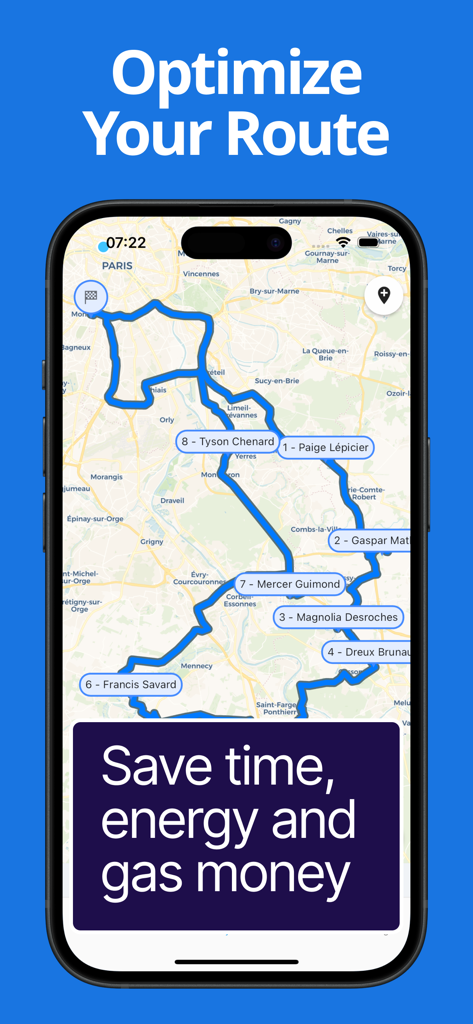
Route Optimizer - Easy Way - 番号付きの停止地点とクライアント名が表示された最適化されたセールスルートマップを表示するiPhone画面
番号付きの停止地点とクライアント名が表示された最適化されたセールスルートマップを表示するiPhone画面

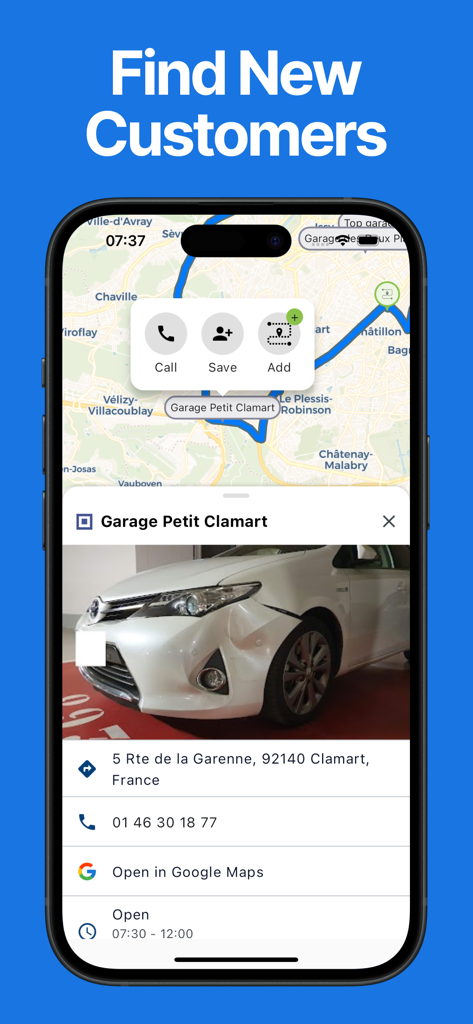
Route Optimizer - Easy Way - 地図上にビジネスプロフィールが表示され、電話またはルートへの追加オプションが表示されるイージーウェイアプリのインターフェース
地図上にビジネスプロフィールが表示され、電話またはルートへの追加オプションが表示されるイージーウェイアプリのインターフェース

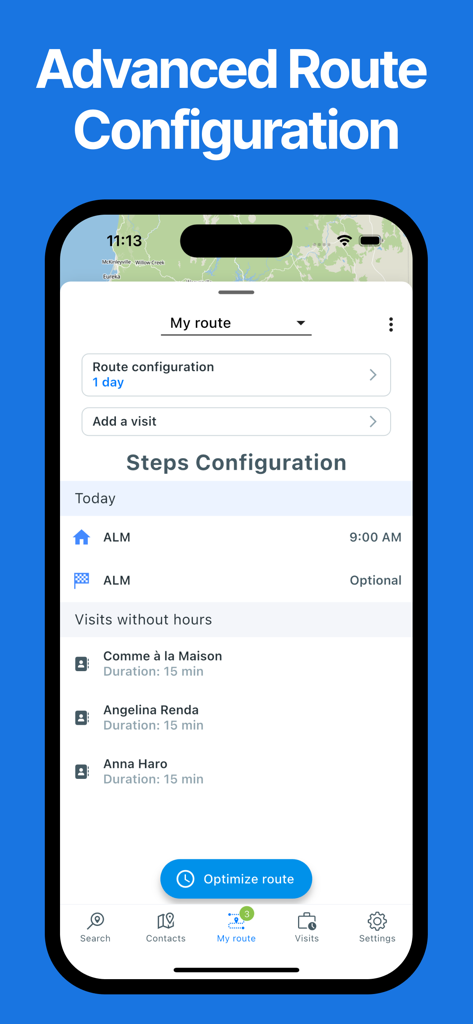
Route Optimizer - Easy Way - 訪問リストとルート最適化ボタンが表示されるイージーウェイアプリの詳細ルート設定画面
訪問リストとルート最適化ボタンが表示されるイージーウェイアプリの詳細ルート設定画面

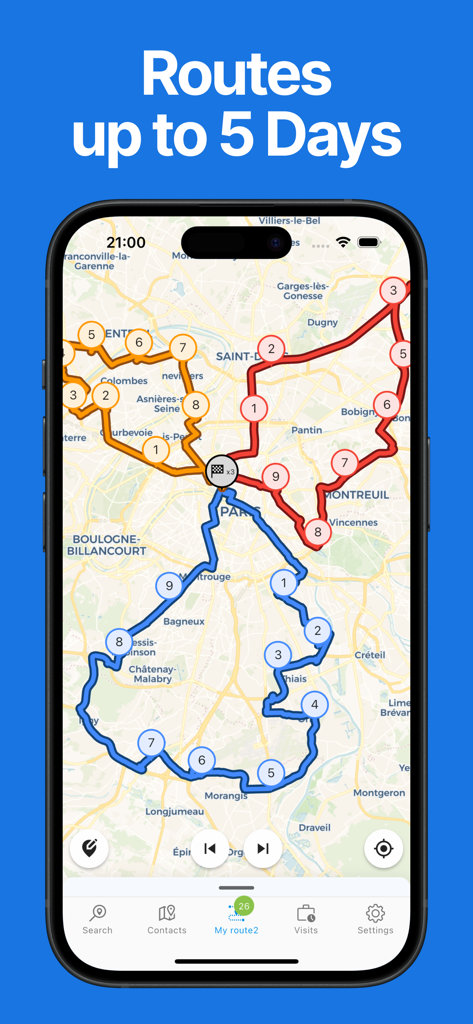
Route Optimizer - Easy Way - 5日間のスケジュール用に、地図上に複数の色分けされた配送ルートと番号付きの停止地点が表示されるルート最適化アプリ
5日間のスケジュール用に、地図上に複数の色分けされた配送ルートと番号付きの停止地点が表示されるルート最適化アプリ

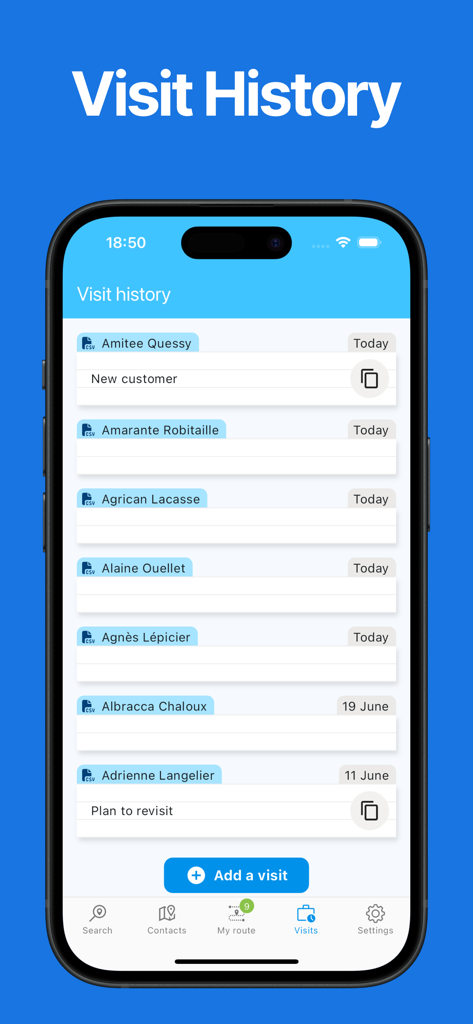
Route Optimizer - Easy Way - クライアント名と日付のログが表示されるルート最適化アプリの訪問履歴画面

クライアント名と日付のログが表示されるルート最適化アプリの訪問履歴画面

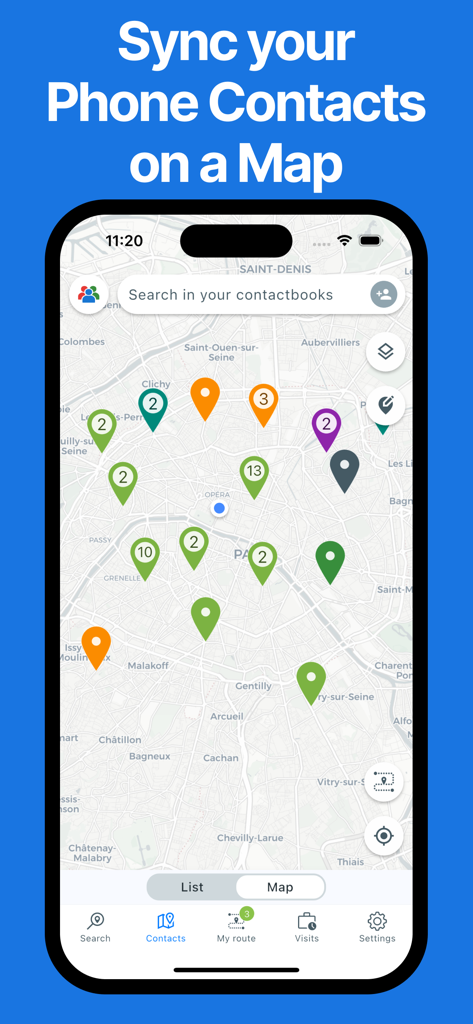
Route Optimizer - Easy Way - 携帯電話の連絡先が同期され、都市の地図上に色分けされたピンとして表示されるモバイルアプリのインターフェース

携帯電話の連絡先が同期され、都市の地図上に色分けされたピンとして表示されるモバイルアプリのインターフェース

説明

EasyWay is the app designed specifically for Field Sales Reps! Natacha V. - Sales Director “This app is a game-changer for preparing my routes. It saves me so much time and allows me to easily keep track of my appointments, including summaries with the date, time spent, and future client needs. As a Sales Director, I’ve recommended it to my team, and they’ve all appreciated the efficiency and time savings it offers.” Ben S. - Business Engineer “Harold has developed an outstanding app that simplifies route planning and provides a clear overview of visit statuses across the sales territory. It’s a real time-saver for my daily activities! The app is intuitive, user-friendly, and easy to get started with. On top of that, Harold is incredibly responsive when it comes to implementing new features to enhance the experience. I strongly recommend this app to all field sales reps—try it, and you’ll adopt it in no time!” Its purpose: to save you time so you can spend more with your clients. It has four main features that make it a tailor-made app for salespeople: • A contact map • A prospect search in Google Maps • A route planner and optimizer • A visit history This makes it a sort of mini-CRM or personal CRM, dedicated to field sales professionals. But why would you need such an app if you already have a CRM? Many CRMs are outdated and often have issues such as: • Only a web app on a PC, forcing you to take out your PC in the car and requiring a network connection • CRMs without a contact map, forcing you to use Google Maps alongside your clients • 2000s-era ergonomics Let’s take a tour of the app and explore its features in more detail! • STARTING POINT: A CONTACT MAP: These are from your phone’s directory or an Excel file. You can also manually add a contact. There’s even a filter system by group or last visit to simplify finding the next client to visit. • LOOKING FOR NEW CLIENTS: Launch a search in a city or around a client. Add the results directly to your route in just a few clicks. • EASY PLANNING: Add clients to a route in two clicks. • VISIT SETUP: Define the time on-site and set a fixed or flexible hour. • SMART OPTIMIZATION: Optimize your route and get the shortest itinerary ⇒ saving time and energy. • THE ROUTE IS READY, LET’S GO: Start the route and check your schedule during the day ⇒ know if you can extend or shorten the visit. • EASY NAVIGATION: Start navigation to your contacts in one click with your favorite navigation app (Waze, Google Maps…). • VISIT HISTORY: Keep track of the visit date (with or without notes). • END OF THE ROUTE: Congratulations, you’ve reached the end, but it’s not over yet… Download Easy Way! You can use it for free indefinitely (with some limitations, but it’s perfectly usable). You can enjoy a one-month free trial to test all the features. Please note that this app requires a paid subscription to access all its features. Your Apple ID account will be charged on the last day of your free trial. Your subscription will automatically renew at the end of each billing period unless canceled 24 hours before the expiration date. You can manage and cancel your subscriptions in your Apple ID account settings after purchase. Enjoy a one-week free trial to test all the features.

Download

ダウンロード: App Store

このページはアプリまたはその開発者の公式ページではなく、情報提供および論評を目的として作成された独立した編集出版物です。明示的に別段の記載がない限り、アプリおよびその開発者は、MWM、Apple、Google Play、アプリのパブリッシャー、またはアプリの開発者と提携、承認、後援、認可、またはその他の公式的な関係はなく、このページのいかなる内容も、アプリがMWMのサービスを使用して開発されたことを意味するものではありません。すべての商標、ロゴ、スクリーンショット、その他のコンテンツはそれぞれの所有者の財産です。