
このページはアプリまたはその開発者の公式ページではなく、情報提供および論評を目的として作成された独立した編集出版物です。明示的に別段の記載がない限り、アプリおよびその開発者は、MWM、Apple、Google Play、アプリのパブリッシャー、またはアプリの開発者と提携、承認、後援、認可、またはその他の公式的な関係はなく、このページのいかなる内容も、アプリがMWMのサービスを使用して開発されたことを意味するものではありません。すべての商標、ロゴ、スクリーンショット、その他のコンテンツはそれぞれの所有者の財産です。


ダウンロード
1M+ユーザー評価
評価数
6.6K開発元
カテゴリ
Education対応言語
2最新バージョン
3.6.2サイズ
66.8 MBリリース日
2017年6月15日高度なセキュリティと管理機能がオンライン試験環境を強化
SafeExamBrowser (SEB) for iOS: 主要機能分析
高度なセキュアキオスクモード
このアプリは、オンライン試験中にiOSデバイスを安全なキオスクモードにロックし、学生が他のアプリケーションに切り替えたり、不正なウェブサイトにアクセスしたり、通信したりするのを防ぎます。
広範なeアセスメントおよびLMSとの連携
このツールは、Moodle、OpenOlat、ILIASなどの主要な学習管理システムや、Inspera Assessment、Duggaなどの様々なeアセスメントシステムとシームレスに統合します。
柔軟な設定と展開オプション
このプラットフォームは、MDMシステム、QRコード、ハイパーリンク、暗号化された設定ファイルなど、多様な方法で設定および展開が可能であり、IT管理者に高い柔軟性を提供します。
管理・未管理iOSデバイスへの対応
このソリューションは、教育機関が所有・管理するデバイスだけでなく、学生個人のiPadなどの未管理iOSデバイス上でも安全な試験を実施できます。
試験後の自動・手動ロック解除
試験の提出後、本アプリはデバイスのセルフロックアセスメントモードを自動的に終了させることができます。必要に応じて、試験監督者はパスワードを使用して手動でセッションを終了することも可能です。
フリーウェアとしての提供
このアプリケーションはフリーウェアとして提供されており、教育機関は予算を気にすることなく、コスト効率の高いセキュアな試験環境を導入できます。
Apple Classroomとの連携
このツールはApple Classroomと連携し、教師は学生の全デバイス上で個別に設定された試験を開始できるため、授業での管理が容易になります。
セキュアな試験中ナビゲーション機能
ユーザーは、オプションのドックや左側のスライダーメニューを介して、試験セッションの終了、スタートページへの移動、ウェブページの再読み込み、閲覧履歴の移動などのコマンドにアクセスできます。
試験ポータルと開始ページのカスタマイズ
このシステムは、試験システムの開始ページや、現在の試験へのリンク一覧を含む試験ポータルページを個別に設定できるため、学生を適切に誘導します。
クロスプラットフォーム設定互換性
このソフトウェアは、他のプラットフォーム版SafeExamBrowserと同じ暗号化された.seb設定ファイル形式を使用しており、複数OS環境での構成管理を簡素化します。
よくある質問
について知っておくべきこと SafeExamBrowser
What is SafeExamBrowser (SEB)?
SafeExamBrowser (SEB) is a secure kiosk web browser environment designed for e-assessments on iOS devices. It locks the device into an exam mode, preventing students from accessing other apps or websites during an exam.
Which devices does SafeExamBrowser support?
SafeExamBrowser supports iOS devices, specifically iPads, iPhones, and iPod Touches. It enables secure exams on both unmanaged student-owned devices and institution-managed devices.
How does SafeExamBrowser ensure exam security?
SafeExamBrowser locks an iOS device into assessment kiosk mode. This prevents students from switching to other apps, accessing unauthorized websites, or communicating during an exam.
Can SafeExamBrowser be used with existing learning management systems (LMS)?
Yes, SafeExamBrowser integrates well with learning management systems (LMS) such as Moodle, OpenOlat, and ILIAS. It also supports various commercial and non-commercial exam systems.
How can an exam be started in SafeExamBrowser?
Exams can be started in SafeExamBrowser by opening a configuration hyperlink from Safari, Mail, or a messenger app. Users can also scan a QR code or enter an institution's URL.
Does SafeExamBrowser use a cloud service for exams?
No, SafeExamBrowser does not use a centralized server or cloud service. It can be configured using an API, configuration files, special links, and QR codes.
Is SafeExamBrowser compatible with Apple Classroom?
Yes, SafeExamBrowser works with Apple Classroom. Teachers can start individually configured exams on all student devices directly through Apple Classroom.
How can an exam session be quit in SafeExamBrowser?
An exam session in SafeExamBrowser can be quit automatically after submission, or manually by an invigilator using a quit password. A left slider menu command also exists for quitting.
Can students reconfigure SafeExamBrowser during an exam?
Reconfiguring SafeExamBrowser during an exam session can be restricted. The "Allow Reconfiguring" option in the Exam Session settings controls this functionality.
Is SafeExamBrowser a free application?
Yes, SafeExamBrowser is released as freeware. Its code is subject to the Mozilla Public License Version 1.1, which permits its free use.
以下のスクリーンショットと説明は、アプリの公式ストアリスティングから直接取得されたものであり、アプリ開発者の所有物です。
アプリストア
スクリーンショット

この画面では、ユーザーがSafariやメールアプリから試験や設定の「リンクを開く」ことで開始したり、「QRコードをスキャン」して設定を読み込んだりできます。これにより、試験環境へのアクセスが簡素化されます。
試験開始オプション

試験中にアクセスできる「コマンドメニュー」が表示されており、ユーザーは「設定の編集」や「セッションの終了」といった機能を素早く操作できます。画面のズーム調整やスタートページへの戻りもここから可能です。
豊富なコマンドメニュー
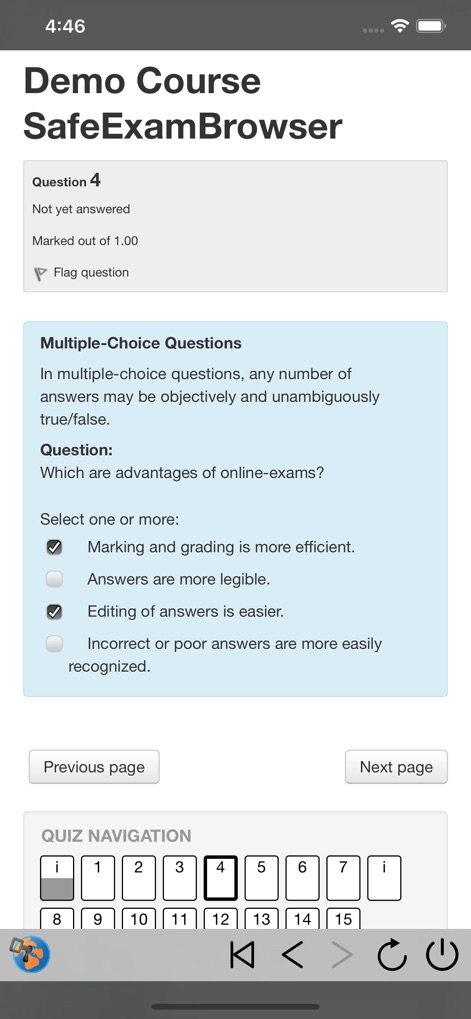
この試験画面は、ユーザーが「複数選択問題」形式の設問に回答するインターフェースを示しています。下部には「クイズナビゲーション」が配置され、試験内のページ間を容易に移動できる機能が提供されています。
e-アセスメント画面
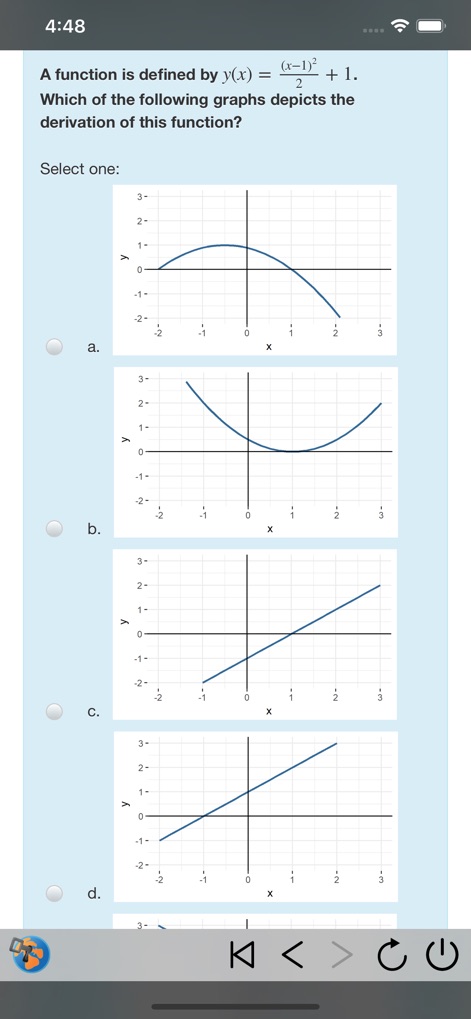
本試験画面では、数式と連動する「グラフ表示の設問」に対応しており、ユーザーは提示された複数の「選択肢としてのグラフ」から正しいものを選びます。これにより、視覚的な問題解決能力も評価可能です。
多様な問題形式

この「設定」画面では、管理者が試験の「開始URL」を指定し、特定の試験ポータルへのアクセスを確立できます。さらに、「管理者パスワード」を設定することで、設定変更に対する強固なセキュリティを適用します。
高度な設定管理

「試験セッション設定」画面では、セッション終了に関する詳細なオプションを提供します。管理者は「終了パスワードの必須化」を有効にし、また「セッション終了の確認」プロンプトを設定して、試験のセキュリティと運用を強化できます。
セッション制御オプション

「試験選択画面」は、SEBサーバーに接続後、ユーザーに利用可能な「試験リスト」を提示します。このリストには、「Moodleと連携」した試験も表示され、ユーザーは受験する試験を直感的に選択できます。
試験リスト選択
説明
Download







このページはアプリまたはその開発者の公式ページではなく、情報提供および論評を目的として作成された独立した編集出版物です。明示的に別段の記載がない限り、アプリおよびその開発者は、MWM、Apple、Google Play、アプリのパブリッシャー、またはアプリの開発者と提携、承認、後援、認可、またはその他の公式的な関係はなく、このページのいかなる内容も、アプリがMWMのサービスを使用して開発されたことを意味するものではありません。すべての商標、ロゴ、スクリーンショット、その他のコンテンツはそれぞれの所有者の財産です。