
このページはアプリまたはその開発者の公式ページではなく、情報提供および論評を目的として作成された独立した編集出版物です。明示的に別段の記載がない限り、アプリおよびその開発者は、MWM、Apple、Google Play、アプリのパブリッシャー、またはアプリの開発者と提携、承認、後援、認可、またはその他の公式的な関係はなく、このページのいかなる内容も、アプリがMWMのサービスを使用して開発されたことを意味するものではありません。すべての商標、ロゴ、スクリーンショット、その他のコンテンツはそれぞれの所有者の財産です。


Scan & Translate+ Text Grabber
紙の言葉を瞬時に理解し、異文化の壁を打ち破る能力をユーザーに授ける。
ダウンロード
10M+ユーザー評価
評価数
12.5K開発元
カテゴリ
Productivity対応言語
15最新バージョン
6.5.20サイズ
102.4 MBリリース日
2014年4月17日テックアナリストが評価する、言語の壁を打ち破る革新的なツール
アプリ「Scan & Translate+ Text Grabber」の主要機能分析
画像からの即時テキスト抽出と翻訳
このアプリは、印刷されたあらゆる資料(書類、書籍、標識など)からテキストを抽出し、90以上の言語に即座に翻訳することを可能にします。これにより、ユーザーは物理的なテキストをデジタル化し、言語の壁を迅速に克服できます。
複数言語対応(認識と翻訳)
70以上の言語でのテキスト認識と、90以上の言語への翻訳をサポートしています。ユーザーは幅広い言語間でコミュニケーションや情報取得が可能です。
オフライン対応(プレミアム機能)
プレミアム購読により、インターネット接続がない環境でもテキスト認識と翻訳を行うことができます。旅行者やネットワーク環境が不安定な場所で作業するユーザーにとって極めて重要です。
高度な光学文字認識(OCR)技術
79言語に対応する高度なOCR技術を搭載しており、紙媒体のテキストを正確にデジタルデータに変換します。これにより、信頼性の高いテキスト抽出が保証されます。
無制限の使用(プレミアム機能)
プレミアム購読により、翻訳およびテキスト認識の回数制限が解除されます。ヘビーユーザーやビジネス用途でアプリを頻繁に利用するユーザーは、中断することなく作業を進めることができます。
テキスト読み上げ機能
認識および翻訳されたテキストを44以上の言語で読み上げることができます。この機能は、発音の学習や視覚障害を持つユーザーにとって非常に有益です。
テキスト編集と共有
認識されたテキストは、ユーザーが編集したり、クリップボードにコピーしたり、他のアプリケーションに保存したりすることができます。また、主要なソーシャルメディアやメール、SMSで簡単に共有することも可能です。
履歴保存と復元
認識および翻訳されたすべてのテキストは履歴として保存され、いつでも復元できます。ユーザーは以前の作業を容易に参照し、再利用することが可能です。
スナップモード(プレミアム機能)
プレミアム機能であるスナップモードは、より迅速かつ効率的にテキストをキャプチャし、認識プロセスを高速化します。ユーザーは瞬時に目的の情報を取得できます。
広告なしの利用体験(プレミアム機能)
プレミアム購読者は、広告に邪魔されることなく集中して翻訳作業に取り組むことができます。これにより、よりスムーズで快適なユーザー体験が提供されます。
よくある質問
について知っておくべきこと Scan & Translate+ Text Grabber
What is the Scan & Translate+ Text Grabber app?
Scan & Translate+ Text Grabber is an application that scans and extracts text from printed sources like documents or signs. It translates the extracted text into over 90 languages.
How many languages does Scan & Translate+ Text Grabber support for translation?
The Scan & Translate app supports translation into more than 90 different languages. It also recognizes texts in over 70 languages and reads texts in over 44 languages.
Can Scan & Translate+ Text Grabber translate documents offline?
Yes, the premium version of Scan & Translate+ Text Grabber offers offline text recognition and offline translations. This feature allows use without an internet connection.
How do I use the Scan & Translate app to translate text?
To use the Scan & Translate app, select the original text's language, take a picture of the document, then press "Scan." The recognized text appears for translation into your chosen target language.
What are the premium features included with a Scan & Translate+ Text Grabber subscription?
Premium features for Scan & Translate+ Text Grabber include unlimited translations, unlimited text recognitions, offline text recognition, offline translations, an ads-free experience, and Snap Mode.
What types of documents can the Scan & Translate app scan and translate?
The Scan & Translate app scans various printed materials, including business documents, contracts, homework, menus, recipes, notes, letters, articles, instructions, product labels, and road signs.
Does Scan & Translate+ Text Grabber require an internet connection for advanced features?
Yes, advanced optical character recognition for 79 languages and full text translation for over 90 languages require an internet connection. Premium subscriptions offer offline capabilities.
How does the Scan & Translate+ Text Grabber app save translated texts?
All recognized and translated texts are automatically saved in the Scan & Translate app's History. Users can recover these texts at any time from the History section.
Can I listen to translated text using the Scan & Translate+ Text Grabber app?
Yes, the Scan & Translate app allows users to listen to text that has been recognized and translated. This feature supports more than 44 languages.
What subscription options are available for Scan & Translate+ Text Grabber?
Scan & Translate+ Text Grabber offers standard subscription options, including a 1-month Subscription and a 1-year Subscription. These plans unlock all premium features.
How do I cancel my Scan & Translate+ Text Grabber subscription or free trial?
You can cancel your Scan & Translate+ Text Grabber subscription or free trial through your iTunes account settings. Cancellation must occur 24 hours before the period ends to avoid charges.
Does the free version of Scan & Translate+ Text Grabber have any limitations?
Yes, the free version of Scan & Translate+ Text Grabber may have limitations. These can include a restricted number of daily text recognitions and translations, which are subject to change.
What permissions does the Scan & Translate+ Text Grabber app require to function?
For complete access and full functionality, Scan & Translate+ Text Grabber requires permission to access your device's Camera and Photos.
以下のスクリーンショットと説明は、アプリの公式ストアリスティングから直接取得されたものであり、アプリ開発者の所有物です。
アプリストア
スクリーンショット

本アプリのグローバルな提供範囲を示す地球儀のイラストと、文書や画像のデジタル化を象徴するアイコンが特徴です。
世界最高の翻訳アプリ

多数の言語がダウンロード可能で、オフラインモードを有効にするボタンにより、ユーザーはどこでも翻訳を利用できることを示唆しています。
オフライン翻訳対応

スキャンされたレシピテキストが画面中央に表示され、その下にスピーカーアイコンと共有オプションを備えたスペイン語の翻訳文が確認できます。
どこでもスキャン翻訳
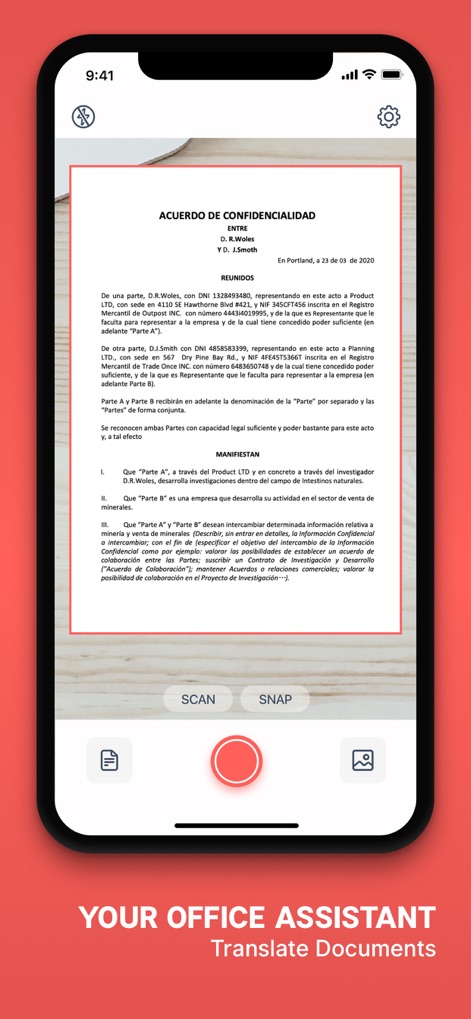
画面中央に表示された機密保持契約書のスキャンプレビューと、写真撮影やギャラリーからの選択が可能な下部のコントロールボタンにより、文書取り込みの容易さを伝えます。
ドキュメントをスキャン
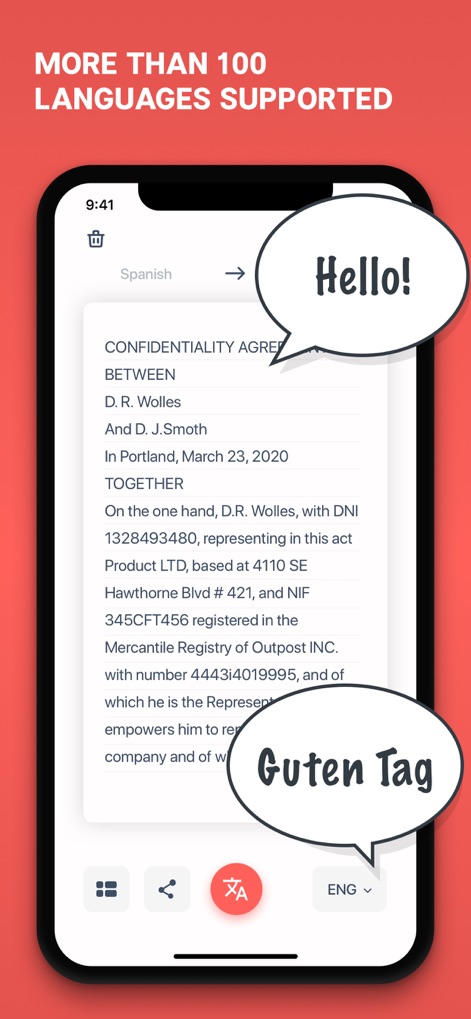
「Hello!」と「Guten Tag」という吹き出しと共に、機密保持契約書がスペイン語から英語へ翻訳されている様子が示されており、本アプリの幅広い言語サポートを強調しています。
多言語対応翻訳

日本語の文章がスペイン語に翻訳された結果が表示されており、「Hola」と「こんにちは」の吹き出しは、異なる言語間でのコミュニケーションと学習を支援する機能を視覚的に表現しています。
言語学習アシスト
説明
Download
類似アプリ
似た機能とユーザー体験を持つアプリ

DeepL Translate
DeepL SE

腾讯翻译君-多语言翻译
Tencent Technology (Shenzhen) Company Limited

出国翻译官- 多语言语音翻译聊天交友
Beijing Qicai Muzhi Technology Co.,Ltd.

Translate Voice:Ai Chat
TINY BOLT (HK) CO., LIMITED

GO Translate・AI Translator App
INNOVAPP LLC

翻译全能王-中文日文图片扫描翻译器
Shanghai Baowu Network Technology Co., Ltd.

translation-Global translation
Hebei jiudao network technology co., ltd

Photo Translator: Camera OCR
Son Hoang

Voice Translator : Language +
AmazinPro Technology Solutions And Training Company Limited
このページはアプリまたはその開発者の公式ページではなく、情報提供および論評を目的として作成された独立した編集出版物です。明示的に別段の記載がない限り、アプリおよびその開発者は、MWM、Apple、Google Play、アプリのパブリッシャー、またはアプリの開発者と提携、承認、後援、認可、またはその他の公式的な関係はなく、このページのいかなる内容も、アプリがMWMのサービスを使用して開発されたことを意味するものではありません。すべての商標、ロゴ、スクリーンショット、その他のコンテンツはそれぞれの所有者の財産です。