ScorePDF: Sheet Music Viewer
ダウンロード: App Store

このページはアプリまたはその開発者の公式ページではなく、情報提供および論評を目的として作成された独立した編集出版物です。明示的に別段の記載がない限り、アプリおよびその開発者は、MWM、Apple、Google Play、アプリのパブリッシャー、またはアプリの開発者と提携、承認、後援、認可、またはその他の公式的な関係はなく、このページのいかなる内容も、アプリがMWMのサービスを使用して開発されたことを意味するものではありません。すべての商標、ロゴ、スクリーンショット、その他のコンテンツはそれぞれの所有者の財産です。


ロゴ: ScorePDF: Sheet Music Viewer
ダウンロード: App Store

ScorePDF: Sheet Music Viewer

重いバインダーは捨てて、レパートリーをコントロールしましょう。正確な注釈、プロフェッショナルなセットリストの整理、Bluetoothペダル対応のハンズフリーページめくりを、現代のミュージシャンのためにデザインされたエレガントなアプリで実現します。

主要数値

ダウンロード

24K+

ユーザー評価

4.5/5

評価数

100

開発元

enoiu

カテゴリ

Music

対応言語

7

最新バージョン

14.5.1

サイズ

66.2 MB

リリース日

2022年8月15日
機能

現代のミュージシャンのためのパフォーマンス準備ツール

練習室からコンサートホールまで、ScorePDFはハンズフリーナビゲーションとプロレベルの整理でワークフローを効率化します。

ハンズフリーページめくり

Bluetoothフットペダルまたはカスタムジェスチャーを使用して、パフォーマンスに集中しましょう。リピートやコーダを楽にするためにページを並べ替えます。

正確な注釈

カスタマイズ可能なペンとマーカーで楽譜に書き込みましょう。Apple Pencilを使用して、自然な手書きのメモや簡単なPDFエクスポートを実現します。

以下のスクリーンショットと説明は、アプリの公式ストアリスティングから直接取得されたものであり、アプリ開発者の所有物です。

アプリストア

スクリーンショット
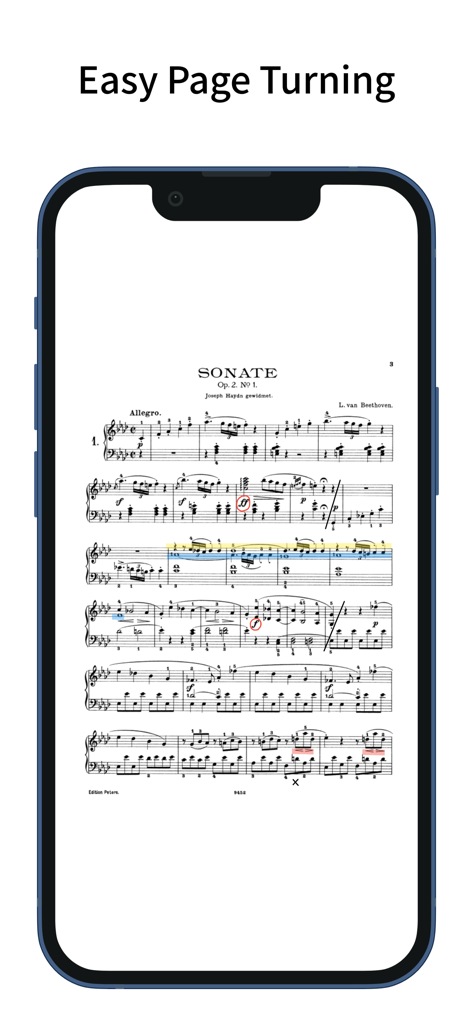
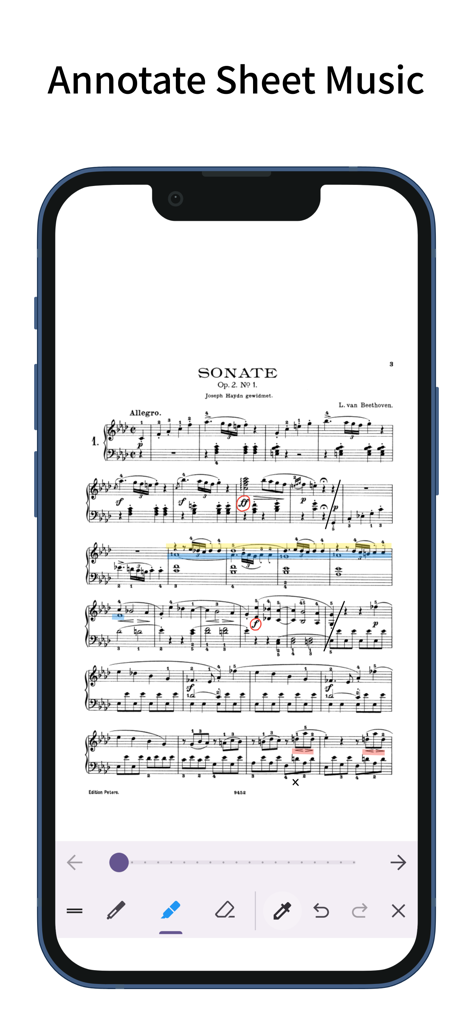
ScorePDF: Sheet Music Viewer - ScorePDFアプリがiPhone画面に注釈付きのベートーヴェンの楽譜を表示している
ScorePDFアプリがiPhone画面に注釈付きのベートーヴェンの楽譜を表示している

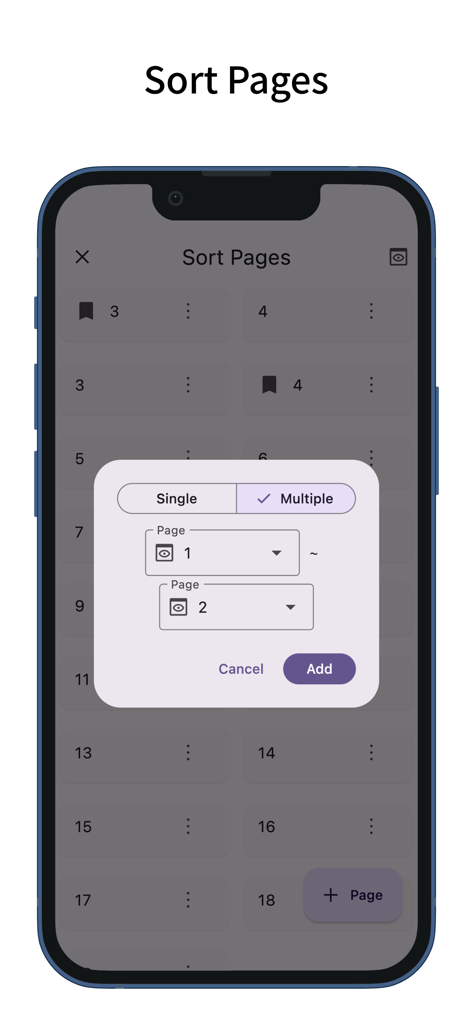
ScorePDF: Sheet Music Viewer - ScorePDF楽譜ビューアアプリでページを並べ替え、再編成するためのインターフェース
ScorePDF楽譜ビューアアプリでページを並べ替え、再編成するためのインターフェース

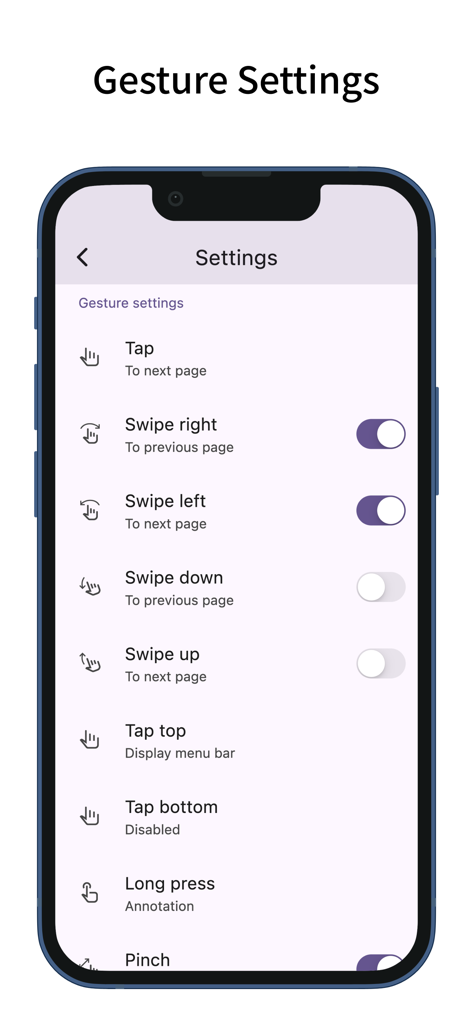
ScorePDF: Sheet Music Viewer - ScorePDFアプリのジェスチャー設定画面。楽譜をめくるためのタップとスワイプのカスタマイズが表示されている
ScorePDFアプリのジェスチャー設定画面。楽譜をめくるためのタップとスワイプのカスタマイズが表示されている

ScorePDF: Sheet Music Viewer - ScorePDFアプリと描画ツールが表示された注釈付き楽譜のiPhone

ScorePDFアプリと描画ツールが表示された注釈付き楽譜のiPhone

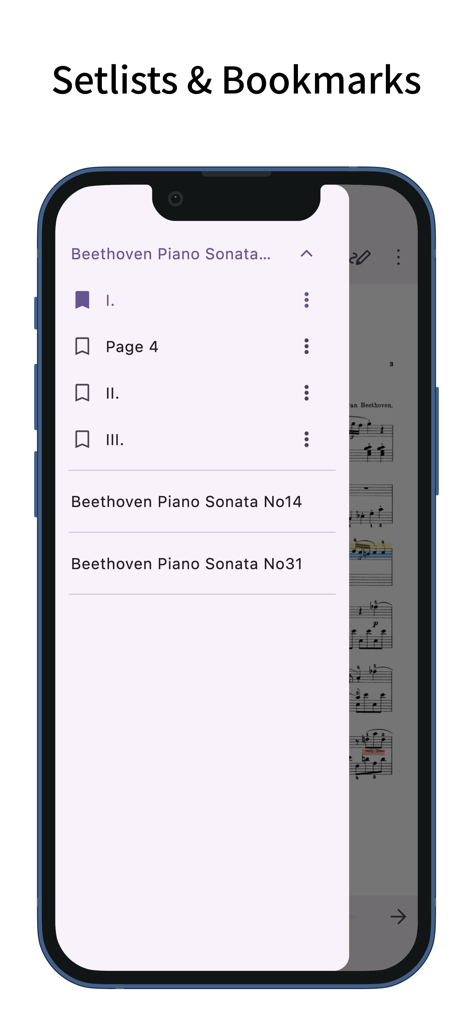
ScorePDF: Sheet Music Viewer - ScorePDFアプリのインターフェース。ベートーヴェンのピアノソナタのセットリストとブックマークが表示されている
ScorePDFアプリのインターフェース。ベートーヴェンのピアノソナタのセットリストとブックマークが表示されている

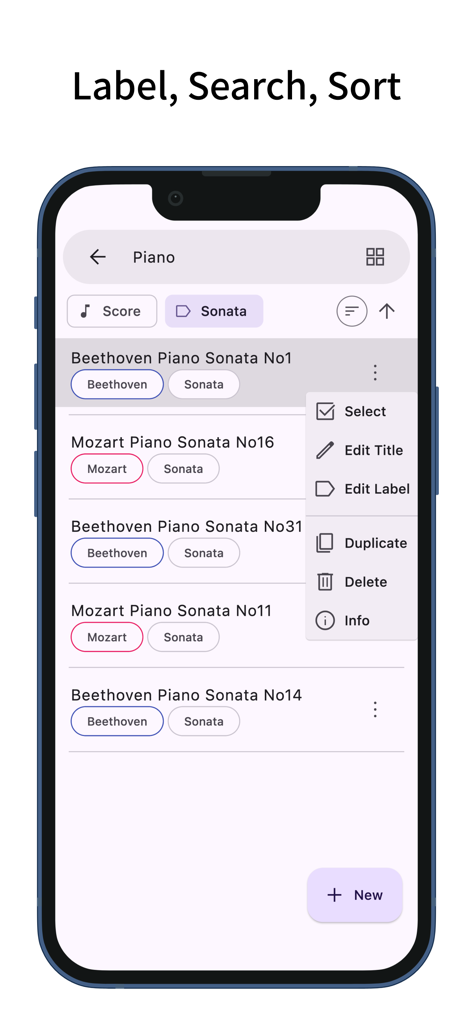
ScorePDF: Sheet Music Viewer - ScorePDFアプリのインターフェース。ピアノ楽譜のラベル検索と並べ替えオプション付きの楽譜ライブラリが表示されている
ScorePDFアプリのインターフェース。ピアノ楽譜のラベル検索と並べ替えオプション付きの楽譜ライブラリが表示されている

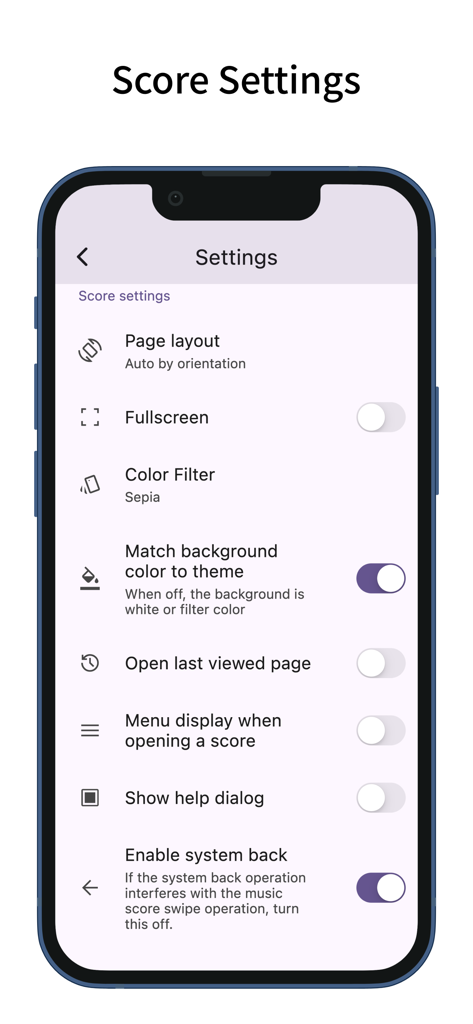
ScorePDF: Sheet Music Viewer - ScorePDFアプリの設定画面。ページレイアウトやカラーフィルターを含む楽譜のカスタマイズ用
ScorePDFアプリの設定画面。ページレイアウトやカラーフィルターを含む楽譜のカスタマイズ用

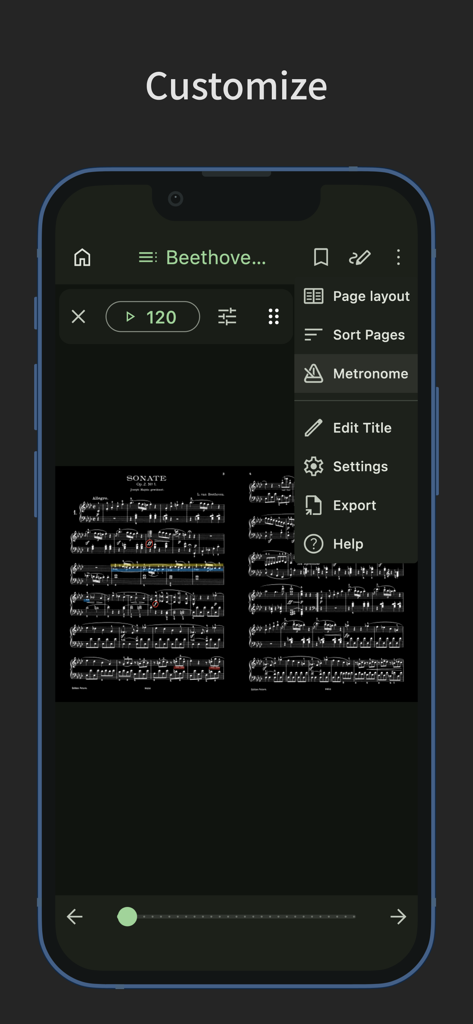
ScorePDF: Sheet Music Viewer - ScorePDFカスタマイズメニュー。メトロノームとダークモードの楽譜表示

ScorePDFカスタマイズメニュー。メトロノームとダークモードの楽譜表示

説明

A sheet music viewer app with easy page turning. Turn pages with taps and swipes. You can also reorder the pages of your sheet music. Easy Page Turning - You can turn pages with taps and swipes. - Supports Bluetooth page-turning foot pedals. - Tap assignments can be set to: previous page, left/right, top/bottom, next page, or disabled. - Swipe gestures can be toggled on or off individually for up, down, left, and right. - Actions other than page turning (such as displaying the menu or writing annotations) can be assigned to gestures that won’t interfere with page turning, such as long-pressing or tapping the top or bottom edges. - Zoom operations on the sheet music (pinch or double-tap) can also be toggled on or off. Page Reordering - Reordering the pages makes page turning easier during repeats, dal segno, codas, and similar situations. - When adding pages via reordering, you can add and drag multiple pages at once—not just one. - You can also delete pages or add blank pages. Annotations on Sheet Music - You can write handwritten annotations on your sheet music. - Two types of pens, markers, and an eraser are available, with undo and redo functions. - Pens and markers allow you to choose line thickness and color, and you can draw straight lines. - An eyedropper tool lets you pick up colors from the screen. - You can output a PDF that includes your annotations. Setlist - You can group multiple pieces of sheet music into a setlist for continuous viewing without reopening files. - Tapping the title in the menu bar displays the list of sheet music in the setlist; tapping one jumps to that piece. Bookmark - You can add bookmarks to specific pages of your sheet music. - Bookmarks can have custom titles. - Tapping the title in the menu bar displays a list of bookmarks; tapping one jumps to that page. Page Layout - You can choose from single-page, two-page (spread), fit width, fit height, half page (top/bottom), or half page (left/right) layouts for your sheet music. - The layout can automatically change based on the screen orientation. - When selecting fit width, the sheet music is displayed at full screen width, making it easier to view on small devices. Color Filter - You can apply a color filter to your sheet music, choosing from sepia, green, or inverted. - If you find the white of the sheet music too bright, this setting may improve readability. Adding Sheet Music - You can add sheet music in PDF format. - In the sheet music list screen, tapping the plus button at the bottom right lets you add PDF files from your device. (In the setlist screen, tapping the plus button opens the setlist addition screen.) - You can also add sheet music by sharing PDF files from other apps. - Multiple pieces of sheet music can be added at once. Managing Sheet Music - The label feature lets you add labels to sheet music or setlists, allowing you to filter by multiple labels. - Tapping the search bar lets you search for sheet music or setlists by title. - Sheet music and setlists can be sorted by title, creation date, or last viewed. Customization - Supports dark mode. - Allows you to change the theme color. - Features a simple design adhering to Material Design principles.

Download

ダウンロード: App Store

このページはアプリまたはその開発者の公式ページではなく、情報提供および論評を目的として作成された独立した編集出版物です。明示的に別段の記載がない限り、アプリおよびその開発者は、MWM、Apple、Google Play、アプリのパブリッシャー、またはアプリの開発者と提携、承認、後援、認可、またはその他の公式的な関係はなく、このページのいかなる内容も、アプリがMWMのサービスを使用して開発されたことを意味するものではありません。すべての商標、ロゴ、スクリーンショット、その他のコンテンツはそれぞれの所有者の財産です。