
このページはアプリまたはその開発者の公式ページではなく、情報提供および論評を目的として作成された独立した編集出版物です。明示的に別段の記載がない限り、アプリおよびその開発者は、MWM、Apple、Google Play、アプリのパブリッシャー、またはアプリの開発者と提携、承認、後援、認可、またはその他の公式的な関係はなく、このページのいかなる内容も、アプリがMWMのサービスを使用して開発されたことを意味するものではありません。すべての商標、ロゴ、スクリーンショット、その他のコンテンツはそれぞれの所有者の財産です。


ダウンロード
750k+ユーザー評価
評価数
3.9K開発元
カテゴリ
Finance対応言語
1最新バージョン
1.43.0サイズ
95.4 MBリリース日
2024年8月2日新しいデジタルバンキングプラットフォームの主要機能分析
Security Bankアプリの技術評価
送金機能
口座間送金、他行送金(InstaPay経由)、定期送金、送金が可能であり、利用者の金融活動を包括的にサポートします。
請求書支払い機能
請求書の検索、表示、および定期支払いのスケジュール設定を簡素化し、利用者の請求書管理を効率化します。
自動同期機能
1つの口座で登録するだけで、利用者のすべてのSecurity Bank口座、クレジットカード、投資、保存済み請求先、お気に入りを自動的にリンクし、統合されたビューを提供します。
カード管理機能
日次予算アラートの設定や、いつでもクレジットカードをロック/ロック解除できる機能を提供し、利用者に高いセキュリティと支出管理能力を与えます。
ウェブログインおよび取引承認
モバイルアプリを通じてウェブログインを承認し、ウェブ版での取引を承認することを義務付けることで、利用者のオンラインバンキングのセキュリティを強化します。
オフラインソフトトークン
電話がオフラインの状態でも、アプリからウェブ取引やログインを承認することを可能にし、利用者のセキュリティと利便性を向上させます。
eセキュア貯蓄口座
最大10の口座を開設し、旅行、請求書、緊急資金などの特定の目標のために貯蓄することを可能にし、利用者の貯蓄計画を支援します。
クイック残高照会
ログインせずに安全に口座残高を確認できる機能を提供し、利用者の日常的な利便性を高めます。
eギフトキャッシュ
eGC対応ATMを利用して、カードなしでの現金引き出しや、大切な人への送金を可能にし、利用者の現金アクセス手段を拡大します。
クレジットカード支払い
アプリ内でSecurity Bankのクレジットカード支払いを簡単に行うことができ、利用者の支払いプロセスを簡素化します。
よくある質問
について知っておくべきこと Security Bank App
Do I need to re-register for the new Security Bank app if I used the old app?
Yes, you need to register again for the new Security Bank app. Your old login credentials do not work. However, saved favorites and scheduled transactions automatically migrate to your new account.
Does the Security Bank app automatically link all my accounts?
Yes, the Security Bank app features auto-sync. Register with one account, and all other Security Bank accounts, credit cards, investments, saved billers, and favorites link automatically.
Can I view Joint "AND" accounts in the new Security Bank app?
No, Joint "AND" and Joint ITF accounts are not eligible for online enrollment and cannot be viewed in the new Security Bank app. Only Joint "OR" accounts are viewable by all account holders.
Can I enroll multiple mobile devices to the Security Bank app?
No, you can only enroll one mobile device to the Security Bank app at a time for security. This ensures only your designated device authorizes web logins and transactions.
Can I open a new account through the Security Bank app?
Yes, you can open a new account, including checking and savings accounts, directly through the Security Bank app. This eliminates the need to visit a physical branch.
How can I pay my Security Bank credit card in the app?
You can easily pay your Security Bank Credit Card directly within the app. The "Pay Credit Card" feature is available for convenient payments.
Can I convert my credit card limit to cash using the Security Bank app?
Yes, you can convert your available credit card limit into cash using the "Ready Cash" feature in the Security Bank app.
Does the Security Bank app offer installment options for credit card purchases?
Yes, the Security Bank app offers "ChargeLight" to convert big credit card purchases into lighter installments. This feature makes managing large transactions easier.
Can I scan and pay with QR codes using the Security Bank app?
Yes, you can scan and pay via QR Ph using the Security Bank app. This service is available at over 1 million merchants nationwide.
Does the Security Bank app support large fund transfers?
Yes, the Security Bank app supports large fund transfers up to PHP500,000 via PESONet. Gold Circle members and Wealth customers receive free transfer fees.
Can I check my account balance without logging into the Security Bank app?
Yes, the Security Bank app includes a Quick Balance feature. This allows you to check your accounts and balances safely without needing to log in.
Can the Security Bank app authorize web logins when my phone is offline?
Yes, the Security Bank app features an Offline Soft Token. This allows you to authorize your web transactions and logins even when your phone is offline.
Does the Security Bank app allow me to control my credit cards?
Yes, the Security Bank app features Card Control. You can set daily budget alerts and lock or unlock your credit cards anytime through the app.
How many eSecure Savings accounts can I open with the Security Bank app?
You can open up to 10 eSecure Savings (eSS) accounts using the Security Bank app. This feature helps you save for specific financial goals.
How can I contact customer support for the Security Bank app?
You can contact Security Bank customer support via the in-app Help Center, email at customercare@securitybank.com.ph, or through their 24-hour hotline (+632) 8887 9188.
以下のスクリーンショットと説明は、アプリの公式ストアリスティングから直接取得されたものであり、アプリ開発者の所有物です。
アプリストア
スクリーンショット

このアプリのログイン画面では、ユーザーは既存のアカウントに安全にアクセスでき、下部の「Open an account」ボタンから新しい口座を開設できます。
簡単口座開設
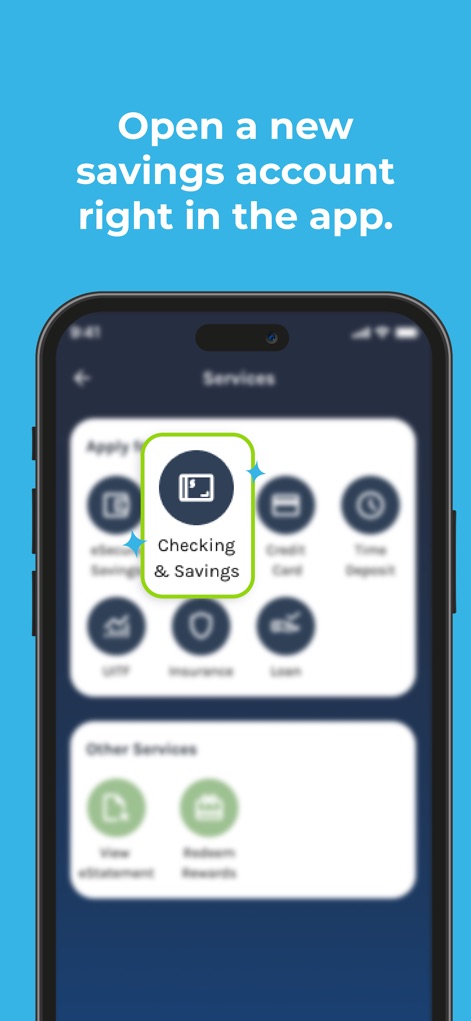
「サービス」メニューから「Checking & Savings」オプションを選択することで、ユーザーは手間なく貯蓄口座の開設手続きを進めることができます。
貯蓄口座を開設

アプリのウェルカム画面にある「Open an account」ボタンを利用すれば、ユーザーは支店に出向くことなく新規口座開設を完了できます。
支店不要で手続き
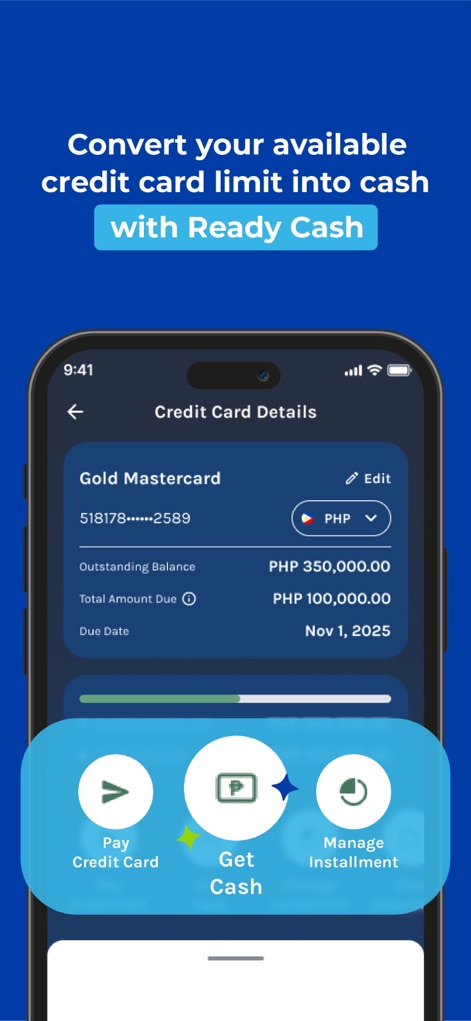
クレジットカード詳細画面では、未払い残高や支払期日を確認でき、「Get Cash」機能を通じて利用可能な信用枠を現金に変換できます。
便利な資金調達
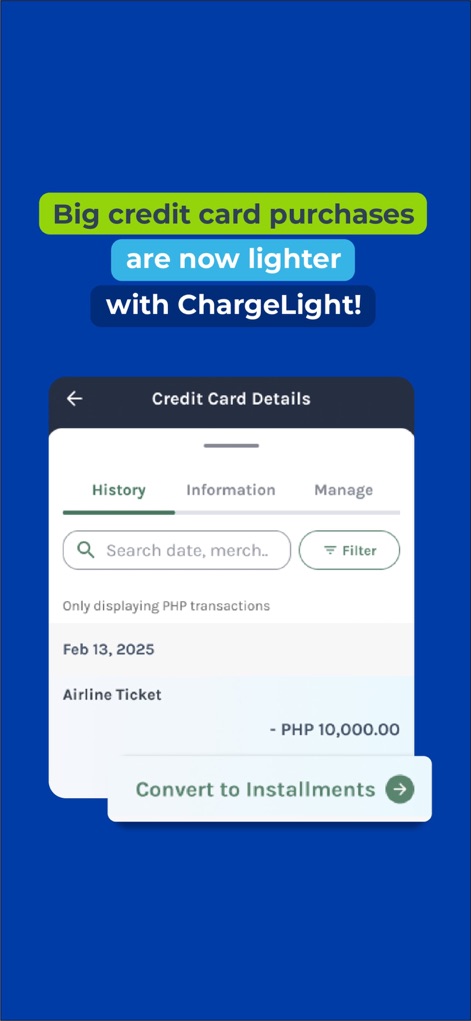
クレジットカードの「History」タブでは、購入履歴を一覧表示し、「Convert to Installments」機能で大きな買い物を分割払いに変更できます。
支払い柔軟性を向上

このアプリはQR Ph機能を搭載しており、ユーザーは画面に表示されるQRコードをスキャンして、全国100万以上の加盟店で支払いを完了できます。
迅速なQR決済
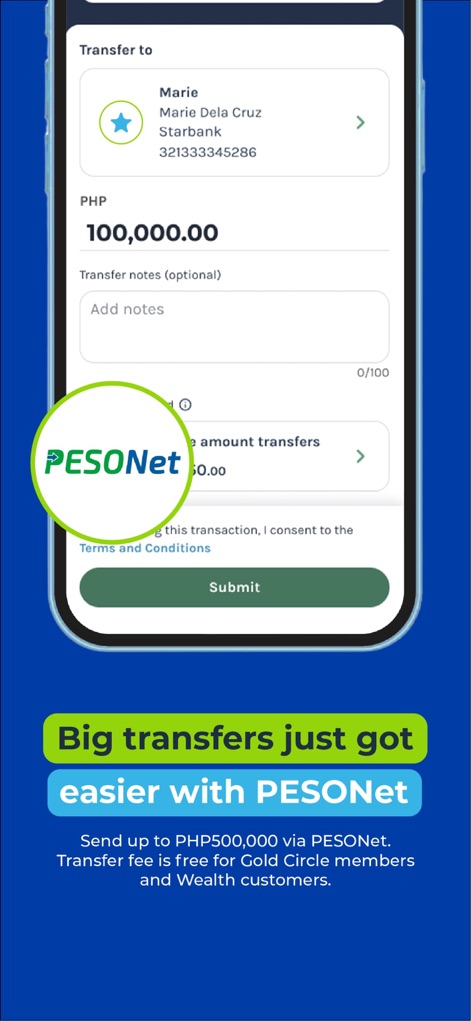
送金画面では、受取人の詳細と送金額を入力し、PESONetサービスを利用して最大PHP500,000までの大口資金移動を簡単に行えます。
大口送金もスムーズ

アプリのホーム画面では、ユーザーが登録したアカウントが自動的に同期され、チェッキング&貯蓄口座とクレジットカードの残高を一覧で確認できます。
アカウントを自動連携

請求書支払い画面では、最近の請求書を簡単に確認でき、ビラーを検索したりカテゴリ別にアクセスしたりして、支払いを効率的に管理できます。
請求書払いも直感的に

新しいデバイスでのログイン検知ポップアップと6桁のPIN入力画面により、このアプリはウェブログインと取引承認に安全な二段階認証を提供します。
強固なセキュリティ
説明
Download
類似アプリ
似た機能とユーザー体験を持つアプリ

Enpara Bank Cep Şube
Enpara Bank Anonim Sirketi

Alinma App - تطبيق الإنماء
Alinma Bank

Huntington Mobile Banking
The Huntington National Bank, Inc

國泰世華網路銀行CUBE
Cathay United Bank

中國信託行動銀行
CTBC Bank Co., Ltd.

FNB Banking App
FirstRand Bank Limited

Riyad Bank App
Riyad Bank

CIMB OCTO MY
CIMB Bank Berhad

Regions Mobile
Regions Financial
このページはアプリまたはその開発者の公式ページではなく、情報提供および論評を目的として作成された独立した編集出版物です。明示的に別段の記載がない限り、アプリおよびその開発者は、MWM、Apple、Google Play、アプリのパブリッシャー、またはアプリの開発者と提携、承認、後援、認可、またはその他の公式的な関係はなく、このページのいかなる内容も、アプリがMWMのサービスを使用して開発されたことを意味するものではありません。すべての商標、ロゴ、スクリーンショット、その他のコンテンツはそれぞれの所有者の財産です。