
このページはアプリまたはその開発者の公式ページではなく、情報提供および論評を目的として作成された独立した編集出版物です。明示的に別段の記載がない限り、アプリおよびその開発者は、MWM、Apple、Google Play、アプリのパブリッシャー、またはアプリの開発者と提携、承認、後援、認可、またはその他の公式的な関係はなく、このページのいかなる内容も、アプリがMWMのサービスを使用して開発されたことを意味するものではありません。すべての商標、ロゴ、スクリーンショット、その他のコンテンツはそれぞれの所有者の財産です。


ダウンロード
1M+ユーザー評価
評価数
4.1K開発元
カテゴリ
Utilities対応言語
17最新バージョン
3.1.380サイズ
58.4 MBリリース日
2018年12月21日モバイルゲーマー向け高度制御機能の評価
ShootingPlus V3 アプリケーション詳細分析
キーボード&マウス操作の統合
本アプリケーションは、キーボードおよびマウスコンバーターをBluetooth経由でモバイルデバイスに接続することを可能にし、ユーザーはPCライクな精密なエイムと操作感を享受できます。
ゲームパッド互換性
アプリケーションは幅広い種類のゲームパッドとのBluetooth接続をサポートしており、ユーザーはモバイルゲームをコンソールのような快適な操作でプレイすることが可能です。
安定したBluetooth接続管理
本ツールは、外部コントローラーとの信頼性の高いBluetooth接続を提供し、ゲームプレイ中の遅延や切断を最小限に抑え、シームレスな体験を保証します。
iOSデバイス最適化モード
アプリは、特定のBluetoothデバイスをiOSモードで接続するための指示を提供し、Appleデバイスでの互換性と安定したパフォーマンスを確保します。
よくある質問
について知っておくべきこと ShootingPlus V3
What is ShootingPlus V3?
ShootingPlus V3 is a Bluetooth tool that functions as a gamepad, keyboard, and mouse converter for mobile gaming. It allows users to connect various input devices to their mobile phone.
How do I connect a keyboard and mouse converter to ShootingPlus V3?
To connect a keyboard and mouse converter, first cancel Bluetooth pairing, disconnect and reconnect power, then press Left Ctrl + 2 (on W button) to switch to iOS mode, connect Bluetooth, and finally open the ShootingPlus V3 app.
How do I connect a gamepad to ShootingPlus V3?
To connect a gamepad, cancel Bluetooth pairing, turn off the gamepad, then long-press Y + Home to power it on in iOS mode. After that, connect to Bluetooth and open the ShootingPlus V3 app.
Does ShootingPlus V3 support iOS devices?
Yes, ShootingPlus V3 supports iOS devices. Both keyboard/mouse converters and gamepads require switching to an iOS mode before connecting via Bluetooth for proper functionality.
Can I customize controls with ShootingPlus V3?
Yes, ShootingPlus V3 allows extensive control customization. Users can map keyboard, mouse, and gamepad buttons, adjust button sizes, transparency, and configure recoil settings for games.
What games are compatible with ShootingPlus V3?
ShootingPlus V3 is compatible with a variety of mobile games. The app displays game icons for popular titles such as League of Legends Mobile, Peace Elite, Honor of Kings, and Call of Duty Mobile.
Does ShootingPlus V3 offer recoil adjustment features?
Yes, ShootingPlus V3 offers recoil adjustment features. Users can access "Recoil Settings" to fine-tune recoil amplitude using sliders for specific functions like F4, F5, F6, and F7.
How can I get support for ShootingPlus V3?
For any questions regarding ShootingPlus V3, users can contact the support team directly via email at shootingplus@shootingplus.com.cn.
以下のスクリーンショットと説明は、アプリの公式ストアリスティングから直接取得されたものであり、アプリ開発者の所有物です。
アプリストア
スクリーンショット
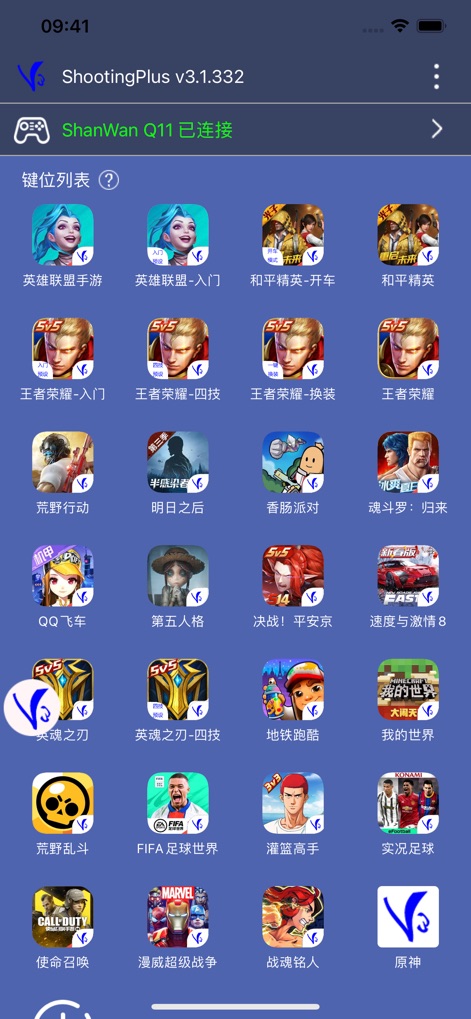
このアプリは、接続された「ShanWan Q11」コントローラーを通じて、幅広いモバイルゲームの「リスト」からプレイするゲームを選択し、準備ができたことをユーザーに示します。
対応ゲーム一覧

ユーザーは、ゲーム画面上に表示される「仮想ボタンの自由な配置」と、「ボタンの透明度調整」を通じて、プレイスタイルに合わせたコントローラー設定を直感的にカスタマイズできます。
自由なボタン配置

ユーザーは、「圧槍幅度の詳細なスライダー調整」と、「Fキーに割り当てられた設定オプション」により、精密なエイムアシストをカスタマイズし、射撃精度を向上させることができます。
高度な照準設定
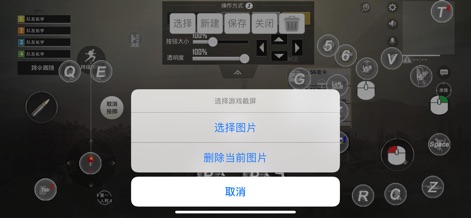
このツールは、「ゲームのスクリーンショットを選択する機能」と、「現在の画像を削除するオプション」を提供し、ユーザーがカスタム設定の背景を視覚的に管理するのを支援します。
背景画像管理

ユーザーは、「グリッドシステムによる正確なボタン配置」と、「マウス、キーボード、および数値キーを含む多様な入力キーマッピング」を活用して、あらゆるゲームに対応するカスタムプロファイルを作成できます。
精密キーマッピング
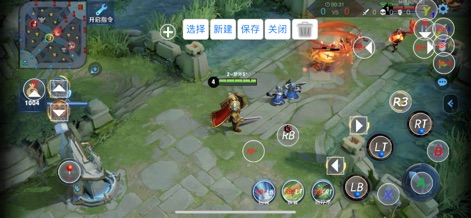
このアプリは、「MOBAゲームに特化したコントローラー配置」と、「詳細なゲームパッドボタンアイコンの表示」を通じて、ユーザーが複雑なスキル操作を直感的に実行できるようにします。
MOBA向け最適化
説明
Download
類似アプリ
似た機能とユーザー体験を持つアプリ

Game Controller Tester Gamepad
Emoji Apps GmbH

8BitDo Ultimate Software
SHENZHEN 8BITDO TECH CO., LTD.

GameSir
Guangzhou Chicken Run Network Technology Co.,Ltd.

KeyLinker
ShenZhen ZhiXu Technology Co., Ltd

Flydigi Game Center
Shanghai Flydigi Electronics Tech Co., Ltd.

墨将助手
Shenzhen Warsong Technology Co., Ltd.
このページはアプリまたはその開発者の公式ページではなく、情報提供および論評を目的として作成された独立した編集出版物です。明示的に別段の記載がない限り、アプリおよびその開発者は、MWM、Apple、Google Play、アプリのパブリッシャー、またはアプリの開発者と提携、承認、後援、認可、またはその他の公式的な関係はなく、このページのいかなる内容も、アプリがMWMのサービスを使用して開発されたことを意味するものではありません。すべての商標、ロゴ、スクリーンショット、その他のコンテンツはそれぞれの所有者の財産です。